BIOS Waiting time for "DEL or other Key" missing in BIOS


Lao Mu

Member
Local time
8:02 AM
Posts
2
OS
Win 11 Pro
Hi,
since I built a new PC with AMD 7950X3D,32GB DDR 5 Trident, Sapphire RX7900XTX and last but not least Windows 11 Pro (DE)
I am happy in general but I am missing a possibilty to change the waiting time to press DEL or similar during boot to get into the BIOS.
In the moment it is very short(guess less then a second) and the screen is just flashing. To get ionto BIOS I just press DEL direct after I power on the PC. That works, but I remember that on my old BIOS I could extend this time to 3 seconds. This function is missing now.

The Motherboard is: MSI MAG X670E Tomahawk WiFi BIOS Version is : E7E12AMS.140 The board is UEFI Bios
Everything works fine but I cannot find where to change this waiting time

The board is UEFI Bios
 
Windows Build/Version
Win 11Pro DE Build: 22621.2361 Version: 22H2

My Computer My Computer

At a glance

Win 11 ProAMD Ryzen 9 7950 X3D32 GB DDR5 TridentSapphire Nitro RX 7900 XTX
OS
Win 11 Pro
Computer type
PC/Desktop
Manufacturer/Model
Self built
CPU
AMD Ryzen 9 7950 X3D
Motherboard
MSI Tomahawk X670E
Memory
32 GB DDR5 Trident
Graphics Card(s)
Sapphire Nitro RX 7900 XTX
Sound Card
on board
Monitor(s) Displays
Samsung 34"
Screen Resolution
3440 x 1440
Hard Drives
FangXiang 4TB NVM ; Samsung SSD 980 1TB ; Toshiba 16GB
PSU
LC Power 1200W Platinium
Cooling
Watercooled
Keyboard
Steelseries
Mouse
Logiteck MX Master
Internet Speed
1 GB
Browser
Mozilla
Antivirus
Microsoft
Hello @Lao Mu and welcome to ElevenForum. :-)


Newer versions of a BIOS don't necessarily have everything the older versions did.
They only have so much space to squeeze stuff on to a BIOS chip.

Since SSDs came on the scene... we've all had to deal with computers booting seriously fast.
Generally, what we do when we want to enter the BIOS, is just start gently spamming the DEL about twice a second.
This is usually fast enough for even the fastest computer.

Side Note: The F11 will get you to the Boot Menu on your MSI motherboard.


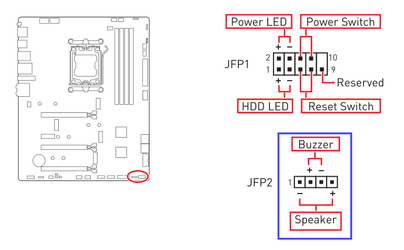
The best method is to get a motherboard speaker. The speaker will beep once when the motherboard finishes the
POST (Power On Self Test). When you hear the beep... that's when you start spamming either the BIOS key or the Boot Menu key.

Motherboard Speaker

I don't know what country you're in, but you can get a motherboard speaker... anywhere. :-)

There will be a connector for it, at the same place you attach the case's front panel wires.


This is from your motherboard manual...

Image1.png


Now IF there is a setting for the delay time... it'll be on the Boot tab in the BIOS.
I can't find your BIOS manual so I can't look it up. :(
 
Last edited:

My Computers My Computers

  • At a glance

    Win 11 Home ♦♦♦26200.8655 ♦♦♦♦♦♦♦25H2AMD Ryzen 7 3700XG.Skill (F4-3200C14D-16GTZKW)EVGA RTX 2070 (08G-P4-2171-KR)
    OS
    Win 11 Home ♦♦♦26200.8655 ♦♦♦♦♦♦♦25H2
    Computer type
    PC/Desktop
    Manufacturer/Model
    Built by Ghot® [May 2020]
    CPU
    AMD Ryzen 7 3700X
    Motherboard
    Asus Pro WS X570-ACE (BIOS 5302)
    Memory
    G.Skill (F4-3200C14D-16GTZKW)
    Graphics Card(s)
    EVGA RTX 2070 (08G-P4-2171-KR)
    Sound Card
    Realtek ALC1220P / ALC S1220A
    Monitor(s) Displays
    Dell U3011 30"
    Screen Resolution
    2560 x 1600
    Hard Drives
    2x Samsung 860 EVO 500GB,
    WD 4TB Black FZBX - SATA III,
    WD 8TB Black FZBX - SATA III,
    DRW-24B1ST CD/DVD Burner
    PSU
    PC Power & Cooling 750W Quad EPS12V
    Case
    Cooler Master ATCS 840 Tower
    Cooling
    CM Hyper 212 EVO (push/pull)
    Keyboard
    Ducky DK9008 Shine II Blue LED
    Mouse
    Logitech Optical M-100
    Internet Speed
    300/300
    Browser
    Firefox (latest)
    Antivirus
    Bitdefender Total Security
    Other Info
    Speakers: Klipsch Pro Media 2.1
  • At a glance

    Windows XP Pro 32bit w/SP3AMD Athlon 64 X2 5000+ (OC'd @ 3.2Ghz)TWIN2X2048-6400C4DHX (2 x 1GB, DDR2 800)EVGA 256-P2-N758-TR GeForce 8600GT SSC
    Operating System
    Windows XP Pro 32bit w/SP3
    Computer type
    PC/Desktop
    Manufacturer/Model
    Built by Ghot® (not in use)
    CPU
    AMD Athlon 64 X2 5000+ (OC'd @ 3.2Ghz)
    Motherboard
    ASUS M2N32-SLI Deluxe Wireless Edition
    Memory
    TWIN2X2048-6400C4DHX (2 x 1GB, DDR2 800)
    Graphics card(s)
    EVGA 256-P2-N758-TR GeForce 8600GT SSC
    Sound Card
    Onboard
    Monitor(s) Displays
    ViewSonic G90FB Black 19" Professional (CRT)
    Screen Resolution
    up to 2048 x 1536
    Hard Drives
    WD 36GB 10,000rpm Raptor SATA
    Seagate 80GB 7200rpm SATA
    Lite-On LTR-52246S CD/RW
    Lite-On LH-18A1P CD/DVD Burner
    PSU
    PC Power & Cooling Silencer 750 Quad EPS12V
    Case
    Generic Beige case, 80mm fans
    Cooling
    ZALMAN 9500A 92mm CPU Cooler
    Keyboard
    Logitech Classic Keybooard 200
    Mouse
    Logitech Optical M-BT96a
    Internet Speed
    300/300
    Browser
    Firefox 3.x ??
    Antivirus
    Symantec (Norton)
    Other Info
    Still assembled, still runs. Haven't turned it on for 15 years?
You may have the option in BIOS to select fast startup or very fast startup. If so, make sure that they are not selected.

Of course you may need another option to get into the BIOS to actually change it! There is a software option in Windows which gives you the startup menu.

See here: Boot to UEFI BIOS Firmware Settings in Windows 11 Tutorial
 

My Computers My Computers

  • At a glance

    Linux Mint (22.3) and Windows 11Ryzen 3900x32GB (2x16) @ 3600 MHz Corsair Vengeance LPXAsus Geforce RTX 5060 Ti Dual OC 16 GB
    OS
    Linux Mint (22.3) and Windows 11
    Computer type
    PC/Desktop
    Manufacturer/Model
    Home built
    CPU
    Ryzen 3900x
    Motherboard
    Gigabyte Aorus Master x570 rel 1.0
    Memory
    32GB (2x16) @ 3600 MHz Corsair Vengeance LPX
    Graphics Card(s)
    Asus Geforce RTX 5060 Ti Dual OC 16 GB
    Sound Card
    No separate sound card.
    Monitor(s) Displays
    Dell U2718Q
    Screen Resolution
    3840x2160
    Hard Drives
    1TB WD-Black SN850; 1TB Samsung Sata 850 Evo; 4 TB WD Blue Sata SA510 2.5''; 4TB Samsung Sata SSD 870 EVO 2.5".
    PSU
    Be Quiet Dark Power Pro 11 750W
    Case
    Lian Li PC-8FIB
    Cooling
    CPU: Noctua NH-U12A; Case: BeQuiet + Lian Li fans.
    Keyboard
    Steelseries Apex 7 brown keys.
    Mouse
    Logitech (wired) G403
    Internet Speed
    940 Mb/s down; 105 Mb/s up
    Browser
    Firefox
    Other Info
    Pioneer blu-ray optical drive.
  • At a glance

    Windows 11 Home (ARM version) (latest update)Qualcomm Snapdragon X Elite X1E-80-10016 GB LPDDR5Qualcomm Adreno
    Operating System
    Windows 11 Home (ARM version) (latest update)
    Computer type
    Laptop
    Manufacturer/Model
    Samsung Galaxy Book4 Edge 14" Copilot+ PC
    CPU
    Qualcomm Snapdragon X Elite X1E-80-100
    Memory
    16 GB LPDDR5
    Graphics card(s)
    Qualcomm Adreno
    Monitor(s) Displays
    Touch screen 14" AMOLED monitor
    Screen Resolution
    2880x1800
    Hard Drives
    512 GB eUFS
    Internet Speed
    930 Mb/s (Wifi)
    Browser
    Firefox
    Antivirus
    Eset Internet Security
    Other Info
    NPU Qualcomm Hexagon
Hi,
thx for all help. I checked it but it was not the reason for this. Next is to change from UEFI back to CSM and if i find this waiting time then i change it to 3 sec or so and go back to UEFI.
 

My Computer My Computer

At a glance

Win 11 ProAMD Ryzen 9 7950 X3D32 GB DDR5 TridentSapphire Nitro RX 7900 XTX
OS
Win 11 Pro
Computer type
PC/Desktop
Manufacturer/Model
Self built
CPU
AMD Ryzen 9 7950 X3D
Motherboard
MSI Tomahawk X670E
Memory
32 GB DDR5 Trident
Graphics Card(s)
Sapphire Nitro RX 7900 XTX
Sound Card
on board
Monitor(s) Displays
Samsung 34"
Screen Resolution
3440 x 1440
Hard Drives
FangXiang 4TB NVM ; Samsung SSD 980 1TB ; Toshiba 16GB
PSU
LC Power 1200W Platinium
Cooling
Watercooled
Keyboard
Steelseries
Mouse
Logiteck MX Master
Internet Speed
1 GB
Browser
Mozilla
Antivirus
Microsoft

Latest Support Threads

Back
Top Bottom