BitLocker


Forty_Two

New member
Local time
10:15 AM
Posts
3
OS
W11
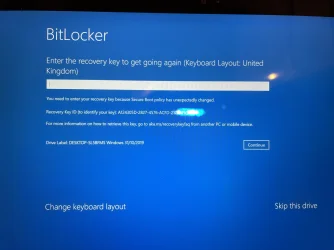
I have a MS windows Surface Pro tablet. This morning on shutting down it asked me (as is often and normal) to update windows and I clicked update and shutdown. This evening I switched on and the blue screen came up BitLocker - enter the recovery key etc., and it listed a 30 alpha / numeric recovery code starting with A- - -- tapping on the line to enter that code brought up just a numeric keyboard i.e. no letters and I can't see any way of getting up an alpha numeric keyboard. I plugged a keyboard into the USB port and it lit up and i can use that to type in numbers but no letters appear. The blue screen does offer other options e.g re install windows NONE of which work.
Anyone got any ideas on how I solve this ?
 

My Computer My Computer

At a glance

W11
OS
W11
Computer type
PC/Desktop
Bitlocker recovery keys are numbers only
 

My Computer My Computer

At a glance

Linux Mint
OS
Linux Mint
Computer type
Laptop
Manufacturer/Model
System76 Lemur Pro
Welcome.

A couple of things:
Firstly, there was a bug that apparently caused this for some and a recent Cumulative Update was supposed to repair it. I can’t remember which update. I can’t remember where I seen it. If I find it I’ll post it.

As for the key:


My Computers My Computers

  • At a glance

    Windows 11 Pro 25H2 Build 26200.8655Intel(R) Core(TM) i7-4770K CPU @ 3.50GHz32.0 GB of I forget and the box is in storage.Gigabyte nVidia GeForce GTX 1660 Super OC 6GB
    OS
    Windows 11 Pro 25H2 Build 26200.8655
    Computer type
    PC/Desktop
    Manufacturer/Model
    Sin-built 2013
    CPU
    Intel(R) Core(TM) i7-4770K CPU @ 3.50GHz
    Motherboard
    ASUS ROG Maximus VI Formula
    Memory
    32.0 GB of I forget and the box is in storage.
    Graphics Card(s)
    Gigabyte nVidia GeForce GTX 1660 Super OC 6GB
    Sound Card
    ROG SupremeFX Formula 8-Channel High Definition Audio
    Monitor(s) Displays
    5 x LG 25MS500-B - 1 x 24MK430H-B - 1 x Wacom Pro 22" Touch Screen Tablet
    Screen Resolution
    All over the place
    Hard Drives
    Too many to list. OS on Samsung 1TB 870 QVO SATA
    PSU
    Silverstone 1500
    Case
    NZXT Phantom 820 Full-Tower Case
    Cooling
    Noctua NH-D15 Elite Class Dual Tower CPU Cooler / 6 x EziDIY 120mm / 2 x Corsair 140mm somethings / 1 x 140mm Thermaltake something / 2 x 200mm Corsair.
    Keyboard
    Corsair K95 / Logitech diNovo Edge Wireless
    Mouse
    Logitech: G402 / G502 / Mx Masters / Mx Air Cordless
    Internet Speed
    2000/500Mbps
    Browser
    All sorts
    Antivirus
    Kaspersky Premium
    Other Info
    ㅤㅤㅤㅤㅤㅤㅤㅤㅤㅤㅤㅤㅤㅤㅤㅤㅤㅤㅤㅤㅤㅤㅤㅤㅤㅤㅤㅤㅤㅤㅤㅤㅤㅤㅤㅤㅤㅤㅤㅤ⠀⠀⠀⠀⠀⠀⠀⠀⠀⠀
    TP-Link BE9300 WiFi 7 Bluetooth 5.4 (Archer TBE550E)
    TP-Link TX201 V1 2.5GB Lan

    Grandstream HT812 - VoIP
    ASUS DSL-AX82U - Mesh
    ASUS RT-AC68U - Mesh
    ASUS RT-BE88U Router

    Brother MFC-L2880DW Printer

    I’m on a horse.
  • At a glance

    Windows 11 Pro 25H2 Build 26200.8655 (Wifes)13th Generation Intel® Core™ i5-1340P Process...16GB LPDDR5-52001x Intel® Iris® Xe Graphics
    Operating System
    Windows 11 Pro 25H2 Build 26200.8655 (Wifes)
    Computer type
    Laptop
    Manufacturer/Model
    LENOVO Yoga 7 14IRL8 - Type 82YL
    CPU
    13th Generation Intel® Core™ i5-1340P Processor(Core™ i5-1340P)
    Memory
    16GB LPDDR5-5200
    Graphics card(s)
    1x Intel® Iris® Xe Graphics
    Sound Card
    Optimized with Dolby Atmos®
    Screen Resolution
    QHD 2880 x 1800 OLED
    Hard Drives
    M.2 512 GB SSD PCIe
    Mouse
    Logiteck MX Master 3S
    Internet Speed
    2000/500
    Antivirus
    Defender / Malwarebytes
    Other Info
    …still on a horse.


    Wireless Network: Wi-Fi 6E 2x2 AX; Bluetooth® 5.1 or above
    Ports: 1x 1 Novo button; 2 in 1 Audio Combo jack; Micro SD Card Reader; HDMI 1.4b; 2 x USB Type-C (TBT4)
    USB 3.2 Gen 2 DP 1.4a
    PD 3.0); 1 x USB 3.2 Gen1 Type A
    Camera
    1x 1080P FHD IR/RGB Hybrid with Privacy Shutter and Dual Array Microphone
    Graphics
    1x Intel® Iris® Xe Graphics
    Monitor
    14" WUXGA
    Form Factor
    Convertible Notebook
  • Windows 11 Pro 25H2 Build 26200.8655 (Wifes)

    Yoga 7 2-in-1 14IML9 - Type 83DJ

    Processor: Intel® Core™ Ultra 7 155H Processor(Core™ Ultra 7 155H)

    Memory: 32GB LPD5X-7467

    Hard Drive: 1 TB SSD PCIe

    Wireless Network: 1x Wi-Fi 6E 2x2 AX; Bluetooth® 5.1 or above

    Ports: 1 x HDMI 2.1 TMDS; 1 x Novo Button; 1 x Combo Audio Jack
    2 x USB-C (USB 4.0)
    1 x USB-A 3.2 Gen 1

    Camera: 1080P FHD IR Hybrid with Dual Microphone

    Graphics: Intel® Arc™ Graphics

    Monitor: 14" 2.8K

    ...Where's my horse?
Did you save a copy of your BitLocker key anywhere? When you set it up, it gives you the option to back up your key. You can save it to a file on a USB drive, your Microsoft account, or print it. I keep at least two different backups of mine.
 

My Computer My Computer

At a glance

Windows 11 Pro For Workstations 25H2Intel Xeon W-10855M @ 4.9Ghz32GB OWC ECC DDR4-2666 RAMiGPU: Intel UHD Graphics P630 | Discrete GPU:...
OS
Windows 11 Pro For Workstations 25H2
Computer type
Laptop
Manufacturer/Model
Dell Precision 7550
CPU
Intel Xeon W-10855M @ 4.9Ghz
Memory
32GB OWC ECC DDR4-2666 RAM
Graphics Card(s)
iGPU: Intel UHD Graphics P630 | Discrete GPU: NVIDIA Quadro RTX 3000 6GB
Sound Card
Realtek Audio
Monitor(s) Displays
Integrated Ultrasharp
Screen Resolution
1920*1080
Hard Drives
OS: Samsung 980 PRO 500GB NVMe
Data: Western Digital Black SN750 1TB
PSU
Dell 180W
Internet Speed
1Gbps
Browser
Edge Chromium
Antivirus
Microsoft Defender
Other Info
OpenSUSE Leap 16 VM
Zorin OS 18 VM
... and it listed a 30 alpha / numeric recovery code starting with A- - --

That's the recovery key ID, to help you find and confirm the correct recovery key.

The actual recovery key is 48 digits.
 

My Computer My Computer

At a glance

Windows 11
OS
Windows 11
Computer type
Laptop
Thanks for the ehlpful posts
If the below is the recovery key ID - what do I dop to get the recovery cod number? - - - -- ah - - - I see that there's a YouTube link above - will look at that
 

Attachments

  • BitL.webp
    BitL.webp
    1.5 MB · Views: 3

My Computer My Computer

At a glance

W11
OS
W11
Computer type
PC/Desktop
what do I dop to get the recovery cod number?
As dear Antspants mentioned, from here:

  • Option One: If you saved your BitLocker Recovery Key to your Microsoft account
  • Option Two: If you saved your BitLocker Recovery Key to a File
  • Option Three: If you saved your BitLocker Recovery Key to USB flash drive
  • Option Four: If you Printed your BitLocker Recovery Key
  • Option Five: If you saved your BitLocker Recovery Key to Microsoft Entra ID account
  • Option Six: If BitLocker Recovery Key Held by your System Administrator
 

My Computers My Computers

  • At a glance

    Windows 11 Pro 25H2Ryzen 5 3500U8GBVega 8
    OS
    Windows 11 Pro 25H2
    Computer type
    Laptop
    Manufacturer/Model
    Huawei MateBook D15
    CPU
    Ryzen 5 3500U
    Memory
    8GB
    Graphics Card(s)
    Vega 8
    Screen Resolution
    FHD
    Hard Drives
    256GB Samsung SSD + 1TB HDD
    Browser
    Microsoft Edge
    Antivirus
    ESET Smart Security Premium
  • At a glance

    Windows 10 Enterprise LTSC 21H2intel core i7 6700HQ16GBNvidia Geforce GTX1060 (6GB)
    Operating System
    Windows 10 Enterprise LTSC 21H2
    Computer type
    Laptop
    Manufacturer/Model
    MSI GS73 6RF Stealth Pro
    CPU
    intel core i7 6700HQ
    Memory
    16GB
    Graphics card(s)
    Nvidia Geforce GTX1060 (6GB)
    Screen Resolution
    FHD
    Hard Drives
    128GB SSD + 1TB HDD
    Browser
    Microsoft Edge
    Antivirus
    Windows Defender
Sorted - I followed the instructions on YouTube, logged into the MS account, got the recoveru code and all done.

God, knows how and why this all came to be, I didn't know I had BitLocker enabled - don't need it, dont; want it.

Thanks for all the helpful posts
 

My Computer My Computer

At a glance

W11
OS
W11
Computer type
PC/Desktop

My Computers My Computers

  • At a glance

    Windows 11 Pro 25H2Ryzen 5 3500U8GBVega 8
    OS
    Windows 11 Pro 25H2
    Computer type
    Laptop
    Manufacturer/Model
    Huawei MateBook D15
    CPU
    Ryzen 5 3500U
    Memory
    8GB
    Graphics Card(s)
    Vega 8
    Screen Resolution
    FHD
    Hard Drives
    256GB Samsung SSD + 1TB HDD
    Browser
    Microsoft Edge
    Antivirus
    ESET Smart Security Premium
  • At a glance

    Windows 10 Enterprise LTSC 21H2intel core i7 6700HQ16GBNvidia Geforce GTX1060 (6GB)
    Operating System
    Windows 10 Enterprise LTSC 21H2
    Computer type
    Laptop
    Manufacturer/Model
    MSI GS73 6RF Stealth Pro
    CPU
    intel core i7 6700HQ
    Memory
    16GB
    Graphics card(s)
    Nvidia Geforce GTX1060 (6GB)
    Screen Resolution
    FHD
    Hard Drives
    128GB SSD + 1TB HDD
    Browser
    Microsoft Edge
    Antivirus
    Windows Defender

Latest Support Threads

Back
Top Bottom