Bluetooth device not migrated from previous OS installation


uncletim

Well-known member
Member
Local time
11:32 AM
Posts
48
OS
Windows 11 Pro
Samsung 13th gen intel laptop came with Windows 11 home, upgraded to Pro.

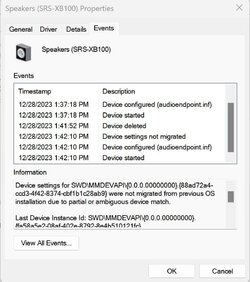
no sound from Sony Bluetooth speaker, both have BT 5.3. first time installing this speaker. works with my phone.

tried uninstalling Intel Bluetooth, latest driver etc. speaker connects fine, just no sound.
sony_xb100.jpg
 
Windows Build/Version
Win11 23H2 22631.2861

My Computer My Computer

At a glance

Windows 11 Proi7-1360p16g
OS
Windows 11 Pro
Computer type
Laptop
Manufacturer/Model
Samsung Galaxy Book3 Pro NP960NFG-KC1US 16"
CPU
i7-1360p
Memory
16g
Monitor(s) Displays
Samsung 4K 27"
Hard Drives
WD 1tb SSD C: in Samsung laptop LOL
WDSN740-SDDPNQD-1T00-1004

24H2 had some issues with WD SSDs, do not think mine was affected, firmware up to date. maybe that is why 24H2 never installed, until I installed with in-place accidently.

Samsung 970 EVO Plus 2tb SSD second slot
Internet Speed
fiber 500/500
Browser
Firefox
Antivirus
no
Other Info
Old 9th gen desktop still running in US, updated to 24H2 and working well.
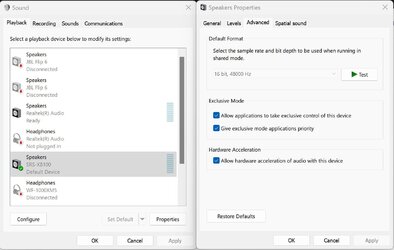
Go to control panel - sound and make sure the correct speakers are selected. Then in the same applet, double-click on the speakers and go to the "levels" tab and make sure they aren't muted (don't laugh - happens more often than you'd think). Then go to the "advanced" tab and click on the test button. What happens?
 

My Computer My Computer

At a glance

W11
OS
W11
Computer type
PC/Desktop
Manufacturer/Model
2 HP Desktops, 1 Dell Desktop, 2 Dell XPS Laptops, 1 HP Laptop
Keyboard
Logitech
Mouse
Logitech MX Master 4 & 3
Internet Speed
500 mps
Browser
Firefox
Antivirus
Bitdefender
when I hit test the meter moves, just no sound. it's connected.

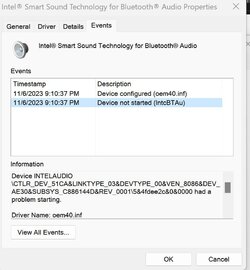
seeing this:

Device INTELAUDIO\CTLR_DEV_51CA&LINKTYPE_03&DEVTYPE_00&VEN_8086&DEV_AE30&SUBSYS_C886144D&REV_0001\5&4fdee2c&0&0000 had a problem starting.

Driver Name: oem40.inf
Class Guid: {4d36e96c-e325-11ce-bfc1-08002be10318}
Service: IntcBTAu
Lower Filters:
Upper Filters:
Problem: 0x0
Problem Status: 0xC00000E5


sony2.jpg


sony3.jpg
 
Last edited:

My Computer My Computer

At a glance

Windows 11 Proi7-1360p16g
OS
Windows 11 Pro
Computer type
Laptop
Manufacturer/Model
Samsung Galaxy Book3 Pro NP960NFG-KC1US 16"
CPU
i7-1360p
Memory
16g
Monitor(s) Displays
Samsung 4K 27"
Hard Drives
WD 1tb SSD C: in Samsung laptop LOL
WDSN740-SDDPNQD-1T00-1004

24H2 had some issues with WD SSDs, do not think mine was affected, firmware up to date. maybe that is why 24H2 never installed, until I installed with in-place accidently.

Samsung 970 EVO Plus 2tb SSD second slot
Internet Speed
fiber 500/500
Browser
Firefox
Antivirus
no
Other Info
Old 9th gen desktop still running in US, updated to 24H2 and working well.
Have tried reinstalling drivers?
 

My Computer My Computer

At a glance

Windows 11 Pro 23H2Intel i3 8100 @3.6Ghz1 x 16GB DDR4 @2400 MHzNvidia GeForce GT 1030 2GB SDDR4
OS
Windows 11 Pro 23H2
Computer type
PC/Desktop
Manufacturer/Model
MSI / MS-7B29
CPU
Intel i3 8100 @3.6Ghz
Motherboard
H310M PRO-VDH (MS-7B29)
Memory
1 x 16GB DDR4 @2400 MHz
Graphics Card(s)
Nvidia GeForce GT 1030 2GB SDDR4
Sound Card
Realtek VEN_10EC&DEV_0887 / NVIDIA VEN_10DE&DEV_0081
Monitor(s) Displays
Acer V226HQL
Screen Resolution
1920 x 1080
Hard Drives
SSD 500 GB Crucial MX500 / HDD 1 TB TOSHIBA DT01ACA100
PSU
ATX, details unknown
Case
Everest 551B
Cooling
details unknown
Keyboard
Mechanical Gaming Hydra R7 - Rampage
Mouse
Logitech G703
Internet Speed
Down: 28Mbps / Up: 19Mbps
Browser
Microsoft Edge
Antivirus
Microsoft Defender Antivirus
Other Info
Bluetooth: TP Link 5.0 Nano USB adapter UB500
WLAN: D-Link 150 Pico USB adapter, N standard
Web camera: Logitech C270 HD 720p @30fps
Microphone: Trust MICO, model 23790
Have tried reinstalling drivers?

yes, used Samsung update and all up to date. all other BT devices work fine. Appears to be Smart Sound Technology for Bluetooth audio.

very latest Intel drivers installed.
 

My Computer My Computer

At a glance

Windows 11 Proi7-1360p16g
OS
Windows 11 Pro
Computer type
Laptop
Manufacturer/Model
Samsung Galaxy Book3 Pro NP960NFG-KC1US 16"
CPU
i7-1360p
Memory
16g
Monitor(s) Displays
Samsung 4K 27"
Hard Drives
WD 1tb SSD C: in Samsung laptop LOL
WDSN740-SDDPNQD-1T00-1004

24H2 had some issues with WD SSDs, do not think mine was affected, firmware up to date. maybe that is why 24H2 never installed, until I installed with in-place accidently.

Samsung 970 EVO Plus 2tb SSD second slot
Internet Speed
fiber 500/500
Browser
Firefox
Antivirus
no
Other Info
Old 9th gen desktop still running in US, updated to 24H2 and working well.
Appears to be Smart Sound Technology for Bluetooth audio.
That's why I suggested to reinstall drivers, Samsung update reports it as "up to date" but current driver is not working.
It might be corrupt or some missing registry setting which failed to migrate, reinstalling should restore corrupt configuration if that's the case.
 

My Computer My Computer

At a glance

Windows 11 Pro 23H2Intel i3 8100 @3.6Ghz1 x 16GB DDR4 @2400 MHzNvidia GeForce GT 1030 2GB SDDR4
OS
Windows 11 Pro 23H2
Computer type
PC/Desktop
Manufacturer/Model
MSI / MS-7B29
CPU
Intel i3 8100 @3.6Ghz
Motherboard
H310M PRO-VDH (MS-7B29)
Memory
1 x 16GB DDR4 @2400 MHz
Graphics Card(s)
Nvidia GeForce GT 1030 2GB SDDR4
Sound Card
Realtek VEN_10EC&DEV_0887 / NVIDIA VEN_10DE&DEV_0081
Monitor(s) Displays
Acer V226HQL
Screen Resolution
1920 x 1080
Hard Drives
SSD 500 GB Crucial MX500 / HDD 1 TB TOSHIBA DT01ACA100
PSU
ATX, details unknown
Case
Everest 551B
Cooling
details unknown
Keyboard
Mechanical Gaming Hydra R7 - Rampage
Mouse
Logitech G703
Internet Speed
Down: 28Mbps / Up: 19Mbps
Browser
Microsoft Edge
Antivirus
Microsoft Defender Antivirus
Other Info
Bluetooth: TP Link 5.0 Nano USB adapter UB500
WLAN: D-Link 150 Pico USB adapter, N standard
Web camera: Logitech C270 HD 720p @30fps
Microphone: Trust MICO, model 23790
Actually, there is a possibility that you may need to roll back the driver. See this thread: Redirecting
No harm in trying - you can always update.
 

My Computer My Computer

At a glance

W11
OS
W11
Computer type
PC/Desktop
Manufacturer/Model
2 HP Desktops, 1 Dell Desktop, 2 Dell XPS Laptops, 1 HP Laptop
Keyboard
Logitech
Mouse
Logitech MX Master 4 & 3
Internet Speed
500 mps
Browser
Firefox
Antivirus
Bitdefender
Actually, there is a possibility that you may need to roll back the driver. See this thread: Redirecting
No harm in trying - you can always update.

Nice find! I rolled all the Intel Smart Sound drivers back one at a time, rebooted and same thing. reinstalled the latest and nothing. I can look for a restore point, don't think any of these drivers were updated recently. I do see optional Realtek drivers in Windows Update.
 

My Computer My Computer

At a glance

Windows 11 Proi7-1360p16g
OS
Windows 11 Pro
Computer type
Laptop
Manufacturer/Model
Samsung Galaxy Book3 Pro NP960NFG-KC1US 16"
CPU
i7-1360p
Memory
16g
Monitor(s) Displays
Samsung 4K 27"
Hard Drives
WD 1tb SSD C: in Samsung laptop LOL
WDSN740-SDDPNQD-1T00-1004

24H2 had some issues with WD SSDs, do not think mine was affected, firmware up to date. maybe that is why 24H2 never installed, until I installed with in-place accidently.

Samsung 970 EVO Plus 2tb SSD second slot
Internet Speed
fiber 500/500
Browser
Firefox
Antivirus
no
Other Info
Old 9th gen desktop still running in US, updated to 24H2 and working well.
Is it safe to do an In-Place upgrade being out of the US region?
 

My Computer My Computer

At a glance

Windows 11 Proi7-1360p16g
OS
Windows 11 Pro
Computer type
Laptop
Manufacturer/Model
Samsung Galaxy Book3 Pro NP960NFG-KC1US 16"
CPU
i7-1360p
Memory
16g
Monitor(s) Displays
Samsung 4K 27"
Hard Drives
WD 1tb SSD C: in Samsung laptop LOL
WDSN740-SDDPNQD-1T00-1004

24H2 had some issues with WD SSDs, do not think mine was affected, firmware up to date. maybe that is why 24H2 never installed, until I installed with in-place accidently.

Samsung 970 EVO Plus 2tb SSD second slot
Internet Speed
fiber 500/500
Browser
Firefox
Antivirus
no
Other Info
Old 9th gen desktop still running in US, updated to 24H2 and working well.

Do by any chance have any speakers or headphones plugged in? I see that under speakers Realtek Audio is listed as Ready. I use a Bluetooth transmitter on my desktop to connect to my Bluetooth headphones. I use to be able to keep it connected and just change the sound output by me turning on or off my headphones. I don't know if it was a Windows Canary update or a Realtek driver update but my computer stopped sending the output to my speakers. The sound graph showed sound was being outputted. Even manually selecting the output didn't worked. Turns out that the sound output was not changing and was being sent to my headphones even though they were turned off. I had to unplug the transmitter from the headphone jack to get the sound output to change to the speakers. The problem was fixed for a short time by finding a driver that worked. the problem is now back again. Just a minor inconvenience now that I know the solution. Getting back to your problem, if you have any speakers plugged in try disconnecting them and then selecting your Bluetooth speakers.
 

My Computers My Computers

  • At a glance

    Windows 11 Pro 25H2Intel Core i7-10700K16GB (8GB PC4-19200 DDR4 SDRAM x2)NVIDIA GeForce GTX 1050 TI
    OS
    Windows 11 Pro 25H2
    Computer type
    PC/Desktop
    Manufacturer/Model
    PowerSpec B746
    CPU
    Intel Core i7-10700K
    Motherboard
    ASRock Z490 Phantom Gaming 4/ax
    Memory
    16GB (8GB PC4-19200 DDR4 SDRAM x2)
    Graphics Card(s)
    NVIDIA GeForce GTX 1050 TI
    Sound Card
    Realtek Audio
    Monitor(s) Displays
    #1. LG ULTRAWIDE 34" #2. AOC Q32G2WG3 32"
    Screen Resolution
    #1. 3440 X 1440 #2. 1920 x 1080
    Hard Drives
    NVMe WDC WDS100T2B0C-00PXH0 1TB
    Samsung SSD 860 EVO 1TB
    PSU
    750 Watts (62.5A)
    Case
    PowerSpec/Lian Li ATX 205
    Keyboard
    Logitech K270
    Mouse
    Logitech M185
    Browser
    Microsoft Edge and Firefox
    Antivirus
    Webroot SecureAnywhere CE 26.1
  • At a glance

    Windows 11 Canary ChannelIntel Core i5-8400 CPU @ 2.80GHz16 MB DDR 4-2666
    Operating System
    Windows 11 Canary Channel
    Computer type
    PC/Desktop
    Manufacturer/Model
    PowerSpec G156
    CPU
    Intel Core i5-8400 CPU @ 2.80GHz
    Motherboard
    AsusTeK Prime B360M-A
    Memory
    16 MB DDR 4-2666
    Monitor(s) Displays
    23" Speptre HDMI 75Hz
    Screen Resolution
    1920x1080
    Hard Drives
    Samsung 970 EVO 500GB NVMe
    Keyboard
    Logitek K270
    Mouse
    Logitek M185
    Browser
    Firefox, Edge and Edge Canary
    Antivirus
    Windows Defender
Do by any chance have any speakers or headphones plugged in? I see that under speakers Realtek Audio is listed as Ready. I use a Bluetooth transmitter on my desktop to connect to my Bluetooth headphones. I use to be able to keep it connected and just change the sound output by me turning on or off my headphones. I don't know if it was a Windows Canary update or a Realtek driver update but my computer stopped sending the output to my speakers. The sound graph showed sound was being outputted. Even manually selecting the output didn't worked. Turns out that the sound output was not changing and was being sent to my headphones even though they were turned off. I had to unplug the transmitter from the headphone jack to get the sound output to change to the speakers. The problem was fixed for a short time by finding a driver that worked. the problem is now back again. Just a minor inconvenience now that I know the solution. Getting back to your problem, if you have any speakers plugged in try disconnecting them and then selecting your Bluetooth speakers.

No speakers plugged in. only thing I use once in a while is a USB DAC. I have 2 other Bluetooth speakers that work fine, I did a reset on the Sony speaker. thought it would be nice on my trip this weekend, easy to carry. no luck yet.

messed with this for hours for a couple days now. rolling back drivers, uninstalling, reinstalling, etc Thanks!
 

My Computer My Computer

At a glance

Windows 11 Proi7-1360p16g
OS
Windows 11 Pro
Computer type
Laptop
Manufacturer/Model
Samsung Galaxy Book3 Pro NP960NFG-KC1US 16"
CPU
i7-1360p
Memory
16g
Monitor(s) Displays
Samsung 4K 27"
Hard Drives
WD 1tb SSD C: in Samsung laptop LOL
WDSN740-SDDPNQD-1T00-1004

24H2 had some issues with WD SSDs, do not think mine was affected, firmware up to date. maybe that is why 24H2 never installed, until I installed with in-place accidently.

Samsung 970 EVO Plus 2tb SSD second slot
Internet Speed
fiber 500/500
Browser
Firefox
Antivirus
no
Other Info
Old 9th gen desktop still running in US, updated to 24H2 and working well.
No speakers plugged in. only thing I use once in a while is a USB DAC. I have 2 other Bluetooth speakers that work fine, I did a reset on the Sony speaker. thought it would be nice on my trip this weekend, easy to carry. no luck yet.

messed with this for hours for a couple days now. rolling back drivers, uninstalling, reinstalling, etc Thanks!
I do hope you can find a solution. Seeing how Realtek is listed I'm guessing that your soundcard uses Realtek drivers. Realtek may not be your problem but because of the problems I've had with Realtek and their drivers I would never go out of my way to buy any soundcards based on Realtek. Years ago when I had to buy my soundcards, I always went with Sound Blaster. Because most if not all motherboards(or at least what I have bought) now come with onboard sound cards I have no idea of what is available.
 

My Computers My Computers

  • At a glance

    Windows 11 Pro 25H2Intel Core i7-10700K16GB (8GB PC4-19200 DDR4 SDRAM x2)NVIDIA GeForce GTX 1050 TI
    OS
    Windows 11 Pro 25H2
    Computer type
    PC/Desktop
    Manufacturer/Model
    PowerSpec B746
    CPU
    Intel Core i7-10700K
    Motherboard
    ASRock Z490 Phantom Gaming 4/ax
    Memory
    16GB (8GB PC4-19200 DDR4 SDRAM x2)
    Graphics Card(s)
    NVIDIA GeForce GTX 1050 TI
    Sound Card
    Realtek Audio
    Monitor(s) Displays
    #1. LG ULTRAWIDE 34" #2. AOC Q32G2WG3 32"
    Screen Resolution
    #1. 3440 X 1440 #2. 1920 x 1080
    Hard Drives
    NVMe WDC WDS100T2B0C-00PXH0 1TB
    Samsung SSD 860 EVO 1TB
    PSU
    750 Watts (62.5A)
    Case
    PowerSpec/Lian Li ATX 205
    Keyboard
    Logitech K270
    Mouse
    Logitech M185
    Browser
    Microsoft Edge and Firefox
    Antivirus
    Webroot SecureAnywhere CE 26.1
  • At a glance

    Windows 11 Canary ChannelIntel Core i5-8400 CPU @ 2.80GHz16 MB DDR 4-2666
    Operating System
    Windows 11 Canary Channel
    Computer type
    PC/Desktop
    Manufacturer/Model
    PowerSpec G156
    CPU
    Intel Core i5-8400 CPU @ 2.80GHz
    Motherboard
    AsusTeK Prime B360M-A
    Memory
    16 MB DDR 4-2666
    Monitor(s) Displays
    23" Speptre HDMI 75Hz
    Screen Resolution
    1920x1080
    Hard Drives
    Samsung 970 EVO 500GB NVMe
    Keyboard
    Logitek K270
    Mouse
    Logitek M185
    Browser
    Firefox, Edge and Edge Canary
    Antivirus
    Windows Defender
I do hope you can find a solution. Seeing how Realtek is listed I'm guessing that your soundcard uses Realtek drivers. Realtek may not be your problem but because of the problems I've had with Realtek and their drivers I would never go out of my way to buy any soundcards based on Realtek. Years ago when I had to buy my soundcards, I always went with Sound Blaster. Because most if not all motherboards(or at least what I have bought) now come with onboard sound cards I have no idea of what is available.

yeah have never used the Realtek audio. for headphone listening with the laptop I use a USB DAC. I gave up on it, too many hours on this. I may reinstall windows at some point. Thanks
 

My Computer My Computer

At a glance

Windows 11 Proi7-1360p16g
OS
Windows 11 Pro
Computer type
Laptop
Manufacturer/Model
Samsung Galaxy Book3 Pro NP960NFG-KC1US 16"
CPU
i7-1360p
Memory
16g
Monitor(s) Displays
Samsung 4K 27"
Hard Drives
WD 1tb SSD C: in Samsung laptop LOL
WDSN740-SDDPNQD-1T00-1004

24H2 had some issues with WD SSDs, do not think mine was affected, firmware up to date. maybe that is why 24H2 never installed, until I installed with in-place accidently.

Samsung 970 EVO Plus 2tb SSD second slot
Internet Speed
fiber 500/500
Browser
Firefox
Antivirus
no
Other Info
Old 9th gen desktop still running in US, updated to 24H2 and working well.
I do see optional Realtek drivers in Windows Update.
Purpose of optional driver updates is to troubleshoot issues, so you should install them.
 

My Computer My Computer

At a glance

Windows 11 Pro 23H2Intel i3 8100 @3.6Ghz1 x 16GB DDR4 @2400 MHzNvidia GeForce GT 1030 2GB SDDR4
OS
Windows 11 Pro 23H2
Computer type
PC/Desktop
Manufacturer/Model
MSI / MS-7B29
CPU
Intel i3 8100 @3.6Ghz
Motherboard
H310M PRO-VDH (MS-7B29)
Memory
1 x 16GB DDR4 @2400 MHz
Graphics Card(s)
Nvidia GeForce GT 1030 2GB SDDR4
Sound Card
Realtek VEN_10EC&DEV_0887 / NVIDIA VEN_10DE&DEV_0081
Monitor(s) Displays
Acer V226HQL
Screen Resolution
1920 x 1080
Hard Drives
SSD 500 GB Crucial MX500 / HDD 1 TB TOSHIBA DT01ACA100
PSU
ATX, details unknown
Case
Everest 551B
Cooling
details unknown
Keyboard
Mechanical Gaming Hydra R7 - Rampage
Mouse
Logitech G703
Internet Speed
Down: 28Mbps / Up: 19Mbps
Browser
Microsoft Edge
Antivirus
Microsoft Defender Antivirus
Other Info
Bluetooth: TP Link 5.0 Nano USB adapter UB500
WLAN: D-Link 150 Pico USB adapter, N standard
Web camera: Logitech C270 HD 720p @30fps
Microphone: Trust MICO, model 23790
Is it safe to do an In-Place upgrade being out of the US region?
Yes and that was going to be my suggestion. You have to download the iso for your language and it must be of same or later version of 11 that you are running.
 

My Computers My Computers

  • At a glance

    Windows 11 Pro 25H2 26200.8655i9-10900 10 core 20 threads32 gbnone-Intel UHD Graphics 630
    OS
    Windows 11 Pro 25H2 26200.8655
    Computer type
    PC/Desktop
    Manufacturer/Model
    Dell Optiplex 7080
    CPU
    i9-10900 10 core 20 threads
    Motherboard
    DELL 0J37VM
    Memory
    32 gb
    Graphics Card(s)
    none-Intel UHD Graphics 630
    Sound Card
    Integrated Realtek
    Monitor(s) Displays
    Benq 27
    Screen Resolution
    2560x1440
    Hard Drives
    2x1tb Solidigm m.2 nvme /External drives 512gb Samsung m.2 sata+2tb Kingston m2.nvme
    PSU
    500w
    Case
    MT
    Cooling
    Dell Premium
    Keyboard
    Logitech wired
    Mouse
    Logitech wireless
    Internet Speed
    so slow I'm too embarrassed to tell
    Browser
    #1 Edge #2 Firefox
    Antivirus
    Defender+MWB Premium
  • At a glance

    Windows 11 Pro 24H2 26200.8457AMD Ryzen 7 6800U32 gbintegrated
    Operating System
    Windows 11 Pro 24H2 26200.8457
    Computer type
    PC/Desktop
    Manufacturer/Model
    Beelink Mini PC SER5
    CPU
    AMD Ryzen 7 6800U
    Memory
    32 gb
    Graphics card(s)
    integrated
    Sound Card
    integrated
    Monitor(s) Displays
    Benq 27
    Screen Resolution
    2560x1440
    Hard Drives
    1TB Crucial nvme
    Keyboard
    Logitech wired
    Mouse
    Logitech wireless
    Internet Speed
    still too embarrassed to tell
    Browser
    Firefox
    Antivirus
    Defender
    Other Info
    System 3 is non compliant Dell 9020 i7-4770/24gb ram Win11 PRO 26200.8457

Latest Support Threads

Back
Top Bottom