Solved Bonjour Services | Not Showing Up Services To Run


Kuroo

Well-known member
Member
Local time
6:42 AM
Posts
94
OS
Windows 11
So I can't seem to get Bonjour Services to run.
- Install Bonjour Servies software C:\Program Files (x86)\Bonjour
- Turn off Memory in setting from other thread that cause issues.
- Reboot and all but still doesn't even show up in the servies list.

Not sure what else to do to get it to run. Did some Googleing but nothing under my area.
 

My Computer

System One

  • OS
    Windows 11
    Computer type
    PC/Desktop
    Manufacturer/Model
    Custom Built
    CPU
    AMD Ryzen 9 5950X
    Motherboard
    MAG X5750 Tomahawk Max Wifi
    Memory
    64 GB DDR4
    Graphics Card(s)
    Nvidia GeForce RTX 3070
    Sound Card
    N/A
    Monitor(s) Displays
    Viotek
    Screen Resolution
    1920 x 1080
Anybody may got any ideas on why a service may now run and how to find out how to to figure it out?
 

My Computer

System One

  • OS
    Windows 11
    Computer type
    PC/Desktop
    Manufacturer/Model
    Custom Built
    CPU
    AMD Ryzen 9 5950X
    Motherboard
    MAG X5750 Tomahawk Max Wifi
    Memory
    64 GB DDR4
    Graphics Card(s)
    Nvidia GeForce RTX 3070
    Sound Card
    N/A
    Monitor(s) Displays
    Viotek
    Screen Resolution
    1920 x 1080
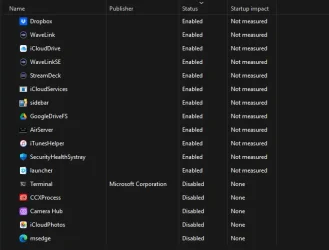
Does it show up in the Task Manager > Start-up apps list? If so, is it set to Enabled?
 

My Computers

System One System Two

  • OS
    Windows 11 2xH2 (latest update ... forever anal)
    Computer type
    PC/Desktop
    Manufacturer/Model
    HP Slim S01
    CPU
    Intel i5-12400
    Memory
    8GB
    Graphics Card(s)
    NVIDIA GeForce GT730
    Sound Card
    OOBE
    Monitor(s) Displays
    Acer 32"
    Screen Resolution
    1920x1080
    Hard Drives
    512GB KIOXIA NVMe
    1TB SATA SSD
    PSU
    OOBE
    Case
    OOBE
    Cooling
    OOBE
    Keyboard
    BT
    Mouse
    BT
    Browser
    Brave FFox Chrome Opera
    Antivirus
    KIS
  • Operating System
    Windows 11 Pro 2xH2 (latest update ... 4ever anal)
    Computer type
    Laptop
    Manufacturer/Model
    HP Pavillion 15
    CPU
    i7-1165G7 @ 2.80GHz
    Graphics card(s)
    Intel Iris Xe Graphics
    Hard Drives
    Samsung NVMe 512GB
    + numerous/multiple SSD Type C USB enclosures
    Internet Speed
    NBN FTTN 50
    Browser
    Brave
    Antivirus
    KIS

My Computer

System One

  • OS
    Windows 11
    Computer type
    PC/Desktop
    Manufacturer/Model
    Custom Built
    CPU
    AMD Ryzen 9 5950X
    Motherboard
    MAG X5750 Tomahawk Max Wifi
    Memory
    64 GB DDR4
    Graphics Card(s)
    Nvidia GeForce RTX 3070
    Sound Card
    N/A
    Monitor(s) Displays
    Viotek
    Screen Resolution
    1920 x 1080
The only thing I can suggest now is uninstall the Apple software (use RevoUninstaller, which will identify all the individual Apple components if listed separately. Don't forget to use the subsequent Advanced option in Revo otherwise It will be a useless exercise), re-download then re-install

In days of yore when I used to use iTunes, Bonjour was always installed, whether I wanted it or not. These days, I find apple and Microsoft/Windows all the less tolerant of each other and thus constantly the topic of conversations in forums such as this one.
 

My Computers

System One System Two

  • OS
    Windows 11 2xH2 (latest update ... forever anal)
    Computer type
    PC/Desktop
    Manufacturer/Model
    HP Slim S01
    CPU
    Intel i5-12400
    Memory
    8GB
    Graphics Card(s)
    NVIDIA GeForce GT730
    Sound Card
    OOBE
    Monitor(s) Displays
    Acer 32"
    Screen Resolution
    1920x1080
    Hard Drives
    512GB KIOXIA NVMe
    1TB SATA SSD
    PSU
    OOBE
    Case
    OOBE
    Cooling
    OOBE
    Keyboard
    BT
    Mouse
    BT
    Browser
    Brave FFox Chrome Opera
    Antivirus
    KIS
  • Operating System
    Windows 11 Pro 2xH2 (latest update ... 4ever anal)
    Computer type
    Laptop
    Manufacturer/Model
    HP Pavillion 15
    CPU
    i7-1165G7 @ 2.80GHz
    Graphics card(s)
    Intel Iris Xe Graphics
    Hard Drives
    Samsung NVMe 512GB
    + numerous/multiple SSD Type C USB enclosures
    Internet Speed
    NBN FTTN 50
    Browser
    Brave
    Antivirus
    KIS
The only thing I can suggest now is uninstall the Apple software (use RevoUninstaller, which will identify all the individual Apple components if listed separately. Don't forget to use the subsequent Advanced option in Revo otherwise It will be a useless exercise), re-download then re-install

In days of yore when I used to use iTunes, Bonjour was always installed, whether I wanted it or not. These days, I find apple and Microsoft/Windows all the less tolerant of each other and thus constantly the topic of conversations in forums such as this one.

This is stupid, I had to downgrade to like 12.9 (a year later) to install it then it working and then upgrade it. Windows is so dumb.
 

My Computer

System One

  • OS
    Windows 11
    Computer type
    PC/Desktop
    Manufacturer/Model
    Custom Built
    CPU
    AMD Ryzen 9 5950X
    Motherboard
    MAG X5750 Tomahawk Max Wifi
    Memory
    64 GB DDR4
    Graphics Card(s)
    Nvidia GeForce RTX 3070
    Sound Card
    N/A
    Monitor(s) Displays
    Viotek
    Screen Resolution
    1920 x 1080
Windows is so dumb.
Why is it Microsoft's/Windows' fault/problem? It's a competitor's product, I'd hardly hold Microsoft/Windows responsible for having to spend time/money on developing compatibility to cater for a competitor. And it's actually Apple's software that's not working, not Microsoft's.

Maybe you'd have better luck posing your problem in an Apple forum?
 

My Computers

System One System Two

  • OS
    Windows 11 2xH2 (latest update ... forever anal)
    Computer type
    PC/Desktop
    Manufacturer/Model
    HP Slim S01
    CPU
    Intel i5-12400
    Memory
    8GB
    Graphics Card(s)
    NVIDIA GeForce GT730
    Sound Card
    OOBE
    Monitor(s) Displays
    Acer 32"
    Screen Resolution
    1920x1080
    Hard Drives
    512GB KIOXIA NVMe
    1TB SATA SSD
    PSU
    OOBE
    Case
    OOBE
    Cooling
    OOBE
    Keyboard
    BT
    Mouse
    BT
    Browser
    Brave FFox Chrome Opera
    Antivirus
    KIS
  • Operating System
    Windows 11 Pro 2xH2 (latest update ... 4ever anal)
    Computer type
    Laptop
    Manufacturer/Model
    HP Pavillion 15
    CPU
    i7-1165G7 @ 2.80GHz
    Graphics card(s)
    Intel Iris Xe Graphics
    Hard Drives
    Samsung NVMe 512GB
    + numerous/multiple SSD Type C USB enclosures
    Internet Speed
    NBN FTTN 50
    Browser
    Brave
    Antivirus
    KIS
Anybody may got any ideas on why a service may now run and how to find out how to to figure it out?
Press WIN+R - type services.msc -> "Enter"

You get basic information on each service.

Service Name
• The "friendly" name (e.g. Bonjour Service, Windows Update).
• Description
• A brief explanation of what the service does (if provided by the vendor).
• Status
• Whether the service is Running, Stopped, Paused.
• Startup Type
 

My Computer

System One

  • OS
    Windows 11
    Computer type
    Laptop
    Manufacturer/Model
    Acer
Press WIN+R - type services.msc -> "Enter"

You get basic information on each service.

Service Name
• The "friendly" name (e.g. Bonjour Service, Windows Update).
• Description
• A brief explanation of what the service does (if provided by the vendor).
• Status
• Whether the service is Running, Stopped, Paused.
• Startup Type
That the thing at the time it was not even in the services listing!
 

My Computer

System One

  • OS
    Windows 11
    Computer type
    PC/Desktop
    Manufacturer/Model
    Custom Built
    CPU
    AMD Ryzen 9 5950X
    Motherboard
    MAG X5750 Tomahawk Max Wifi
    Memory
    64 GB DDR4
    Graphics Card(s)
    Nvidia GeForce RTX 3070
    Sound Card
    N/A
    Monitor(s) Displays
    Viotek
    Screen Resolution
    1920 x 1080
Why is it Microsoft's/Windows' fault/problem? It's a competitor's product, I'd hardly hold Microsoft/Windows responsible for having to spend time/money on developing compatibility to cater for a competitor. And it's actually Apple's software that's not working, not Microsoft's.

Maybe you'd have better luck posing your problem in an Apple forum?
Nah it a windows thing. But someone else may find a fix to it one day for now this is the work around.
 

My Computer

System One

  • OS
    Windows 11
    Computer type
    PC/Desktop
    Manufacturer/Model
    Custom Built
    CPU
    AMD Ryzen 9 5950X
    Motherboard
    MAG X5750 Tomahawk Max Wifi
    Memory
    64 GB DDR4
    Graphics Card(s)
    Nvidia GeForce RTX 3070
    Sound Card
    N/A
    Monitor(s) Displays
    Viotek
    Screen Resolution
    1920 x 1080

Latest Support Threads

Back
Top Bottom