- Local time
- 10:55 AM
- Posts
- 47
- OS
- Windows 11
The specs for this build are Asus Z790 Max Gaming Wifi7 motherboard, Intel i5-14600K, G.SKILL Trident Z5 RGB Series DDR5 RAM (Intel XMP 3.0) 32GB (2x16GB) 6400MT/s CL32-39-39-102 1.40V (F5-6400J3239G16GA2-TZ5RK), Samsung 990 Pro 2tb SSD, Cooler Master N400 case, Pioneer DVR-S21WBK/PLUS DVD Burner, StarTech.com 3.5in Front Bay 22-in-1 USB 2.0 Internal Multi Media Memory Card Reader.
As usual with a new build, I go to Asus's website and get the latest motherboard firmware and update the firmware before installing Windows, the latest version of firmware for this motherboard was version 1825.
I'm using a flash drive created with the latest Microsoft Media Creation Tool, downloaded from their website so I'm not 100% sure what version Windows it's installing (since it doesn't say during the creation) but I assume it's 25H2.
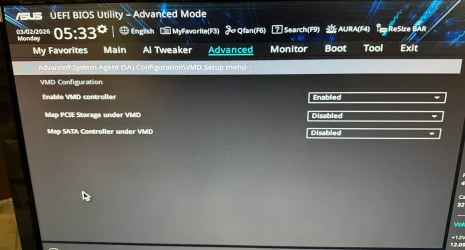
When I install Windows I get through the part where it asks what drive I want to install on and I select the 2tb Samsung, it installs and says that the computer may reboot several times. Then it reboots and I get the spinning circle with the message "Installing X% Please keep your computer on. Your computer may restart a few times." when the computer restarts I get a black screen and the hard drive activity light is blighting fairly regularly but the install never proceeds past this point and I'm left it for a couple hours like that. In the event that the USB card reader or DVD drive is somehow interfering with the install I've shut down and unplugged them and tried booting from the flash drive again; deleting any existing partitions and trying again with the same results. If I turn the computer off and try and from the bios boot from the Samsung SSD I get the same "Installing...." message and it eventually reboots to the same black screen.
Does anyone have any idea what the problem here is and how to overcome it?
As usual with a new build, I go to Asus's website and get the latest motherboard firmware and update the firmware before installing Windows, the latest version of firmware for this motherboard was version 1825.
I'm using a flash drive created with the latest Microsoft Media Creation Tool, downloaded from their website so I'm not 100% sure what version Windows it's installing (since it doesn't say during the creation) but I assume it's 25H2.
When I install Windows I get through the part where it asks what drive I want to install on and I select the 2tb Samsung, it installs and says that the computer may reboot several times. Then it reboots and I get the spinning circle with the message "Installing X% Please keep your computer on. Your computer may restart a few times." when the computer restarts I get a black screen and the hard drive activity light is blighting fairly regularly but the install never proceeds past this point and I'm left it for a couple hours like that. In the event that the USB card reader or DVD drive is somehow interfering with the install I've shut down and unplugged them and tried booting from the flash drive again; deleting any existing partitions and trying again with the same results. If I turn the computer off and try and from the bios boot from the Samsung SSD I get the same "Installing...." message and it eventually reboots to the same black screen.
Does anyone have any idea what the problem here is and how to overcome it?
- Windows Build/Version
- 25H2
My Computer
At a glance
Windows 11Intel 13-900K32gb Corsair Dominator Platinum DDR5Zotac 3090TI AMP Extreme Holo
- OS
- Windows 11
- Computer type
- PC/Desktop
- Manufacturer/Model
- Built Myself
- CPU
- Intel 13-900K
- Motherboard
- Asus ProArt Z790 Creator Wifi
- Memory
- 32gb Corsair Dominator Platinum DDR5
- Graphics Card(s)
- Zotac 3090TI AMP Extreme Holo
- Sound Card
- Realtek S1220A 7.1 Surround Sound High Definition Audio CODEC
- Monitor(s) Displays
- Asus 4K 29inch and LG Ultra Wide
- Screen Resolution
- Asus 3840z2160 LG 3440x1440