Solved Brand new build, gets stuck with no video during Windows install?


NormAtHome

Well-known member
Member
Local time
5:14 PM
Posts
47
OS
Windows 11
The specs for this build are Asus Z790 Max Gaming Wifi7 motherboard, Intel i5-14600K, G.SKILL Trident Z5 RGB Series DDR5 RAM (Intel XMP 3.0) 32GB (2x16GB) 6400MT/s CL32-39-39-102 1.40V (F5-6400J3239G16GA2-TZ5RK), Samsung 990 Pro 2tb SSD, Cooler Master N400 case, Pioneer DVR-S21WBK/PLUS DVD Burner, StarTech.com 3.5in Front Bay 22-in-1 USB 2.0 Internal Multi Media Memory Card Reader.

As usual with a new build, I go to Asus's website and get the latest motherboard firmware and update the firmware before installing Windows, the latest version of firmware for this motherboard was version 1825.

I'm using a flash drive created with the latest Microsoft Media Creation Tool, downloaded from their website so I'm not 100% sure what version Windows it's installing (since it doesn't say during the creation) but I assume it's 25H2.

When I install Windows I get through the part where it asks what drive I want to install on and I select the 2tb Samsung, it installs and says that the computer may reboot several times. Then it reboots and I get the spinning circle with the message "Installing X% Please keep your computer on. Your computer may restart a few times." when the computer restarts I get a black screen and the hard drive activity light is blighting fairly regularly but the install never proceeds past this point and I'm left it for a couple hours like that. In the event that the USB card reader or DVD drive is somehow interfering with the install I've shut down and unplugged them and tried booting from the flash drive again; deleting any existing partitions and trying again with the same results. If I turn the computer off and try and from the bios boot from the Samsung SSD I get the same "Installing...." message and it eventually reboots to the same black screen.

Does anyone have any idea what the problem here is and how to overcome it?
 
Windows Build/Version
25H2

My Computer My Computer

At a glance

Windows 11Intel 13-900K32gb Corsair Dominator Platinum DDR5Zotac 3090TI AMP Extreme Holo
OS
Windows 11
Computer type
PC/Desktop
Manufacturer/Model
Built Myself
CPU
Intel 13-900K
Motherboard
Asus ProArt Z790 Creator Wifi
Memory
32gb Corsair Dominator Platinum DDR5
Graphics Card(s)
Zotac 3090TI AMP Extreme Holo
Sound Card
Realtek S1220A 7.1 Surround Sound High Definition Audio CODEC
Monitor(s) Displays
Asus 4K 29inch and LG Ultra Wide
Screen Resolution
Asus 3840z2160 LG 3440x1440
@NormAtHome

First, here's ten points just for filling out your computer specs. :-)


I'm not an Intel guy but you may need the Intel RST driver??
Also, you need to check whether the SATA controller is set to AHCI or RAID.

You may have to wait for someone that knows more about this.
 

My Computers My Computers

  • At a glance

    Win 11 Home ♦♦♦26300.9278 ♦♦♦♦♦♦♦26H2AMD Ryzen 7 3700XG.Skill (F4-3200C14D-16GTZKW)EVGA RTX 2070 (08G-P4-2171-KR)
    OS
    Win 11 Home ♦♦♦26300.9278 ♦♦♦♦♦♦♦26H2
    Computer type
    PC/Desktop
    Manufacturer/Model
    Built by Ghot® [May 2020]
    CPU
    AMD Ryzen 7 3700X
    Motherboard
    Asus Pro WS X570-ACE (BIOS 5302)
    Memory
    G.Skill (F4-3200C14D-16GTZKW)
    Graphics Card(s)
    EVGA RTX 2070 (08G-P4-2171-KR)
    Sound Card
    Realtek ALC1220P / ALC S1220A
    Monitor(s) Displays
    Dell U3011 30"
    Screen Resolution
    2560 x 1600
    Hard Drives
    2x Samsung 860 EVO 500GB,
    WD 4TB Black FZBX - SATA III,
    WD 8TB Black FZBX - SATA III,
    DRW-24B1ST CD/DVD Burner
    PSU
    PC Power & Cooling 750W Quad EPS12V
    Case
    Cooler Master ATCS 840 Tower
    Cooling
    CM Hyper 212 EVO (push/pull)
    Keyboard
    Ducky DK9008 Shine II Blue LED
    Mouse
    Logitech Optical M-100
    Internet Speed
    300/300
    Browser
    Firefox (latest)
    Antivirus
    Bitdefender Total Security
    Other Info
    Speakers: Klipsch Pro Media 2.1
  • At a glance

    Windows XP Pro 32bit w/SP3AMD Athlon 64 X2 5000+ (OC'd @ 3.2Ghz)TWIN2X2048-6400C4DHX (2 x 1GB, DDR2 800)EVGA 256-P2-N758-TR GeForce 8600GT SSC
    Operating System
    Windows XP Pro 32bit w/SP3
    Computer type
    PC/Desktop
    Manufacturer/Model
    Built by Ghot® (not in use)
    CPU
    AMD Athlon 64 X2 5000+ (OC'd @ 3.2Ghz)
    Motherboard
    ASUS M2N32-SLI Deluxe Wireless Edition
    Memory
    TWIN2X2048-6400C4DHX (2 x 1GB, DDR2 800)
    Graphics card(s)
    EVGA 256-P2-N758-TR GeForce 8600GT SSC
    Sound Card
    Onboard
    Monitor(s) Displays
    ViewSonic G90FB Black 19" Professional (CRT)
    Screen Resolution
    up to 2048 x 1536
    Hard Drives
    WD 36GB 10,000rpm Raptor SATA
    Seagate 80GB 7200rpm SATA
    Lite-On LTR-52246S CD/RW
    Lite-On LH-18A1P CD/DVD Burner
    PSU
    PC Power & Cooling Silencer 750 Quad EPS12V
    Case
    Generic Beige case, 80mm fans
    Cooling
    ZALMAN 9500A 92mm CPU Cooler
    Keyboard
    Logitech Classic Keybooard 200
    Mouse
    Logitech Optical M-BT96a
    Internet Speed
    300/300
    Browser
    Firefox 3.x ??
    Antivirus
    Symantec (Norton)
    Other Info
    Still assembled, still runs. Haven't turned it on for 15 years?
I've never seen that issue.

What GPU is in the build?

I presume that the BIOS default for the drive controller is AHCI rather than RAID.

All that comes to mind is disconnecting the optical drive and the card reader while doing the install. Pretty random, though.
 

My Computers My Computers

  • At a glance

    Windows 11 26300.9278Amd Threadripper 7970X128GB (4 X 32) G.Skill DDR5 6400 (RDIMM)Gigabyte RTX 4090 OC
    OS
    Windows 11 26300.9278
    Computer type
    PC/Desktop
    Manufacturer/Model
    homebuilt
    CPU
    Amd Threadripper 7970X
    Motherboard
    Gigabyte TRX50 Aero D Rev. 1.0
    Memory
    128GB (4 X 32) G.Skill DDR5 6400 (RDIMM)
    Graphics Card(s)
    Gigabyte RTX 4090 OC
    Sound Card
    none (USB to speakers), Realtek
    Monitor(s) Displays
    Innocn 32" OLED
    Screen Resolution
    3840 X 2160 @ 60Hz
    Hard Drives
    Crucial T700 2TB M.2 NVME SSD
    WD 4TB Blue SATA SSD
    Seagate 18TB IronWolf Pro
    PSU
    BeQuiet! Straight Power 12 1500W
    Case
    Lian Li 011 Dynamic Evo XL
    Cooling
    SilverStone Technology XE360-TR5, with 3 Phanteks T30 fans
    Keyboard
    Cherry KC 500 MX LP (mechanical)
    Mouse
    Logitech M500s (wired)
    Internet Speed
    2000/250 Mbps (down/up)
    Other Info
    xFinity gateway
  • At a glance

    windows 11 26300.9278Intel I9-13900K64GB G.Skill DDR5-6000Gigabyte RTX 3090 ti
    Operating System
    windows 11 26300.9278
    Computer type
    PC/Desktop
    Manufacturer/Model
    homebuilt
    CPU
    Intel I9-13900K
    Motherboard
    Asus RoG Strix Z690-E
    Memory
    64GB G.Skill DDR5-6000
    Graphics card(s)
    Gigabyte RTX 3090 ti
    Sound Card
    built in Realtek
    Monitor(s) Displays
    Philips 27E1N8900 27" OLED
    Screen Resolution
    3840 X 2160 @60Hz
    Hard Drives
    WDC SN850 1TB
    8TB Seagate Ironwolf
    4TB Seagate Ironwolf
    PSU
    eVGA SuperNOVA 1300 GT
    Case
    Lian Li 011 Dynamic Evo
    Cooling
    Corsair iCUE H150i ELITE CAPELLIX Liquid CPU Cooler
    Keyboard
    Cherry Streaming (wired)
    Mouse
    Logitech M500s (wired)
@NormAtHome

First, here's ten points just for filling out your computer specs. :-)


I'm not an Intel guy but you may need the Intel RST driver??
Also, you need to check whether the SATA controller is set to AHCI or RAID.

You may have to wait for someone that knows more about this.
The thing is I've build at least 10 computers with Z790 motherboards over this last year and none of them required that the intel RST drivers be separately loaded during the Windows 11 Pro install.

I might subtract a few because "system 1" isn't the system in the post text.

Why? Just because the computer I'm asking about is a build that's not my main working computer? In my office I have 4 computers, 3 desktop and 1 server and the computer I'm asking about is a build for someone else.
 

My Computer My Computer

At a glance

Windows 11Intel 13-900K32gb Corsair Dominator Platinum DDR5Zotac 3090TI AMP Extreme Holo
OS
Windows 11
Computer type
PC/Desktop
Manufacturer/Model
Built Myself
CPU
Intel 13-900K
Motherboard
Asus ProArt Z790 Creator Wifi
Memory
32gb Corsair Dominator Platinum DDR5
Graphics Card(s)
Zotac 3090TI AMP Extreme Holo
Sound Card
Realtek S1220A 7.1 Surround Sound High Definition Audio CODEC
Monitor(s) Displays
Asus 4K 29inch and LG Ultra Wide
Screen Resolution
Asus 3840z2160 LG 3440x1440

I've never seen that issue.

What GPU is in the build?

I presume that the BIOS default for the drive controller is AHCI rather than RAID.

All that comes to mind is disconnecting the optical drive and the card reader while doing the install. Pretty random, though.
The Intel Core i5-14600K features integrated Intel UHD Graphics 770. This integrated GPU has a base frequency of 300 MHz and a maximum dynamic frequency of 1.55 GHz. It supports up to 4 displays, DirectX 12.1, and features like Intel Quick Sync Video

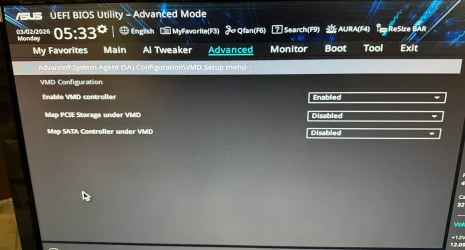
Since one of the other posters asked, I'm looking in the bios for the setting for AHCI / Raid and I can't find it, fyi Intel Rapid Storage is set to default which is off and Google suggests it should either be under PCH Storage configuration or under Advanced / System Agent (SA) Configuration / VMD menu however under VMD config these are the options (see photo):
 

Attachments

  • VMD Config.webp
    VMD Config.webp
    1.4 MB · Views: 1

My Computer My Computer

At a glance

Windows 11Intel 13-900K32gb Corsair Dominator Platinum DDR5Zotac 3090TI AMP Extreme Holo
OS
Windows 11
Computer type
PC/Desktop
Manufacturer/Model
Built Myself
CPU
Intel 13-900K
Motherboard
Asus ProArt Z790 Creator Wifi
Memory
32gb Corsair Dominator Platinum DDR5
Graphics Card(s)
Zotac 3090TI AMP Extreme Holo
Sound Card
Realtek S1220A 7.1 Surround Sound High Definition Audio CODEC
Monitor(s) Displays
Asus 4K 29inch and LG Ultra Wide
Screen Resolution
Asus 3840z2160 LG 3440x1440

it should either be under PCH Storage configuration or under Advanced / System Agent (SA) Configuration / VMD menu however under VMD config these are the options (see photo):

When the VMD controller is enabled, it's set to "RAID".
Disabling it sets it to AHCI, although it doesn't indicate as such.

Reinstall again, and when you get to the black screen try resetting the graphics driver:

Press Win + Ctrl + Shift + B
Hold all four keys simultaneously. The screen will briefly flash or go black for a couple of seconds, indicating the driver has reloaded.

This may or may not work, but it can't hurt to try.
 

My Computers My Computers

  • At a glance

    Win 11 Pro 25H2 26200.9278Intel® Core™ i7-14700KG.SKILL Ripjaws S5 Series 64GB (2 x 32GB) DDR5ASUS GeForce RTX 4070 Super 12GB
    OS
    Win 11 Pro 25H2 26200.9278
    Computer type
    PC/Desktop
    Manufacturer/Model
    Self Built
    CPU
    Intel® Core™ i7-14700K
    Motherboard
    ASUS TUF Z690-PLUS WIFI (BIOS 4505)
    Memory
    G.SKILL Ripjaws S5 Series 64GB (2 x 32GB) DDR5
    Graphics Card(s)
    ASUS GeForce RTX 4070 Super 12GB
    Sound Card
    Sound Blaster AE-5 Plus
    Monitor(s) Displays
    ASUS TUF Gaming 27" 2K HDR Gaming
    Screen Resolution
    2560 x 1440
    Hard Drives
    Samsung 990 Pro 1TB NVMe (Win 11 25H2)
    SK hynix P41 500GB NVMe
    SK hynix P41 2TB NVMe (x3)
    Crucial P3 Plus 4TB
    PSU
    Corsair RM850x Shift
    Case
    Antec Dark Phantom DP502 FLUX
    Cooling
    Corsair Nautilus 360 RS AIO
    Keyboard
    Logitech MK 320
    Mouse
    Razer Basilisk V3
    Internet Speed
    750Mbs
    Browser
    Firefox
    Antivirus
    Winows Security
    Other Info
    MR 8.1 Home
  • At a glance

    Win 11 Pro 25H2 26200.9278Intel Core i5-1140064 GB DDR4MSI GeForce RTX 3060 Ventus 2X 12GB
    Operating System
    Win 11 Pro 25H2 26200.9278
    Computer type
    PC/Desktop
    Manufacturer/Model
    Self Built
    CPU
    Intel Core i5-11400
    Motherboard
    Asus TUF Gaming Z590 Plus WiFi (BIOS 2803)
    Memory
    64 GB DDR4
    Graphics card(s)
    MSI GeForce RTX 3060 Ventus 2X 12GB
    Sound Card
    SoundBlaster Audigy Fx V2
    Monitor(s) Displays
    Samsung F27T350
    Screen Resolution
    1920x1080
    Hard Drives
    Samsung 980 Pro 1TB
    Samsung 970 EVO Plus 2TB
    Samsung 870 EVO 500GB SSD
    PSU
    Corsair HX750
    Case
    Cougar MX330-G Window
    Cooling
    Thermalright Frozen Edge 240 Black AIO
    Internet Speed
    350Mbps
    Browser
    Firefox
    Antivirus
    Windows Security
  • System Three
    Win 11 Pro 25H2 26200.9278
    ASUS PRIME Z370-P II BIOS 3004 7/12/21
    Intel Core i7-8700 CPU @ 3.20GHz
    32GB DDR4 RAM (4x8)
    iGPU Intel UHD Graphics 630
    Cooler Master Hyper 212
    Mid-Tower Desktop
When the VMD controller is enabled, it's set to "RAID".
Disabling it sets it to AHCI, although it doesn't indicate as such.

Reinstall again, and when you get to the black screen try resetting the graphics driver:

Press Win + Ctrl + Shift + B
Hold all four keys simultaneously. The screen will briefly flash or go black for a couple of seconds, indicating the driver has reloaded.

This may or may not work, but it can't hurt to try.
I'll try "Enable VMD Controller to disable; fyi my most recent attempt to install was stuck on the black screen and Win+Ctrl+Shif+B failed to do anything but thanks for the information. I'll be back after I try changing the VMD setting to disabled.
 

My Computer My Computer

At a glance

Windows 11Intel 13-900K32gb Corsair Dominator Platinum DDR5Zotac 3090TI AMP Extreme Holo
OS
Windows 11
Computer type
PC/Desktop
Manufacturer/Model
Built Myself
CPU
Intel 13-900K
Motherboard
Asus ProArt Z790 Creator Wifi
Memory
32gb Corsair Dominator Platinum DDR5
Graphics Card(s)
Zotac 3090TI AMP Extreme Holo
Sound Card
Realtek S1220A 7.1 Surround Sound High Definition Audio CODEC
Monitor(s) Displays
Asus 4K 29inch and LG Ultra Wide
Screen Resolution
Asus 3840z2160 LG 3440x1440

The Intel Core i5-14600K features integrated Intel UHD Graphics 770. This integrated GPU has a base frequency of 300 MHz and a maximum dynamic frequency of 1.55 GHz. It supports up to 4 displays, DirectX 12.1, and features like Intel Quick Sync Video

Since one of the other posters asked, I'm looking in the bios for the setting for AHCI / Raid and I can't find it, fyi Intel Rapid Storage is set to default which is off and Google suggests it should either be under PCH Storage configuration or under Advanced / System Agent (SA) Configuration / VMD menu however under VMD config these are the options (see photo):
The 14600 would need an F suffix to lack an iGPU. You didn't mention that you were using the iGPU in the first post. I didn't assume it.

It's too bad that Asus didn't produce a separate downloadable BIOS manual for the Z790 Max Gaming Wifi7. (My old Z690-E has one.) The user manual seems pretty limited as regards settings.

A bit of Web searching suggests that the Intel IRST drivers are needed to install Win11 on an NVME drive if VMD is enabled, even if RAID is not used. Disabling that would allow the standard Windows drivers to be used.

Searching also suggests that enabling VMD will not do anything useful for most, if RAID (or Optane) is not used.

I'm surprised that it was enabled. Disabled should be the default.
 
Last edited:

My Computers My Computers

  • At a glance

    Windows 11 26300.9278Amd Threadripper 7970X128GB (4 X 32) G.Skill DDR5 6400 (RDIMM)Gigabyte RTX 4090 OC
    OS
    Windows 11 26300.9278
    Computer type
    PC/Desktop
    Manufacturer/Model
    homebuilt
    CPU
    Amd Threadripper 7970X
    Motherboard
    Gigabyte TRX50 Aero D Rev. 1.0
    Memory
    128GB (4 X 32) G.Skill DDR5 6400 (RDIMM)
    Graphics Card(s)
    Gigabyte RTX 4090 OC
    Sound Card
    none (USB to speakers), Realtek
    Monitor(s) Displays
    Innocn 32" OLED
    Screen Resolution
    3840 X 2160 @ 60Hz
    Hard Drives
    Crucial T700 2TB M.2 NVME SSD
    WD 4TB Blue SATA SSD
    Seagate 18TB IronWolf Pro
    PSU
    BeQuiet! Straight Power 12 1500W
    Case
    Lian Li 011 Dynamic Evo XL
    Cooling
    SilverStone Technology XE360-TR5, with 3 Phanteks T30 fans
    Keyboard
    Cherry KC 500 MX LP (mechanical)
    Mouse
    Logitech M500s (wired)
    Internet Speed
    2000/250 Mbps (down/up)
    Other Info
    xFinity gateway
  • At a glance

    windows 11 26300.9278Intel I9-13900K64GB G.Skill DDR5-6000Gigabyte RTX 3090 ti
    Operating System
    windows 11 26300.9278
    Computer type
    PC/Desktop
    Manufacturer/Model
    homebuilt
    CPU
    Intel I9-13900K
    Motherboard
    Asus RoG Strix Z690-E
    Memory
    64GB G.Skill DDR5-6000
    Graphics card(s)
    Gigabyte RTX 3090 ti
    Sound Card
    built in Realtek
    Monitor(s) Displays
    Philips 27E1N8900 27" OLED
    Screen Resolution
    3840 X 2160 @60Hz
    Hard Drives
    WDC SN850 1TB
    8TB Seagate Ironwolf
    4TB Seagate Ironwolf
    PSU
    eVGA SuperNOVA 1300 GT
    Case
    Lian Li 011 Dynamic Evo
    Cooling
    Corsair iCUE H150i ELITE CAPELLIX Liquid CPU Cooler
    Keyboard
    Cherry Streaming (wired)
    Mouse
    Logitech M500s (wired)
Do you, per chance, have an external monitor plugged in via HDMI cable but turned off? If so, unplug the HDMI cable.
 

My Computers My Computers

  • At a glance

    Win 10 Pro / Win 11 Pro & Home, Linux MintAMD Ryzen 7 5700X / A10-7860K32GB / 16GBAMD RX 6650 XT / RX 580
    OS
    Win 10 Pro / Win 11 Pro & Home, Linux Mint
    Computer type
    PC/Desktop
    Manufacturer/Model
    Custom builds
    CPU
    AMD Ryzen 7 5700X / A10-7860K
    Motherboard
    MSI PRO B550-VC / ASRock A88M-G/3.1
    Memory
    32GB / 16GB
    Graphics Card(s)
    AMD RX 6650 XT / RX 580
    Monitor(s) Displays
    Samsung 27" / LG 24"
    Screen Resolution
    1920x1080
    Hard Drives
    Toshiba 2 TB
    Toshiba 1 TB
    Toshiba 1 TB
    WD Black SN770 1TB

    PNY 1 TB
    PNY 500 GB
    WD Black SN770 200 GB
    Inland 500 GB
    Inland 256 GB
    Case
    NZXT / Lian LI
    Keyboard
    ROCCAT PYRO / Logitech 148
    Mouse
    Logitech
    Browser
    Firefox, Opera, Waterfox, Tor
  • At a glance

    Windows 11 HomeIntel i516GB
    Operating System
    Windows 11 Home
    Computer type
    Laptop
    Manufacturer/Model
    HP 17
    CPU
    Intel i5
    Memory
    16GB
    Screen Resolution
    1920 x 1080
    Hard Drives
    512 GB
    Browser
    Firefox
@NormAtHome

Yes... if you have more than one monitor connected... disconnect the extra one(s).
 

My Computers My Computers

  • At a glance

    Win 11 Home ♦♦♦26300.9278 ♦♦♦♦♦♦♦26H2AMD Ryzen 7 3700XG.Skill (F4-3200C14D-16GTZKW)EVGA RTX 2070 (08G-P4-2171-KR)
    OS
    Win 11 Home ♦♦♦26300.9278 ♦♦♦♦♦♦♦26H2
    Computer type
    PC/Desktop
    Manufacturer/Model
    Built by Ghot® [May 2020]
    CPU
    AMD Ryzen 7 3700X
    Motherboard
    Asus Pro WS X570-ACE (BIOS 5302)
    Memory
    G.Skill (F4-3200C14D-16GTZKW)
    Graphics Card(s)
    EVGA RTX 2070 (08G-P4-2171-KR)
    Sound Card
    Realtek ALC1220P / ALC S1220A
    Monitor(s) Displays
    Dell U3011 30"
    Screen Resolution
    2560 x 1600
    Hard Drives
    2x Samsung 860 EVO 500GB,
    WD 4TB Black FZBX - SATA III,
    WD 8TB Black FZBX - SATA III,
    DRW-24B1ST CD/DVD Burner
    PSU
    PC Power & Cooling 750W Quad EPS12V
    Case
    Cooler Master ATCS 840 Tower
    Cooling
    CM Hyper 212 EVO (push/pull)
    Keyboard
    Ducky DK9008 Shine II Blue LED
    Mouse
    Logitech Optical M-100
    Internet Speed
    300/300
    Browser
    Firefox (latest)
    Antivirus
    Bitdefender Total Security
    Other Info
    Speakers: Klipsch Pro Media 2.1
  • At a glance

    Windows XP Pro 32bit w/SP3AMD Athlon 64 X2 5000+ (OC'd @ 3.2Ghz)TWIN2X2048-6400C4DHX (2 x 1GB, DDR2 800)EVGA 256-P2-N758-TR GeForce 8600GT SSC
    Operating System
    Windows XP Pro 32bit w/SP3
    Computer type
    PC/Desktop
    Manufacturer/Model
    Built by Ghot® (not in use)
    CPU
    AMD Athlon 64 X2 5000+ (OC'd @ 3.2Ghz)
    Motherboard
    ASUS M2N32-SLI Deluxe Wireless Edition
    Memory
    TWIN2X2048-6400C4DHX (2 x 1GB, DDR2 800)
    Graphics card(s)
    EVGA 256-P2-N758-TR GeForce 8600GT SSC
    Sound Card
    Onboard
    Monitor(s) Displays
    ViewSonic G90FB Black 19" Professional (CRT)
    Screen Resolution
    up to 2048 x 1536
    Hard Drives
    WD 36GB 10,000rpm Raptor SATA
    Seagate 80GB 7200rpm SATA
    Lite-On LTR-52246S CD/RW
    Lite-On LH-18A1P CD/DVD Burner
    PSU
    PC Power & Cooling Silencer 750 Quad EPS12V
    Case
    Generic Beige case, 80mm fans
    Cooling
    ZALMAN 9500A 92mm CPU Cooler
    Keyboard
    Logitech Classic Keybooard 200
    Mouse
    Logitech Optical M-BT96a
    Internet Speed
    300/300
    Browser
    Firefox 3.x ??
    Antivirus
    Symantec (Norton)
    Other Info
    Still assembled, still runs. Haven't turned it on for 15 years?
An odd thing that I noticed after changing
The 14600 would need an F suffix to lack an iGPU. You didn't mention that you were using the iGPU in the first post. I didn't assume it.

It's too bad that Asus didn't produce a separate downloadable BIOS manual for the Z790 Max Gaming Wifi7. (My old Z690-E has one.) The user manual seems pretty limited as regards settings.

A bit of Web searching suggests that the Intel IRST drivers are needed to install Win11 on an NVME drive, even if RAID is not used. Disabling that would allow the standard Windows drivers to be used.
If I'd been using a discrete GPU I would have mentioned it, I would have thought that since I didn't people would understand that I'm using the on chip graphics; I didn't know off the top of my head which one it was and had to look it up to add it to my reply to you.

Over the course of 2025 I built 10 computers for friends and family to replace their old non-Windows 11 compatible computers, I used exclusively the Asus Z790 Gaming WIFI 7 which I usually got from Microcenter. However for this build Microcenter was out of stock and had no eta on that board so I bought this one Asus Z790 MAX Gaming WIFI 7 from Amazon which appears identical to the previous board but in no instance of those other 10 computers did I need to load any drivers for the Intel storage controller for the Windows install to work properly. So you understand why I'm wondering why the Z790 Gaming Wifi7 did not need that but that the Z790 MAX Gaming Wifi7 would need that? Also before posting I also saw people mentioning two things i.e. you need the RST drivers loaded and you want the Samsung nvme drivers also; but as I mentioned none of my other Z790 builds required that but I did try in one of my many attempts before posting to load the RST drivers but ended up with the same results.
 

My Computer My Computer

At a glance

Windows 11Intel 13-900K32gb Corsair Dominator Platinum DDR5Zotac 3090TI AMP Extreme Holo
OS
Windows 11
Computer type
PC/Desktop
Manufacturer/Model
Built Myself
CPU
Intel 13-900K
Motherboard
Asus ProArt Z790 Creator Wifi
Memory
32gb Corsair Dominator Platinum DDR5
Graphics Card(s)
Zotac 3090TI AMP Extreme Holo
Sound Card
Realtek S1220A 7.1 Surround Sound High Definition Audio CODEC
Monitor(s) Displays
Asus 4K 29inch and LG Ultra Wide
Screen Resolution
Asus 3840z2160 LG 3440x1440

Do you, per chance, have an external monitor plugged in via HDMI cable but turned off? If so, unplug the HDMI cable.
This motherboard has a single HDMI port for the onboard graphics, I'm using a single monitor attached to that HDMI port, there are not multiple monitors attached.
 

My Computer My Computer

At a glance

Windows 11Intel 13-900K32gb Corsair Dominator Platinum DDR5Zotac 3090TI AMP Extreme Holo
OS
Windows 11
Computer type
PC/Desktop
Manufacturer/Model
Built Myself
CPU
Intel 13-900K
Motherboard
Asus ProArt Z790 Creator Wifi
Memory
32gb Corsair Dominator Platinum DDR5
Graphics Card(s)
Zotac 3090TI AMP Extreme Holo
Sound Card
Realtek S1220A 7.1 Surround Sound High Definition Audio CODEC
Monitor(s) Displays
Asus 4K 29inch and LG Ultra Wide
Screen Resolution
Asus 3840z2160 LG 3440x1440

Send it back to Amazon and get the Z890(?)
 

My Computers My Computers

  • At a glance

    Windows 11 (up to date)Intel i5 12400Corsair Vengeance LPX 16GBOn Board the Z690
    OS
    Windows 11 (up to date)
    Computer type
    PC/Desktop
    Manufacturer/Model
    Custom
    CPU
    Intel i5 12400
    Motherboard
    Gigabyte Z690 UA
    Memory
    Corsair Vengeance LPX 16GB
    Graphics Card(s)
    On Board the Z690
    Sound Card
    On Board
    Monitor(s) Displays
    43" Samsung tu7000
    Screen Resolution
    2560 x 1440
    Hard Drives
    SAMSUNG SSD 1TB NVMe M.2
    PSU
    Thermaltake smart 500w 80+
    Case
    LIAN LANCOOL_205M
    Cooling
    Bunch of fans . . . :o) (lights dont work)
    Keyboard
    Unicomp: Ultra Classic White Buckling Spring USB
    Mouse
    M510
    Internet Speed
    50mbps on Ethernet
    Browser
    Fire Fox
    Antivirus
    Windows
    Other Info
    Love this computer but I still prefer Win-7 like I love my old Lazy Boy Recliner . . . it just feels better.
  • At a glance

    WIN-7-64BIT and Win-11 pro for testing on uns...i5-3570K CPU @ 3.40GHz, 3801 Mhz, 4 Core(s), ...16 GB - Crucial Ballistick 4GB PC3-14900 DDR3...NVIDIA GeForce GTX 1050
    Operating System
    WIN-7-64BIT and Win-11 pro for testing on unsupported hardware
    Computer type
    PC/Desktop
    Manufacturer/Model
    Home built
    CPU
    i5-3570K CPU @ 3.40GHz, 3801 Mhz, 4 Core(s), 4 Logical Processor(s)
    Motherboard
    GA-Z77-HD3
    Memory
    16 GB - Crucial Ballistick 4GB PC3-14900 DDR3-1333 MHz
    Graphics card(s)
    NVIDIA GeForce GTX 1050
    Sound Card
    On Board
    Monitor(s) Displays
    ASUS VP278
    Screen Resolution
    1920 x 1080
    Hard Drives
    4 - internal Samsung 2.5" SSD, 1 WD HDD 7200 and some external drives
    PSU
    EVGA 550w
    Case
    Old Gygabyte Tower
    Cooling
    Yes
    Keyboard
    Unicomp - UNIOP4A USB (like the old IBM Model H that I started with)
    Mouse
    M510
    Internet Speed
    50mbps
    Browser
    Firefox
    Antivirus
    Windows
    Other Info
    The only thing it lack is USB-3.2 on the front face but it has 3.0 on the back
The 14600 would need an F suffix to lack an iGPU. You didn't mention that you were using the iGPU in the first post. I didn't assume it.

It's too bad that Asus didn't produce a separate downloadable BIOS manual for the Z790 Max Gaming Wifi7. (My old Z690-E has one.) The user manual seems pretty limited as regards settings.

A bit of Web searching suggests that the Intel IRST drivers are needed to install Win11 on an NVME drive if VMD is enabled, even if RAID is not used. Disabling that would allow the standard Windows drivers to be used.

Searching also suggests that enabling VMD will not do anything useful for most, if RAID (or Optane) is not used.

I'm surprised that it was enabled. Disabled should be the default.
Something odd that I'd just throw in here as a note: I have the provided speaker attached to the front panel connectors speaker header for beep codes and I always get a single beep when the computer boots up before the "Hit Del or F2 to enter bios" appears; when I changed the VMD to disabled and used the F10 key to save changes and exit the computer appeared to reboot but I did not get a beep and the "Hit Del or F2 to enter bios" did not appear and I ended up stuck in with the same black screen / hard drive activity blinking as I do when Windows reboots during install.

When I tried again to use the install media to install Windows (with VMD disabled) and I got the the partition screen where the "load drivers" option was and I tried to load the RST drivers by browsing to the folder I created on the install media it showed no available drivers however "Hide drivers that aren't compatible with this computers hardware" was checked and if I unchecked that then the RST drivers appeared. So the Windows installer believes the RST drivers aren't necessary when VMD is disabled.

I'm not sure what to make of this.
 

My Computer My Computer

At a glance

Windows 11Intel 13-900K32gb Corsair Dominator Platinum DDR5Zotac 3090TI AMP Extreme Holo
OS
Windows 11
Computer type
PC/Desktop
Manufacturer/Model
Built Myself
CPU
Intel 13-900K
Motherboard
Asus ProArt Z790 Creator Wifi
Memory
32gb Corsair Dominator Platinum DDR5
Graphics Card(s)
Zotac 3090TI AMP Extreme Holo
Sound Card
Realtek S1220A 7.1 Surround Sound High Definition Audio CODEC
Monitor(s) Displays
Asus 4K 29inch and LG Ultra Wide
Screen Resolution
Asus 3840z2160 LG 3440x1440
I might subtract a few because "system 1" isn't the system in the post text. Nor is it system 2.
I have to agree with @Ghot, They do mention the computer specs at the very beginning of the post. That is unless they edited the post to add the specs.
 

My Computers My Computers

  • At a glance

    Windows 11 Pro 25H2Intel Core i7-10700K16GB (8GB PC4-19200 DDR4 SDRAM x2)NVIDIA GeForce GTX 1050 TI
    OS
    Windows 11 Pro 25H2
    Computer type
    PC/Desktop
    Manufacturer/Model
    PowerSpec B746
    CPU
    Intel Core i7-10700K
    Motherboard
    ASRock Z490 Phantom Gaming 4/ax
    Memory
    16GB (8GB PC4-19200 DDR4 SDRAM x2)
    Graphics Card(s)
    NVIDIA GeForce GTX 1050 TI
    Sound Card
    Realtek Audio
    Monitor(s) Displays
    #1. LG ULTRAWIDE 34" #2. AOC Q32G2WG3 32"
    Screen Resolution
    #1. 3440 X 1440 #2. 1920 x 1080
    Hard Drives
    NVMe WDC WDS100T2B0C-00PXH0 1TB
    Samsung SSD 860 EVO 1TB
    PSU
    750 Watts (62.5A)
    Case
    PowerSpec/Lian Li ATX 205
    Keyboard
    Logitech K270
    Mouse
    Logitech M185
    Browser
    Microsoft Edge and Firefox
    Antivirus
    Webroot SecureAnywhere CE 26.1
  • At a glance

    Windows 11 Canary ChannelIntel Core i5-8400 CPU @ 2.80GHz16 MB DDR 4-2666
    Operating System
    Windows 11 Canary Channel
    Computer type
    PC/Desktop
    Manufacturer/Model
    PowerSpec G156
    CPU
    Intel Core i5-8400 CPU @ 2.80GHz
    Motherboard
    AsusTeK Prime B360M-A
    Memory
    16 MB DDR 4-2666
    Monitor(s) Displays
    23" Speptre HDMI 75Hz
    Screen Resolution
    1920x1080
    Hard Drives
    Samsung 970 EVO 500GB NVMe
    Keyboard
    Logitek K270
    Mouse
    Logitek M185
    Browser
    Firefox, Edge and Edge Canary
    Antivirus
    Windows Defender
Send it back to Amazon and get the Z890(?)
The Z890 does not support this cpu and both the CPU and motherboard packages have been opened (and by this point are non-returnable) and fyi the person this is for specifically did not want a platform with an AI co-processor
 

My Computer My Computer

At a glance

Windows 11Intel 13-900K32gb Corsair Dominator Platinum DDR5Zotac 3090TI AMP Extreme Holo
OS
Windows 11
Computer type
PC/Desktop
Manufacturer/Model
Built Myself
CPU
Intel 13-900K
Motherboard
Asus ProArt Z790 Creator Wifi
Memory
32gb Corsair Dominator Platinum DDR5
Graphics Card(s)
Zotac 3090TI AMP Extreme Holo
Sound Card
Realtek S1220A 7.1 Surround Sound High Definition Audio CODEC
Monitor(s) Displays
Asus 4K 29inch and LG Ultra Wide
Screen Resolution
Asus 3840z2160 LG 3440x1440
An odd thing that I noticed after changing

If I'd been using a discrete GPU I would have mentioned it, I would have thought that since I didn't people would understand that I'm using the on chip graphics; I didn't know off the top of my head which one it was and had to look it up to add it to my reply to you.

Over the course of 2025 I built 10 computers for friends and family to replace their old non-Windows 11 compatible computers, I used exclusively the Asus Z790 Gaming WIFI 7 which I usually got from Microcenter. However for this build Microcenter was out of stock and had no eta on that board so I bought this one Asus Z790 MAX Gaming WIFI 7 from Amazon which appears identical to the previous board but in no instance of those other 10 computers did I need to load any drivers for the Intel storage controller for the Windows install to work properly. So you understand why I'm wondering why the Z790 Gaming Wifi7 did not need that but that the Z790 MAX Gaming Wifi7 would need that? Also before posting I also saw people mentioning two things i.e. you need the RST drivers loaded and you want the Samsung nvme drivers also; but as I mentioned none of my other Z790 builds required that but I did try in one of my many attempts before posting to load the RST drivers but ended up with the same results.
You didn't need to specify the exact iGPU. I just wondered whether you were using a discrete card but had failed to mention it. (Not that I thought it had anything to do with your problem.)

Some older Samsung SSDs require proprietary drivers. However, the 990 Pro uses the standard Microsoft drivers.

If you disable VMD, I hope that the Win11 install will proceed without needing any additional drivers.

The Asus Z790 Max Gaming WIFI7 is reportedly an upgraded version of the Asus Z790 Gaming WIFI7. They're supposed to be very similar, with the Max being better with very fast DDR5. (I haven't tried a 1:1 comparison.) Assuming that there's nothing wrong with the Max, I suppose it comes down to BIOS settings. But I'm surprised that stuff like VMD weren't set to the defaults, which would have made the install go as in your past successes.

I apologize for responses that seem insensitive. I hope that you get things sorted soonest.
 
Last edited:

My Computers My Computers

  • At a glance

    Windows 11 26300.9278Amd Threadripper 7970X128GB (4 X 32) G.Skill DDR5 6400 (RDIMM)Gigabyte RTX 4090 OC
    OS
    Windows 11 26300.9278
    Computer type
    PC/Desktop
    Manufacturer/Model
    homebuilt
    CPU
    Amd Threadripper 7970X
    Motherboard
    Gigabyte TRX50 Aero D Rev. 1.0
    Memory
    128GB (4 X 32) G.Skill DDR5 6400 (RDIMM)
    Graphics Card(s)
    Gigabyte RTX 4090 OC
    Sound Card
    none (USB to speakers), Realtek
    Monitor(s) Displays
    Innocn 32" OLED
    Screen Resolution
    3840 X 2160 @ 60Hz
    Hard Drives
    Crucial T700 2TB M.2 NVME SSD
    WD 4TB Blue SATA SSD
    Seagate 18TB IronWolf Pro
    PSU
    BeQuiet! Straight Power 12 1500W
    Case
    Lian Li 011 Dynamic Evo XL
    Cooling
    SilverStone Technology XE360-TR5, with 3 Phanteks T30 fans
    Keyboard
    Cherry KC 500 MX LP (mechanical)
    Mouse
    Logitech M500s (wired)
    Internet Speed
    2000/250 Mbps (down/up)
    Other Info
    xFinity gateway
  • At a glance

    windows 11 26300.9278Intel I9-13900K64GB G.Skill DDR5-6000Gigabyte RTX 3090 ti
    Operating System
    windows 11 26300.9278
    Computer type
    PC/Desktop
    Manufacturer/Model
    homebuilt
    CPU
    Intel I9-13900K
    Motherboard
    Asus RoG Strix Z690-E
    Memory
    64GB G.Skill DDR5-6000
    Graphics card(s)
    Gigabyte RTX 3090 ti
    Sound Card
    built in Realtek
    Monitor(s) Displays
    Philips 27E1N8900 27" OLED
    Screen Resolution
    3840 X 2160 @60Hz
    Hard Drives
    WDC SN850 1TB
    8TB Seagate Ironwolf
    4TB Seagate Ironwolf
    PSU
    eVGA SuperNOVA 1300 GT
    Case
    Lian Li 011 Dynamic Evo
    Cooling
    Corsair iCUE H150i ELITE CAPELLIX Liquid CPU Cooler
    Keyboard
    Cherry Streaming (wired)
    Mouse
    Logitech M500s (wired)
I have to agree with @Ghot, They do mention the computer specs at the very beginning of the post. That is unless they edited the post to add the specs.
But the specs that I mention at the very beginning of my post are the specs of the computer I'm asking about, not the specs of my day to day main computer which the forum adds automatically.
 

My Computer My Computer

At a glance

Windows 11Intel 13-900K32gb Corsair Dominator Platinum DDR5Zotac 3090TI AMP Extreme Holo
OS
Windows 11
Computer type
PC/Desktop
Manufacturer/Model
Built Myself
CPU
Intel 13-900K
Motherboard
Asus ProArt Z790 Creator Wifi
Memory
32gb Corsair Dominator Platinum DDR5
Graphics Card(s)
Zotac 3090TI AMP Extreme Holo
Sound Card
Realtek S1220A 7.1 Surround Sound High Definition Audio CODEC
Monitor(s) Displays
Asus 4K 29inch and LG Ultra Wide
Screen Resolution
Asus 3840z2160 LG 3440x1440
But the specs that I mention at the very beginning of my post are the specs of the computer I'm asking about, not the specs of my day to day main computer which the forum adds automatically.
I'm agreeing with @Ghot about giving you 10 points because you did list the specs for the computer your trying to setup.
 

My Computers My Computers

  • At a glance

    Windows 11 Pro 25H2Intel Core i7-10700K16GB (8GB PC4-19200 DDR4 SDRAM x2)NVIDIA GeForce GTX 1050 TI
    OS
    Windows 11 Pro 25H2
    Computer type
    PC/Desktop
    Manufacturer/Model
    PowerSpec B746
    CPU
    Intel Core i7-10700K
    Motherboard
    ASRock Z490 Phantom Gaming 4/ax
    Memory
    16GB (8GB PC4-19200 DDR4 SDRAM x2)
    Graphics Card(s)
    NVIDIA GeForce GTX 1050 TI
    Sound Card
    Realtek Audio
    Monitor(s) Displays
    #1. LG ULTRAWIDE 34" #2. AOC Q32G2WG3 32"
    Screen Resolution
    #1. 3440 X 1440 #2. 1920 x 1080
    Hard Drives
    NVMe WDC WDS100T2B0C-00PXH0 1TB
    Samsung SSD 860 EVO 1TB
    PSU
    750 Watts (62.5A)
    Case
    PowerSpec/Lian Li ATX 205
    Keyboard
    Logitech K270
    Mouse
    Logitech M185
    Browser
    Microsoft Edge and Firefox
    Antivirus
    Webroot SecureAnywhere CE 26.1
  • At a glance

    Windows 11 Canary ChannelIntel Core i5-8400 CPU @ 2.80GHz16 MB DDR 4-2666
    Operating System
    Windows 11 Canary Channel
    Computer type
    PC/Desktop
    Manufacturer/Model
    PowerSpec G156
    CPU
    Intel Core i5-8400 CPU @ 2.80GHz
    Motherboard
    AsusTeK Prime B360M-A
    Memory
    16 MB DDR 4-2666
    Monitor(s) Displays
    23" Speptre HDMI 75Hz
    Screen Resolution
    1920x1080
    Hard Drives
    Samsung 970 EVO 500GB NVMe
    Keyboard
    Logitek K270
    Mouse
    Logitek M185
    Browser
    Firefox, Edge and Edge Canary
    Antivirus
    Windows Defender
You didn't need to specify the exact iGPU. I just wondered whether you were using a discrete card but had failed to mention it. (Not that I thought it had anything to do with the problem.)

Some Samsung SSDs require proprietary drivers. However, 990 Pro uses the standard Windows drivers.

If you disable VMD, I hope that the Win11 install will proceed without needing any additional drivers.

The Asus Z790 Max Gaming WIFI7 is reportedly an upgraded version of the Asus Z790 Gaming WIFI7. They're supposed to be very similar, with the Max being better with very fast DDR5.
Sorry, no joy; same problem when the computer reboots when the install requires it I get this black screen and hard drive activity light blinking
 

My Computer My Computer

At a glance

Windows 11Intel 13-900K32gb Corsair Dominator Platinum DDR5Zotac 3090TI AMP Extreme Holo
OS
Windows 11
Computer type
PC/Desktop
Manufacturer/Model
Built Myself
CPU
Intel 13-900K
Motherboard
Asus ProArt Z790 Creator Wifi
Memory
32gb Corsair Dominator Platinum DDR5
Graphics Card(s)
Zotac 3090TI AMP Extreme Holo
Sound Card
Realtek S1220A 7.1 Surround Sound High Definition Audio CODEC
Monitor(s) Displays
Asus 4K 29inch and LG Ultra Wide
Screen Resolution
Asus 3840z2160 LG 3440x1440
Back
Top Bottom