BSOD > nvme failure in multiple systems (KB5062553/KB5062660)


AlexG

Member
Local time
4:14 AM
Posts
8
OS
Win11
I have several Dell 3680 machines with win11 ver 24H2 OS Build 26100.4770, which during the day, randomly, receive BSOD with stop code: Critical Process died.
Event viewer has critical error with event ID 41 (The system has rebooted without cleanly shutting down first. This error could be caused if the system stopped responding, crashed, or lost power unexpectedly.)
and there is no dump generated (event id 161 - Dump file creation failed due to error during dump creation. BugCheckProgress was: 0x00060049).

After restart - NVME drive is not recognized.
Solution is to shut down the PC, disconnect it from the outlet and discharge voltage.
System boots normally after that.

I suspect this issue started with win update KB5062553. After updating to KB5062660 I still experience this issue.
Machines that are not connected to the internet and don't receive updates don't experience this issue.

Is there any solution to the nvme shutting down and not waking up? I don't see this as a known issue in either windows update.

Thanks in advance,
Alex


Windows Build/Version
24H2 OS Build 26100.4770

My Computer

System One

  • OS
    Win11
    Computer type
    PC/Desktop
    Manufacturer/Model
    Dell 3680
    CPU
    i9-14900K
    Memory
    128GB
    Graphics Card(s)
    RTX 4080 SUPER
    Hard Drives
    SN820 NVME WD 4TB

Please use a separate thread for each computer:


Post share links for:


a) Tuneup plus


b) Event viewer system and application:


My Computer

System One

  • OS
    Windows 10
    Computer type
    Laptop
    Manufacturer/Model
    HP
    CPU
    Intel(R) Core(TM) i7-4800MQ CPU @ 2.70GHz
    Motherboard
    Product : 190A Version : KBC Version 94.56
    Memory
    16 GB Total: Manufacturer : Samsung MemoryType : DDR3 FormFactor : SODIMM Capacity : 8GB Speed : 1600
    Graphics Card(s)
    NVIDIA Quadro K3100M; Intel(R) HD Graphics 4600
    Sound Card
    IDT High Definition Audio CODEC; PNP Device ID HDAUDIO\FUNC_01&VEN_111D&DEV_76E0
    Hard Drives
    Model Hitachi HTS727575A9E364
    Antivirus
    Microsoft Defender
    Other Info
    Mobile Workstation
Attaching tuneup_log and V2Collect log, and event viewer log:
EventViewer.evtx
 

Attachments

My Computer

System One

  • OS
    Win11
    Computer type
    PC/Desktop
    Manufacturer/Model
    Dell 3680
    CPU
    i9-14900K
    Memory
    128GB
    Graphics Card(s)
    RTX 4080 SUPER
    Hard Drives
    SN820 NVME WD 4TB
Please perform the following steps:


1) Reinstall the newest BIOS:


2) Create a new restore point:


Make sure that the SanDisk USB drive is included in all tests.


3) Run Sea Tools Long generic test (all drives) > post images or share links


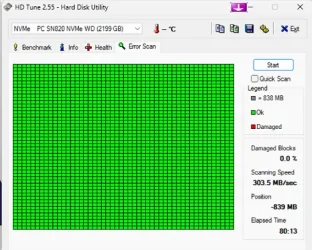
4) Run HD Tune (all drives) (old version) > post images or share links


a) Health

b) Full error scan


5) Open administrative command prompt and copy and paste:

chkdsk /b /v

Run these chkdsk switches on all drives using the syntax: chkdsk /b /v C: or chkdsk /b /v D: or chkdsk /b /v E: etc.

Make sure that the windows drive runs overnight while sleeping.

C:\WINDOWS\system32>chkdsk /b /v
The type of the file system is NTFS.
Cannot lock current drive.
Chkdsk cannot run because the volume is in use by another
process. Would you like to schedule this volume to be
checked the next time the system restarts? (Y/N)

Type: Y

Reboot as needed.


6) After completing all chkdsk /b /v run:

https://www.tenforums.com/attachmen...-files-use-bsod-debugging-chkdskfromevent.bat

Batch files for use in BSOD debugging - Windows 10 Help Forums

Batch files for use in BSOD debugging - Windows 10 Help Forums


Make sure that this runs only after the prior three steps for each drive.


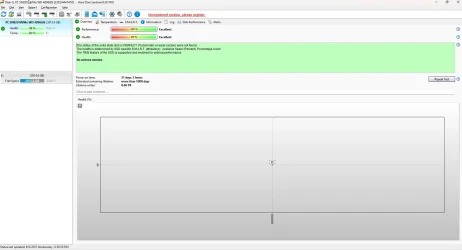
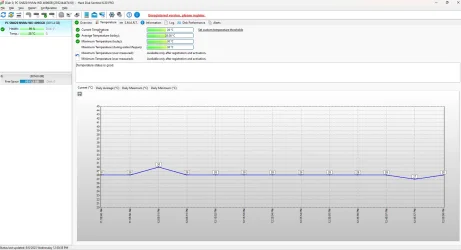
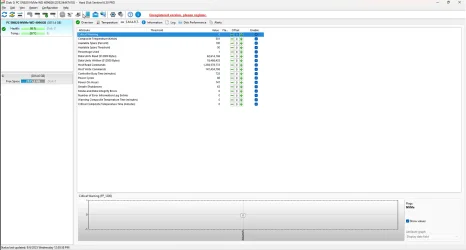
7) Run HD Sentinel (all drives) > post images or share links (do not run until posting results for each steps 3, 4, 5 and 6 )

Hard Disk Sentinel - HDD health and temperature monitoring
a) Overview
b) Temperature
c) SMART


8) Please make sure that all of the above steps are performed in sequence

These steps / tests can be performed overnight while sleeping:
a) Sea Tools Long generic test
b) HD Tune Full error scan
c) Chkdsk /b /v
 

My Computer

System One

  • OS
    Windows 10
    Computer type
    Laptop
    Manufacturer/Model
    HP
    CPU
    Intel(R) Core(TM) i7-4800MQ CPU @ 2.70GHz
    Motherboard
    Product : 190A Version : KBC Version 94.56
    Memory
    16 GB Total: Manufacturer : Samsung MemoryType : DDR3 FormFactor : SODIMM Capacity : 8GB Speed : 1600
    Graphics Card(s)
    NVIDIA Quadro K3100M; Intel(R) HD Graphics 4600
    Sound Card
    IDT High Definition Audio CODEC; PNP Device ID HDAUDIO\FUNC_01&VEN_111D&DEV_76E0
    Hard Drives
    Model Hitachi HTS727575A9E364
    Antivirus
    Microsoft Defender
    Other Info
    Mobile Workstation
1 and 2 done.
SeaTools:
1754463213888.webp

HDTune:
1754463253230.webp

1754463269719.webp
1754463321953.webp


Code:
TimeCreated : 8/4/2025 2:21:29 PM
Message     : Chkdsk was executed in scan mode on a volume snapshot. 
              
              Checking file system on C:
              The type of the file system is NTFS.
              
              Stage 1: Examining basic file system structure ...
                1249024 file records processed.                                                       
              File verification completed.
               Phase duration (File record verification): 3.81 seconds.
                71478 large file records processed.                                   
               Phase duration (Orphan file record recovery): 15.73 milliseconds.
                0 bad file records processed.                                     
               Phase duration (Bad file record checking): 0.02 milliseconds.
              
              Stage 2: Examining file name linkage ...
                47286 reparse records processed.                                     
                1449050 index entries processed.                                                       
              Index verification completed.
               Phase duration (Index verification): 7.73 seconds.
                0 unindexed files scanned.                                       
               Phase duration (Orphan reconnection): 1.09 seconds.
                0 unindexed files recovered to lost and found.                   
               Phase duration (Orphan recovery to lost and found): 0.04 milliseconds.
                47286 reparse records processed.                                     
               Phase duration (Reparse point and Object ID verification): 62.75 milliseconds.
              
              Stage 3: Examining security descriptors ...
              Security descriptor verification completed.
               Phase duration (Security descriptor verification): 30.88 milliseconds.
                100014 data files processed.                                           
               Phase duration (Data attribute verification): 0.02 milliseconds.
              CHKDSK is verifying Usn Journal...
                40684080 USN bytes processed.                                                           
              Usn Journal verification completed.
               Phase duration (USN journal verification): 52.43 milliseconds.
              
              Windows has scanned the file system and found no problems.
              No further action is required.
              
                 3906175 MB total disk space.
              1895888592 KB in 562004 files.
                  334960 KB in 100015 indexes.
                       0 KB in bad sectors.
                 1492919 KB in use by the system.
                   65536 KB occupied by the log file.
              2102207752 KB available on disk.
              
                    4096 bytes in each allocation unit.
               999981055 total allocation units on disk.
               525551938 allocation units available on disk.
              Total duration: 12.79 seconds (12798 ms).
              
              ----------------------------------------------------------------------
              
              
              Stage 1: Examining basic file system structure ...
              
              Stage 2: Examining file name linkage ...
              
              Stage 3: Examining security descriptors ...
 

My Computer

System One

  • OS
    Win11
    Computer type
    PC/Desktop
    Manufacturer/Model
    Dell 3680
    CPU
    i9-14900K
    Memory
    128GB
    Graphics Card(s)
    RTX 4080 SUPER
    Hard Drives
    SN820 NVME WD 4TB
1754474002578.webp

1754474023423.webp1754474040072.webp
 

My Computer

System One

  • OS
    Win11
    Computer type
    PC/Desktop
    Manufacturer/Model
    Dell 3680
    CPU
    i9-14900K
    Memory
    128GB
    Graphics Card(s)
    RTX 4080 SUPER
    Hard Drives
    SN820 NVME WD 4TB

When available please update the progress with:


1) Reinstall the newest BIOS:


2) Create a new restore point:


Make sure that the SanDisk USB drive is included in all tests.
 

My Computer

System One

  • OS
    Windows 10
    Computer type
    Laptop
    Manufacturer/Model
    HP
    CPU
    Intel(R) Core(TM) i7-4800MQ CPU @ 2.70GHz
    Motherboard
    Product : 190A Version : KBC Version 94.56
    Memory
    16 GB Total: Manufacturer : Samsung MemoryType : DDR3 FormFactor : SODIMM Capacity : 8GB Speed : 1600
    Graphics Card(s)
    NVIDIA Quadro K3100M; Intel(R) HD Graphics 4600
    Sound Card
    IDT High Definition Audio CODEC; PNP Device ID HDAUDIO\FUNC_01&VEN_111D&DEV_76E0
    Hard Drives
    Model Hitachi HTS727575A9E364
    Antivirus
    Microsoft Defender
    Other Info
    Mobile Workstation
I've reinstalled the latest BIOS and created a restore point.
Regarding the SanDisk USB drive - What USB drive are we talking about? The only drive I have is the SD NVME which is disk c:\
 

My Computer

System One

  • OS
    Win11
    Computer type
    PC/Desktop
    Manufacturer/Model
    Dell 3680
    CPU
    i9-14900K
    Memory
    128GB
    Graphics Card(s)
    RTX 4080 SUPER
    Hard Drives
    SN820 NVME WD 4TB

Regarding the SanDisk USB drive - What USB drive are we talking about? The only drive I have is the SD NVME which is disk c:\


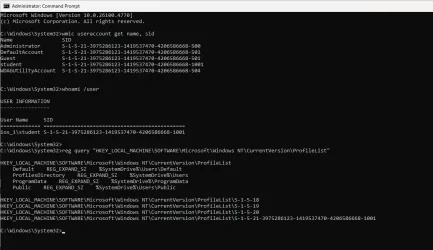
1) Please identify what was D: on 07/27/2025


2) Open administrative command prompt and copy and paste:

wmic useraccount get name, sid

whoami /user

reg query "HKEY_LOCAL_MACHINE\SOFTWARE\Microsoft\Windows NT\CurrentVersion\ProfileList"

Post a share link.


Code:
Event[24625]
  Log Name: System
  Source: Microsoft-Windows-Ntfs
  Date: 2025-07-27T14:28:52.9650000Z
  Event ID: 140
  Task: N/A
  Level: Warning
  Opcode: Info
  Keyword: N/A
  User: S-1-5-18
  User Name: NT AUTHORITY\SYSTEM
  Computer: IOS_1
  Description:
The system failed to flush data to the transaction log. Corruption may occur in VolumeId: D:, DeviceName: \Device\HarddiskVolume8.

           Failure status: A device which does not exist was specified.

           Device GUID: {7fa19611-d4eb-a3df-a322-096c19a0df9f}
           Device manufacturer: SanDisk
           Device model: Portable SSD
           Device revision: 6004
           Device serial number: 22245U400175
           Bus type: USB

           Adapter serial number:


Code:
Event[24488]
  Log Name: System
  Source: Microsoft-Windows-Ntfs
  Date: 2025-07-27T14:13:35.0410000Z
  Event ID: 140
  Task: N/A
  Level: Warning
  Opcode: Info
  Keyword: N/A
  User: S-1-5-21-3975286123-1419537470-4206586668-1001
  User Name: IOS_1\student
  Computer: IOS_1
  Description:
The system failed to flush data to the transaction log. Corruption may occur in VolumeId: D:, DeviceName: \Device\HarddiskVolume5.

           Failure status: A device which does not exist was specified.

           Device GUID: {7fa19611-d4eb-a3df-a322-096c19a0df9f}
           Device manufacturer: SanDisk
           Device model: Portable SSD 
           Device revision: 6004
           Device serial number: 22245U400175 
           Bus type: USB

           Adapter serial number:
 
Last edited:

My Computer

System One

  • OS
    Windows 10
    Computer type
    Laptop
    Manufacturer/Model
    HP
    CPU
    Intel(R) Core(TM) i7-4800MQ CPU @ 2.70GHz
    Motherboard
    Product : 190A Version : KBC Version 94.56
    Memory
    16 GB Total: Manufacturer : Samsung MemoryType : DDR3 FormFactor : SODIMM Capacity : 8GB Speed : 1600
    Graphics Card(s)
    NVIDIA Quadro K3100M; Intel(R) HD Graphics 4600
    Sound Card
    IDT High Definition Audio CODEC; PNP Device ID HDAUDIO\FUNC_01&VEN_111D&DEV_76E0
    Hard Drives
    Model Hitachi HTS727575A9E364
    Antivirus
    Microsoft Defender
    Other Info
    Mobile Workstation
Regarding the portable SSD - It was probably temporarily connected to transfer files.

2) cmd:
1754553936549.webp
 

My Computer

System One

  • OS
    Win11
    Computer type
    PC/Desktop
    Manufacturer/Model
    Dell 3680
    CPU
    i9-14900K
    Memory
    128GB
    Graphics Card(s)
    RTX 4080 SUPER
    Hard Drives
    SN820 NVME WD 4TB

Please post a new V2 share link into the newest post.


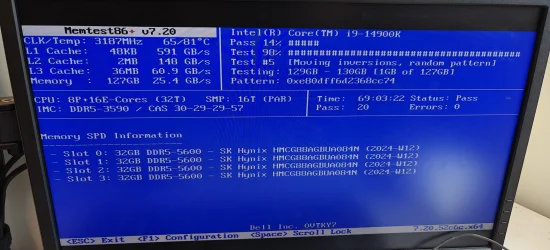
The computer has 4 RAM modules 32GB each.

RAM testing all at one time may take possibly 3 - 4 days.


Run Memtest86+ for 8 or more passes > take pictures > post images or share links

Memtest86+ | The Open-Source Memory Testing Tool

Just 1 error is a test fail and testing can be aborted.

The more the passes the better the testing conditions.

It sometimes takes passes into the 20's to detect malfunctioning RAM.

The RAM can be tested all at one time, in pairs, or one at a time in the same DIMM.

Memtest86+ | The Open-Source Memory Testing Tool

MemTest86+ - Test RAM
 

My Computer

System One

  • OS
    Windows 10
    Computer type
    Laptop
    Manufacturer/Model
    HP
    CPU
    Intel(R) Core(TM) i7-4800MQ CPU @ 2.70GHz
    Motherboard
    Product : 190A Version : KBC Version 94.56
    Memory
    16 GB Total: Manufacturer : Samsung MemoryType : DDR3 FormFactor : SODIMM Capacity : 8GB Speed : 1600
    Graphics Card(s)
    NVIDIA Quadro K3100M; Intel(R) HD Graphics 4600
    Sound Card
    IDT High Definition Audio CODEC; PNP Device ID HDAUDIO\FUNC_01&VEN_111D&DEV_76E0
    Hard Drives
    Model Hitachi HTS727575A9E364
    Antivirus
    Microsoft Defender
    Other Info
    Mobile Workstation
I let it run during the weekend; it is still running so unless I stop it, I can't get a new V2 log.
Do I keep running it to ~30 passes?

memtest.webp
 

My Computer

System One

  • OS
    Win11
    Computer type
    PC/Desktop
    Manufacturer/Model
    Dell 3680
    CPU
    i9-14900K
    Memory
    128GB
    Graphics Card(s)
    RTX 4080 SUPER
    Hard Drives
    SN820 NVME WD 4TB

That's great testing.

Please complete the RAM testing.

Use the computer for several days then post a new V2 share link into the newest post.


Are the other computers still having BSODs?
 

My Computer

System One

  • OS
    Windows 10
    Computer type
    Laptop
    Manufacturer/Model
    HP
    CPU
    Intel(R) Core(TM) i7-4800MQ CPU @ 2.70GHz
    Motherboard
    Product : 190A Version : KBC Version 94.56
    Memory
    16 GB Total: Manufacturer : Samsung MemoryType : DDR3 FormFactor : SODIMM Capacity : 8GB Speed : 1600
    Graphics Card(s)
    NVIDIA Quadro K3100M; Intel(R) HD Graphics 4600
    Sound Card
    IDT High Definition Audio CODEC; PNP Device ID HDAUDIO\FUNC_01&VEN_111D&DEV_76E0
    Hard Drives
    Model Hitachi HTS727575A9E364
    Antivirus
    Microsoft Defender
    Other Info
    Mobile Workstation
I've removed KB5062553 from the other computers and paused updates on them (on Thursday), so far no BSOD on them. I'll monitor what is happening for the next few days.


My Computer

System One

  • OS
    Win11
    Computer type
    PC/Desktop
    Manufacturer/Model
    Dell 3680
    CPU
    i9-14900K
    Memory
    128GB
    Graphics Card(s)
    RTX 4080 SUPER
    Hard Drives
    SN820 NVME WD 4TB

Please scan these lists to see if there is a known issue:


If there are continued BSOD after several days of use then plan to rule in / rule out misbehaving drivers using Windows Driver Verifier (WDV):


(Option nine and seven)
 

My Computer

System One

  • OS
    Windows 10
    Computer type
    Laptop
    Manufacturer/Model
    HP
    CPU
    Intel(R) Core(TM) i7-4800MQ CPU @ 2.70GHz
    Motherboard
    Product : 190A Version : KBC Version 94.56
    Memory
    16 GB Total: Manufacturer : Samsung MemoryType : DDR3 FormFactor : SODIMM Capacity : 8GB Speed : 1600
    Graphics Card(s)
    NVIDIA Quadro K3100M; Intel(R) HD Graphics 4600
    Sound Card
    IDT High Definition Audio CODEC; PNP Device ID HDAUDIO\FUNC_01&VEN_111D&DEV_76E0
    Hard Drives
    Model Hitachi HTS727575A9E364
    Antivirus
    Microsoft Defender
    Other Info
    Mobile Workstation

Latest Support Threads

Back
Top Bottom