
BSOD, wasn't able to read the whole blue screen before PC restarted.


Thready

Well-known member
Member
Local time
3:00 PM
Posts
60
OS
Windows 11 Pro
I have my system specs in the pic. I was playing Battlefield 2042 and my PC BSODed but restarted before I could take note of anything the BSOD said, and it didn't seem to collect any data. I've had 2 more BSODs playing this game in the last few months, and I've had intermittent BSODs in the past with different issues from memory to drivers. Never enough to make me want to pop open my case and test my components but that might change today. I assume today's was software based because BF2042 is known for being buggy and it has been accused of having memory leaks. My system is 5 years old and I replaced the Ryzen 3600x with a 5900x 2 years ago and I've already been down the rabbit hole of making sure that change wasn't the cause of my BSODs. Before installation I cleared my CMOS and updated the MB's firmware to accept the 5900x. I had BSODs before the switch too. If this seems like a memory issue then I might just bite the bullet and upgrade my RAM instead of running any tests.

I used MS Onedrive for the collector here.

PATRICK1-(2025-01-04_12-18-29).zip
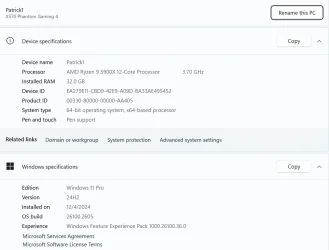
1736014931924.webp
 

My Computer My Computer

At a glance

Windows 11 ProRyzen 5 3600X32 GB 3200RTX 2070
OS
Windows 11 Pro
Computer type
PC/Desktop
Manufacturer/Model
Me
CPU
Ryzen 5 3600X
Motherboard
ASROCK Gaming 4 Phantom Z570
Memory
32 GB 3200
Graphics Card(s)
RTX 2070
Monitor(s) Displays
Asus MX27AQ
Hard Drives
Too many to count!
 

My Computer My Computer

At a glance

Windows 11AMD Ryzen 7 5700GMicron Technology DDR4-3200 16GBNVIDIA GeForce RTX 3060
OS
Windows 11
Computer type
PC/Desktop
Manufacturer/Model
HP Pavilion
CPU
AMD Ryzen 7 5700G
Motherboard
Erica6
Memory
Micron Technology DDR4-3200 16GB
Graphics Card(s)
NVIDIA GeForce RTX 3060
Sound Card
Realtek ALC671
Monitor(s) Displays
Samsung SyncMaster U28E590
Screen Resolution
3840 x 2160
Hard Drives
SAMSUNG MZVLQ1T0HALB-000H1
The findings were typical of malfunctioning or incompatible hardware.

However the BIOS is not up to date and one of the 3 collected BSODs had a misbehaving driver.


Please perform the following steps:


1) Run Tuneup plus > post a share link


2) Create a new restore point


3) The BIOS Version/Date American Megatrends Inc. P4.30, 2/23/2022

Upgrade the BIOS: 4.3 > 5.6


4) Run Memtest86+ for 8 or more passes > take pictures > post images or share links

Memtest86+ | The Open-Source Memory Testing Tool

Just 1 error is a test fail and testing can be aborted.

The more the passes the better the testing conditions.

It sometimes takes passes into the 20's to detect malfunctioning RAM.

The RAM can be tested all at one time or one at a time in the same DIMM.

Memtest86+ | The Open-Source Memory Testing Tool

MemTest86+ - Test RAM


5) Run HD Sentinel (all drives) > post images or share links

Hard Disk Sentinel - HDD health and temperature monitoring
a) Overview
b) Temperature
c) SMART
 

My Computer My Computer

At a glance

Windows 10Intel(R) Core(TM) i7-4800MQ CPU @ 2.70GHz16 GB Total: Manufacturer : Samsung MemoryTyp...NVIDIA Quadro K3100M; Intel(R) HD Graphics 4600
OS
Windows 10
Computer type
Laptop
Manufacturer/Model
HP
CPU
Intel(R) Core(TM) i7-4800MQ CPU @ 2.70GHz
Motherboard
Product : 190A Version : KBC Version 94.56
Memory
16 GB Total: Manufacturer : Samsung MemoryType : DDR3 FormFactor : SODIMM Capacity : 8GB Speed : 1600
Graphics Card(s)
NVIDIA Quadro K3100M; Intel(R) HD Graphics 4600
Sound Card
IDT High Definition Audio CODEC; PNP Device ID HDAUDIO\FUNC_01&VEN_111D&DEV_76E0
Hard Drives
Model Hitachi HTS727575A9E364
Antivirus
Microsoft Defender
Other Info
Mobile Workstation

Latest Support Threads

Back
Top Bottom






