Solved BSOD when starting the desktop yesterday morning


Lou

Well-known member
Member
Local time
5:12 PM
Posts
134
Location
East Coast
OS
WIN11 HOME Version 24H2
Yesterday morning when I attempted to start my desktop the machine stalled at the DELL splash screen.
I held the power button closed until the machine rebooted and was greeted with the BSOD
I selected POWER DOWN to shut off the PC and then powered up.
The machine booted correctly while displaying information similar to what is seen when one preforms a CHKDSK.
I preformed several REBOOTS and the machine started normally each time with no noticeable change in boot-up time.
I then did the SFC /SCANNOW and NO issues were reported
I checked my SSD with HDTUNE and found NO defected blocks
I ran CHKDSK /F- an inspection of the WININIT event log showed no issues
There are NO new RESTORE POINTS.
I'm attaching the V2LOG for your review
This is a NEW desktop(4-weeks old) with NO over-clocking and NO new apps added for the past 3-weeks.
The machine booted properly this morning.
I have (2) questions-
1. What happened- is this something I need to concern myself with????
2. When I checked my SSD this morning I noticed it went from 235GB free to 226--- Where did 9GB of space go????
 

Attachments

My Computer My Computer

At a glance

WIN11 HOME Version 24H211th Gen Intel(R) Core(TM) i7-11700 @ 2.50GHz...32GBNVIDIA GeForce GTX 1650 SUPER
OS
WIN11 HOME Version 24H2
Computer type
PC/Desktop
Manufacturer/Model
DELL XPS 8940
CPU
11th Gen Intel(R) Core(TM) i7-11700 @ 2.50GHz 2.50 GH
Motherboard
Dell OE
Memory
32GB
Graphics Card(s)
NVIDIA GeForce GTX 1650 SUPER
Sound Card
Realtek Audio (on board)
Monitor(s) Displays
(2) DELL 2007FP
Screen Resolution
1600 X 1200
Hard Drives
C: (OS and APPS) 512GB SSD
D: (data) 1TB SATA
PSU
360W
Case
DELL OE
Cooling
Noctua NF-A9 PWM 92mm case fan and NH-D9L CPU Cooler with 92mm fan
Keyboard
Dell
Mouse
Logitech M705
Internet Speed
1Gb DWN 1Gb UP
Browser
FIREFOX- once in a great while will use EDGE
Antivirus
MS
Other Info
The case fan and CPU cooler were after purchase upgrades...the i7 cpu runs hot and the OE solution can best be described as marginal when CPU intensive apps are used.
ALSO added VRM and SSD passive heatsinks.
PS-The machine is fully updated (Dell and Microsoft)
 

My Computer My Computer

At a glance

WIN11 HOME Version 24H211th Gen Intel(R) Core(TM) i7-11700 @ 2.50GHz...32GBNVIDIA GeForce GTX 1650 SUPER
OS
WIN11 HOME Version 24H2
Computer type
PC/Desktop
Manufacturer/Model
DELL XPS 8940
CPU
11th Gen Intel(R) Core(TM) i7-11700 @ 2.50GHz 2.50 GH
Motherboard
Dell OE
Memory
32GB
Graphics Card(s)
NVIDIA GeForce GTX 1650 SUPER
Sound Card
Realtek Audio (on board)
Monitor(s) Displays
(2) DELL 2007FP
Screen Resolution
1600 X 1200
Hard Drives
C: (OS and APPS) 512GB SSD
D: (data) 1TB SATA
PSU
360W
Case
DELL OE
Cooling
Noctua NF-A9 PWM 92mm case fan and NH-D9L CPU Cooler with 92mm fan
Keyboard
Dell
Mouse
Logitech M705
Internet Speed
1Gb DWN 1Gb UP
Browser
FIREFOX- once in a great while will use EDGE
Antivirus
MS
Other Info
The case fan and CPU cooler were after purchase upgrades...the i7 cpu runs hot and the OE solution can best be described as marginal when CPU intensive apps are used.
ALSO added VRM and SSD passive heatsinks.
2. When I checked my SSD this morning I noticed it went from 235GB free to 226--- Where did 9GB of space go????

2 things I can think of-go to c: drive. Is there a windows.old file there? If so, there could have been a pending update right in the middle of your blue-screening that created the windows.old file. You can also take a look to see how much hdd space you have allocated for system restore.Whatever amount you have allocated is taken away from the amount of available drive space.

1. What happened- is this something I need to concern myself with????
If it has not blue-screened (Black-screened) since and your have restarted and cold booted multiple times, I wouldn't worry about it until it does it again. You troubleshooted correctly. If you're curious as to what caused the transient blue screen, you can download a little standalone program called BlueScreenView that might point you to the faulting object. Download BlueScreenView
 

My Computers My Computers

  • At a glance

    Windows 11 Pro 25H2 26200.9457i9-10900 10 core 20 threads32 gbnone-Intel UHD Graphics 630
    OS
    Windows 11 Pro 25H2 26200.9457
    Computer type
    PC/Desktop
    Manufacturer/Model
    Dell Optiplex 7080
    CPU
    i9-10900 10 core 20 threads
    Motherboard
    DELL 0J37VM
    Memory
    32 gb
    Graphics Card(s)
    none-Intel UHD Graphics 630
    Sound Card
    Integrated Realtek
    Monitor(s) Displays
    Benq 27
    Screen Resolution
    2560x1440
    Hard Drives
    2x1tb Solidigm m.2 nvme /External drives 512gb Samsung m.2 sata+2tb Kingston m2.nvme
    PSU
    500w
    Case
    MT
    Cooling
    Dell Premium
    Keyboard
    Logitech wired
    Mouse
    Logitech wireless
    Internet Speed
    so slow I'm too embarrassed to tell
    Browser
    #1 Edge #2 Firefox
    Antivirus
    Defender+MWB Premium
  • At a glance

    Windows 11 Pro 24H2 26200.9457AMD Ryzen 7 6800U32 gbintegrated
    Operating System
    Windows 11 Pro 24H2 26200.9457
    Computer type
    PC/Desktop
    Manufacturer/Model
    Beelink Mini PC SER5
    CPU
    AMD Ryzen 7 6800U
    Memory
    32 gb
    Graphics card(s)
    integrated
    Sound Card
    integrated
    Monitor(s) Displays
    Benq 27
    Screen Resolution
    2560x1440
    Hard Drives
    1TB Crucial nvme
    Keyboard
    Logitech wired
    Mouse
    Logitech wireless
    Internet Speed
    still too embarrassed to tell
    Browser
    Firefox
    Antivirus
    Defender
  • System 3 is non compliant Dell 9020 i7-4770/24gb ram Win11 PRO 26200.9457
OK-
I found NO windows.old file on my C: drive
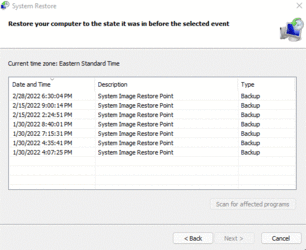
I checked how much space restore is "set" for-presently at 1% 4.56GB. I deleted all restore points and created a new one and found something interesting--What are these Backup files listed....they can't be deleted or more correctly I don't know how to get rid of them
PS- THANKS for walking me thru this. I also did DL that app you mentioned to use if things go silly again.
1.gif
 

My Computer My Computer

At a glance

WIN11 HOME Version 24H211th Gen Intel(R) Core(TM) i7-11700 @ 2.50GHz...32GBNVIDIA GeForce GTX 1650 SUPER
OS
WIN11 HOME Version 24H2
Computer type
PC/Desktop
Manufacturer/Model
DELL XPS 8940
CPU
11th Gen Intel(R) Core(TM) i7-11700 @ 2.50GHz 2.50 GH
Motherboard
Dell OE
Memory
32GB
Graphics Card(s)
NVIDIA GeForce GTX 1650 SUPER
Sound Card
Realtek Audio (on board)
Monitor(s) Displays
(2) DELL 2007FP
Screen Resolution
1600 X 1200
Hard Drives
C: (OS and APPS) 512GB SSD
D: (data) 1TB SATA
PSU
360W
Case
DELL OE
Cooling
Noctua NF-A9 PWM 92mm case fan and NH-D9L CPU Cooler with 92mm fan
Keyboard
Dell
Mouse
Logitech M705
Internet Speed
1Gb DWN 1Gb UP
Browser
FIREFOX- once in a great while will use EDGE
Antivirus
MS
Other Info
The case fan and CPU cooler were after purchase upgrades...the i7 cpu runs hot and the OE solution can best be described as marginal when CPU intensive apps are used.
ALSO added VRM and SSD passive heatsinks.
PSS- I made a REPAIR DISC and have a FULL Windows Image Backup (C: and D) on a portable 4TB drive
 

My Computer My Computer

At a glance

WIN11 HOME Version 24H211th Gen Intel(R) Core(TM) i7-11700 @ 2.50GHz...32GBNVIDIA GeForce GTX 1650 SUPER
OS
WIN11 HOME Version 24H2
Computer type
PC/Desktop
Manufacturer/Model
DELL XPS 8940
CPU
11th Gen Intel(R) Core(TM) i7-11700 @ 2.50GHz 2.50 GH
Motherboard
Dell OE
Memory
32GB
Graphics Card(s)
NVIDIA GeForce GTX 1650 SUPER
Sound Card
Realtek Audio (on board)
Monitor(s) Displays
(2) DELL 2007FP
Screen Resolution
1600 X 1200
Hard Drives
C: (OS and APPS) 512GB SSD
D: (data) 1TB SATA
PSU
360W
Case
DELL OE
Cooling
Noctua NF-A9 PWM 92mm case fan and NH-D9L CPU Cooler with 92mm fan
Keyboard
Dell
Mouse
Logitech M705
Internet Speed
1Gb DWN 1Gb UP
Browser
FIREFOX- once in a great while will use EDGE
Antivirus
MS
Other Info
The case fan and CPU cooler were after purchase upgrades...the i7 cpu runs hot and the OE solution can best be described as marginal when CPU intensive apps are used.
ALSO added VRM and SSD passive heatsinks.
Some detective work was performed.


There were no BSOD seen in the log files.

There was corruption reported in the logs: Code Integrity Policies


Please run these scripts and post share links into this thread using one drive, drop box, or google drive:


Code:
The following file necessary for Windows startup was corrupt: ot\cipolicies\active\{cdd5cb55-db68-4d71-aa38-3df2b6473a52}.cip
 

My Computer My Computer

At a glance

Windows 10Intel(R) Core(TM) i7-4800MQ CPU @ 2.70GHz16 GB Total: Manufacturer : Samsung MemoryTyp...NVIDIA Quadro K3100M; Intel(R) HD Graphics 4600
OS
Windows 10
Computer type
Laptop
Manufacturer/Model
HP
CPU
Intel(R) Core(TM) i7-4800MQ CPU @ 2.70GHz
Motherboard
Product : 190A Version : KBC Version 94.56
Memory
16 GB Total: Manufacturer : Samsung MemoryType : DDR3 FormFactor : SODIMM Capacity : 8GB Speed : 1600
Graphics Card(s)
NVIDIA Quadro K3100M; Intel(R) HD Graphics 4600
Sound Card
IDT High Definition Audio CODEC; PNP Device ID HDAUDIO\FUNC_01&VEN_111D&DEV_76E0
Hard Drives
Model Hitachi HTS727575A9E364
Antivirus
Microsoft Defender
Other Info
Mobile Workstation

My Computer My Computer

At a glance

WIN11 HOME Version 24H211th Gen Intel(R) Core(TM) i7-11700 @ 2.50GHz...32GBNVIDIA GeForce GTX 1650 SUPER
OS
WIN11 HOME Version 24H2
Computer type
PC/Desktop
Manufacturer/Model
DELL XPS 8940
CPU
11th Gen Intel(R) Core(TM) i7-11700 @ 2.50GHz 2.50 GH
Motherboard
Dell OE
Memory
32GB
Graphics Card(s)
NVIDIA GeForce GTX 1650 SUPER
Sound Card
Realtek Audio (on board)
Monitor(s) Displays
(2) DELL 2007FP
Screen Resolution
1600 X 1200
Hard Drives
C: (OS and APPS) 512GB SSD
D: (data) 1TB SATA
PSU
360W
Case
DELL OE
Cooling
Noctua NF-A9 PWM 92mm case fan and NH-D9L CPU Cooler with 92mm fan
Keyboard
Dell
Mouse
Logitech M705
Internet Speed
1Gb DWN 1Gb UP
Browser
FIREFOX- once in a great while will use EDGE
Antivirus
MS
Other Info
The case fan and CPU cooler were after purchase upgrades...the i7 cpu runs hot and the OE solution can best be described as marginal when CPU intensive apps are used.
ALSO added VRM and SSD passive heatsinks.
@Lou Try this to get rid of all but most recent restore points.Search for disk cleanup.
Open Disk Cleanup app as administrator
click More Options tab. Under which click System Restore & Shadow Copies and followed by that click Clean Up tab a message will popup -Are you sure you want to delete all but the most recent restore point?Click Yes then OK. Finally another message will popup-Are you sure you want to perform these actions?Click Yes.
Now, all the System Restore points except the most recent one are cleaned. As a result there will be more free space in hard disk.

@zbook is your man for blue/black screens. Good for you for making a backup of your system. Once you work out these issues I suggest you make another one as well as continuing to do so on a regular basis in the future. Might I ask what method did you use to backup your system?
 

My Computers My Computers

  • At a glance

    Windows 11 Pro 25H2 26200.9457i9-10900 10 core 20 threads32 gbnone-Intel UHD Graphics 630
    OS
    Windows 11 Pro 25H2 26200.9457
    Computer type
    PC/Desktop
    Manufacturer/Model
    Dell Optiplex 7080
    CPU
    i9-10900 10 core 20 threads
    Motherboard
    DELL 0J37VM
    Memory
    32 gb
    Graphics Card(s)
    none-Intel UHD Graphics 630
    Sound Card
    Integrated Realtek
    Monitor(s) Displays
    Benq 27
    Screen Resolution
    2560x1440
    Hard Drives
    2x1tb Solidigm m.2 nvme /External drives 512gb Samsung m.2 sata+2tb Kingston m2.nvme
    PSU
    500w
    Case
    MT
    Cooling
    Dell Premium
    Keyboard
    Logitech wired
    Mouse
    Logitech wireless
    Internet Speed
    so slow I'm too embarrassed to tell
    Browser
    #1 Edge #2 Firefox
    Antivirus
    Defender+MWB Premium
  • At a glance

    Windows 11 Pro 24H2 26200.9457AMD Ryzen 7 6800U32 gbintegrated
    Operating System
    Windows 11 Pro 24H2 26200.9457
    Computer type
    PC/Desktop
    Manufacturer/Model
    Beelink Mini PC SER5
    CPU
    AMD Ryzen 7 6800U
    Memory
    32 gb
    Graphics card(s)
    integrated
    Sound Card
    integrated
    Monitor(s) Displays
    Benq 27
    Screen Resolution
    2560x1440
    Hard Drives
    1TB Crucial nvme
    Keyboard
    Logitech wired
    Mouse
    Logitech wireless
    Internet Speed
    still too embarrassed to tell
    Browser
    Firefox
    Antivirus
    Defender
  • System 3 is non compliant Dell 9020 i7-4770/24gb ram Win11 PRO 26200.9457
I did as you suggested---
interesting results--
ALL restore point are gone except these shadow copies
I JUST made a new restore point1.gif
 

My Computer My Computer

At a glance

WIN11 HOME Version 24H211th Gen Intel(R) Core(TM) i7-11700 @ 2.50GHz...32GBNVIDIA GeForce GTX 1650 SUPER
OS
WIN11 HOME Version 24H2
Computer type
PC/Desktop
Manufacturer/Model
DELL XPS 8940
CPU
11th Gen Intel(R) Core(TM) i7-11700 @ 2.50GHz 2.50 GH
Motherboard
Dell OE
Memory
32GB
Graphics Card(s)
NVIDIA GeForce GTX 1650 SUPER
Sound Card
Realtek Audio (on board)
Monitor(s) Displays
(2) DELL 2007FP
Screen Resolution
1600 X 1200
Hard Drives
C: (OS and APPS) 512GB SSD
D: (data) 1TB SATA
PSU
360W
Case
DELL OE
Cooling
Noctua NF-A9 PWM 92mm case fan and NH-D9L CPU Cooler with 92mm fan
Keyboard
Dell
Mouse
Logitech M705
Internet Speed
1Gb DWN 1Gb UP
Browser
FIREFOX- once in a great while will use EDGE
Antivirus
MS
Other Info
The case fan and CPU cooler were after purchase upgrades...the i7 cpu runs hot and the OE solution can best be described as marginal when CPU intensive apps are used.
ALSO added VRM and SSD passive heatsinks.
I used the MS tools for backup---I'm still reading up on the third party freeware
PS- I also do the DISK CLEANUP as part of my monthly maintenance
 

My Computer My Computer

At a glance

WIN11 HOME Version 24H211th Gen Intel(R) Core(TM) i7-11700 @ 2.50GHz...32GBNVIDIA GeForce GTX 1650 SUPER
OS
WIN11 HOME Version 24H2
Computer type
PC/Desktop
Manufacturer/Model
DELL XPS 8940
CPU
11th Gen Intel(R) Core(TM) i7-11700 @ 2.50GHz 2.50 GH
Motherboard
Dell OE
Memory
32GB
Graphics Card(s)
NVIDIA GeForce GTX 1650 SUPER
Sound Card
Realtek Audio (on board)
Monitor(s) Displays
(2) DELL 2007FP
Screen Resolution
1600 X 1200
Hard Drives
C: (OS and APPS) 512GB SSD
D: (data) 1TB SATA
PSU
360W
Case
DELL OE
Cooling
Noctua NF-A9 PWM 92mm case fan and NH-D9L CPU Cooler with 92mm fan
Keyboard
Dell
Mouse
Logitech M705
Internet Speed
1Gb DWN 1Gb UP
Browser
FIREFOX- once in a great while will use EDGE
Antivirus
MS
Other Info
The case fan and CPU cooler were after purchase upgrades...the i7 cpu runs hot and the OE solution can best be described as marginal when CPU intensive apps are used.
ALSO added VRM and SSD passive heatsinks.
PSS-
I truly appreciate you folks taking the time assist me here!
 

My Computer My Computer

At a glance

WIN11 HOME Version 24H211th Gen Intel(R) Core(TM) i7-11700 @ 2.50GHz...32GBNVIDIA GeForce GTX 1650 SUPER
OS
WIN11 HOME Version 24H2
Computer type
PC/Desktop
Manufacturer/Model
DELL XPS 8940
CPU
11th Gen Intel(R) Core(TM) i7-11700 @ 2.50GHz 2.50 GH
Motherboard
Dell OE
Memory
32GB
Graphics Card(s)
NVIDIA GeForce GTX 1650 SUPER
Sound Card
Realtek Audio (on board)
Monitor(s) Displays
(2) DELL 2007FP
Screen Resolution
1600 X 1200
Hard Drives
C: (OS and APPS) 512GB SSD
D: (data) 1TB SATA
PSU
360W
Case
DELL OE
Cooling
Noctua NF-A9 PWM 92mm case fan and NH-D9L CPU Cooler with 92mm fan
Keyboard
Dell
Mouse
Logitech M705
Internet Speed
1Gb DWN 1Gb UP
Browser
FIREFOX- once in a great while will use EDGE
Antivirus
MS
Other Info
The case fan and CPU cooler were after purchase upgrades...the i7 cpu runs hot and the OE solution can best be described as marginal when CPU intensive apps are used.
ALSO added VRM and SSD passive heatsinks.
Monitor the computer using Reliability Monitor:

For any BSOD run V2 and upload results into the newest post.
 

My Computer My Computer

At a glance

Windows 10Intel(R) Core(TM) i7-4800MQ CPU @ 2.70GHz16 GB Total: Manufacturer : Samsung MemoryTyp...NVIDIA Quadro K3100M; Intel(R) HD Graphics 4600
OS
Windows 10
Computer type
Laptop
Manufacturer/Model
HP
CPU
Intel(R) Core(TM) i7-4800MQ CPU @ 2.70GHz
Motherboard
Product : 190A Version : KBC Version 94.56
Memory
16 GB Total: Manufacturer : Samsung MemoryType : DDR3 FormFactor : SODIMM Capacity : 8GB Speed : 1600
Graphics Card(s)
NVIDIA Quadro K3100M; Intel(R) HD Graphics 4600
Sound Card
IDT High Definition Audio CODEC; PNP Device ID HDAUDIO\FUNC_01&VEN_111D&DEV_76E0
Hard Drives
Model Hitachi HTS727575A9E364
Antivirus
Microsoft Defender
Other Info
Mobile Workstation
Will do--
THANKS for your time!
 

My Computer My Computer

At a glance

WIN11 HOME Version 24H211th Gen Intel(R) Core(TM) i7-11700 @ 2.50GHz...32GBNVIDIA GeForce GTX 1650 SUPER
OS
WIN11 HOME Version 24H2
Computer type
PC/Desktop
Manufacturer/Model
DELL XPS 8940
CPU
11th Gen Intel(R) Core(TM) i7-11700 @ 2.50GHz 2.50 GH
Motherboard
Dell OE
Memory
32GB
Graphics Card(s)
NVIDIA GeForce GTX 1650 SUPER
Sound Card
Realtek Audio (on board)
Monitor(s) Displays
(2) DELL 2007FP
Screen Resolution
1600 X 1200
Hard Drives
C: (OS and APPS) 512GB SSD
D: (data) 1TB SATA
PSU
360W
Case
DELL OE
Cooling
Noctua NF-A9 PWM 92mm case fan and NH-D9L CPU Cooler with 92mm fan
Keyboard
Dell
Mouse
Logitech M705
Internet Speed
1Gb DWN 1Gb UP
Browser
FIREFOX- once in a great while will use EDGE
Antivirus
MS
Other Info
The case fan and CPU cooler were after purchase upgrades...the i7 cpu runs hot and the OE solution can best be described as marginal when CPU intensive apps are used.
ALSO added VRM and SSD passive heatsinks.
I truly appreciate you folks taking the time assist me here!
That's what the forum is all about-folks helping folks. Another way to get rid of ALL restore points and start over is to open system restore like you're going to make a restore point. Select 'disable system protection' Click configure-click delete next to delete all restore points. under max usage drag the slider down to 0 and apply. Restart and go back into system restore and select your C: drive from the list, check box to turn on system protection, under configure drag the slider to however much space you want to use for restore points, apply,OK. You should then be able to create a restore point.

Ever since Windows 7, I have found system restore to be unreliable so I have it turned off entirely. I backup regularly with Macrium which has never failed me when system restore did. I have a small ssd boot drive so having system restore turned off gains me more usable space.

Something else I've found that eats into your drive space is hibernate. The hiberfil.sys file is usually 40% of your amount of ram which in my case my ram is 32 gb so the hiberfil.sys was a whopping 13gb in size. My system allows for S3 sleep so I turned off hibernate and now use S3 sleep instead.You can keep that in mind if you ever start to run out of disk space. However, your SSD is double the size of mine so you shouldn't run into that problem.
 

My Computers My Computers

  • At a glance

    Windows 11 Pro 25H2 26200.9457i9-10900 10 core 20 threads32 gbnone-Intel UHD Graphics 630
    OS
    Windows 11 Pro 25H2 26200.9457
    Computer type
    PC/Desktop
    Manufacturer/Model
    Dell Optiplex 7080
    CPU
    i9-10900 10 core 20 threads
    Motherboard
    DELL 0J37VM
    Memory
    32 gb
    Graphics Card(s)
    none-Intel UHD Graphics 630
    Sound Card
    Integrated Realtek
    Monitor(s) Displays
    Benq 27
    Screen Resolution
    2560x1440
    Hard Drives
    2x1tb Solidigm m.2 nvme /External drives 512gb Samsung m.2 sata+2tb Kingston m2.nvme
    PSU
    500w
    Case
    MT
    Cooling
    Dell Premium
    Keyboard
    Logitech wired
    Mouse
    Logitech wireless
    Internet Speed
    so slow I'm too embarrassed to tell
    Browser
    #1 Edge #2 Firefox
    Antivirus
    Defender+MWB Premium
  • At a glance

    Windows 11 Pro 24H2 26200.9457AMD Ryzen 7 6800U32 gbintegrated
    Operating System
    Windows 11 Pro 24H2 26200.9457
    Computer type
    PC/Desktop
    Manufacturer/Model
    Beelink Mini PC SER5
    CPU
    AMD Ryzen 7 6800U
    Memory
    32 gb
    Graphics card(s)
    integrated
    Sound Card
    integrated
    Monitor(s) Displays
    Benq 27
    Screen Resolution
    2560x1440
    Hard Drives
    1TB Crucial nvme
    Keyboard
    Logitech wired
    Mouse
    Logitech wireless
    Internet Speed
    still too embarrassed to tell
    Browser
    Firefox
    Antivirus
    Defender
  • System 3 is non compliant Dell 9020 i7-4770/24gb ram Win11 PRO 26200.9457
Follow-up
No issues since the first report.
I've made notes of all the comments and suggestions-THANKS troops!
One thing---
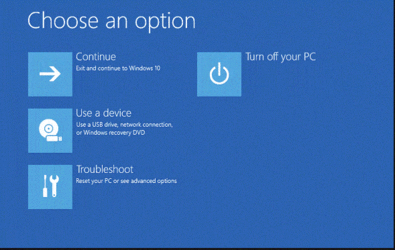
I didn't experience a BSOD as initially reported----It was the WINDOWS RE screen---My bad!
WIN RE screen.gif
 

My Computer My Computer

At a glance

WIN11 HOME Version 24H211th Gen Intel(R) Core(TM) i7-11700 @ 2.50GHz...32GBNVIDIA GeForce GTX 1650 SUPER
OS
WIN11 HOME Version 24H2
Computer type
PC/Desktop
Manufacturer/Model
DELL XPS 8940
CPU
11th Gen Intel(R) Core(TM) i7-11700 @ 2.50GHz 2.50 GH
Motherboard
Dell OE
Memory
32GB
Graphics Card(s)
NVIDIA GeForce GTX 1650 SUPER
Sound Card
Realtek Audio (on board)
Monitor(s) Displays
(2) DELL 2007FP
Screen Resolution
1600 X 1200
Hard Drives
C: (OS and APPS) 512GB SSD
D: (data) 1TB SATA
PSU
360W
Case
DELL OE
Cooling
Noctua NF-A9 PWM 92mm case fan and NH-D9L CPU Cooler with 92mm fan
Keyboard
Dell
Mouse
Logitech M705
Internet Speed
1Gb DWN 1Gb UP
Browser
FIREFOX- once in a great while will use EDGE
Antivirus
MS
Other Info
The case fan and CPU cooler were after purchase upgrades...the i7 cpu runs hot and the OE solution can best be described as marginal when CPU intensive apps are used.
ALSO added VRM and SSD passive heatsinks.

Latest Support Threads

Back
Top Bottom