BSODs and Often Overnight on HP Omen 30L


Thank you for the details data and suggestions. Because the U: and H: drives that showed corruption are offline PGP Disk .PGD files stored on my NAS, I only mount them occasionally. I have unmounted them before any of these tests and put them offline and out of scope here. So I have three local hard disks.

C: is a 2TB SSD with 737GB free
D: is a 2TB WD Black HDD with 1,706GB free
E: is a 2TB SSD with 1,026GB free

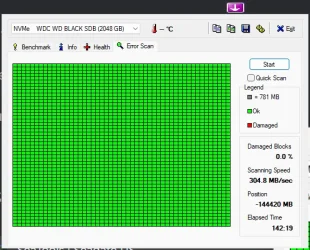
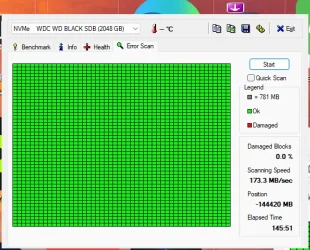
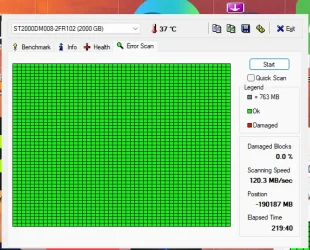
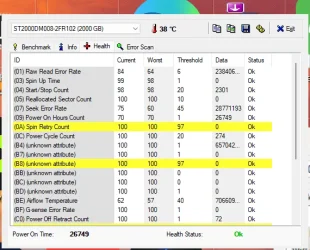
I have attached the hard drive tests...I was not able to run CHKDSK /b /v yet, I guess I did it wrong somehow, said could only be done on reboot, I said yes, but don't think it ever ran.

Further input welcome! thank you very much for your time and help!!
 

Attachments

  • hdsentinel.webp
    hdsentinel.webp
    1.2 KB · Views: 1
  • HDTune_Error_Scan_NVMe____WDC_WD_BLACK_SDB #2.webp
    HDTune_Error_Scan_NVMe____WDC_WD_BLACK_SDB #2.webp
    54.4 KB · Views: 1
  • HDTune_Error_Scan_NVMe____WDC_WD_BLACK_SDB.webp
    HDTune_Error_Scan_NVMe____WDC_WD_BLACK_SDB.webp
    57.1 KB · Views: 1
  • HDTune_Error_Scan_ST2000DM008-2FR102.webp
    HDTune_Error_Scan_ST2000DM008-2FR102.webp
    57.3 KB · Views: 1
  • HDTune_Health_ST2000DM008-2FR102.webp
    HDTune_Health_ST2000DM008-2FR102.webp
    42.7 KB · Views: 1
  • red.webp
    red.webp
    834 bytes · Views: 1

My Computers My Computers

  • At a glance

    Windows 11i9 10850K @ 3.6GHz64GB DDR4NVIDIA GeForce RTX 3090
    OS
    Windows 11
    Computer type
    PC/Desktop
    Manufacturer/Model
    HP Omen 30L
    CPU
    i9 10850K @ 3.6GHz
    Motherboard
    HP 8703 UU3E1)
    Memory
    64GB DDR4
    Graphics Card(s)
    NVIDIA GeForce RTX 3090
    Monitor(s) Displays
    Samsung
    Screen Resolution
    2560 x 1440
  • At a glance

    Windows 11 Home11th Gen Intel(R) Core(TM) i7-1165G7 @ 2.80GH...16GBIntel Iris(R) Xe Graphics
    Operating System
    Windows 11 Home
    Computer type
    Laptop
    Manufacturer/Model
    Samsung NP950QDB
    CPU
    11th Gen Intel(R) Core(TM) i7-1165G7 @ 2.80GHz, 2803 Mhz, 4 Core(s), 8 Logical Processor(s)
    Motherboard
    Samsung NP950QDB-KB1US
    Memory
    16GB
    Graphics card(s)
    Intel Iris(R) Xe Graphics
    Sound Card
    Realtek
    Monitor(s) Displays
    Onboard screen, sometimes Samsung 4K 27" monitor
    Screen Resolution
    1920 x 1080
    Hard Drives
    1TB SSD
    PSU
    laptop Power Supply USB-C 65W
    Case
    laptop
    Cooling
    integral fan
    Keyboard
    US Integral
    Mouse
    Logitech MX Master 3S
    Internet Speed
    1Gb x 1Gb
    Browser
    Chrome
    Antivirus
    Norton 360
    Other Info
    Malware Bytes
When possible please continue with step #3.

The chkdsk /b /v can run from windows or windows RE.
 

My Computer My Computer

At a glance

Windows 10Intel(R) Core(TM) i7-4800MQ CPU @ 2.70GHz16 GB Total: Manufacturer : Samsung MemoryTyp...NVIDIA Quadro K3100M; Intel(R) HD Graphics 4600
OS
Windows 10
Computer type
Laptop
Manufacturer/Model
HP
CPU
Intel(R) Core(TM) i7-4800MQ CPU @ 2.70GHz
Motherboard
Product : 190A Version : KBC Version 94.56
Memory
16 GB Total: Manufacturer : Samsung MemoryType : DDR3 FormFactor : SODIMM Capacity : 8GB Speed : 1600
Graphics Card(s)
NVIDIA Quadro K3100M; Intel(R) HD Graphics 4600
Sound Card
IDT High Definition Audio CODEC; PNP Device ID HDAUDIO\FUNC_01&VEN_111D&DEV_76E0
Hard Drives
Model Hitachi HTS727575A9E364
Antivirus
Microsoft Defender
Other Info
Mobile Workstation
Going to try the chkdsk /b /v piece again...tried to let it run yesterday, but found the machine was BSOD before it finished......trying again now.....
 

My Computers My Computers

  • At a glance

    Windows 11i9 10850K @ 3.6GHz64GB DDR4NVIDIA GeForce RTX 3090
    OS
    Windows 11
    Computer type
    PC/Desktop
    Manufacturer/Model
    HP Omen 30L
    CPU
    i9 10850K @ 3.6GHz
    Motherboard
    HP 8703 UU3E1)
    Memory
    64GB DDR4
    Graphics Card(s)
    NVIDIA GeForce RTX 3090
    Monitor(s) Displays
    Samsung
    Screen Resolution
    2560 x 1440
  • At a glance

    Windows 11 Home11th Gen Intel(R) Core(TM) i7-1165G7 @ 2.80GH...16GBIntel Iris(R) Xe Graphics
    Operating System
    Windows 11 Home
    Computer type
    Laptop
    Manufacturer/Model
    Samsung NP950QDB
    CPU
    11th Gen Intel(R) Core(TM) i7-1165G7 @ 2.80GHz, 2803 Mhz, 4 Core(s), 8 Logical Processor(s)
    Motherboard
    Samsung NP950QDB-KB1US
    Memory
    16GB
    Graphics card(s)
    Intel Iris(R) Xe Graphics
    Sound Card
    Realtek
    Monitor(s) Displays
    Onboard screen, sometimes Samsung 4K 27" monitor
    Screen Resolution
    1920 x 1080
    Hard Drives
    1TB SSD
    PSU
    laptop Power Supply USB-C 65W
    Case
    laptop
    Cooling
    integral fan
    Keyboard
    US Integral
    Mouse
    Logitech MX Master 3S
    Internet Speed
    1Gb x 1Gb
    Browser
    Chrome
    Antivirus
    Norton 360
    Other Info
    Malware Bytes
If BSOD interrupt chkdsk then run the chkdsk switches using a bootable windows MCT (iso) windows RE.

Option seven:
 

My Computer My Computer

At a glance

Windows 10Intel(R) Core(TM) i7-4800MQ CPU @ 2.70GHz16 GB Total: Manufacturer : Samsung MemoryTyp...NVIDIA Quadro K3100M; Intel(R) HD Graphics 4600
OS
Windows 10
Computer type
Laptop
Manufacturer/Model
HP
CPU
Intel(R) Core(TM) i7-4800MQ CPU @ 2.70GHz
Motherboard
Product : 190A Version : KBC Version 94.56
Memory
16 GB Total: Manufacturer : Samsung MemoryType : DDR3 FormFactor : SODIMM Capacity : 8GB Speed : 1600
Graphics Card(s)
NVIDIA Quadro K3100M; Intel(R) HD Graphics 4600
Sound Card
IDT High Definition Audio CODEC; PNP Device ID HDAUDIO\FUNC_01&VEN_111D&DEV_76E0
Hard Drives
Model Hitachi HTS727575A9E364
Antivirus
Microsoft Defender
Other Info
Mobile Workstation
Apologies, but I'm not succeeding in booting into the WinRE instance to do the Chkdsk /v /b. I've gone to System > Recover and booted to the blue screen / white print and icons with recovery options...it didn't seem that there was a recovery partition the program could find...so I restarted and chose to make a Recovery Device on a USB 3.0 stick....
I booted from the USB back into the recovery screen, but the only options I saw were something like 'back to windows', or 'wipe your Windows and files', or 'just install Windows'....

I admit, I'm a bit lost here and really bummed not to be able to get this fixed up when I really need this machine to be stable for Lightroom and for some video production. THANKS for any further direction or correction here.
 

My Computers My Computers

  • At a glance

    Windows 11i9 10850K @ 3.6GHz64GB DDR4NVIDIA GeForce RTX 3090
    OS
    Windows 11
    Computer type
    PC/Desktop
    Manufacturer/Model
    HP Omen 30L
    CPU
    i9 10850K @ 3.6GHz
    Motherboard
    HP 8703 UU3E1)
    Memory
    64GB DDR4
    Graphics Card(s)
    NVIDIA GeForce RTX 3090
    Monitor(s) Displays
    Samsung
    Screen Resolution
    2560 x 1440
  • At a glance

    Windows 11 Home11th Gen Intel(R) Core(TM) i7-1165G7 @ 2.80GH...16GBIntel Iris(R) Xe Graphics
    Operating System
    Windows 11 Home
    Computer type
    Laptop
    Manufacturer/Model
    Samsung NP950QDB
    CPU
    11th Gen Intel(R) Core(TM) i7-1165G7 @ 2.80GHz, 2803 Mhz, 4 Core(s), 8 Logical Processor(s)
    Motherboard
    Samsung NP950QDB-KB1US
    Memory
    16GB
    Graphics card(s)
    Intel Iris(R) Xe Graphics
    Sound Card
    Realtek
    Monitor(s) Displays
    Onboard screen, sometimes Samsung 4K 27" monitor
    Screen Resolution
    1920 x 1080
    Hard Drives
    1TB SSD
    PSU
    laptop Power Supply USB-C 65W
    Case
    laptop
    Cooling
    integral fan
    Keyboard
    US Integral
    Mouse
    Logitech MX Master 3S
    Internet Speed
    1Gb x 1Gb
    Browser
    Chrome
    Antivirus
    Norton 360
    Other Info
    Malware Bytes
Above option one in this tutorial are the images when booting a Windows Media Creation Tool (MCT) (iso) > choose an option > continue > command prompt


If the above is not seen > make another MCT:


Also:
 

My Computer My Computer

At a glance

Windows 10Intel(R) Core(TM) i7-4800MQ CPU @ 2.70GHz16 GB Total: Manufacturer : Samsung MemoryTyp...NVIDIA Quadro K3100M; Intel(R) HD Graphics 4600
OS
Windows 10
Computer type
Laptop
Manufacturer/Model
HP
CPU
Intel(R) Core(TM) i7-4800MQ CPU @ 2.70GHz
Motherboard
Product : 190A Version : KBC Version 94.56
Memory
16 GB Total: Manufacturer : Samsung MemoryType : DDR3 FormFactor : SODIMM Capacity : 8GB Speed : 1600
Graphics Card(s)
NVIDIA Quadro K3100M; Intel(R) HD Graphics 4600
Sound Card
IDT High Definition Audio CODEC; PNP Device ID HDAUDIO\FUNC_01&VEN_111D&DEV_76E0
Hard Drives
Model Hitachi HTS727575A9E364
Antivirus
Microsoft Defender
Other Info
Mobile Workstation
OK, so with your generous help I was able to boot from my USB stick Windows image made in the Media Creation Teool, and was able to run a Command Prompt and execute the chkdsk /b /v on all three physical drives, C: , D: and E:

Here is the batch file output via Notepad plus the tags requested. Note that whether the tutorial on Tenforums is outdated or I'm missing something else, I didn;t find a lot of the icons that I was to click on ....didn't see "the Hash tag # icon to Wrap
Code:
tags" or an 'Avanced Mode" etc....so I kind of guessed at placing the CODE entries. Let me know if you need this another way.


Code:
TimeCreated : 4/23/2025 5:22:41 PM
Message     : Chkdsk was executed in read/write mode.  
              
              Checking file system on H:
              Volume label is PGPDISK.
              
              Stage 1: Examining basic file system structure ...
                256 file records processed.                                                        
              File verification completed.
               Phase duration (File record verification): 28.62 milliseconds.
                0 large file records processed.                                   
               Phase duration (Orphan file record recovery): 0.95 milliseconds.
                0 bad file records processed.                                     
               Phase duration (Bad file record checking): 0.63 milliseconds.
              
              Stage 2: Examining file name linkage ...
                12 reparse records processed.                                      
                284 index entries processed.                                                       
              Index verification completed.
               Phase duration (Index verification): 393.21 milliseconds.
              
               Phase duration (Orphan reconnection): 4.43 milliseconds.
              
               Phase duration (Orphan recovery to lost and found): 16.67 milliseconds.
                12 reparse records processed.                                      
               Phase duration (Reparse point and Object ID verification): 7.20 milliseconds.
              
              Stage 3: Examining security descriptors ...
              Cleaning up 2 unused index entries from index $SII of file 0x9.
              Cleaning up 2 unused index entries from index $SDH of file 0x9.
              Cleaning up 2 unused security descriptors.
              Security descriptor verification completed.
               Phase duration (Security descriptor verification): 131.99 milliseconds.
                14 data files processed.                                           
               Phase duration (Data attribute verification): 2.38 milliseconds.
              
              Windows has scanned the file system and found no problems.
              No further action is required.
              
                33554431 KB total disk space.
                27004072 KB in 21 files.
                      80 KB in 16 indexes.
                   47227 KB in use by the system.
                   45536 KB occupied by the log file.
                 6503052 KB available on disk.
              
                    4096 bytes in each allocation unit.
                 8388607 total allocation units on disk.
                 1625763 allocation units available on disk.
              Total duration: 723.37 milliseconds (723 ms).
              

TimeCreated : 4/23/2025 5:22:22 PM
Message     : Chkdsk was executed in scan mode on a volume snapshot.  
              
              Checking file system on H:
              The shadow copy provider had an unexpected error while trying to process the specified operation.
              
              A snapshot error occured while scanning this drive. You can try again, but if this problem persists, run 
              an offline scan and fix.
              

TimeCreated : 4/23/2025 5:22:12 PM
Message     : Chkdsk was executed in scan mode on a volume snapshot.  
              
              Checking file system on H:
              The shadow copy provider had an unexpected error while trying to process the specified operation.
              
              A snapshot error occured while scanning this drive. You can try again, but if this problem persists, run 
              an offline scan and fix.
              

TimeCreated : 4/21/2025 8:38:39 AM
Message     : Chkdsk was executed in read/write mode.  
              
              Checking file system on U:
              Volume dismounted.  All opened handles to this volume are now invalid.
              Volume label is PGPDISK.
              
              Stage 1: Examining basic file system structure ...
                256 file records processed.                                                        
              File verification completed.
               Phase duration (File record verification): 133.28 milliseconds.
              Deleting orphan file record segment 3C.
              Deleting orphan file record segment 3E.
                3 large file records processed.                                   
              Deleting orphan file record segment 3F.
               Phase duration (Orphan file record recovery): 21.06 milliseconds.
                0 bad file records processed.                                     
               Phase duration (Bad file record checking): 1.16 milliseconds.
              
              Stage 2: Examining file name linkage ...
              Index entry VidCap 2053_ddv3.mov of index $I30 in file 0x5 points to unused file 0x3c.
              Deleting index entry VidCap 2053_ddv3.mov in index $I30 of file 5.
                11 reparse records processed.                                      
                288 index entries processed.                                                       
              Index verification completed.
               Phase duration (Index verification): 160.66 milliseconds.
              
               Phase duration (Orphan reconnection): 2.90 milliseconds.
              
               Phase duration (Orphan recovery to lost and found): 7.76 milliseconds.
                11 reparse records processed.                                      
               Phase duration (Reparse point and Object ID verification): 4.27 milliseconds.
              
              Stage 3: Examining security descriptors ...
              Cleaning up 5 unused index entries from index $SII of file 0x9.
              Cleaning up 5 unused index entries from index $SDH of file 0x9.
              Cleaning up 5 unused security descriptors.
              Security descriptor verification completed.
               Phase duration (Security descriptor verification): 119.39 milliseconds.
                17 data files processed.                                           
               Phase duration (Data attribute verification): 2.32 milliseconds.
              CHKDSK is verifying Usn Journal...
                197136 USN bytes processed.                                                           
              Usn Journal verification completed.
               Phase duration (USN journal verification): 19.10 milliseconds.
              CHKDSK discovered free space marked as allocated in the
              master file table (MFT) bitmap.
              CHKDSK discovered free space marked as allocated in the volume bitmap.
              
              Windows has made corrections to the file system.
              No further action is required.
              
                31457279 KB total disk space.
                29742788 KB in 22 files.
                      80 KB in 18 indexes.
                   45051 KB in use by the system.
                   42912 KB occupied by the log file.
                 1669356 KB available on disk.
              
                    4096 bytes in each allocation unit.
                 7864319 total allocation units on disk.
                  417339 allocation units available on disk.
              Total duration: 597.44 milliseconds (597 ms).
              

TimeCreated : 3/28/2025 12:42:06 PM
Message     : Chkdsk was executed in scan mode on a volume snapshot.  
              
              Checking file system on C:
              The type of the file system is NTFS.
              Volume label is SSD Apps.
              
              Stage 1: Examining basic file system structure ...
                2520832 file records processed.                                                        
              File verification completed.
               Phase duration (File record verification): 18.50 seconds.
                27169 large file records processed.                                   
               Phase duration (Orphan file record recovery): 17.53 milliseconds.
                0 bad file records processed.                                     
               Phase duration (Bad file record checking): 0.07 milliseconds.
              
              Stage 2: Examining file name linkage ...
                50110 reparse records processed.                                      
                3114252 index entries processed.                                                       
              Index verification completed.
               Phase duration (Index verification): 29.62 seconds.
                0 unindexed files scanned.                                        
               Phase duration (Orphan reconnection): 13.49 seconds.
                0 unindexed files recovered to lost and found.                    
               Phase duration (Orphan recovery to lost and found): 0.07 milliseconds.
                50110 reparse records processed.                                      
               Phase duration (Reparse point and Object ID verification): 90.12 milliseconds.
              
              Stage 3: Examining security descriptors ...
              Security descriptor verification completed.
               Phase duration (Security descriptor verification): 54.55 milliseconds.
                296711 data files processed.                                           
               Phase duration (Data attribute verification): 0.04 milliseconds.
              CHKDSK is verifying Usn Journal...
                36427968 USN bytes processed.                                                           
              Usn Journal verification completed.
               Phase duration (USN journal verification): 103.74 milliseconds.
              
              Windows has scanned the file system and found no problems.
              No further action is required.
              
              1999278079 KB total disk space.
              1255488424 KB in 1433015 files.
                  731808 KB in 296712 indexes.
                       0 KB in bad sectors.
                 2739803 KB in use by the system.
                   65536 KB occupied by the log file.
               740318044 KB available on disk.
              
                    4096 bytes in each allocation unit.
               499819519 total allocation units on disk.
               185079511 allocation units available on disk.
              Total duration: 1.03 minutes (61899 ms).
              
              ----------------------------------------------------------------------
              
              
              Stage 1: Examining basic file system structure ...
              
              Stage 2: Examining file name linkage ...
              
              Stage 3: Examining security descriptors ...


TimeCreated : 4/28/2025 9:31:32 AM
Message     : 
              
              Checking file system on C:
              The type of the file system is NTFS.
              Volume label is SSD Apps.
              
              A disk check has been scheduled.
              Windows will now check the disk.                         
              
              Stage 1: Examining basic file system structure ...
                2520832 file records processed.                                                        
              
              File verification completed.
               Phase duration (File record verification): 18.28 seconds.
                28088 large file records processed.                                   
              
               Phase duration (Orphan file record recovery): 12.86 milliseconds.
                0 bad file records processed.                                     
              
               Phase duration (Bad file record checking): 5.49 milliseconds.
              
              Stage 2: Examining file name linkage ...
                50121 reparse records processed.                                      
              
                3133426 index entries processed.                                                       
              
              Index verification completed.
               Phase duration (Index verification): 39.79 seconds.
                0 unindexed files scanned.                                        
              
               Phase duration (Orphan reconnection): 10.01 seconds.
                0 unindexed files recovered to lost and found.                    
              
               Phase duration (Orphan recovery to lost and found): 6.52 milliseconds.
                50121 reparse records processed.                                      
              
               Phase duration (Reparse point and Object ID verification): 91.16 milliseconds.
              
              Stage 3: Examining security descriptors ...
              Cleaning up 20 unused index entries from index $SII of file 0x9.
              Cleaning up 20 unused index entries from index $SDH of file 0x9.
              Cleaning up 20 unused security descriptors.
              Security descriptor verification completed.
               Phase duration (Security descriptor verification): 25.87 milliseconds.
                306298 data files processed.                                           
              
               Phase duration (Data attribute verification): 5.76 milliseconds.
              CHKDSK is verifying Usn Journal...
                39621760 USN bytes processed.                                                           
              
              Usn Journal verification completed.
               Phase duration (USN journal verification): 116.77 milliseconds.
              
              Stage 4: Looking for bad clusters in user file data ...
                2520816 files processed.                                                               
              
              File data verification completed.
               Phase duration (User file recovery): 44.18 minutes.
              
              Stage 5: Looking for bad, free clusters ...
                179477334 free clusters processed.                                                       
              
              Free space verification is complete.
               Phase duration (Free space recovery): 1.07 minutes.
              
              Windows has scanned the file system and found no problems.
              No further action is required.
              
              1999207423 KB total disk space.
              1277818528 KB in 1436231 files.
                  736092 KB in 306299 indexes.
                       0 KB in bad sectors.
                 2743467 KB in use by the system.
                   65536 KB occupied by the log file.
               717909336 KB available on disk.
              
                    4096 bytes in each allocation unit.
               499801855 total allocation units on disk.
               179477334 allocation units available on disk.
              Total duration: 46.40 minutes (2784065 ms).
              
              Internal Info:
              00 77 26 00 c5 96 1a 00 00 3a 27 00 00 00 00 00  .w&......:'.....
              5d 12 00 00 6c b1 00 00 00 00 00 00 00 00 00 00  ]...l...........
              

TimeCreated : 4/27/2025 6:05:15 PM
Message     : 
              
              Checking file system on C:
              The type of the file system is NTFS.
              Volume label is SSD Apps.
              
              A disk check has been scheduled.
              Windows will now check the disk.                         
              
              Stage 1: Examining basic file system structure ...
                2520832 file records processed.                                                        
              
              File verification completed.
               Phase duration (File record verification): 18.32 seconds.
                28083 large file records processed.                                   
              
               Phase duration (Orphan file record recovery): 12.72 milliseconds.
                0 bad file records processed.                                     
              
               Phase duration (Bad file record checking): 5.46 milliseconds.
              
              Stage 2: Examining file name linkage ...
                50118 reparse records processed.                                      
              
                3133344 index entries processed.                                                       
              
              Index verification completed.
               Phase duration (Index verification): 41.41 seconds.
                0 unindexed files scanned.                                        
              
               Phase duration (Orphan reconnection): 9.73 seconds.
                0 unindexed files recovered to lost and found.                    
              
               Phase duration (Orphan recovery to lost and found): 236.53 milliseconds.
                50118 reparse records processed.                                      
              
               Phase duration (Reparse point and Object ID verification): 91.16 milliseconds.
              
              Stage 3: Examining security descriptors ...
              Cleaning up 115 unused index entries from index $SII of file 0x9.
              Cleaning up 115 unused index entries from index $SDH of file 0x9.
              Cleaning up 115 unused security descriptors.
              Security descriptor verification completed.
               Phase duration (Security descriptor verification): 46.42 milliseconds.
                306257 data files processed.                                           
              
               Phase duration (Data attribute verification): 5.75 milliseconds.
              CHKDSK is verifying Usn Journal...
                33943544 USN bytes processed.                                                           
              
              Usn Journal verification completed.
               Phase duration (USN journal verification): 161.54 milliseconds.
              
              Stage 4: Looking for bad clusters in user file data ...
                2520816 files processed.                                                               
              
              File data verification completed.
               Phase duration (User file recovery): 47.94 minutes.
              
              Stage 5: Looking for bad, free clusters ...
                179348794 free clusters processed.                                                       
              
              Free space verification is complete.
               Phase duration (Free space recovery): 1.08 minutes.
              
              Windows has scanned the file system and found no problems.
              No further action is required.
              
              1999207423 KB total disk space.
              1278338464 KB in 1435443 files.
                  735948 KB in 306258 indexes.
                       0 KB in bad sectors.
                 2737835 KB in use by the system.
                   65536 KB occupied by the log file.
               717395176 KB available on disk.
              
                    4096 bytes in each allocation unit.
               499801855 total allocation units on disk.
               179348794 allocation units available on disk.
              Total duration: 50.20 minutes (3012327 ms).
              
              Internal Info:
              00 77 26 00 88 93 1a 00 c5 36 27 00 00 00 00 00  .w&......6'.....
              5a 12 00 00 6c b1 00 00 00 00 00 00 00 00 00 00  Z...l...........
              

TimeCreated : 4/22/2025 8:35:43 PM
Message     : 
              
              Checking file system on C:
              The type of the file system is NTFS.
              Volume label is SSD Apps.
              
              A disk check has been scheduled.
              Windows will now check the disk.                         
              
              Stage 1: Examining basic file system structure ...
              Cleaning up instance tags for file 0x4fcf2.
              Cleaning up instance tags for file 0x622b6.
              Cleaning up instance tags for file 0x6ce1a.
                2520832 file records processed.                                                        
              
              File verification completed.
               Phase duration (File record verification): 19.33 seconds.
                28154 large file records processed.                                   
              
               Phase duration (Orphan file record recovery): 12.83 milliseconds.
                0 bad file records processed.                                     
              
               Phase duration (Bad file record checking): 5.41 milliseconds.
              
              Stage 2: Examining file name linkage ...
                50110 reparse records processed.                                      
              
                3134248 index entries processed.                                                       
              
              Index verification completed.
               Phase duration (Index verification): 49.78 seconds.
                0 unindexed files scanned.                                        
              
               Phase duration (Orphan reconnection): 9.92 seconds.
                0 unindexed files recovered to lost and found.                    
              
               Phase duration (Orphan recovery to lost and found): 8.09 seconds.
                50110 reparse records processed.                                      
              
               Phase duration (Reparse point and Object ID verification): 93.22 milliseconds.
              
              Stage 3: Examining security descriptors ...
              Cleaning up 3061 unused index entries from index $SII of file 0x9.
              Cleaning up 3061 unused index entries from index $SDH of file 0x9.
              Cleaning up 3061 unused security descriptors.
              Security descriptor verification completed.
               Phase duration (Security descriptor verification): 56.65 milliseconds.
                306709 data files processed.                                           
              
               Phase duration (Data attribute verification): 5.83 milliseconds.
              CHKDSK is verifying Usn Journal...
              Usn Journal verification completed.
              
              Stage 4: Looking for bad clusters in user file data ...
                2520816 files processed.                                                               
              
              File data verification completed.
               Phase duration (User file recovery): 48.34 minutes.
              
              Stage 5: Looking for bad, free clusters ...
                183598599 free clusters processed.                                                       
              
              Free space verification is complete.
               Phase duration (Free space recovery): 1.10 minutes.
              CHKDSK discovered free space marked as allocated in the volume bitmap.

              
              Windows has made corrections to the file system.
              No further action is required.
              
              1999207423 KB total disk space.
              1261370300 KB in 1442519 files.
                  738264 KB in 306710 indexes.
                       0 KB in bad sectors.
                 2704463 KB in use by the system.
                   65536 KB occupied by the log file.
               734394396 KB available on disk.
              
                    4096 bytes in each allocation unit.
               499801855 total allocation units on disk.
               183598599 allocation units available on disk.
              Total duration: 50.91 minutes (3054961 ms).
              
              Internal Info:
              00 77 26 00 f0 b0 1a 00 fa 56 27 00 00 00 00 00  .w&......V'.....
              52 12 00 00 6c b1 00 00 00 00 00 00 00 00 00 00  R...l...........
 

My Computers My Computers

  • At a glance

    Windows 11i9 10850K @ 3.6GHz64GB DDR4NVIDIA GeForce RTX 3090
    OS
    Windows 11
    Computer type
    PC/Desktop
    Manufacturer/Model
    HP Omen 30L
    CPU
    i9 10850K @ 3.6GHz
    Motherboard
    HP 8703 UU3E1)
    Memory
    64GB DDR4
    Graphics Card(s)
    NVIDIA GeForce RTX 3090
    Monitor(s) Displays
    Samsung
    Screen Resolution
    2560 x 1440
  • At a glance

    Windows 11 Home11th Gen Intel(R) Core(TM) i7-1165G7 @ 2.80GH...16GBIntel Iris(R) Xe Graphics
    Operating System
    Windows 11 Home
    Computer type
    Laptop
    Manufacturer/Model
    Samsung NP950QDB
    CPU
    11th Gen Intel(R) Core(TM) i7-1165G7 @ 2.80GHz, 2803 Mhz, 4 Core(s), 8 Logical Processor(s)
    Motherboard
    Samsung NP950QDB-KB1US
    Memory
    16GB
    Graphics card(s)
    Intel Iris(R) Xe Graphics
    Sound Card
    Realtek
    Monitor(s) Displays
    Onboard screen, sometimes Samsung 4K 27" monitor
    Screen Resolution
    1920 x 1080
    Hard Drives
    1TB SSD
    PSU
    laptop Power Supply USB-C 65W
    Case
    laptop
    Cooling
    integral fan
    Keyboard
    US Integral
    Mouse
    Logitech MX Master 3S
    Internet Speed
    1Gb x 1Gb
    Browser
    Chrome
    Antivirus
    Norton 360
    Other Info
    Malware Bytes
OK, so with your generous help I was able to boot from my USB stick Windows image made in the Media Creation Teool, and was able to run a Command Prompt and execute the chkdsk /b /v on all three physical drives, C: , D: and E:

The link displayed chkdsk results for these drives:
H:
U:
C:


?
D: and E:
 

My Computer My Computer

At a glance

Windows 10Intel(R) Core(TM) i7-4800MQ CPU @ 2.70GHz16 GB Total: Manufacturer : Samsung MemoryTyp...NVIDIA Quadro K3100M; Intel(R) HD Graphics 4600
OS
Windows 10
Computer type
Laptop
Manufacturer/Model
HP
CPU
Intel(R) Core(TM) i7-4800MQ CPU @ 2.70GHz
Motherboard
Product : 190A Version : KBC Version 94.56
Memory
16 GB Total: Manufacturer : Samsung MemoryType : DDR3 FormFactor : SODIMM Capacity : 8GB Speed : 1600
Graphics Card(s)
NVIDIA Quadro K3100M; Intel(R) HD Graphics 4600
Sound Card
IDT High Definition Audio CODEC; PNP Device ID HDAUDIO\FUNC_01&VEN_111D&DEV_76E0
Hard Drives
Model Hitachi HTS727575A9E364
Antivirus
Microsoft Defender
Other Info
Mobile Workstation

My Computers My Computers

  • At a glance

    Windows 11i9 10850K @ 3.6GHz64GB DDR4NVIDIA GeForce RTX 3090
    OS
    Windows 11
    Computer type
    PC/Desktop
    Manufacturer/Model
    HP Omen 30L
    CPU
    i9 10850K @ 3.6GHz
    Motherboard
    HP 8703 UU3E1)
    Memory
    64GB DDR4
    Graphics Card(s)
    NVIDIA GeForce RTX 3090
    Monitor(s) Displays
    Samsung
    Screen Resolution
    2560 x 1440
  • At a glance

    Windows 11 Home11th Gen Intel(R) Core(TM) i7-1165G7 @ 2.80GH...16GBIntel Iris(R) Xe Graphics
    Operating System
    Windows 11 Home
    Computer type
    Laptop
    Manufacturer/Model
    Samsung NP950QDB
    CPU
    11th Gen Intel(R) Core(TM) i7-1165G7 @ 2.80GHz, 2803 Mhz, 4 Core(s), 8 Logical Processor(s)
    Motherboard
    Samsung NP950QDB-KB1US
    Memory
    16GB
    Graphics card(s)
    Intel Iris(R) Xe Graphics
    Sound Card
    Realtek
    Monitor(s) Displays
    Onboard screen, sometimes Samsung 4K 27" monitor
    Screen Resolution
    1920 x 1080
    Hard Drives
    1TB SSD
    PSU
    laptop Power Supply USB-C 65W
    Case
    laptop
    Cooling
    integral fan
    Keyboard
    US Integral
    Mouse
    Logitech MX Master 3S
    Internet Speed
    1Gb x 1Gb
    Browser
    Chrome
    Antivirus
    Norton 360
    Other Info
    Malware Bytes
OK, so I booted from the USB stick and from the Command Prompt I ran:

chkdsk e: /b /v
chkdsk d: /b /v
chkdsk c: /b /v

It looks like the batch file again captured results for H: ???? that is the letter assigned to the USB stick I booted from.

Not sure what is going on here. I do use PGP Disk and I often will mount a drive and it will take X: or U:.....my Synology NAS is mapped to S:

Unsure why I am not getting this right.. Do I have to switch to the drive on which I wish to run the check or can I not, as I did just run those commands in the Command Prompt I choose from the Troubleshoot or Repair your PC recovery.


Code:
TimeCreated : 4/23/2025 5:22:41 PM
Message     : Chkdsk was executed in read/write mode.  
              
              Checking file system on H:
              Volume label is PGPDISK.
              
              Stage 1: Examining basic file system structure ...
                256 file records processed.                                                        
              File verification completed.
               Phase duration (File record verification): 28.62 milliseconds.
                0 large file records processed.                                   
               Phase duration (Orphan file record recovery): 0.95 milliseconds.
                0 bad file records processed.                                     
               Phase duration (Bad file record checking): 0.63 milliseconds.
              
              Stage 2: Examining file name linkage ...
                12 reparse records processed.                                      
                284 index entries processed.                                                       
              Index verification completed.
               Phase duration (Index verification): 393.21 milliseconds.
              
               Phase duration (Orphan reconnection): 4.43 milliseconds.
              
               Phase duration (Orphan recovery to lost and found): 16.67 milliseconds.
                12 reparse records processed.                                      
               Phase duration (Reparse point and Object ID verification): 7.20 milliseconds.
              
              Stage 3: Examining security descriptors ...
              Cleaning up 2 unused index entries from index $SII of file 0x9.
              Cleaning up 2 unused index entries from index $SDH of file 0x9.
              Cleaning up 2 unused security descriptors.
              Security descriptor verification completed.
               Phase duration (Security descriptor verification): 131.99 milliseconds.
                14 data files processed.                                           
               Phase duration (Data attribute verification): 2.38 milliseconds.
              
              Windows has scanned the file system and found no problems.
              No further action is required.
              
                33554431 KB total disk space.
                27004072 KB in 21 files.
                      80 KB in 16 indexes.
                   47227 KB in use by the system.
                   45536 KB occupied by the log file.
                 6503052 KB available on disk.
              
                    4096 bytes in each allocation unit.
                 8388607 total allocation units on disk.
                 1625763 allocation units available on disk.
              Total duration: 723.37 milliseconds (723 ms).
              

TimeCreated : 4/23/2025 5:22:22 PM
Message     : Chkdsk was executed in scan mode on a volume snapshot.  
              
              Checking file system on H:
              The shadow copy provider had an unexpected error while trying to process the specified operation.
              
              A snapshot error occured while scanning this drive. You can try again, but if this problem persists, run 
              an offline scan and fix.
              

TimeCreated : 4/23/2025 5:22:12 PM
Message     : Chkdsk was executed in scan mode on a volume snapshot.  
              
              Checking file system on H:
              The shadow copy provider had an unexpected error while trying to process the specified operation.
              
              A snapshot error occured while scanning this drive. You can try again, but if this problem persists, run 
              an offline scan and fix.
              

TimeCreated : 4/21/2025 8:38:39 AM
Message     : Chkdsk was executed in read/write mode.  
              
              Checking file system on U:
              Volume dismounted.  All opened handles to this volume are now invalid.
              Volume label is PGPDISK.
              
              Stage 1: Examining basic file system structure ...
                256 file records processed.                                                        
              File verification completed.
               Phase duration (File record verification): 133.28 milliseconds.
              Deleting orphan file record segment 3C.
              Deleting orphan file record segment 3E.
                3 large file records processed.                                   
              Deleting orphan file record segment 3F.
               Phase duration (Orphan file record recovery): 21.06 milliseconds.
                0 bad file records processed.                                     
               Phase duration (Bad file record checking): 1.16 milliseconds.
              
              Stage 2: Examining file name linkage ...
              Index entry VidCap 2053_ddv3.mov of index $I30 in file 0x5 points to unused file 0x3c.
              Deleting index entry VidCap 2053_ddv3.mov in index $I30 of file 5.
                11 reparse records processed.                                      
                288 index entries processed.                                                       
              Index verification completed.
               Phase duration (Index verification): 160.66 milliseconds.
              
               Phase duration (Orphan reconnection): 2.90 milliseconds.
              
               Phase duration (Orphan recovery to lost and found): 7.76 milliseconds.
                11 reparse records processed.                                      
               Phase duration (Reparse point and Object ID verification): 4.27 milliseconds.
              
              Stage 3: Examining security descriptors ...
              Cleaning up 5 unused index entries from index $SII of file 0x9.
              Cleaning up 5 unused index entries from index $SDH of file 0x9.
              Cleaning up 5 unused security descriptors.
              Security descriptor verification completed.
               Phase duration (Security descriptor verification): 119.39 milliseconds.
                17 data files processed.                                           
               Phase duration (Data attribute verification): 2.32 milliseconds.
              CHKDSK is verifying Usn Journal...
                197136 USN bytes processed.                                                           
              Usn Journal verification completed.
               Phase duration (USN journal verification): 19.10 milliseconds.
              CHKDSK discovered free space marked as allocated in the
              master file table (MFT) bitmap.
              CHKDSK discovered free space marked as allocated in the volume bitmap.
              
              Windows has made corrections to the file system.
              No further action is required.
              
                31457279 KB total disk space.
                29742788 KB in 22 files.
                      80 KB in 18 indexes.
                   45051 KB in use by the system.
                   42912 KB occupied by the log file.
                 1669356 KB available on disk.
              
                    4096 bytes in each allocation unit.
                 7864319 total allocation units on disk.
                  417339 allocation units available on disk.
              Total duration: 597.44 milliseconds (597 ms).
              

TimeCreated : 3/28/2025 12:42:06 PM
Message     : Chkdsk was executed in scan mode on a volume snapshot.  
              
              Checking file system on C:
              The type of the file system is NTFS.
              Volume label is SSD Apps.
              
              Stage 1: Examining basic file system structure ...
                2520832 file records processed.                                                        
              File verification completed.
               Phase duration (File record verification): 18.50 seconds.
                27169 large file records processed.                                   
               Phase duration (Orphan file record recovery): 17.53 milliseconds.
                0 bad file records processed.                                     
               Phase duration (Bad file record checking): 0.07 milliseconds.
              
              Stage 2: Examining file name linkage ...
                50110 reparse records processed.                                      
                3114252 index entries processed.                                                       
              Index verification completed.
               Phase duration (Index verification): 29.62 seconds.
                0 unindexed files scanned.                                        
               Phase duration (Orphan reconnection): 13.49 seconds.
                0 unindexed files recovered to lost and found.                    
               Phase duration (Orphan recovery to lost and found): 0.07 milliseconds.
                50110 reparse records processed.                                      
               Phase duration (Reparse point and Object ID verification): 90.12 milliseconds.
              
              Stage 3: Examining security descriptors ...
              Security descriptor verification completed.
               Phase duration (Security descriptor verification): 54.55 milliseconds.
                296711 data files processed.                                           
               Phase duration (Data attribute verification): 0.04 milliseconds.
              CHKDSK is verifying Usn Journal...
                36427968 USN bytes processed.                                                           
              Usn Journal verification completed.
               Phase duration (USN journal verification): 103.74 milliseconds.
              
              Windows has scanned the file system and found no problems.
              No further action is required.
              
              1999278079 KB total disk space.
              1255488424 KB in 1433015 files.
                  731808 KB in 296712 indexes.
                       0 KB in bad sectors.
                 2739803 KB in use by the system.
                   65536 KB occupied by the log file.
               740318044 KB available on disk.
              
                    4096 bytes in each allocation unit.
               499819519 total allocation units on disk.
               185079511 allocation units available on disk.
              Total duration: 1.03 minutes (61899 ms).
              
              ----------------------------------------------------------------------
              
              
              Stage 1: Examining basic file system structure ...
              
              Stage 2: Examining file name linkage ...
              
              Stage 3: Examining security descriptors ...


TimeCreated : 4/28/2025 9:31:32 AM
Message     : 
              
              Checking file system on C:
              The type of the file system is NTFS.
              Volume label is SSD Apps.
              
              A disk check has been scheduled.
              Windows will now check the disk.                         
              
              Stage 1: Examining basic file system structure ...
                2520832 file records processed.                                                        
              
              File verification completed.
               Phase duration (File record verification): 18.28 seconds.
                28088 large file records processed.                                   
              
               Phase duration (Orphan file record recovery): 12.86 milliseconds.
                0 bad file records processed.                                     
              
               Phase duration (Bad file record checking): 5.49 milliseconds.
              
              Stage 2: Examining file name linkage ...
                50121 reparse records processed.                                      
              
                3133426 index entries processed.                                                       
              
              Index verification completed.
               Phase duration (Index verification): 39.79 seconds.
                0 unindexed files scanned.                                        
              
               Phase duration (Orphan reconnection): 10.01 seconds.
                0 unindexed files recovered to lost and found.                    
              
               Phase duration (Orphan recovery to lost and found): 6.52 milliseconds.
                50121 reparse records processed.                                      
              
               Phase duration (Reparse point and Object ID verification): 91.16 milliseconds.
              
              Stage 3: Examining security descriptors ...
              Cleaning up 20 unused index entries from index $SII of file 0x9.
              Cleaning up 20 unused index entries from index $SDH of file 0x9.
              Cleaning up 20 unused security descriptors.
              Security descriptor verification completed.
               Phase duration (Security descriptor verification): 25.87 milliseconds.
                306298 data files processed.                                           
              
               Phase duration (Data attribute verification): 5.76 milliseconds.
              CHKDSK is verifying Usn Journal...
                39621760 USN bytes processed.                                                           
              
              Usn Journal verification completed.
               Phase duration (USN journal verification): 116.77 milliseconds.
              
              Stage 4: Looking for bad clusters in user file data ...
                2520816 files processed.                                                               
              
              File data verification completed.
               Phase duration (User file recovery): 44.18 minutes.
              
              Stage 5: Looking for bad, free clusters ...
                179477334 free clusters processed.                                                       
              
              Free space verification is complete.
               Phase duration (Free space recovery): 1.07 minutes.
              
              Windows has scanned the file system and found no problems.
              No further action is required.
              
              1999207423 KB total disk space.
              1277818528 KB in 1436231 files.
                  736092 KB in 306299 indexes.
                       0 KB in bad sectors.
                 2743467 KB in use by the system.
                   65536 KB occupied by the log file.
               717909336 KB available on disk.
              
                    4096 bytes in each allocation unit.
               499801855 total allocation units on disk.
               179477334 allocation units available on disk.
              Total duration: 46.40 minutes (2784065 ms).
              
              Internal Info:
              00 77 26 00 c5 96 1a 00 00 3a 27 00 00 00 00 00  .w&......:'.....
              5d 12 00 00 6c b1 00 00 00 00 00 00 00 00 00 00  ]...l...........
              

TimeCreated : 4/27/2025 6:05:15 PM
Message     : 
              
              Checking file system on C:
              The type of the file system is NTFS.
              Volume label is SSD Apps.
              
              A disk check has been scheduled.
              Windows will now check the disk.                         
              
              Stage 1: Examining basic file system structure ...
                2520832 file records processed.                                                        
              
              File verification completed.
               Phase duration (File record verification): 18.32 seconds.
                28083 large file records processed.                                   
              
               Phase duration (Orphan file record recovery): 12.72 milliseconds.
                0 bad file records processed.                                     
              
               Phase duration (Bad file record checking): 5.46 milliseconds.
              
              Stage 2: Examining file name linkage ...
                50118 reparse records processed.                                      
              
                3133344 index entries processed.                                                       
              
              Index verification completed.
               Phase duration (Index verification): 41.41 seconds.
                0 unindexed files scanned.                                        
              
               Phase duration (Orphan reconnection): 9.73 seconds.
                0 unindexed files recovered to lost and found.                    
              
               Phase duration (Orphan recovery to lost and found): 236.53 milliseconds.
                50118 reparse records processed.                                      
              
               Phase duration (Reparse point and Object ID verification): 91.16 milliseconds.
              
              Stage 3: Examining security descriptors ...
              Cleaning up 115 unused index entries from index $SII of file 0x9.
              Cleaning up 115 unused index entries from index $SDH of file 0x9.
              Cleaning up 115 unused security descriptors.
              Security descriptor verification completed.
               Phase duration (Security descriptor verification): 46.42 milliseconds.
                306257 data files processed.                                           
              
               Phase duration (Data attribute verification): 5.75 milliseconds.
              CHKDSK is verifying Usn Journal...
                33943544 USN bytes processed.                                                           
              
              Usn Journal verification completed.
               Phase duration (USN journal verification): 161.54 milliseconds.
              
              Stage 4: Looking for bad clusters in user file data ...
                2520816 files processed.                                                               
              
              File data verification completed.
               Phase duration (User file recovery): 47.94 minutes.
              
              Stage 5: Looking for bad, free clusters ...
                179348794 free clusters processed.                                                       
              
              Free space verification is complete.
               Phase duration (Free space recovery): 1.08 minutes.
              
              Windows has scanned the file system and found no problems.
              No further action is required.
              
              1999207423 KB total disk space.
              1278338464 KB in 1435443 files.
                  735948 KB in 306258 indexes.
                       0 KB in bad sectors.
                 2737835 KB in use by the system.
                   65536 KB occupied by the log file.
               717395176 KB available on disk.
              
                    4096 bytes in each allocation unit.
               499801855 total allocation units on disk.
               179348794 allocation units available on disk.
              Total duration: 50.20 minutes (3012327 ms).
              
              Internal Info:
              00 77 26 00 88 93 1a 00 c5 36 27 00 00 00 00 00  .w&......6'.....
              5a 12 00 00 6c b1 00 00 00 00 00 00 00 00 00 00  Z...l...........
              

TimeCreated : 4/22/2025 8:35:43 PM
Message     : 
              
              Checking file system on C:
              The type of the file system is NTFS.
              Volume label is SSD Apps.
              
              A disk check has been scheduled.
              Windows will now check the disk.                         
              
              Stage 1: Examining basic file system structure ...
              Cleaning up instance tags for file 0x4fcf2.
              Cleaning up instance tags for file 0x622b6.
              Cleaning up instance tags for file 0x6ce1a.
                2520832 file records processed.                                                        
              
              File verification completed.
               Phase duration (File record verification): 19.33 seconds.
                28154 large file records processed.                                   
              
               Phase duration (Orphan file record recovery): 12.83 milliseconds.
                0 bad file records processed.                                     
              
               Phase duration (Bad file record checking): 5.41 milliseconds.
              
              Stage 2: Examining file name linkage ...
                50110 reparse records processed.                                      
              
                3134248 index entries processed.                                                       
              
              Index verification completed.
               Phase duration (Index verification): 49.78 seconds.
                0 unindexed files scanned.                                        
              
               Phase duration (Orphan reconnection): 9.92 seconds.
                0 unindexed files recovered to lost and found.                    
              
               Phase duration (Orphan recovery to lost and found): 8.09 seconds.
                50110 reparse records processed.                                      
              
               Phase duration (Reparse point and Object ID verification): 93.22 milliseconds.
              
              Stage 3: Examining security descriptors ...
              Cleaning up 3061 unused index entries from index $SII of file 0x9.
              Cleaning up 3061 unused index entries from index $SDH of file 0x9.
              Cleaning up 3061 unused security descriptors.
              Security descriptor verification completed.
               Phase duration (Security descriptor verification): 56.65 milliseconds.
                306709 data files processed.                                           
              
               Phase duration (Data attribute verification): 5.83 milliseconds.
              CHKDSK is verifying Usn Journal...
              Usn Journal verification completed.
              
              Stage 4: Looking for bad clusters in user file data ...
                2520816 files processed.                                                               
              
              File data verification completed.
               Phase duration (User file recovery): 48.34 minutes.
              
              Stage 5: Looking for bad, free clusters ...
                183598599 free clusters processed.                                                       
              
              Free space verification is complete.
               Phase duration (Free space recovery): 1.10 minutes.
              CHKDSK discovered free space marked as allocated in the volume bitmap.
              
              Windows has made corrections to the file system.
              No further action is required.
              
              1999207423 KB total disk space.
              1261370300 KB in 1442519 files.
                  738264 KB in 306710 indexes.
                       0 KB in bad sectors.
                 2704463 KB in use by the system.
                   65536 KB occupied by the log file.
               734394396 KB available on disk.
              
                    4096 bytes in each allocation unit.
               499801855 total allocation units on disk.
               183598599 allocation units available on disk.
              Total duration: 50.91 minutes (3054961 ms).
              
              Internal Info:
              00 77 26 00 f0 b0 1a 00 fa 56 27 00 00 00 00 00  .w&......V'.....
              52 12 00 00 6c b1 00 00 00 00 00 00 00 00 00 00  R...l...........
 

My Computers My Computers

  • At a glance

    Windows 11i9 10850K @ 3.6GHz64GB DDR4NVIDIA GeForce RTX 3090
    OS
    Windows 11
    Computer type
    PC/Desktop
    Manufacturer/Model
    HP Omen 30L
    CPU
    i9 10850K @ 3.6GHz
    Motherboard
    HP 8703 UU3E1)
    Memory
    64GB DDR4
    Graphics Card(s)
    NVIDIA GeForce RTX 3090
    Monitor(s) Displays
    Samsung
    Screen Resolution
    2560 x 1440
  • At a glance

    Windows 11 Home11th Gen Intel(R) Core(TM) i7-1165G7 @ 2.80GH...16GBIntel Iris(R) Xe Graphics
    Operating System
    Windows 11 Home
    Computer type
    Laptop
    Manufacturer/Model
    Samsung NP950QDB
    CPU
    11th Gen Intel(R) Core(TM) i7-1165G7 @ 2.80GHz, 2803 Mhz, 4 Core(s), 8 Logical Processor(s)
    Motherboard
    Samsung NP950QDB-KB1US
    Memory
    16GB
    Graphics card(s)
    Intel Iris(R) Xe Graphics
    Sound Card
    Realtek
    Monitor(s) Displays
    Onboard screen, sometimes Samsung 4K 27" monitor
    Screen Resolution
    1920 x 1080
    Hard Drives
    1TB SSD
    PSU
    laptop Power Supply USB-C 65W
    Case
    laptop
    Cooling
    integral fan
    Keyboard
    US Integral
    Mouse
    Logitech MX Master 3S
    Internet Speed
    1Gb x 1Gb
    Browser
    Chrome
    Antivirus
    Norton 360
    Other Info
    Malware Bytes
The most recent chkdsk report date was 04/28.
Today is 05/02.

Where are the new results?

Please post a new V2 share link into the newest post.


In Windows RE command prompt type:

notepad
notepad
diskpart
lis dis
lis vol
sel dis 0
det dis
lis par
sel dis 1
det dis
lis par
sel dis 2
det dis
lis par
sel dis 3
det dis
lis par
sel dis 4
det dis
lis par

Save to notepad > save to a flash drive > post a share link


ProGrade CFexpress PG05.5 SCSI Disk Device
NVMe WDC WD BLACK SDBPNTZ-2T00-1106
ProGrade SD PG05.5 USB Device
ST2000DM008-2FR102
 

My Computer My Computer

At a glance

Windows 10Intel(R) Core(TM) i7-4800MQ CPU @ 2.70GHz16 GB Total: Manufacturer : Samsung MemoryTyp...NVIDIA Quadro K3100M; Intel(R) HD Graphics 4600
OS
Windows 10
Computer type
Laptop
Manufacturer/Model
HP
CPU
Intel(R) Core(TM) i7-4800MQ CPU @ 2.70GHz
Motherboard
Product : 190A Version : KBC Version 94.56
Memory
16 GB Total: Manufacturer : Samsung MemoryType : DDR3 FormFactor : SODIMM Capacity : 8GB Speed : 1600
Graphics Card(s)
NVIDIA Quadro K3100M; Intel(R) HD Graphics 4600
Sound Card
IDT High Definition Audio CODEC; PNP Device ID HDAUDIO\FUNC_01&VEN_111D&DEV_76E0
Hard Drives
Model Hitachi HTS727575A9E364
Antivirus
Microsoft Defender
Other Info
Mobile Workstation
I ran all three CHKDSK /b /v of the three physical drives on 5/1....then I ran the batch file to collect the logs...I did see in part of the output s0omething like 'unable to establish handle on log file'..or thereabouts. Will run a new V2 soon, thanks
 

My Computers My Computers

  • At a glance

    Windows 11i9 10850K @ 3.6GHz64GB DDR4NVIDIA GeForce RTX 3090
    OS
    Windows 11
    Computer type
    PC/Desktop
    Manufacturer/Model
    HP Omen 30L
    CPU
    i9 10850K @ 3.6GHz
    Motherboard
    HP 8703 UU3E1)
    Memory
    64GB DDR4
    Graphics Card(s)
    NVIDIA GeForce RTX 3090
    Monitor(s) Displays
    Samsung
    Screen Resolution
    2560 x 1440
  • At a glance

    Windows 11 Home11th Gen Intel(R) Core(TM) i7-1165G7 @ 2.80GH...16GBIntel Iris(R) Xe Graphics
    Operating System
    Windows 11 Home
    Computer type
    Laptop
    Manufacturer/Model
    Samsung NP950QDB
    CPU
    11th Gen Intel(R) Core(TM) i7-1165G7 @ 2.80GHz, 2803 Mhz, 4 Core(s), 8 Logical Processor(s)
    Motherboard
    Samsung NP950QDB-KB1US
    Memory
    16GB
    Graphics card(s)
    Intel Iris(R) Xe Graphics
    Sound Card
    Realtek
    Monitor(s) Displays
    Onboard screen, sometimes Samsung 4K 27" monitor
    Screen Resolution
    1920 x 1080
    Hard Drives
    1TB SSD
    PSU
    laptop Power Supply USB-C 65W
    Case
    laptop
    Cooling
    integral fan
    Keyboard
    US Integral
    Mouse
    Logitech MX Master 3S
    Internet Speed
    1Gb x 1Gb
    Browser
    Chrome
    Antivirus
    Norton 360
    Other Info
    Malware Bytes

My Computers My Computers

  • At a glance

    Windows 11i9 10850K @ 3.6GHz64GB DDR4NVIDIA GeForce RTX 3090
    OS
    Windows 11
    Computer type
    PC/Desktop
    Manufacturer/Model
    HP Omen 30L
    CPU
    i9 10850K @ 3.6GHz
    Motherboard
    HP 8703 UU3E1)
    Memory
    64GB DDR4
    Graphics Card(s)
    NVIDIA GeForce RTX 3090
    Monitor(s) Displays
    Samsung
    Screen Resolution
    2560 x 1440
  • At a glance

    Windows 11 Home11th Gen Intel(R) Core(TM) i7-1165G7 @ 2.80GH...16GBIntel Iris(R) Xe Graphics
    Operating System
    Windows 11 Home
    Computer type
    Laptop
    Manufacturer/Model
    Samsung NP950QDB
    CPU
    11th Gen Intel(R) Core(TM) i7-1165G7 @ 2.80GHz, 2803 Mhz, 4 Core(s), 8 Logical Processor(s)
    Motherboard
    Samsung NP950QDB-KB1US
    Memory
    16GB
    Graphics card(s)
    Intel Iris(R) Xe Graphics
    Sound Card
    Realtek
    Monitor(s) Displays
    Onboard screen, sometimes Samsung 4K 27" monitor
    Screen Resolution
    1920 x 1080
    Hard Drives
    1TB SSD
    PSU
    laptop Power Supply USB-C 65W
    Case
    laptop
    Cooling
    integral fan
    Keyboard
    US Integral
    Mouse
    Logitech MX Master 3S
    Internet Speed
    1Gb x 1Gb
    Browser
    Chrome
    Antivirus
    Norton 360
    Other Info
    Malware Bytes
I ran all three CHKDSK /b /v of the three physical drives on 5/1....then I ran the batch file to collect the logs...I did see in part of the output s0omething like 'unable to establish handle on log file'..or thereabouts. Will run a new V2 soon, thanks
The V2 log collector reported the last chkdsk on Date: 2025-04-28T09:31:32.4830000Z
 

My Computer My Computer

At a glance

Windows 10Intel(R) Core(TM) i7-4800MQ CPU @ 2.70GHz16 GB Total: Manufacturer : Samsung MemoryTyp...NVIDIA Quadro K3100M; Intel(R) HD Graphics 4600
OS
Windows 10
Computer type
Laptop
Manufacturer/Model
HP
CPU
Intel(R) Core(TM) i7-4800MQ CPU @ 2.70GHz
Motherboard
Product : 190A Version : KBC Version 94.56
Memory
16 GB Total: Manufacturer : Samsung MemoryType : DDR3 FormFactor : SODIMM Capacity : 8GB Speed : 1600
Graphics Card(s)
NVIDIA Quadro K3100M; Intel(R) HD Graphics 4600
Sound Card
IDT High Definition Audio CODEC; PNP Device ID HDAUDIO\FUNC_01&VEN_111D&DEV_76E0
Hard Drives
Model Hitachi HTS727575A9E364
Antivirus
Microsoft Defender
Other Info
Mobile Workstation
I have no explanation, it ran on all three drives on 4/30 and on 5/1 and apparently there aren't logs??

Any other direction I can go here? Does reinstalling a new Windows 11 solve this? May be replacing C: SSD...I'm open...this i skilling me.
 

My Computers My Computers

  • At a glance

    Windows 11i9 10850K @ 3.6GHz64GB DDR4NVIDIA GeForce RTX 3090
    OS
    Windows 11
    Computer type
    PC/Desktop
    Manufacturer/Model
    HP Omen 30L
    CPU
    i9 10850K @ 3.6GHz
    Motherboard
    HP 8703 UU3E1)
    Memory
    64GB DDR4
    Graphics Card(s)
    NVIDIA GeForce RTX 3090
    Monitor(s) Displays
    Samsung
    Screen Resolution
    2560 x 1440
  • At a glance

    Windows 11 Home11th Gen Intel(R) Core(TM) i7-1165G7 @ 2.80GH...16GBIntel Iris(R) Xe Graphics
    Operating System
    Windows 11 Home
    Computer type
    Laptop
    Manufacturer/Model
    Samsung NP950QDB
    CPU
    11th Gen Intel(R) Core(TM) i7-1165G7 @ 2.80GHz, 2803 Mhz, 4 Core(s), 8 Logical Processor(s)
    Motherboard
    Samsung NP950QDB-KB1US
    Memory
    16GB
    Graphics card(s)
    Intel Iris(R) Xe Graphics
    Sound Card
    Realtek
    Monitor(s) Displays
    Onboard screen, sometimes Samsung 4K 27" monitor
    Screen Resolution
    1920 x 1080
    Hard Drives
    1TB SSD
    PSU
    laptop Power Supply USB-C 65W
    Case
    laptop
    Cooling
    integral fan
    Keyboard
    US Integral
    Mouse
    Logitech MX Master 3S
    Internet Speed
    1Gb x 1Gb
    Browser
    Chrome
    Antivirus
    Norton 360
    Other Info
    Malware Bytes
Please open administrative command prompt > run chkdsk /b /v on each drive > post a new share link

If all chkdsk results are unremarkable then plan three days of monitoring > if there are no new unexpected shutdowns and restarts with or without BSOD then that will complete the troubleshooting.
 

My Computer My Computer

At a glance

Windows 10Intel(R) Core(TM) i7-4800MQ CPU @ 2.70GHz16 GB Total: Manufacturer : Samsung MemoryTyp...NVIDIA Quadro K3100M; Intel(R) HD Graphics 4600
OS
Windows 10
Computer type
Laptop
Manufacturer/Model
HP
CPU
Intel(R) Core(TM) i7-4800MQ CPU @ 2.70GHz
Motherboard
Product : 190A Version : KBC Version 94.56
Memory
16 GB Total: Manufacturer : Samsung MemoryType : DDR3 FormFactor : SODIMM Capacity : 8GB Speed : 1600
Graphics Card(s)
NVIDIA Quadro K3100M; Intel(R) HD Graphics 4600
Sound Card
IDT High Definition Audio CODEC; PNP Device ID HDAUDIO\FUNC_01&VEN_111D&DEV_76E0
Hard Drives
Model Hitachi HTS727575A9E364
Antivirus
Microsoft Defender
Other Info
Mobile Workstation
OK, feels like progress. I ran the chkdsk c: /b /v from an Administrator level Command Prompt....since the drive/volume was in use, it offered to check it on next restart, so I restarted and it ran on startup then took me to Windows.
Next i ran chkdsk d: /b /v and it finished with no problem found, next I ran chkdsk e: /b /v and that also no problems.

Here is the V2 Log collection requested.

Again, thank you very much for your help so far.....hoping not to see BSODs for a a while....knocking on wooden desk here.


Below is the output to screen from the d: and e: checks:

Microsoft Windows [Version 10.0.26100.3775]
(c) Microsoft Corporation. All rights reserved.

C:\Windows\System32>chkdsk d: /b /v
The type of the file system is NTFS.
Volume label is Data 7200.

Stage 1: Examining basic file system structure ...
184320 file records processed.
File verification completed.
Phase duration (File record verification): 1.00 seconds.
53 large file records processed.
Phase duration (Orphan file record recovery): 0.96 milliseconds.
0 bad file records processed.
Phase duration (Bad file record checking): 0.35 milliseconds.

Stage 2: Examining file name linkage ...
20 reparse records processed.
185678 index entries processed.
Index verification completed.
Phase duration (Index verification): 913.06 milliseconds.
0 unindexed files scanned.
Phase duration (Orphan reconnection): 8.25 milliseconds.
0 unindexed files recovered to lost and found.
Phase duration (Orphan recovery to lost and found): 1.17 milliseconds.
20 reparse records processed.
Phase duration (Reparse point and Object ID verification): 1.66 milliseconds.

Stage 3: Examining security descriptors ...
Security descriptor verification completed.
Phase duration (Security descriptor verification): 12.24 milliseconds.
680 data files processed.
Phase duration (Data attribute verification): 0.21 milliseconds.
CHKDSK is verifying Usn Journal...
38146224 USN bytes processed.
Usn Journal verification completed.
Phase duration (USN journal verification): 2.29 seconds.

Stage 4: Looking for bad clusters in user file data ...
184304 files processed.
File data verification completed.
Phase duration (User file recovery): 10.83 minutes.

Stage 5: Looking for bad, free clusters ...
458951252 free clusters processed.
Free space verification is complete.
Phase duration (Free space recovery): 1.63 hours.

Windows has scanned the file system and found no problems.
No further action is required.

1953513471 KB total disk space.
117357116 KB in 13775 files.
4108 KB in 681 indexes.
0 KB in bad sectors.
347239 KB in use by the system.
65536 KB occupied by the log file.
1835805008 KB available on disk.

4096 bytes in each allocation unit.
488378367 total allocation units on disk.
458951252 allocation units available on disk.
Total duration: 1.81 hours (6537499 ms).

C:\Windows\System32>chkdsk e: /b /v
The type of the file system is NTFS.
Volume label is SSD Data.

Stage 1: Examining basic file system structure ...
1022208 file records processed.
File verification completed.
Phase duration (File record verification): 5.56 seconds.
585 large file records processed.
Phase duration (Orphan file record recovery): 1.21 milliseconds.
0 bad file records processed.
Phase duration (Bad file record checking): 0.40 milliseconds.

Stage 2: Examining file name linkage ...
10637 reparse records processed.
1335868 index entries processed.
Index verification completed.
Phase duration (Index verification): 20.29 seconds.
0 unindexed files scanned.
Phase duration (Orphan reconnection): 2.20 seconds.
0 unindexed files recovered to lost and found.
Phase duration (Orphan recovery to lost and found): 1.25 milliseconds.
10637 reparse records processed.
Phase duration (Reparse point and Object ID verification): 31.98 milliseconds.

Stage 3: Examining security descriptors ...
Cleaning up 2 unused index entries from index $SII of file 9.
Cleaning up 2 unused index entries from index $SDH of file 9.
Cleaning up 2 unused security descriptors.
Security descriptor verification completed.
Phase duration (Security descriptor verification): 0.96 milliseconds.
156831 data files processed.
Phase duration (Data attribute verification): 0.22 milliseconds.
CHKDSK is verifying Usn Journal...
39325256 USN bytes processed.
Usn Journal verification completed.
Phase duration (USN journal verification): 68.25 milliseconds.

Stage 4: Looking for bad clusters in user file data ...
1022192 files processed.
File data verification completed.
Phase duration (User file recovery): 36.29 minutes.

Stage 5: Looking for bad, free clusters ...
268331051 free clusters processed.
Free space verification is complete.
Phase duration (Free space recovery): 1.83 minutes.

Windows has scanned the file system and found no problems.
No further action is required.

2000380927 KB total disk space.
925545428 KB in 864676 files.
323488 KB in 156832 indexes.
0 KB in bad sectors.
1187807 KB in use by the system.
65536 KB occupied by the log file.
1073324204 KB available on disk.

4096 bytes in each allocation unit.
500095231 total allocation units on disk.
268331051 allocation units available on disk.
Total duration: 38.60 minutes (2316030 ms).

C:\Windows\System32>
 

My Computers My Computers

  • At a glance

    Windows 11i9 10850K @ 3.6GHz64GB DDR4NVIDIA GeForce RTX 3090
    OS
    Windows 11
    Computer type
    PC/Desktop
    Manufacturer/Model
    HP Omen 30L
    CPU
    i9 10850K @ 3.6GHz
    Motherboard
    HP 8703 UU3E1)
    Memory
    64GB DDR4
    Graphics Card(s)
    NVIDIA GeForce RTX 3090
    Monitor(s) Displays
    Samsung
    Screen Resolution
    2560 x 1440
  • At a glance

    Windows 11 Home11th Gen Intel(R) Core(TM) i7-1165G7 @ 2.80GH...16GBIntel Iris(R) Xe Graphics
    Operating System
    Windows 11 Home
    Computer type
    Laptop
    Manufacturer/Model
    Samsung NP950QDB
    CPU
    11th Gen Intel(R) Core(TM) i7-1165G7 @ 2.80GHz, 2803 Mhz, 4 Core(s), 8 Logical Processor(s)
    Motherboard
    Samsung NP950QDB-KB1US
    Memory
    16GB
    Graphics card(s)
    Intel Iris(R) Xe Graphics
    Sound Card
    Realtek
    Monitor(s) Displays
    Onboard screen, sometimes Samsung 4K 27" monitor
    Screen Resolution
    1920 x 1080
    Hard Drives
    1TB SSD
    PSU
    laptop Power Supply USB-C 65W
    Case
    laptop
    Cooling
    integral fan
    Keyboard
    US Integral
    Mouse
    Logitech MX Master 3S
    Internet Speed
    1Gb x 1Gb
    Browser
    Chrome
    Antivirus
    Norton 360
    Other Info
    Malware Bytes
The last recorded BSOD was on 04/30.

Looking good.

Monitor using: View Reliability History in Windows 11

If there are no BSOD or unexpected shutdowns and restarts during the next few days then that will complete the troubleshooting.
 

My Computer My Computer

At a glance

Windows 10Intel(R) Core(TM) i7-4800MQ CPU @ 2.70GHz16 GB Total: Manufacturer : Samsung MemoryTyp...NVIDIA Quadro K3100M; Intel(R) HD Graphics 4600
OS
Windows 10
Computer type
Laptop
Manufacturer/Model
HP
CPU
Intel(R) Core(TM) i7-4800MQ CPU @ 2.70GHz
Motherboard
Product : 190A Version : KBC Version 94.56
Memory
16 GB Total: Manufacturer : Samsung MemoryType : DDR3 FormFactor : SODIMM Capacity : 8GB Speed : 1600
Graphics Card(s)
NVIDIA Quadro K3100M; Intel(R) HD Graphics 4600
Sound Card
IDT High Definition Audio CODEC; PNP Device ID HDAUDIO\FUNC_01&VEN_111D&DEV_76E0
Hard Drives
Model Hitachi HTS727575A9E364
Antivirus
Microsoft Defender
Other Info
Mobile Workstation
Sadly I am back to having BSODs again here...I ran for a week or more with none, then had one occurrence where the PC was running but was unresponsive to wired mouse or wired keyboard...had to power down and restart. Now I've had three more....when I updated to the latest Windows 11 cumulative update, when the PC rebooted after that update I got a BSOD.
I have had several since including just now on finding the PC unresponsive again...had to shut down with power switch again and upong rebooting got BSOD with usual msg STOP CODE IRQL_LESS_NOT_EQUAL or something close to that.....rebooted.

I'm getting to the end of my rope here...don't really have the budget to buy another $3,000-$5,000 replacement machine....but looks like may be am headed that way. I guess I could reuse at least one of the 2TB SSDs and the two HDDs....I don't have the time or patience or closeup vision to build a machine at the moment...I've done it before with Asus motherboard and so on.

Anyway, any last ditch efforts suggestions??...it's been months of this and lots of logs, but I think we are still where we started.

BTW I have run all of the HP HW Diagnostics on the Omen machine here...including the long 6 hour HW tests and memory runs etc...all came back no problems at all.

Thanks for your further advice and direction here. V2 Log link: DEEPOMEN-(2025-05-17_09-34-03).zip
 

My Computers My Computers

  • At a glance

    Windows 11i9 10850K @ 3.6GHz64GB DDR4NVIDIA GeForce RTX 3090
    OS
    Windows 11
    Computer type
    PC/Desktop
    Manufacturer/Model
    HP Omen 30L
    CPU
    i9 10850K @ 3.6GHz
    Motherboard
    HP 8703 UU3E1)
    Memory
    64GB DDR4
    Graphics Card(s)
    NVIDIA GeForce RTX 3090
    Monitor(s) Displays
    Samsung
    Screen Resolution
    2560 x 1440
  • At a glance

    Windows 11 Home11th Gen Intel(R) Core(TM) i7-1165G7 @ 2.80GH...16GBIntel Iris(R) Xe Graphics
    Operating System
    Windows 11 Home
    Computer type
    Laptop
    Manufacturer/Model
    Samsung NP950QDB
    CPU
    11th Gen Intel(R) Core(TM) i7-1165G7 @ 2.80GHz, 2803 Mhz, 4 Core(s), 8 Logical Processor(s)
    Motherboard
    Samsung NP950QDB-KB1US
    Memory
    16GB
    Graphics card(s)
    Intel Iris(R) Xe Graphics
    Sound Card
    Realtek
    Monitor(s) Displays
    Onboard screen, sometimes Samsung 4K 27" monitor
    Screen Resolution
    1920 x 1080
    Hard Drives
    1TB SSD
    PSU
    laptop Power Supply USB-C 65W
    Case
    laptop
    Cooling
    integral fan
    Keyboard
    US Integral
    Mouse
    Logitech MX Master 3S
    Internet Speed
    1Gb x 1Gb
    Browser
    Chrome
    Antivirus
    Norton 360
    Other Info
    Malware Bytes
1) Please search for:

5/17/2025 9:31:15 AM 3948.08 C:\WINDOWS\MEMORY.DMP > zip > post a share link


2) Read this link on Windows Driver Verifier (WDV):

Enable and Disable Driver Verifier in Windows 10


3) Create a new restore point


4) Learn the methods to recover from BSOD caused by WDV by booting into safe mode and running one or more of these commands:

verifier /reset

verifier /bootmode resetonbootfail


(See options nine and seven)


5) Plan to run the tool with various customized test settings.

a) Test all non-Microsoft drivers

b) Test no Microsoft drivers

c) For the first run of WDV select the 3 customized tests displayed in the TF tutorial


6) Whenever the WDV tool is started if there is no immediate BSOD then open administrative command prompt and copy and paste:

verifier /querysettings

Post a share link.


Customized tests will then be posted for the next run of WDV.


WDV can run continuously during the testing.


For any BSOD post a new V2 share link into the newest post.
 

My Computer My Computer

At a glance

Windows 10Intel(R) Core(TM) i7-4800MQ CPU @ 2.70GHz16 GB Total: Manufacturer : Samsung MemoryTyp...NVIDIA Quadro K3100M; Intel(R) HD Graphics 4600
OS
Windows 10
Computer type
Laptop
Manufacturer/Model
HP
CPU
Intel(R) Core(TM) i7-4800MQ CPU @ 2.70GHz
Motherboard
Product : 190A Version : KBC Version 94.56
Memory
16 GB Total: Manufacturer : Samsung MemoryType : DDR3 FormFactor : SODIMM Capacity : 8GB Speed : 1600
Graphics Card(s)
NVIDIA Quadro K3100M; Intel(R) HD Graphics 4600
Sound Card
IDT High Definition Audio CODEC; PNP Device ID HDAUDIO\FUNC_01&VEN_111D&DEV_76E0
Hard Drives
Model Hitachi HTS727575A9E364
Antivirus
Microsoft Defender
Other Info
Mobile Workstation

Latest Support Threads

Back
Top Bottom