- Local time
- 10:51 PM
- Posts
- 39
- OS
- Windows 11
Thank you @zbook for your very thoughtful and complete response. I was about to share a zipped MEMORY.DMP file when I got two more Blue Screens....BLEH.
Forgive me, but I have a question off to the side here...What is the likelihood that if I fully reset this machine and installed Windows 11 as a fresh installation, that I could put all this testing behind me....? Or is it somehow likely that his combo of HW is the issue...?
I'd just like to know where I stand...if I'm likely to just keep relapsing to where I am now, I'd rather rip the Band Aid off and buy a new machine. But if reinstalling Windows (may be NOT from a RESTORE Partition, prob a new ISO download) might cure this with jsu the aggravation of reloading drivers and Adobe SW and Office etc. I can live with that. Thanks for some candid direction.
Forgive me, but I have a question off to the side here...What is the likelihood that if I fully reset this machine and installed Windows 11 as a fresh installation, that I could put all this testing behind me....? Or is it somehow likely that his combo of HW is the issue...?
I'd just like to know where I stand...if I'm likely to just keep relapsing to where I am now, I'd rather rip the Band Aid off and buy a new machine. But if reinstalling Windows (may be NOT from a RESTORE Partition, prob a new ISO download) might cure this with jsu the aggravation of reloading drivers and Adobe SW and Office etc. I can live with that. Thanks for some candid direction.
My Computers
-
At a glance
Windows 11i9 10850K @ 3.6GHz64GB DDR4NVIDIA GeForce RTX 3090- OS
- Windows 11
- Computer type
- PC/Desktop
- Manufacturer/Model
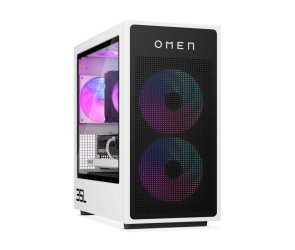
- HP Omen 30L
- CPU
- i9 10850K @ 3.6GHz
- Motherboard
- HP 8703 UU3E1)
- Memory
- 64GB DDR4
- Graphics Card(s)
- NVIDIA GeForce RTX 3090
- Monitor(s) Displays
- Samsung
- Screen Resolution
- 2560 x 1440
-
At a glance
Windows 11 Home11th Gen Intel(R) Core(TM) i7-1165G7 @ 2.80GH...16GBIntel Iris(R) Xe Graphics- Operating System
- Windows 11 Home
- Computer type
- Laptop
- Manufacturer/Model
- Samsung NP950QDB
- CPU
- 11th Gen Intel(R) Core(TM) i7-1165G7 @ 2.80GHz, 2803 Mhz, 4 Core(s), 8 Logical Processor(s)
- Motherboard
- Samsung NP950QDB-KB1US
- Memory
- 16GB
- Graphics card(s)
- Intel Iris(R) Xe Graphics
- Sound Card
- Realtek
- Monitor(s) Displays
- Onboard screen, sometimes Samsung 4K 27" monitor
- Screen Resolution
- 1920 x 1080
- Hard Drives
- 1TB SSD
- PSU
- laptop Power Supply USB-C 65W
- Case
- laptop
- Cooling
- integral fan
- Keyboard
- US Integral
- Mouse
- Logitech MX Master 3S
- Internet Speed
- 1Gb x 1Gb
- Browser
- Chrome
- Antivirus
- Norton 360
- Other Info
- Malware Bytes