BSODs over the past few months, seems to be when using Chrome


HankMcCoyX

Active member
Local time
2:04 PM
Posts
11
OS
Windows 11
Hello, wondering if anyone can help me with a BSOD problem I have been having.

AMD 5700G
B550 Aorus Pro AC
BIOS F18g
Latest Chipset Drivers from AMD.com
G.SKill F4-36500C16-16GTZNC 32 gb DDR4 3600
GeForce RTX 3060 Ti
Win 11 24H2

I did run the CPU, Memory and Linpack tests in OCCT and they each passed 1 hr but I have not run any multiple hours long tests.
I downloaded WinDBG and BlueScreenView but I couldn't make heads of tails of it.

V2 Log Collector: Download SERVO-(2025-09-16_13-07-52).zip | LimeWire

Thank You

Edit Added Tuneup2 log
 

Attachments

Last edited:

My Computer

System One

  • OS
    Windows 11
Check Reliability History for entries.To access it,start typing ---reliability ---into the Search box.
If there are red flagged entries,then start from the earliest one and select the Critical Event line.
RIGHT click on the ---view tech details ---box and this will present another ---view tech details ---box.
Then left click on this box and a "Report Sent" page should appear.
The first few lines of the report will give the identification of the problem cause.
You can then search for a solution.
 

My Computer

System One

  • OS
    win 10
    Computer type
    PC/Desktop
    Manufacturer/Model
    home built
    CPU
    amd ryzen 5-2600
    Motherboard
    gigabyte b450m-ds3h
    Memory
    ng skill sniper x 16gb
    Graphics Card(s)
    nvidea gtx 1050
    Monitor(s) Displays
    benq fp 92
    Hard Drives
    samsung 860 evo 500gb m2 ssd
    PSU
    antec ea550g
    Case
    nzxt noctis 450
    Browser
    edge
So I opened the reliability report and I see 1a8 and 1b8 hardware errors on the 29th of August. On 9/10 and 9/12 i see BSODs with code 3b.

Not too sure how to move forward, anyone have any advice?

I also ran the windows built in memory tester on the default settings and that passed with no problem.

Thanks
 

My Computer

System One

  • OS
    Windows 11
Update your Graphics card driver,through either Device Manager or visiting the Card manufacturer.
Create a System Restore point prior to updating,merely as a precaution.
 

My Computer

System One

  • OS
    win 10
    Computer type
    PC/Desktop
    Manufacturer/Model
    home built
    CPU
    amd ryzen 5-2600
    Motherboard
    gigabyte b450m-ds3h
    Memory
    ng skill sniper x 16gb
    Graphics Card(s)
    nvidea gtx 1050
    Monitor(s) Displays
    benq fp 92
    Hard Drives
    samsung 860 evo 500gb m2 ssd
    PSU
    antec ea550g
    Case
    nzxt noctis 450
    Browser
    edge
I actually did have the latest Nvidia driver installed (or close to it) last week, but decided to roll back to the December 2024 driver because it's known to be much more stable.
 

My Computer

System One

  • OS
    Windows 11
1) Please turn off Windows fast startup:


2) Create a new restore point:


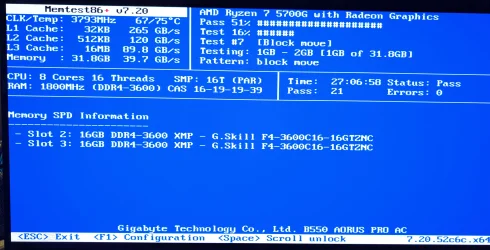
3) Run Memtest86+ for 8 or more passes > take pictures > post images or share links

Memtest86+ | The Open-Source Memory Testing Tool

Just 1 error is a test fail and testing can be aborted.

The more the passes the better the testing conditions.

It sometimes takes passes into the 20's to detect malfunctioning RAM.

The RAM can be tested all at one time or one at a time in the same DIMM.

Memtest86+ | The Open-Source Memory Testing Tool

MemTest86+ - Test RAM
 
Last edited:

My Computer

System One

  • OS
    Windows 10
    Computer type
    Laptop
    Manufacturer/Model
    HP
    CPU
    Intel(R) Core(TM) i7-4800MQ CPU @ 2.70GHz
    Motherboard
    Product : 190A Version : KBC Version 94.56
    Memory
    16 GB Total: Manufacturer : Samsung MemoryType : DDR3 FormFactor : SODIMM Capacity : 8GB Speed : 1600
    Graphics Card(s)
    NVIDIA Quadro K3100M; Intel(R) HD Graphics 4600
    Sound Card
    IDT High Definition Audio CODEC; PNP Device ID HDAUDIO\FUNC_01&VEN_111D&DEV_76E0
    Hard Drives
    Model Hitachi HTS727575A9E364
    Antivirus
    Microsoft Defender
    Other Info
    Mobile Workstation
Nevermind (wasted post/time).
 
Last edited:

My Computer

System One

  • OS
    WinDOS 25H2
    Computer type
    Laptop
    CPU
    Intel & AMD
    Memory
    SO-DIMM SK Hynix 15.8 GB Dual-Channel DDR4-2666 (2 x 8 GB) 1329MHz (19-19-19-43)
    Graphics Card(s)
    nVidia RTX 2060 6GB Mobile GPU (TU106M)
    Sound Card
    Onbord Realtek ALC1220
    Screen Resolution
    1920 x 1080
    Hard Drives
    1x Samsung PM981 NVMe PCIe M.2 512GB / 1x Seagate Expansion ST1000LM035 1TB
I did find errors in the second pass of memtest86, what I'm trying now is setting the dram voltage to 1.35 as stated in the ram spec sheet, auto left it at 1.2 after setting xmp. If that continues to fail I'm going to try setting the speed to lower MTs.
 

My Computer

System One

  • OS
    Windows 11
1) Please post Memtest86+ images or share links


2) Run: getmemoryconfiguration > post a share link


3) Run: Crucial system scanner > post a web link


My Computer

System One

  • OS
    Windows 10
    Computer type
    Laptop
    Manufacturer/Model
    HP
    CPU
    Intel(R) Core(TM) i7-4800MQ CPU @ 2.70GHz
    Motherboard
    Product : 190A Version : KBC Version 94.56
    Memory
    16 GB Total: Manufacturer : Samsung MemoryType : DDR3 FormFactor : SODIMM Capacity : 8GB Speed : 1600
    Graphics Card(s)
    NVIDIA Quadro K3100M; Intel(R) HD Graphics 4600
    Sound Card
    IDT High Definition Audio CODEC; PNP Device ID HDAUDIO\FUNC_01&VEN_111D&DEV_76E0
    Hard Drives
    Model Hitachi HTS727575A9E364
    Antivirus
    Microsoft Defender
    Other Info
    Mobile Workstation
1) Please post Memtest86+ images or share links


2) Run: getmemoryconfiguration > post a share link


3) Run: Crucial system scanner > post a web link

So I ran Memtest86+ for 21 passes with no errors with the ram lowered to 3200, vs xmp 3600. The voltage is set to 1.35.
The spec sheet for the 5700g does say the maximum guaranteed speed is 3200, although I do see postings elsewhere that say 3600 should be possible. Perhaps my particular combination of IMC, the memory itself and the motherboard doesn't work well enough for 3600.

1000038128.webp


Here is the crucial link and the batch file for memory config is attached.
 

Attachments

My Computer

System One

  • OS
    Windows 11
Please monitor using:


For any BSOD post a new V2 share link into the newest post.


Code:
Memory Modules:

Tag               BankLabel    Capacity(GB) Manufacturer PartNumber         Speed
---               ---------    ------------ ------------ ----------         -----
Physical Memory 1 P0 CHANNEL A           16 Unknown      F4-3600C16-16GTZNC  3200
Physical Memory 3 P0 CHANNEL B           16 Unknown      F4-3600C16-16GTZNC  3200


Total Memory:
32GB

Total Memory Slots:
4

Used Memory Slots:
2
 

My Computer

System One

  • OS
    Windows 10
    Computer type
    Laptop
    Manufacturer/Model
    HP
    CPU
    Intel(R) Core(TM) i7-4800MQ CPU @ 2.70GHz
    Motherboard
    Product : 190A Version : KBC Version 94.56
    Memory
    16 GB Total: Manufacturer : Samsung MemoryType : DDR3 FormFactor : SODIMM Capacity : 8GB Speed : 1600
    Graphics Card(s)
    NVIDIA Quadro K3100M; Intel(R) HD Graphics 4600
    Sound Card
    IDT High Definition Audio CODEC; PNP Device ID HDAUDIO\FUNC_01&VEN_111D&DEV_76E0
    Hard Drives
    Model Hitachi HTS727575A9E364
    Antivirus
    Microsoft Defender
    Other Info
    Mobile Workstation
Back
Top Bottom