Bugged acrylic behaviour in Windows 11


JohnnyGui

Well-known member
Member
VIP
Local time
11:56 AM
Posts
232
OS
Windows Pro 11 23H2 Build 22631.3737
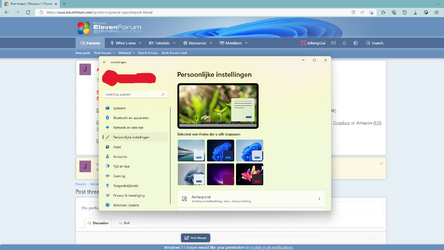
I noticed that an active window/app always shows the acrylic effect with the colors of the desktop background even when there are windows/apps behind it blocking the desktop background.
2022-04-29.png

My desktop has green colors and as you can see the Settings app is showing green hues even though Edge is blocking the desktop from behind.

Does anyone else have this issue?
 

My Computer My Computer

At a glance

Windows Pro 11 23H2 Build 22631.3737i5-12600KTranscend 16GBZotac 4070Ti Trinity
OS
Windows Pro 11 23H2 Build 22631.3737
Computer type
PC/Desktop
Manufacturer/Model
Custom built
CPU
i5-12600K
Motherboard
Gigabyte Z690 UD DDR4
Memory
Transcend 16GB
Graphics Card(s)
Zotac 4070Ti Trinity
Sound Card
Internal: Realtek® ALC892 codec
Monitor(s) Displays
Asus VZ239-H
Screen Resolution
1080p
Hard Drives
Kingston 500GB nVME
Case
Fractal Focus 2 RGB White
Cooling
Xilence LQ240PRO Watercooling
Browser
Edge Chromium
It’s not bugged, it’s that way by design. And it’s not acrylic, they call this Mica material. Read more in the official guidelines: Mica material - Windows apps
 

My Computer My Computer

At a glance

Windows 11
OS
Windows 11
It’s not bugged, it’s that way by design. And it’s not acrylic, they call this Mica material. Read more in the official guidelines: Mica material - Windows apps

Thanks for the reply. I recall Windows 10 showing the colors of the windows behind the active windows instead which would seem more natural and logical to me.
 

My Computer My Computer

At a glance

Windows Pro 11 23H2 Build 22631.3737i5-12600KTranscend 16GBZotac 4070Ti Trinity
OS
Windows Pro 11 23H2 Build 22631.3737
Computer type
PC/Desktop
Manufacturer/Model
Custom built
CPU
i5-12600K
Motherboard
Gigabyte Z690 UD DDR4
Memory
Transcend 16GB
Graphics Card(s)
Zotac 4070Ti Trinity
Sound Card
Internal: Realtek® ALC892 codec
Monitor(s) Displays
Asus VZ239-H
Screen Resolution
1080p
Hard Drives
Kingston 500GB nVME
Case
Fractal Focus 2 RGB White
Cooling
Xilence LQ240PRO Watercooling
Browser
Edge Chromium
That's how Microsoft envisioned this. From a computational perspective, Mica is arguably less resource intensive than acrylic - a redraw of the backdrop brush is necessary only when the wallpaper changes, as opposed to when anything in the background changes.

Acrylic/Aero is indeed nice, but it really is just a gimmick that's not really needed. The thing is, it wastes power needlessly - the screen has to redraw when the slightest thing changes just to have some eye candy effect. Opaque windows are more ecological and really, they can look fine just as well, if not better. If you think about it, why waste computational cycles for something that's not really necessary. The power savings are also much more important on portable computers, which we know struggle already with battery life, because of Intel and Qualcomm's chip designs.
 

My Computer My Computer

At a glance

Windows 11
OS
Windows 11
That's how Microsoft envisioned this. From a computational perspective, Mica is arguably less resource intensive than acrylic - a redraw of the backdrop brush is necessary only when the wallpaper changes, as opposed to when anything in the background changes.

Acrylic/Aero is indeed nice, but it really is just a gimmick that's not really needed. The thing is, it wastes power needlessly - the screen has to redraw when the slightest thing changes just to have some eye candy effect. Opaque windows are more ecological and really, they can look fine just as well, if not better. If you think about it, why waste computational cycles for something that's not really necessary. The power savings are also much more important on portable computers, which we know struggle already with battery life, because of Intel and Qualcomm's chip designs.

Thanks for the explanation. Makes sense performance wise.

@valinet I noticed that the Start menu does show colors of apps/windows in the background for some reason.
 
Last edited:

My Computer My Computer

At a glance

Windows Pro 11 23H2 Build 22631.3737i5-12600KTranscend 16GBZotac 4070Ti Trinity
OS
Windows Pro 11 23H2 Build 22631.3737
Computer type
PC/Desktop
Manufacturer/Model
Custom built
CPU
i5-12600K
Motherboard
Gigabyte Z690 UD DDR4
Memory
Transcend 16GB
Graphics Card(s)
Zotac 4070Ti Trinity
Sound Card
Internal: Realtek® ALC892 codec
Monitor(s) Displays
Asus VZ239-H
Screen Resolution
1080p
Hard Drives
Kingston 500GB nVME
Case
Fractal Focus 2 RGB White
Cooling
Xilence LQ240PRO Watercooling
Browser
Edge Chromium
Thanks for the explanation. Makes sense performance wise.

@valinet I noticed that the Start menu does show colors of apps/windows in the background for some reason.
Yeah, I am not Microsoft, I find it difficult as well to understand some of their decisions, to be honest. Glad I was of help.
 

My Computer My Computer

At a glance

Windows 11
OS
Windows 11

Latest Support Threads

Back
Top Bottom