Solved build 25H2


Brownyboy70

Well-known member
Member
Local time
11:07 AM
Posts
32
OS
Windows 11 Home Beta 25H2- 11-‎8-‎2026- 26220.8062
Hello fellowman in the Eleven forum,

Since 2 days Windows 11, (I am now on
Editie Windows 11 Pro
Versie 24H2
Installatiedatum ‎21-‎2-‎2025
Build van besturingssysteem 26120.6682
Beleving Windows Feature Experience Pack 1000.26100.253.0)
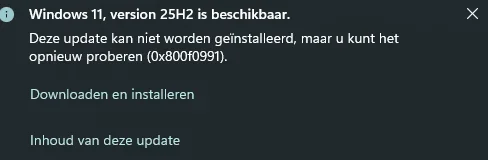
is offering me the update to 25H2, but when I say downloading en install the updat it says after 27% that it is not possible to install the update at this time and you may try again but after a few try agains it came with the same story, is there somebody among you who have had the same experience and maybe a solution to solve it.
I hope to hear some reactions.
Whit regards Browny
 

Attachments
  • Windows update 2025-09-18 132336.webp
    Windows update 2025-09-18 132336.webp
    8.1 KB · Views: 1

My Computer

System One

  • OS
    Windows 11 Home Beta 25H2- 11-‎8-‎2026- 26220.8062
    Computer type
    Laptop
    Manufacturer/Model
    Acer/Aspire 17
    CPU
    13th Gen Intel(R) Core(TM) i7-13620H (2.40 GHz)
    Motherboard
    64-bits besturingssysteem, x64-processor
    Memory
    16 gig
    Graphics Card(s)
    Intel(R) Iris(R) Xe Graphics, NVIDIA Geforce MX450
    Sound Card
    Realtek (R) Audio
    Monitor(s) Displays
    17.3
    Screen Resolution
    1920*1080
    Hard Drives
    Micron_2210_MTFDHBA1T0QFD (SSD) 953,86GB C = 247 D = 705
    Mouse
    m220 logitech
    Internet Speed
    1000 Mbps
    Browser
    Edge chromium
    Antivirus
    Windows Defender, Malwarebytes
Hello fellowman in the Eleven forum,

Since 2 days Windows 11, (I am now on
Editie Windows 11 Pro
Versie 24H2
Installatiedatum ‎21-‎2-‎2025
Build van besturingssysteem 26120.6682
Beleving Windows Feature Experience Pack 1000.26100.253.0)
is offering me the update to 25H2, but when I say downloading en install the updat it says after 27% that it is not possible to install the update at this time and you may try again but after a few try agains it came with the same story, is there somebody among you who have had the same experience and maybe a solution to solve it.
I hope to hear some reactions.
Whit regards Browny
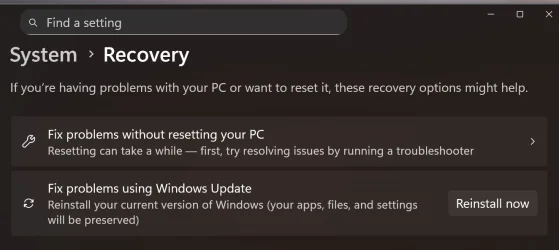
Some have had success with Windows Update errors by repeatedly pausing and resuming updates. Failing that and running the usual DISM and SFC scans the most reliable method of getting the update is to do a repair install by going into settings/system/recovery and selecting the "Fix problems using Windows update" Reinstall Now button. That will save all your apps, settings, configurations and should give you an error free install to the latest build. I've used it a few times now for update errors and it's worked very well for me. It's a bit time consuming though so be prepared to wait a while as it installs.
 

Attachments

  • Screenshot 2025-09-18 081223.webp
    Screenshot 2025-09-18 081223.webp
    39.9 KB · Views: 2

My Computers

System One System Two

  • OS
    Windows 11 25H2
    Computer type
    Laptop
    Manufacturer/Model
    Alienware 18 Area-51
    CPU
    Intel Core Ultra 9 275HX (24-Core)
    Motherboard
    Alienware
    Memory
    64GB DDR5 6400MT/s
    Graphics Card(s)
    NVIDIA GeForce RTX 5080 and Intel UHD Graphics
    Sound Card
    Onboard, Realtek high-performance Audio chips (ALC3329 & ALC1708))
    Monitor(s) Displays
    300HZ 18-inch QHD 500 nit Comfort View+
    Screen Resolution
    2560 x 1600
    Hard Drives
    2TB NVMe M.2 PCIe Gen 5 SSD
    Case
    Magnesium Alloy
    Cooling
    Advanced Cryo-Tech Quad-Fan Cooling system & large vapor chamber
    Keyboard
    Cherry MX ultra low profile mechanical keyboard with per key AlienFX RGB lighting
    Mouse
    Logitech MX Master 4
    Browser
    Vivaldi (main), Firefox, Chrome, Edge
    Antivirus
    MS Defender and Malwarebytes Free
  • Operating System
    Windows 11 25H2
    Computer type
    Laptop
    Manufacturer/Model
    Microsoft Surface Laptop 7
    CPU
    Qualcomm Snapdragon X Elite (12 Core) ARM based CPU
    Motherboard
    Microsoft Corp.
    Memory
    16GB LPDDR5
    Graphics card(s)
    Qualcomm Adreno X1-85
    Sound Card
    Omnisonic speakers with Dolby Atmos spatial sound
    Monitor(s) Displays
    120 Hz 13.8-inch 600 nit PixelSense Flow touchscreen
    Screen Resolution
    2304x1536
    Hard Drives
    1TB NVMe Gen 4 SSD
    Case
    Anodized Aluminum
    Cooling
    Traditional active cooling fan system
    Keyboard
    Mechanical QWERTY, backlit when in use
    Mouse
    Logitech MX Master 4 and Surface Arc Mouse
    Browser
    Vivaldi (main), Firefox, Chrome, Edge
    Antivirus
    MS Defender and Malwarebytes Free
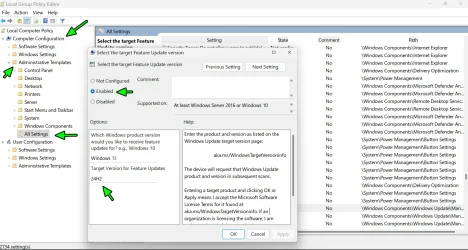
Since you have Windows 11 "PRO"

Win Key + R and type (or copy paste) gpedit.msc

And follow the Arrows down to the 24H2 rabbit hole = search for Select the target Feature Update version - and that's where you apply the following:

2025-09-18_185851.webp
 

My Computer

System One

  • OS
    WinDOS 25H2
    Computer type
    Laptop
    CPU
    Intel & AMD
    Memory
    SO-DIMM SK Hynix 15.8 GB Dual-Channel DDR4-2666 (2 x 8 GB) 1329MHz (19-19-19-43)
    Graphics Card(s)
    nVidia RTX 2060 6GB Mobile GPU (TU106M)
    Sound Card
    Onbord Realtek ALC1220
    Screen Resolution
    1920 x 1080
    Hard Drives
    1x Samsung PM981 NVMe PCIe M.2 512GB / 1x Seagate Expansion ST1000LM035 1TB
Some have had success with Windows Update errors by repeatedly pausing and resuming updates. Failing that and running the usual DISM and SFC scans the most reliable method of getting the update is to do a repair install by going into settings/system/recovery and selecting the "Fix problems using Windows update" Reinstall Now button. That will save all your apps, settings, configurations and should give you an error free install to the latest build. I've used it a few times now for update errors and it's worked very well for me. It's a bit time consuming though so be prepared to wait a while as it installs.
Hi FrancoDT, Yesterday I wanted to go for your last option and wel the reinstall Now button, but before I could do that Windows decided by itself to Reinstall, gladly with saving all my apps, settings and configurations so yesterday evening at 01:00 everything was working and I was then on build 22631.5982 from the release preview version, so far so good, when I started up this morning it all still worked good but after a certain time w11 tells me again that the 25H2 version was available for my PC and so I started to download and install it and now I am on the 25H2 26200.6718 version and working good. Nevertheless I will thank you for your help and answers.

With Regards Browny.
 

My Computer

System One

  • OS
    Windows 11 Home Beta 25H2- 11-‎8-‎2026- 26220.8062
    Computer type
    Laptop
    Manufacturer/Model
    Acer/Aspire 17
    CPU
    13th Gen Intel(R) Core(TM) i7-13620H (2.40 GHz)
    Motherboard
    64-bits besturingssysteem, x64-processor
    Memory
    16 gig
    Graphics Card(s)
    Intel(R) Iris(R) Xe Graphics, NVIDIA Geforce MX450
    Sound Card
    Realtek (R) Audio
    Monitor(s) Displays
    17.3
    Screen Resolution
    1920*1080
    Hard Drives
    Micron_2210_MTFDHBA1T0QFD (SSD) 953,86GB C = 247 D = 705
    Mouse
    m220 logitech
    Internet Speed
    1000 Mbps
    Browser
    Edge chromium
    Antivirus
    Windows Defender, Malwarebytes

Latest Support Threads

Back
Top Bottom