
Solved C: drive only showing half of disk


gourmand

New member
Local time
11:08 PM
Posts
2
OS
Windows 11
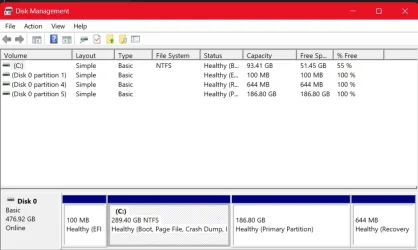
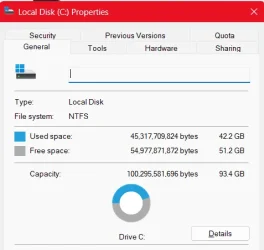
Strange stuff going on- according to Disk Management, the size of C: is 289 GB, but when I rClick and go to Properties, it only shows it as 93.4 GB. I just Reset my laptop from scratch and the problem still occurs. (For the record, about 42.1 GB of that 93 is being used by system files).
1760845262768.webp
(The 186 GB Portion is Linux, not sure on the others)
1760845305673.webp
I've tried chkdsk, I've tried repartitioning, but I have no clue where the missing GB are. Any help is greatly appreciated! More than willing to give out any necessary info, because this is troubling me to a great extent.
 
Windows Build/Version
24H2 (OS Build 26100.6899)

My Computer

System One

  • OS
    Windows 11
    Computer type
    Laptop
    Manufacturer/Model
    Lenovo
It appears your drive got partitioned. The Disk Management image you posted shows the C: partition as 289.40. Then it shows a separate partition of 186.80 GBs. Not sure how this occured unless you replaced the original smaller drive with a larger one and then when you Reset it the Restore process only partitioned the drive to it's original size. You should be able to use Disk Management to Extend the primary partition to use all the rest of the unused partition.
 

My Computer

System One

  • OS
    Win 7/10/11
    Computer type
    PC/Desktop
    Other Info
    I'm a computer enthusiast so have quite a few systems that I run. More like an advanced hobby.
It appears your drive got partitioned. The Disk Management image you posted shows the C: partition as 289.40. Then it shows a separate partition of 186.80 GBs. Not sure how this occured unless you replaced the original smaller drive with a larger one and then when you Reset it the Restore process only partitioned the drive to it's original size. You should be able to use Disk Management to Extend the primary partition to use all the rest of the unused partition.
Thank you- ended up working for me, and now the drive is showing up as it should. :)
 

My Computer

System One

  • OS
    Windows 11
    Computer type
    Laptop
    Manufacturer/Model
    Lenovo
@BamaInArk was spot on with this assesment and this is normal expected behavior. The upper portion shows how much space the FORMATTED partition occupies while the lower portion shows the raw partition size. So, evidentally some resizing must have been performed in the past but the formatted partition had not been extended to fill the entire raw partition space. By extending it you have caused the formatted partition to occupy the entire raw space, thus causing the sizes to match.
 

My Computers

System One System Two

  • OS
    Win11 Pro 25H2 (RTM+)
    Computer type
    PC/Desktop
    Manufacturer/Model
    Acemagic
    CPU
    Intel i7-14650HX
    Memory
    32 GB
    Graphics Card(s)
    No GPU - Built-in Intel Graphics
    Sound Card
    Integrated
    Monitor(s) Displays
    Varies as machine will often be moved to locations with different monitors
    Screen Resolution
    Varies
    Hard Drives
    1 x 1TB Gen 4 NVMe SSD
    PSU
    120W Power Brick
    Keyboard
    Corsair K70 Max RGB Magnetic Keyboard
    Mouse
    Logitech MX Master 3
    Internet Speed
    1Gb Up / 1 Gb Down
    Browser
    Edge
    Antivirus
    Windows Defender
  • Operating System
    Win11 Pro 25H2 (RTM+)
    Computer type
    Laptop
    Manufacturer/Model
    Lenovo ThinkBook 13x Gen 2
    CPU
    Intel i7-1255U
    Memory
    16 GB
    Graphics card(s)
    Intel Iris Xe Graphics
    Sound Card
    Realtek® ALC3306-CG codec
    Monitor(s) Displays
    13.3-inch IPS Display
    Screen Resolution
    WQXGA (2560 x 1600)
    Hard Drives
    2 TB 4 x 4 NVMe SSD
    PSU
    USB-C / Thunderbolt 4 Power / Charging
    Keyboard
    Backlit, spill resistant keyboard
    Mouse
    Buttonless Glass Precision Touchpad
    Internet Speed
    1Gb Up / 1Gb Down
    Browser
    Edge
    Antivirus
    Windows Defender
    Other Info
    WiFi 6e / Bluetooth 5.1 / Facial Recognition / Fingerprint Sensor / ToF (Time of Flight) Human Presence Sensor
Disk management did display anomalies.

Please post a new disk management (if fixed).


And please run > post a share link


My Computer

System One

  • OS
    Windows 10
    Computer type
    Laptop
    Manufacturer/Model
    HP
    CPU
    Intel(R) Core(TM) i7-4800MQ CPU @ 2.70GHz
    Motherboard
    Product : 190A Version : KBC Version 94.56
    Memory
    16 GB Total: Manufacturer : Samsung MemoryType : DDR3 FormFactor : SODIMM Capacity : 8GB Speed : 1600
    Graphics Card(s)
    NVIDIA Quadro K3100M; Intel(R) HD Graphics 4600
    Sound Card
    IDT High Definition Audio CODEC; PNP Device ID HDAUDIO\FUNC_01&VEN_111D&DEV_76E0
    Hard Drives
    Model Hitachi HTS727575A9E364
    Antivirus
    Microsoft Defender
    Other Info
    Mobile Workstation
Back
Top Bottom




