
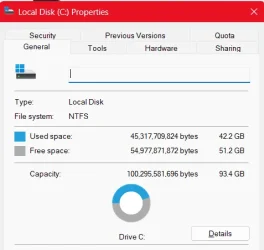
Strange stuff going on- according to Disk Management, the size of C: is 289 GB, but when I rClick and go to Properties, it only shows it as 93.4 GB. I just Reset my laptop from scratch and the problem still occurs. (For the record, about 42.1 GB of that 93 is being used by system files).
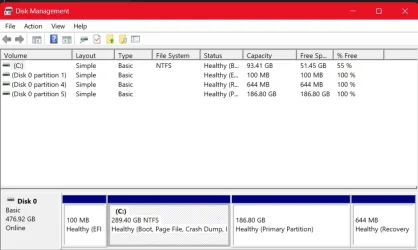
(The 186 GB Portion is Linux, not sure on the others)
I've tried chkdsk, I've tried repartitioning, but I have no clue where the missing GB are. Any help is greatly appreciated! More than willing to give out any necessary info, because this is troubling me to a great extent.
(The 186 GB Portion is Linux, not sure on the others)
I've tried chkdsk, I've tried repartitioning, but I have no clue where the missing GB are. Any help is greatly appreciated! More than willing to give out any necessary info, because this is troubling me to a great extent.
- Windows Build/Version
- 24H2 (OS Build 26100.6899)
My Computer
At a glance
Windows 11
- OS
- Windows 11
- Computer type
- Laptop
- Manufacturer/Model
- Lenovo






