can I control the default view after Explorer Search


hershey4

Active member
Member
Local time
5:25 PM
Posts
58
OS
Windows 11 Pro
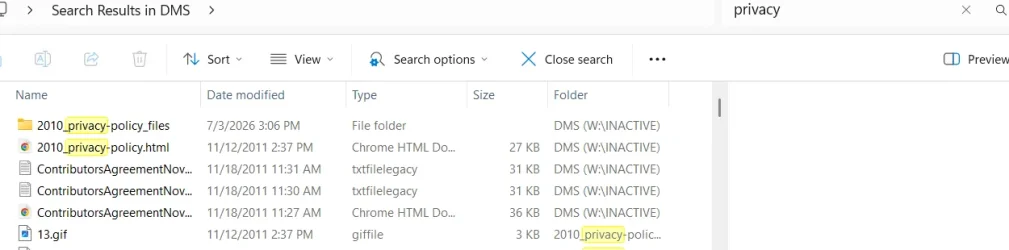
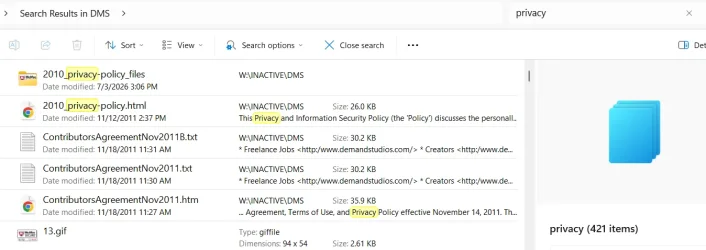
Recent W11 user and it is driving me crazy the default formatting of an explorer search. After every search I am compelled to set View->Details and Details/Preview toggle. It is annoying and wastes time. I want search output to look the way it always has. Is there some magic setting for this?

Example of what I dislike:
1786749808990.webp


Example of what I expect and have experienced for decades and I don't want to change (I'm old and set in my ways
:-) ):

1786749948337.webp

Can I get there from here? Permanently and by default? The Advanced Settings that allow you to apply to all folders of this type have nothing to do with this View issue.
 

My Computers My Computers

  • At a glance

    Windows 11 ProIntel Ultra 516GB
    OS
    Windows 11 Pro
    Computer type
    PC/Desktop
    Manufacturer/Model
    Dell Pro Slim QCS1250
    CPU
    Intel Ultra 5
    Memory
    16GB
  • At a glance

    Windows 7 UltimateI78GB
    Operating System
    Windows 7 Ultimate
    Computer type
    PC/Desktop
    Manufacturer/Model
    Dell XPS 8000 Studio
    CPU
    I7
    Memory
    8GB
  • Windows 10 Dell Inspiron laptop
Can I get there from here? Permanently and by default? The Advanced Settings that allow you to apply to all folders of this type have nothing to do with this View issue.


Windows 11 doesn’t let you set a permanent default view for Search Results in File Explorer. This isn’t something you can fix with folder templates or “Apply to Folders,” because Search Results isn’t a normal folder type. It’s a virtual shell namespace, and Explorer doesn’t store view preferences for it.

You can use a 3rd party file manager like Everything rather than file explorer. There are other file managers available as well, but I think Everything is one of the most popular
 

My Computers My Computers

  • At a glance

    Windows 11 Pro 25H2 26200.9168i9-10900 10 core 20 threads32 gbnone-Intel UHD Graphics 630
    OS
    Windows 11 Pro 25H2 26200.9168
    Computer type
    PC/Desktop
    Manufacturer/Model
    Dell Optiplex 7080
    CPU
    i9-10900 10 core 20 threads
    Motherboard
    DELL 0J37VM
    Memory
    32 gb
    Graphics Card(s)
    none-Intel UHD Graphics 630
    Sound Card
    Integrated Realtek
    Monitor(s) Displays
    Benq 27
    Screen Resolution
    2560x1440
    Hard Drives
    2x1tb Solidigm m.2 nvme /External drives 512gb Samsung m.2 sata+2tb Kingston m2.nvme
    PSU
    500w
    Case
    MT
    Cooling
    Dell Premium
    Keyboard
    Logitech wired
    Mouse
    Logitech wireless
    Internet Speed
    so slow I'm too embarrassed to tell
    Browser
    #1 Edge #2 Firefox
    Antivirus
    Defender+MWB Premium
  • At a glance

    Windows 11 Pro 24H2 26200.9168AMD Ryzen 7 6800U32 gbintegrated
    Operating System
    Windows 11 Pro 24H2 26200.9168
    Computer type
    PC/Desktop
    Manufacturer/Model
    Beelink Mini PC SER5
    CPU
    AMD Ryzen 7 6800U
    Memory
    32 gb
    Graphics card(s)
    integrated
    Sound Card
    integrated
    Monitor(s) Displays
    Benq 27
    Screen Resolution
    2560x1440
    Hard Drives
    1TB Crucial nvme
    Keyboard
    Logitech wired
    Mouse
    Logitech wireless
    Internet Speed
    still too embarrassed to tell
    Browser
    Firefox
    Antivirus
    Defender
  • System 3 is non compliant Dell 9020 i7-4770/24gb ram Win11 PRO 26200.9168
@hershey4

You can try this...


And here's five points, for sort of filling out your computer specs. :-)


This will help some with computer specs...


My Computers My Computers

  • At a glance

    Win 11 Home ♦♦♦26200.9168 ♦♦♦♦♦♦♦25H2AMD Ryzen 7 3700XG.Skill (F4-3200C14D-16GTZKW)EVGA RTX 2070 (08G-P4-2171-KR)
    OS
    Win 11 Home ♦♦♦26200.9168 ♦♦♦♦♦♦♦25H2
    Computer type
    PC/Desktop
    Manufacturer/Model
    Built by Ghot® [May 2020]
    CPU
    AMD Ryzen 7 3700X
    Motherboard
    Asus Pro WS X570-ACE (BIOS 5302)
    Memory
    G.Skill (F4-3200C14D-16GTZKW)
    Graphics Card(s)
    EVGA RTX 2070 (08G-P4-2171-KR)
    Sound Card
    Realtek ALC1220P / ALC S1220A
    Monitor(s) Displays
    Dell U3011 30"
    Screen Resolution
    2560 x 1600
    Hard Drives
    2x Samsung 860 EVO 500GB,
    WD 4TB Black FZBX - SATA III,
    WD 8TB Black FZBX - SATA III,
    DRW-24B1ST CD/DVD Burner
    PSU
    PC Power & Cooling 750W Quad EPS12V
    Case
    Cooler Master ATCS 840 Tower
    Cooling
    CM Hyper 212 EVO (push/pull)
    Keyboard
    Ducky DK9008 Shine II Blue LED
    Mouse
    Logitech Optical M-100
    Internet Speed
    300/300
    Browser
    Firefox (latest)
    Antivirus
    Bitdefender Total Security
    Other Info
    Speakers: Klipsch Pro Media 2.1
  • At a glance

    Windows XP Pro 32bit w/SP3AMD Athlon 64 X2 5000+ (OC'd @ 3.2Ghz)TWIN2X2048-6400C4DHX (2 x 1GB, DDR2 800)EVGA 256-P2-N758-TR GeForce 8600GT SSC
    Operating System
    Windows XP Pro 32bit w/SP3
    Computer type
    PC/Desktop
    Manufacturer/Model
    Built by Ghot® (not in use)
    CPU
    AMD Athlon 64 X2 5000+ (OC'd @ 3.2Ghz)
    Motherboard
    ASUS M2N32-SLI Deluxe Wireless Edition
    Memory
    TWIN2X2048-6400C4DHX (2 x 1GB, DDR2 800)
    Graphics card(s)
    EVGA 256-P2-N758-TR GeForce 8600GT SSC
    Sound Card
    Onboard
    Monitor(s) Displays
    ViewSonic G90FB Black 19" Professional (CRT)
    Screen Resolution
    up to 2048 x 1536
    Hard Drives
    WD 36GB 10,000rpm Raptor SATA
    Seagate 80GB 7200rpm SATA
    Lite-On LTR-52246S CD/RW
    Lite-On LH-18A1P CD/DVD Burner
    PSU
    PC Power & Cooling Silencer 750 Quad EPS12V
    Case
    Generic Beige case, 80mm fans
    Cooling
    ZALMAN 9500A 92mm CPU Cooler
    Keyboard
    Logitech Classic Keybooard 200
    Mouse
    Logitech Optical M-BT96a
    Internet Speed
    300/300
    Browser
    Firefox 3.x ??
    Antivirus
    Symantec (Norton)
    Other Info
    Still assembled, still runs. Haven't turned it on for 15 years?
...
You can use a 3rd party file manager like Everything rather than file explorer.

No doubt that would yield more changes to endure than I am already enduring with w11. Unless I can find one that is Windows7 based.
 

My Computers My Computers

  • At a glance

    Windows 11 ProIntel Ultra 516GB
    OS
    Windows 11 Pro
    Computer type
    PC/Desktop
    Manufacturer/Model
    Dell Pro Slim QCS1250
    CPU
    Intel Ultra 5
    Memory
    16GB
  • At a glance

    Windows 7 UltimateI78GB
    Operating System
    Windows 7 Ultimate
    Computer type
    PC/Desktop
    Manufacturer/Model
    Dell XPS 8000 Studio
    CPU
    I7
    Memory
    8GB
  • Windows 10 Dell Inspiron laptop
As @Ghot suggested, you can use WinSetView to permanently set your preferred search result views.

Although Windows provides no options in its interface to change the default search results views, they are defined in the FolderTypes registry key. Editing a copy of that key in HKCU allows you to control those defaults. That's not so easy to do by hand, but WinSetView does that for you. In the end it's just registry settings.
 

My Computer My Computer

At a glance

Windows 10/11
OS
Windows 10/11
Computer type
Laptop
Manufacturer/Model
Acer
Why use Explorer search? Explorer Sucks. I never use Explorer search. I use Everything. It's the best and I've used it for many years and I've never looked back. I recommend it.
 

My Computers My Computers

  • At a glance

    Windows 11 Pro 25H2Intel 12th Gen Intel Core i5-12600KF, 3686 MHzCORSAIR Vengeance 32GB (2 x 16GB) 288-Pin PC ...GIGABYTE GeForce RTX 4060, 3x Fans, 8GB GDDR6 OC
    OS
    Windows 11 Pro 25H2
    Computer type
    PC/Desktop
    Manufacturer/Model
    Custom Build By Lance1
    CPU
    Intel 12th Gen Intel Core i5-12600KF, 3686 MHz
    Motherboard
    GIGABYTE Z790 AORUS ELITE AX LGA 1700 Intel Z790 ATX
    Memory
    CORSAIR Vengeance 32GB (2 x 16GB) 288-Pin PC RAM DDR5 6400 (PC5 51200) Dual-Channel
    Graphics Card(s)
    GIGABYTE GeForce RTX 4060, 3x Fans, 8GB GDDR6 OC
    Sound Card
    AMD High Definition
    Monitor(s) Displays
    Samsung 32" 60Hz 4ms Curved PLS LED
    Screen Resolution
    1920 X 1080
    Hard Drives
    WD Blue NVME M.2 1T Boot Drive
    WD Blue SSD 1T
    WD Blue NVME M.2 2T
    PSU
    EVGA SuperNOVA 850 GT, 80 Plus Gold 850W, Fully Modular,
    Case
    Fractal Design Pop XL Air RGB Black TG ATX High-Airflow Clear Tempered Glass Window Full Tower
    Cooling
    Noctua NH-D15 chromax black, Dual Tower CPU Cooler with Dual NF-A15 PWM 140mm Fans (Black)
    Keyboard
    Devistator 3
    Mouse
    Inphic PM6 Pro
    Internet Speed
    Telus Fiber Optic: Download 332.7 Mbps / Upload 331.5 Mbps
    Browser
    Vivaldi (64bit)
    Antivirus
    Windows Defender
  • At a glance

    Window 11 ProIntel(R) Core(TM) i3-2310M CPU @ 2.10GHz4 GB DDR3Intel(R) HD Graphics 3000
    Operating System
    Window 11 Pro
    Computer type
    Laptop
    Manufacturer/Model
    DELL Inspiron N7110
    CPU
    Intel(R) Core(TM) i3-2310M CPU @ 2.10GHz
    Motherboard
    Dell Inc. 0YH79Y
    Memory
    4 GB DDR3
    Graphics card(s)
    Intel(R) HD Graphics 3000
    Sound Card
    High Definition Audio
    Monitor(s) Displays
    17.3 Inch Display
    Screen Resolution
    1600 X 900
    Hard Drives
    Samsung SSD 860 EVO 500GB
    Internet Speed
    Fiber Optic: Download 332.7 Mbps / Upload 331.5 Mbps
    Browser
    Vivaldi 64 bit
    Antivirus
    Windows Defender
    Other Info
    YA! This the old backup. In case things go south. It'll give me access to everything I need.

Latest Support Threads

Back
Top Bottom