JavaScript is disabled. For a better experience, please enable JavaScript in your browser before proceeding.
You are using an out of date browser. It may not display this or other websites correctly.
You should upgrade or use an
alternative browser .
Solved Can I use my phone charger to charge my new laptop?
Well-known member
Power User
VIP
I have just realised, after 2 weeks of owning my new Asus Zenbook that it uses the same USB-C port for charging as my phone charger.
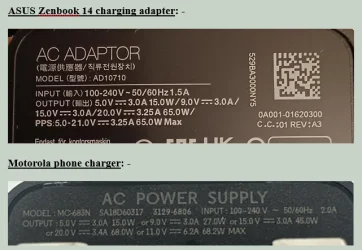
Also both chargers support the same output wattages so it seems that my current (pun) phone charger can charge the Asus laptop as well.
This would mean only having one charger in use and keeping the other as a spare rather than having both plugged in.
However, I thought I would check on here to see if others agree? The reason for this is that the laptop is brand new and under warranty for 12 months.
It looks a no-brainer that the phone charger is compatible and safe to use to charge the laptop but I was wondering if there is something I am missing?
OS
Windows 11 Pro
Computer type
PC/Desktop
Manufacturer/Model
GMKtec K11
CPU
AMD Ryzen 9 8945HS
Memory
32GB DDR5 SO-DIMM
Graphics Card(s)
Integrated AMD Radeon 780M (4.00 GHz)
Monitor(s) Displays
Benq 2250HM
Screen Resolution
1920 x 1080
Hard Drives
1 TB PCIe 4.0 NVMe M.2 SSD
Operating System
Windows 11 Home
Computer type
Laptop
Manufacturer/Model
ASUS Zenbook 14 OLED 14" Laptop - UX3405CA-QL192W
CPU
Intel® Core™ Ultra 7 - 255H processor
Memory
16 GB LPDDR5 SDRAM
Graphics card(s)
Intel Arc 140T onboard graphics
Screen Resolution
1920 x 1200 (16:10 WUXGA resolution) OLED Touchscreen
Hard Drives
1TB SSD
Well-known member
Member
VIP
Yes, you can use the phone charger. But it´s better to use the laptop charger. For one thing, note the laptop charger supports PPS, and the phone charger doesn´t. This may result in a faster charge with the laptop charger, although the difference may be small.
Well-known member
Pro User
VIP
PPS minimizes overheating by matching the exact voltage/current the laptop needs which is beneficial for battery lifespan.
OS
Windows 11 Pro
Computer type
PC/Desktop
CPU
AMD Ryzen 7 9800X3D
Motherboard
MSI PRO B850-P Wifi
Memory
32GB DDR5 CL30 Kingston Fury
Graphics Card(s)
ASUS Prime Radeon RX 9060 XT OC Edition 16GB
Monitor(s) Displays
LG Ultrawide 34" + LG 27" 1080p
Screen Resolution
3440x1440
Hard Drives
Main Boot Drive : 512GB Adata XPG RGB Gen3x4 NVMe M.2 SSD
PSU
EVGA 750 Watts 80+ Gold
Case
Deepcool Genome II
Cooling
Thermalright Burst Assassin 120
Internet Speed
1Gbps
Browser
Chrome
Antivirus
"Moderna"
Operating System
Windows 11 Pro
Computer type
PC/Desktop
CPU
i7-4790K
Motherboard
ASRock Xtreme6 Z97
Memory
16GB Corsair Vengeance Pro
Graphics card(s)
MSI R9 290
Monitor(s) Displays
LG Ultrawide 34"
Screen Resolution
3440x1440
Hard Drives
500GB Adata SSD (OS Only)
PSU
Thermaltake 475 Watts 80 Bronze
Case
Thermaltake Commander I Snow Edition
Cooling
Deep Cool Archer Air Cooler
Keyboard
Armageddon MKA-5R RGB-Hornet
Mouse
Logitech G402
Internet Speed
1Gbps
Browser
Chrome
Antivirus
Moderna :)
Well-known member
Power User
VIP
Thread Starter
But it´s better to use the laptop charger.
PPS minimizes overheating by matching the exact voltage/current the laptop needs which is beneficial for battery lifespan.
So, if I want to use just one charger it should be the Asus charger and that will be okay for the phone as well?
OS
Windows 11 Pro
Computer type
PC/Desktop
Manufacturer/Model
GMKtec K11
CPU
AMD Ryzen 9 8945HS
Memory
32GB DDR5 SO-DIMM
Graphics Card(s)
Integrated AMD Radeon 780M (4.00 GHz)
Monitor(s) Displays
Benq 2250HM
Screen Resolution
1920 x 1080
Hard Drives
1 TB PCIe 4.0 NVMe M.2 SSD
Operating System
Windows 11 Home
Computer type
Laptop
Manufacturer/Model
ASUS Zenbook 14 OLED 14" Laptop - UX3405CA-QL192W
CPU
Intel® Core™ Ultra 7 - 255H processor
Memory
16 GB LPDDR5 SDRAM
Graphics card(s)
Intel Arc 140T onboard graphics
Screen Resolution
1920 x 1200 (16:10 WUXGA resolution) OLED Touchscreen
Hard Drives
1TB SSD
Well-known member
Pro User
VIP
My laptop came with a standard 65W multi-voltage charger, but it's pretty large. I replaced it for traveling with a much slimmer 65W model, works just fine.
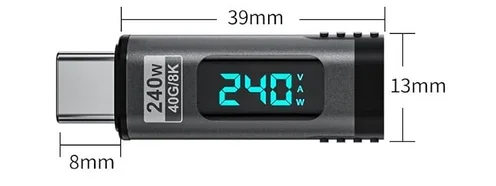
I use this compact USB-C power monitor to see what is happening on the power port.
Digital Display USB C Magnetic Adapter PD240W 24Pin
It also has a magnetic connection so if someone yanks the cord or trips over the power cord, it just disconnects without damaging my USB charging port.
OS
Win 11 Pro 25H2, Build 26200.8524
Computer type
PC/Desktop
Manufacturer/Model
Home Brew
CPU
Intel Core i5 14500
Motherboard
Gigabyte B760M G P WIFI
Memory
64GB DDR4
Graphics Card(s)
GeForce RTX 4060
Sound Card
Chipset Realtek
Monitor(s) Displays
LG 45" Ultragear, Acer 24" 1080p
Screen Resolution
5120x1440, 1920x1080
Hard Drives
Crucial P310 2TB 2280 PCIe Gen4 3D NAND NVMe M.2 SSD (O/S)
Silicon Power 2TB US75 NVMe PCIe Gen4 M.2 2280 SSD (backup)
Crucial BX500 2TB 3D NAND (2nd backup)
Seagate 4TB Ironwolf, rotating HDD archive files
External off-line backup Drives: 2 NVMe 4TB drives in external enclosures
PSU
Thermaltake Toughpower GF3 750W
Case
LIAN LI LANCOOL 216 E-ATX PC Case
Cooling
Lots of fans!
Keyboard
Microsoft Comfort Curve 2000
Mouse
Logitech G305
Internet Speed
Verizon FiOS 1GB
Browser
Firefox
Antivirus
Malware Bytes & Windows Defender Security
Operating System
Win 11 Pro 25H2, Build 26200.8524
Computer type
PC/Desktop
Manufacturer/Model
Home Brew
CPU
Intel Core i5 14400
Motherboard
Gigabyte B760M DS3H AX
Memory
32GB DDR5
Graphics card(s)
Intel 700 Embedded GPU
Sound Card
Realtek Embedded
Monitor(s) Displays
27" HP 1080p
Screen Resolution
1920x1080
Hard Drives
Crucial P310 2TB 2280 PCIe Gen4 eD NAND PCIe SSD
Samsung EVO 990 2TB NVMe Gen4 SSD
Samsung 2TB SATA SSD
PSU
Thermaltake Smart BM3 650W
Case
Okinos Micro ATX Case
Cooling
Fans
Keyboard
Microsoft Comfort Curve 2000
Mouse
Logitech G305
Internet Speed
Verizon FiOS 1GB
Browser
Firefox
Antivirus
Malware Bytes & Windows Defender Security