Can not get monitor to recognize video card.


warpig23

Member
Member
Local time
8:24 AM
Posts
17
Location
Panorama City California
OS
windows
I ended getting a video card ASUS TUF Gaming GeForce RTX ™ 5070 12GB GDDR7 OC Edition Gaming Graphics Card (PCIe® 5.0, HDMI®/DP 2.1, 3.125-slot, and a monitor samsung Odyssey neo G7 43 inch. But now I cant get my monitor to recognize my video card. So I cant install windows or do anything. I...
 
Windows Build/Version
win 11

My Computer

System One

  • OS
    windows
    Computer type
    PC/Desktop
    CPU
    Intel Core Ultra 7 Desktop Processor 265K - 20 cores (8
    Motherboard
    ASUS ROG Maximus Z890 Hero Intel® Z890 LGA 1851 ATX Motherboard
    Memory
    Crucial Pro DDR5 RAM 64GB Kit (2x32GB) 6400MHz CL40
    Graphics Card(s)
    NVIDIA GeForce 9500 GT
    Monitor(s) Displays
    Samsung Odyssey Neo G7
    Hard Drives
    V-NAND SSD 860 PRO 512GB
    PSU
    ASUS ROG Strix 1000W Platinum
    Cooling
    ASUS ROG Ryujin III 240 ARGB All-in-one Liquid CPU Cooler
    Keyboard
    Logitech
    Mouse
    Logitech
    Browser
    Opera, Edge
    Antivirus
    Windows Defender
    Other Info
    HL-DT-ST DVDRAM GH60N, ATAPI iHAS124 F
Hi @warpig23

You may have tried these but they're worth mentioning.
1. Remove and reseat the video card in the PCIe slot on the motherboard.
2. Check and reseat all power connections between the PSU and video card.
3. Try another HDMI/Display Port cable (which ever one your using) between the monitor and video card.
 

My Computers

System One System Two

  • OS
    Windows 11 Pro 25H2
    Computer type
    PC/Desktop
    Manufacturer/Model
    Homebuilt
    CPU
    Intel Core i9 13900K
    Motherboard
    Asus ProArt Z790 Creator WiFi - Bios 3107
    Memory
    Corsair Dominator Platinum 64gb 5600MT/s DDR5 Dual Channel
    Graphics Card(s)
    Sapphire NITRO+ AMD Radeon RX 7900 XTX Vapor-X 24GB
    Sound Card
    External DAC: Cambridge Audio DACMagic200M - Headphone Amp: Topping L50
    Monitor(s) Displays
    Panasonic MX950 Mini LED 55" TV 120hz
    Screen Resolution
    3840 x 2160 120hz
    Hard Drives
    Samsung 980 Pro 2TB (OS)
    Samsung 980 Pro 1TB (Files)
    Lexar NZ790 4TB
    LaCie d2 Professional 6TB external - USB 3.1
    Seagate Expansion 16TB external - USB 3.2
    Seagate One Touch 18TB external HD - USB 3.0
    PSU
    Corsair RM1200x Shift
    Case
    Corsair RGB Smart Case 5000x (white)
    Cooling
    Corsair iCue H150i Elite Capellix XT
    Keyboard
    Incase Ergonomic USB (Microsoft clone)
    Mouse
    Logitech MX Master 3S
    Internet Speed
    Fibre 900/500 Mbps
    Browser
    Microsoft Edge Chromium
    Antivirus
    Bitdefender Total Security
    Other Info
    AMD Radeon Software & Drivers 26.1.1
    Hasleo Backup Suite
    Dashlane password manager
    Kensington Verimark fingerprint reader
    Logitech Brio 4K webcam
    Orico 10-port powered USB 3.0 hub
  • Operating System
    Windows 11 Pro 25H2
    Computer type
    Laptop
    Manufacturer/Model
    Asus Vivobook X1605VA
    CPU
    Intel® Core™ i9-13900H
    Motherboard
    Asus X1605VA bios 309
    Memory
    32GB DDR4-3200 Dual channel
    Graphics card(s)
    *Intel Iris Xᵉ Graphics G7
    Sound Card
    Realtek | Intel SST Bluetooth & USB
    Monitor(s) Displays
    16.0-inch, WUXGA 16:10 aspect ratio, IPS-level Panel
    Screen Resolution
    1920 x 1200 60hz
    Hard Drives
    512GB M.2 NVMe™ PCIe® 3.0 SSD
    Mouse
    Logitech MX Ergo Trackball
    Antivirus
    Bitdefender Total Security
    Other Info
    720p Webcam
    WiFi & USB to ethernet
You don't provide much information.

The card uses a 12VHPWR PCI-E power connector. You've connected it? Maybe using the adapter that came with the card, that connects to two 8 pin PCI-E power cables?

The normal method I use for swapping GPUs is:

Have the driver installer for the new card available on the PC.​
Uninstall the drivers for the old card.​
Power down the PC. (Don't let it restart.)​
Swap cards.​
Power up the PC.​
Install the new drivers.​

In the past, I've sometimes had to clear the CMOS to get the new card recognized.

Good luck.
 

My Computers

System One System Two

  • OS
    Windows 11 26200.8116
    Computer type
    PC/Desktop
    Manufacturer/Model
    homebuilt
    CPU
    Amd Threadripper 7970X
    Motherboard
    Gigabyte TRX50 Aero D Rev. 1.0
    Memory
    128GB (4 X 32) G.Skill DDR5 6400 (RDIMM)
    Graphics Card(s)
    Gigabyte RTX 4090 OC
    Sound Card
    none (USB to speakers), Realtek
    Monitor(s) Displays
    Innocn 32" OLED
    Screen Resolution
    3840 X 2160 @ 60Hz
    Hard Drives
    Crucial T700 2TB M.2 NVME SSD
    WD 4TB Blue SATA SSD
    Seagate 18TB IronWolf Pro
    PSU
    BeQuiet! Straight Power 12 1500W
    Case
    Lian Li 011 Dynamic Evo XL
    Cooling
    SilverStone Technology XE360-TR5, with 3 Phanteks T30 fans
    Keyboard
    Cherry KC 500 MX LP (mechanical)
    Mouse
    Logitech M500s (wired)
    Internet Speed
    2000/250 Mbps (down/up)
    Other Info
    xFinity gateway
  • Operating System
    windows 11 26200.8116
    Computer type
    PC/Desktop
    Manufacturer/Model
    homebuilt
    CPU
    Intel I9-13900K
    Motherboard
    Asus RoG Strix Z690-E
    Memory
    64GB G.Skill DDR5-6000
    Graphics card(s)
    Gigabyte RTX 3090 ti
    Sound Card
    built in Realtek
    Monitor(s) Displays
    Philips 27E1N8900 27" OLED
    Screen Resolution
    3840 X 2160 @60Hz
    Hard Drives
    WDC SN850 1TB
    8TB Seagate Ironwolf
    4TB Seagate Ironwolf
    PSU
    eVGA SuperNOVA 1300 GT
    Case
    Lian Li 011 Dynamic Evo
    Cooling
    Corsair iCUE H150i ELITE CAPELLIX Liquid CPU Cooler
    Keyboard
    Cherry Streaming (wired)
    Mouse
    Logitech M500s (wired)
@warpig23

Assuming your power supply is hefty enough for the vid card... try rebooting a couple of times.
Back in the day, I replaced a GTX 580 with a Titan and had the same problem. I rebooted 2-3 times and it started working.
 
Last edited:

My Computers

System One System Two

  • OS
    Win 11 Home ♦♦♦26200.8457 ♦♦♦♦♦♦♦25H2
    Computer type
    PC/Desktop
    Manufacturer/Model
    Built by Ghot® [May 2020]
    CPU
    AMD Ryzen 7 3700X
    Motherboard
    Asus Pro WS X570-ACE (BIOS 5302)
    Memory
    G.Skill (F4-3200C14D-16GTZKW)
    Graphics Card(s)
    EVGA RTX 2070 (08G-P4-2171-KR)
    Sound Card
    Realtek ALC1220P / ALC S1220A
    Monitor(s) Displays
    Dell U3011 30"
    Screen Resolution
    2560 x 1600
    Hard Drives
    2x Samsung 860 EVO 500GB,
    WD 4TB Black FZBX - SATA III,
    WD 8TB Black FZBX - SATA III,
    DRW-24B1ST CD/DVD Burner
    PSU
    PC Power & Cooling 750W Quad EPS12V
    Case
    Cooler Master ATCS 840 Tower
    Cooling
    CM Hyper 212 EVO (push/pull)
    Keyboard
    Ducky DK9008 Shine II Blue LED
    Mouse
    Logitech Optical M-100
    Internet Speed
    300/300
    Browser
    Firefox (latest)
    Antivirus
    Bitdefender Total Security
    Other Info
    Speakers: Klipsch Pro Media 2.1
  • Operating System
    Windows XP Pro 32bit w/SP3
    Computer type
    PC/Desktop
    Manufacturer/Model
    Built by Ghot® (not in use)
    CPU
    AMD Athlon 64 X2 5000+ (OC'd @ 3.2Ghz)
    Motherboard
    ASUS M2N32-SLI Deluxe Wireless Edition
    Memory
    TWIN2X2048-6400C4DHX (2 x 1GB, DDR2 800)
    Graphics card(s)
    EVGA 256-P2-N758-TR GeForce 8600GT SSC
    Sound Card
    Onboard
    Monitor(s) Displays
    ViewSonic G90FB Black 19" Professional (CRT)
    Screen Resolution
    up to 2048 x 1536
    Hard Drives
    WD 36GB 10,000rpm Raptor SATA
    Seagate 80GB 7200rpm SATA
    Lite-On LTR-52246S CD/RW
    Lite-On LH-18A1P CD/DVD Burner
    PSU
    PC Power & Cooling Silencer 750 Quad EPS12V
    Case
    Generic Beige case, 80mm fans
    Cooling
    ZALMAN 9500A 92mm CPU Cooler
    Keyboard
    Logitech Classic Keybooard 200
    Mouse
    Logitech Optical M-BT96a
    Internet Speed
    300/300
    Browser
    Firefox 3.x ??
    Antivirus
    Symantec (Norton)
    Other Info
    Still assembled, still runs. Haven't turned it on for 15 years?
My Bad I built a new computer I have -

ASUS ROG Maximus Z890 Hero Intel® Z890 LGA 1851 ATX Motherboard,

Intel Core Ultra 7 Desktop Processor 265K - 20 cores,

Crucial Pro DDR5 RAM 64GB Kit (2x32GB) 6400MHz CL40,

ASUS ROG Ryujin III 240 ARGB All-in-one Liquid CPU Cooler with 240mm Radiator. Asetek 8th gen Pump,

ASUS ROG Strix 1000W Platinum (Fully Modular Power Supply, 80 Plus Platinum,


ASUS TUF Gaming GeForce RTX ™ 5070 12GB GDDR7 OC Edition Gaming Graphics Card

V-NAND SSD 860 PRO 512GB
SAMSUNG ODYSSEY NEO G7 43inch Monitor.
So I powered up the first time and Everything seem to be fine was going to install windows but I had to leave so powered down. Now every time I power up the computer the monitor wont open pc screen. It say that the pc is there but has a red dot next to it and wont let me see the computer screen. Every time I select pc nothing happens the monito just says to power on connected device. Tried to restart a few times but nothing. Tried DP Cable, HDMI cable neither seems to work. The monitor works with my old computer as I am using HDMI Cable with a adaptor I think its called DVI. I would try to put my video card in my other PC but it wont fit in that PC. Dont Know if it is a bad video card or what. But all parts ar brand new except I had the SSD already. But it works. Would appreciate any help/info someone might be able to share.
 

My Computer

System One

  • OS
    windows
    Computer type
    PC/Desktop
    CPU
    Intel Core Ultra 7 Desktop Processor 265K - 20 cores (8
    Motherboard
    ASUS ROG Maximus Z890 Hero Intel® Z890 LGA 1851 ATX Motherboard
    Memory
    Crucial Pro DDR5 RAM 64GB Kit (2x32GB) 6400MHz CL40
    Graphics Card(s)
    NVIDIA GeForce 9500 GT
    Monitor(s) Displays
    Samsung Odyssey Neo G7
    Hard Drives
    V-NAND SSD 860 PRO 512GB
    PSU
    ASUS ROG Strix 1000W Platinum
    Cooling
    ASUS ROG Ryujin III 240 ARGB All-in-one Liquid CPU Cooler
    Keyboard
    Logitech
    Mouse
    Logitech
    Browser
    Opera, Edge
    Antivirus
    Windows Defender
    Other Info
    HL-DT-ST DVDRAM GH60N, ATAPI iHAS124 F
1.webp

Try installing the NVMe drive in slots M.2_5 or M.2_6. I'm sorry, you have a SATA drive.
 
Last edited:

My Computer

System One

  • OS
    Microsoft Windows 11 Home
    Computer type
    PC/Desktop
    Manufacturer/Model
    MSI MS-7D98
    CPU
    Intel Core i5-13490F
    Motherboard
    MSI B760 GAMING PLUS WIFI
    Memory
    2 x 16 Patriot Memory (PDP Systems) PSD516G560081 6400MT (32-37-37-74); 1.35V)
    Graphics Card(s)
    GIGABYTE GeForce RTX 4070 WINDFORCE OC 12G (GV-N4070WF3OC-12GD)
    Sound Card
    Bluetooth Аудио
    Monitor(s) Displays
    INNOCN 15K1F
    Screen Resolution
    1920 x 1080
    Hard Drives
    WD_BLACK SN770 250GB
    KINGSTON SNV2S1000G (ELFK0S.6)
    PSU
    Thermaltake Toughpower GF3 1000W
    Case
    CG560 - DeepCool
    Cooling
    ID-COOLING SE-224-XTS / 2 x 140Mm Fan - rear and top; 3 x 120Mm - front
    Keyboard
    Corsair K70 RGB TKL
    Mouse
    Corsair KATAR PRO XT
    Internet Speed
    100 Mbps
    Browser
    Firefox
    Antivirus
    Microsoft Defender Antivirus
    Other Info
    https://www.userbenchmark.com/UserRun/66553205

My Computers

System One System Two

  • OS
    Win 11 Home ♦♦♦26200.8457 ♦♦♦♦♦♦♦25H2
    Computer type
    PC/Desktop
    Manufacturer/Model
    Built by Ghot® [May 2020]
    CPU
    AMD Ryzen 7 3700X
    Motherboard
    Asus Pro WS X570-ACE (BIOS 5302)
    Memory
    G.Skill (F4-3200C14D-16GTZKW)
    Graphics Card(s)
    EVGA RTX 2070 (08G-P4-2171-KR)
    Sound Card
    Realtek ALC1220P / ALC S1220A
    Monitor(s) Displays
    Dell U3011 30"
    Screen Resolution
    2560 x 1600
    Hard Drives
    2x Samsung 860 EVO 500GB,
    WD 4TB Black FZBX - SATA III,
    WD 8TB Black FZBX - SATA III,
    DRW-24B1ST CD/DVD Burner
    PSU
    PC Power & Cooling 750W Quad EPS12V
    Case
    Cooler Master ATCS 840 Tower
    Cooling
    CM Hyper 212 EVO (push/pull)
    Keyboard
    Ducky DK9008 Shine II Blue LED
    Mouse
    Logitech Optical M-100
    Internet Speed
    300/300
    Browser
    Firefox (latest)
    Antivirus
    Bitdefender Total Security
    Other Info
    Speakers: Klipsch Pro Media 2.1
  • Operating System
    Windows XP Pro 32bit w/SP3
    Computer type
    PC/Desktop
    Manufacturer/Model
    Built by Ghot® (not in use)
    CPU
    AMD Athlon 64 X2 5000+ (OC'd @ 3.2Ghz)
    Motherboard
    ASUS M2N32-SLI Deluxe Wireless Edition
    Memory
    TWIN2X2048-6400C4DHX (2 x 1GB, DDR2 800)
    Graphics card(s)
    EVGA 256-P2-N758-TR GeForce 8600GT SSC
    Sound Card
    Onboard
    Monitor(s) Displays
    ViewSonic G90FB Black 19" Professional (CRT)
    Screen Resolution
    up to 2048 x 1536
    Hard Drives
    WD 36GB 10,000rpm Raptor SATA
    Seagate 80GB 7200rpm SATA
    Lite-On LTR-52246S CD/RW
    Lite-On LH-18A1P CD/DVD Burner
    PSU
    PC Power & Cooling Silencer 750 Quad EPS12V
    Case
    Generic Beige case, 80mm fans
    Cooling
    ZALMAN 9500A 92mm CPU Cooler
    Keyboard
    Logitech Classic Keybooard 200
    Mouse
    Logitech Optical M-BT96a
    Internet Speed
    300/300
    Browser
    Firefox 3.x ??
    Antivirus
    Symantec (Norton)
    Other Info
    Still assembled, still runs. Haven't turned it on for 15 years?
So I got the monitor to work with the computer. I started to install win 11 pro got to install almost all the way (took forever to install). After it restarted a few times a blue screen came up telling me to connect cable or wifi to continue. I already have cable connected so I reconnected it and hit next. after about 5mins or so just went back to the same screen and message. Did this about 5 times even tryed to shut down and restart from windows disc but just went back to that same blue screen with same message. Never had this problem. Maybe if I remove the ram and reinstall it and try to reinstall windows and hope for the best.
 

My Computer

System One

  • OS
    windows
    Computer type
    PC/Desktop
    CPU
    Intel Core Ultra 7 Desktop Processor 265K - 20 cores (8
    Motherboard
    ASUS ROG Maximus Z890 Hero Intel® Z890 LGA 1851 ATX Motherboard
    Memory
    Crucial Pro DDR5 RAM 64GB Kit (2x32GB) 6400MHz CL40
    Graphics Card(s)
    NVIDIA GeForce 9500 GT
    Monitor(s) Displays
    Samsung Odyssey Neo G7
    Hard Drives
    V-NAND SSD 860 PRO 512GB
    PSU
    ASUS ROG Strix 1000W Platinum
    Cooling
    ASUS ROG Ryujin III 240 ARGB All-in-one Liquid CPU Cooler
    Keyboard
    Logitech
    Mouse
    Logitech
    Browser
    Opera, Edge
    Antivirus
    Windows Defender
    Other Info
    HL-DT-ST DVDRAM GH60N, ATAPI iHAS124 F
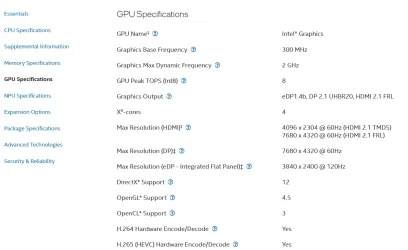
As a test, does the CPU support graphics? If so, remove the GPU and see if the CPU graphics fire the system up. Otherwise, do you have another GPU that you can test your system with?
 

My Computer

System One

  • OS
    Windows 11 Pro 25H2 26200 current release
    Computer type
    PC/Desktop
    Manufacturer/Model
    Home DIY
    CPU
    i7 11700KF
    Motherboard
    Gigabyte Z590 Aorus Elite AX
    Memory
    32g DDR4 @3200
    Graphics Card(s)
    Gigabyte RTX3060ti
    Sound Card
    0
    Monitor(s) Displays
    Samsung Syncmaster B2430HD
    Screen Resolution
    1920 x 1080
    Hard Drives
    Samsung EVO 980 500G M.2
    PSU
    600w EVGA
    Case
    Antec P280
    Cooling
    Coolmaster V6 GT
    Keyboard
    Logitech wireless K520r
    Mouse
    Logitech wirless M705
    Internet Speed
    Starlink 100mbps
    Browser
    Google
    Antivirus
    ESET
    Other Info
    Starlink

My Computers

System One System Two

  • OS
    Win 11 Pro 25H2 26200.8524
    Computer type
    PC/Desktop
    Manufacturer/Model
    Self Built
    CPU
    Intel® Core™ i7-14700K
    Motherboard
    ASUS TUF Z690-PLUS WIFI BIOS 4505 11/29/25
    Memory
    G.SKILL Ripjaws S5 Series 64GB (2 x 32GB) DDR5
    Graphics Card(s)
    ASUS GeForce RTX 4070 Super 12GB
    Sound Card
    Sound Blaster AE-5 Plus
    Monitor(s) Displays
    ASUS TUF Gaming 27" 2K HDR Gaming
    Screen Resolution
    2560 x 1440
    Hard Drives
    Samsung 990 Pro 1TB NVMe (Win 11 25H2)
    SK hynix P41 500GB NVMe 25H2 DEV/Games
    SK hynix P41 2TB NVMe (x3)
    Crucial P3 Plus 4TB
    PSU
    Corsair RM850x Shift
    Case
    Antec Dark Phantom DP502 FLUX
    Cooling
    Corsair Nautilus 360 RS AIO
    Keyboard
    Logitech MK 320
    Mouse
    Razer Basilisk V3
    Internet Speed
    350Mbs
    Browser
    Firefox
    Antivirus
    Winows Security
    Other Info
    MR 8.1 Home

    System 3 Specs
    Win 11 Pro 25H2 26200.8524
    ASUS PRIME Z370-P II BIOS 3004 7/12/21
    Intel Core i7-8700 CPU @ 3.20GHz
    32GB DDR4 RAM (4x8)
    iGPU Intel UHD Graphics 630
  • Operating System
    Win 11 Pro 25H2 26200.8524
    Computer type
    PC/Desktop
    Manufacturer/Model
    Self Built
    CPU
    Intel Core i7-11700F
    Motherboard
    Asus TUF Gaming Z590 Plus WiFi (BIOS 2803)
    Memory
    64 GB DDR4
    Graphics card(s)
    MSI GeForce RTX 3060 Ventus 2X 12GB
    Sound Card
    SoundBlaster Audigy Fx V2
    Monitor(s) Displays
    Samsung F27T350
    Screen Resolution
    1920x1080
    Hard Drives
    Samsung 980 Pro 1TB
    Samsung 970 EVO Plus 2TB
    Samsung 870 EVO 500GB SSD
    PSU
    Corsair HX750
    Case
    Cougar MX330-G Window
    Cooling
    Thermalright Frozen Edge 240 Black AIO
    Internet Speed
    350Mbps
    Browser
    Firefox
    Antivirus
    Windows Security
You think the graphics card could cause the message to come up (did not think of that). The message said something like - there was a unexpected error but it thinks it can fix with update. Told me to connect ethernet cable (But It is already plugged in) and click next. Or click wifi. There was only 2 options click. Next or wifi and I tried both of them a couple times and every time about 5mins later goes back to same screen. I have some other video cards somewhere but there juke compared to the one in that computer. I thought about doing that when I could not get the monitor to work with the computer. I can try the video card out of this computer. But first I am going to try to boot it up from the win cd again maybe I will get lucky.
 

My Computer

System One

  • OS
    windows
    Computer type
    PC/Desktop
    CPU
    Intel Core Ultra 7 Desktop Processor 265K - 20 cores (8
    Motherboard
    ASUS ROG Maximus Z890 Hero Intel® Z890 LGA 1851 ATX Motherboard
    Memory
    Crucial Pro DDR5 RAM 64GB Kit (2x32GB) 6400MHz CL40
    Graphics Card(s)
    NVIDIA GeForce 9500 GT
    Monitor(s) Displays
    Samsung Odyssey Neo G7
    Hard Drives
    V-NAND SSD 860 PRO 512GB
    PSU
    ASUS ROG Strix 1000W Platinum
    Cooling
    ASUS ROG Ryujin III 240 ARGB All-in-one Liquid CPU Cooler
    Keyboard
    Logitech
    Mouse
    Logitech
    Browser
    Opera, Edge
    Antivirus
    Windows Defender
    Other Info
    HL-DT-ST DVDRAM GH60N, ATAPI iHAS124 F
did you try?: go to control panel hardware, devices, find video driver, or graphics card, remove monitor, uninstall. reboot, let it install the stock video drivers and monitor drivers, take it from there.
 

My Computer

System One

  • OS
    Win11
    Computer type
    PC/Desktop
    Manufacturer/Model
    Asus Home built
    CPU
    i9-13900
    Motherboard
    ASUS Strix Z790-H
    Memory
    64 GB
    Graphics Card(s)
    Nvidia RTX 5070 TI OC
    Monitor(s) Displays
    Sony 55"
    Hard Drives
    SSD
    PSU
    850 watt EVGA
    Case
    Cooler Master Haf 932
    Cooling
    CoolerMaster
    Keyboard
    RedDragon
    Mouse
    CoolerMaster
    Internet Speed
    300/300
    Antivirus
    Defender
    Other Info
    VR, Virtual Reality
No big AI fan but here is what it says, basically not a good combination: Video Issue
 

My Computer

System One

  • OS
    11 Pro 25H2
    Computer type
    Laptop
    Manufacturer/Model
    MSI
    CPU
    i7-10750H
    Motherboard
    MSI MS-17F5
    Memory
    16GB Samsung DDR4 3200
    Graphics Card(s)
    Intel + Nvidia RTX3060 Laptop
    Sound Card
    Realtek
    Monitor(s) Displays
    Samsung 24" Curved (HDMI)
    Screen Resolution
    1920x1080
    Hard Drives
    Sabrent Rocket Gen3 1Tb Smasung EVO 870 1TB
    Antivirus
    Bitdefender
Thanks for your response I cant go in to control panel because there is no windows installed. Anyways I finally got it to work (it worked last night). So I got windows installed & whatnot. But then I went to type and the keyboard would not work, had to use the windows keyboard to type. I check all the settings and they looked good all drivers up to date. I restarted and keyboard worked fine to enter log in password but once windows started no keyboard. Going to hook up computer and see whats up. I appreciate you guys helping me out. Thanks
 

My Computer

System One

  • OS
    windows
    Computer type
    PC/Desktop
    CPU
    Intel Core Ultra 7 Desktop Processor 265K - 20 cores (8
    Motherboard
    ASUS ROG Maximus Z890 Hero Intel® Z890 LGA 1851 ATX Motherboard
    Memory
    Crucial Pro DDR5 RAM 64GB Kit (2x32GB) 6400MHz CL40
    Graphics Card(s)
    NVIDIA GeForce 9500 GT
    Monitor(s) Displays
    Samsung Odyssey Neo G7
    Hard Drives
    V-NAND SSD 860 PRO 512GB
    PSU
    ASUS ROG Strix 1000W Platinum
    Cooling
    ASUS ROG Ryujin III 240 ARGB All-in-one Liquid CPU Cooler
    Keyboard
    Logitech
    Mouse
    Logitech
    Browser
    Opera, Edge
    Antivirus
    Windows Defender
    Other Info
    HL-DT-ST DVDRAM GH60N, ATAPI iHAS124 F
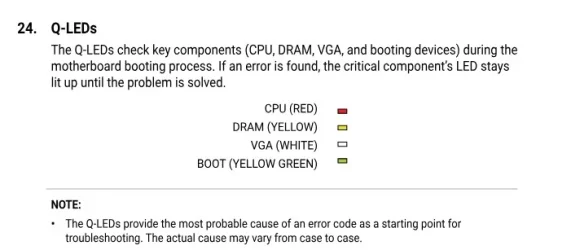
I think I had that issue once, I had a choice of cable from PC to monitor, and tired a different type of cable, to get it going. I think it when I went to a different video card. If I could remember more i would post.
 

My Computer

System One

  • OS
    Win11
    Computer type
    PC/Desktop
    Manufacturer/Model
    Asus Home built
    CPU
    i9-13900
    Motherboard
    ASUS Strix Z790-H
    Memory
    64 GB
    Graphics Card(s)
    Nvidia RTX 5070 TI OC
    Monitor(s) Displays
    Sony 55"
    Hard Drives
    SSD
    PSU
    850 watt EVGA
    Case
    Cooler Master Haf 932
    Cooling
    CoolerMaster
    Keyboard
    RedDragon
    Mouse
    CoolerMaster
    Internet Speed
    300/300
    Antivirus
    Defender
    Other Info
    VR, Virtual Reality

Latest Support Threads

Back
Top Bottom