can not update to preview 26100


elite5211

Member
Local time
2:04 AM
Posts
1
OS
windows 11 preview build 23h
I am getting the problem on the second boot, the system shells out and the reverts back to install the last windows preview build beta.

I then get an erro telling me it some type of driver. all Driver are uptodate. This is a Asus k712ea laptop i5 11th gen . its install window with no probelme from the windows creator tool. also if i try to burn the iso with rufus 4.5 i get the blue screen of death . with a generic Error code OxC00000a what is this error?


all
 

My Computer My Computer

At a glance

windows 11 preview build 23hi5 11th gen24on board
OS
windows 11 preview build 23h
Computer type
Laptop
Manufacturer/Model
Asus k712ea
CPU
i5 11th gen
Motherboard
Asus
Memory
24
Graphics Card(s)
on board
Sound Card
on board real tech
Monitor(s) Displays
asus external monitor laptop monitor is from asus
Hard Drives
samsung 2tb ssd 980
Welcome to the forum. Thank you for filling out your system specs. It's very helpful.
You say "some kind of driver" is mentioned. Exactly what driver is it showing faulty? If you can provide it we might can tell you what it is for.

I also suggest you make sure you have no corrupt system files that is causing this problem. Open a command prompt as administrator and type sfc /scannow
Pay attention to the scan results to see if SFC found anything it could not repair. If it found corruption it could not fix followup with this command (note the spaces)
dism /online /cleanup-image /restorehealth
Restart computer

(Note-you can follow up with another sfc /scannow command to make sure that dism repaired the files)

f i try to burn the iso with rufus 4.5 i get the blue screen of death . with a generic Error code OxC00000a what is this error?
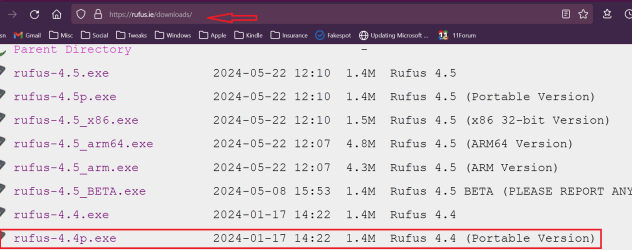
Have you downloaded a fresh copy of Rufus? I always us the portable version of Rufus rather than the installable version to make my installation media. I am currently using version 4.4. (see screenshot) If you get another bsod using it, I suggest you make a post in the BSOD section of the forum. There are instructions there how to gather and provide the logfiles that are needed for analysis.
 

Attachments

  • Screenshot 2024-05-28 032724.png
    Screenshot 2024-05-28 032724.png
    52.9 KB · Views: 0

My Computers My Computers

  • At a glance

    Windows 11 Pro 25H2 26200.9457i9-10900 10 core 20 threads32 gbnone-Intel UHD Graphics 630
    OS
    Windows 11 Pro 25H2 26200.9457
    Computer type
    PC/Desktop
    Manufacturer/Model
    Dell Optiplex 7080
    CPU
    i9-10900 10 core 20 threads
    Motherboard
    DELL 0J37VM
    Memory
    32 gb
    Graphics Card(s)
    none-Intel UHD Graphics 630
    Sound Card
    Integrated Realtek
    Monitor(s) Displays
    Benq 27
    Screen Resolution
    2560x1440
    Hard Drives
    2x1tb Solidigm m.2 nvme /External drives 512gb Samsung m.2 sata+2tb Kingston m2.nvme
    PSU
    500w
    Case
    MT
    Cooling
    Dell Premium
    Keyboard
    Logitech wired
    Mouse
    Logitech wireless
    Internet Speed
    so slow I'm too embarrassed to tell
    Browser
    #1 Edge #2 Firefox
    Antivirus
    Defender+MWB Premium
  • At a glance

    Windows 11 Pro 24H2 26200.9457AMD Ryzen 7 6800U32 gbintegrated
    Operating System
    Windows 11 Pro 24H2 26200.9457
    Computer type
    PC/Desktop
    Manufacturer/Model
    Beelink Mini PC SER5
    CPU
    AMD Ryzen 7 6800U
    Memory
    32 gb
    Graphics card(s)
    integrated
    Sound Card
    integrated
    Monitor(s) Displays
    Benq 27
    Screen Resolution
    2560x1440
    Hard Drives
    1TB Crucial nvme
    Keyboard
    Logitech wired
    Mouse
    Logitech wireless
    Internet Speed
    still too embarrassed to tell
    Browser
    Firefox
    Antivirus
    Defender
  • System 3 is non compliant Dell 9020 i7-4770/24gb ram Win11 PRO 26200.9457
Back
Top Bottom