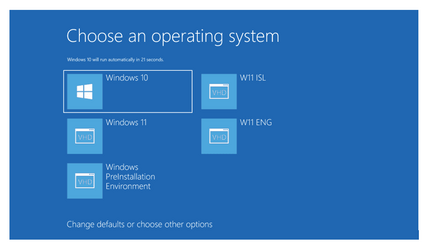
Can we restore main boot menu in PE environment?Can bootable usb be added to main boot menu in PE environment? Answer is YES.

  • Thread starter Thread starter e4rr0o
  • Start date Start date

E

e4rr0o

Guest
I used 4 GB pen drive , format it as NTFS, Mark the partition as ACTIVE.
My pc has Five OS , 3 are of Windows 11, 1 OS of Windows 10, and 1OS of Windows 8.1 pro (all Pro versions)
I run CMD as administrator.
Changed to 4 GB pen drive letter..
c:\windiws\system32>T:
T:>bcdboot c:\windows>system32 /s T: /f ALL
I repeated above command four times again replacing c: with D:, E: , G:, H: one by one.
Boot files successfully added.(each time) Attaching Windows 11 bootable pendrive run Recovery.bat file available in www.tenforum.com Note down drive letter of Windows 11 bootable usb drive.
Type that letter when recovery.bat is run.
Now reboot pc, press any key to boot from 4GB pen drive , you will see the main boot menu with recovery option added. You can boot to any installed OS.
When recovery option is clicked, pc restars, here again press any key to boot from bootable USB pendrive. This time Windows 11 setup runs.
Change winload.efi to winload.exe depending upon MBR or GPT style.
 
Windows Build/Version
Windows 11 21H2 OS Build 22000.978
I used 4 GB pen drive , format it as NTFS, Mark the partition as ACTIVE.
My pc has Five OS , 3 are of Windows 11, 1 OS of Windows 10, and 1OS of Windows 8.1 pro (all Pro versions)
I run CMD as administrator.
Changed to 4 GB pen drive letter..
c:\windiws\system32>T:
T:>bcdboot c:\windows>system32 /s T: /f ALL
I repeated above command four times again replacing c: with D:, E: , G:, H: one by one.
Boot files successfully added.(each time) Attaching Windows 11 bootable pendrive run Recovery.bat file available in www.tenforum.com Note down drive letter of Windows 11 bootable usb drive.
Type that letter when recovery.bat is run.
Now reboot pc, press any key to boot from 4GB pen drive , you will see the main boot menu with recovery option added. You can boot to any installed OS.
When recovery option is clicked, pc restars, here again press any key to boot from bootable USB pendrive. This time Windows 11 setup runs.
Change winload.efi to winload.exe depending upon MBR or GPT style.
Most pcs will not boot from an NTFS formatted usb flash drive.
Most require a fat32 formatted drive.

Also, you only really need to install onr OS, and you can do rest more easily from Windows. Problem in winpe mode drive letters may not be as you expect them to be in Windows.

Easybcd is a great tool for rebuilding a boot menu as it is easy to rename entries, reorder then etc.

Sure you can use bcd commands but when you have 7 boot entries (and some are winpe entries), it can get very tedious.


I find a much easier way of restoring boot menu is to boot from a Macrium Reglect USB flas drive and click 'fix windows boot problems" link, and then tidy up with easybcd.
 

My Computer My Computer

At a glance

Windows 11 Pro + Win11 Canary VM.I9 13th gen i9-13900H 2.60 GHZ16 GB solderedIntegrated Intel Iris XE
OS
Windows 11 Pro + Win11 Canary VM.
Computer type
Laptop
Manufacturer/Model
ASUS Zenbook 14
CPU
I9 13th gen i9-13900H 2.60 GHZ
Motherboard
Yep, Laptop has one.
Memory
16 GB soldered
Graphics Card(s)
Integrated Intel Iris XE
Sound Card
Realtek built in
Monitor(s) Displays
laptop OLED screen
Screen Resolution
2880x1800 touchscreen
Hard Drives
1 TB NVME SSD (only weakness is only one slot)
PSU
Internal + 65W thunderbolt USB4 charger
Case
Yep, got one
Cooling
Stella Artois (UK pint cans - 568 ml) - extra cost.
Keyboard
Built in UK keybd
Mouse
Bluetooth , wireless dongled, wired
Internet Speed
900 mbs (ethernet), wifi 6 typical 350-450 mb/s both up and down
Browser
Edge
Antivirus
Defender
Other Info
TPM 2.0, 2xUSB4 thunderbolt, 1xUsb3 (usb a), 1xUsb-c, hdmi out, 3.5 mm audio out/in combo, ASUS backlit trackpad (inc. switchable number pad)

Macrium Reflect Home V8
Office 365 Family (6 users each 1TB onedrive space)
Hyper-V (a vm runs almost as fast as my older laptop)
Too much "Obfuscation here" by @Ramesh Sharma --- your method won't work on older PC's in any case as they can't boot from an NTFS partition as the previous poster has pointed out.

I have an external SSD drive which I can connect to a PC via a SATA-->USB connector and it shows "Classic" windows boot menu with WINPE as one of the options, Also on "Other options" I can boot Linux, or stand alone GPARTED (partition manager).

multios.png
whether one wants to boot macrium to fix boot problems or simply run the Windows command bcdboot.exe is really a moot point. If you need to boot from an external device into windows 11 you'll need a small fat32 efi partition, then the rest can be an NTFS partition. If you want more than one OS on it create as vhdx filles.

You can boot MBR into Windows 10 if your PC supports MBR (BIOS) booting but if you do it that way you have to go through all the kefuffle of getting to the machines internal BIOS menu. Much easier especially on a laptop to have default as bootable external device before HDD.

@cereberus you know this stuff so just ignore - was directing at the OP. It's of course much easier in general to fix problems from a full windows OS than from a winpe environment.

I also use this method to test install various builds of windows before trying "for real" on the main machine's internal Windows HDD. I also like to have Win 10 around just in case something on W10 works but breaks on W11 or has been removed from W11.

cheers
jimbo
 
Last edited:

My Computer My Computer

At a glance

Windows XP,11 Linux Fedora Rawhide pre-releas...2 X Intel i7
OS
Windows XP,11 Linux Fedora Rawhide pre-release 45
Computer type
PC/Desktop
CPU
2 X Intel i7
Screen Resolution
4KUHD X 2
Most pcs will not boot from an NTFS formatted usb flash drive.
Most require a fat32 formatted drive.

Also, you only really need to install onr OS, and you can do rest more easily from Windows. Problem in winpe mode drive letters may not be as you expect them to be in Windows.

Easybcd is a great tool for rebuilding a boot menu as it is easy to rename entries, reorder then etc.

Sure you can use bcd commands but when you have 7 boot entries (and some are winpe entries), it can get very tedious.


I find a much easier way of restoring boot menu is to boot from a Macrium Reglect USB flas drive and click 'fix windows boot problems" link, and then tidy up with easybcd.
My PC will boot from an NTFS drive, in fact when I re-installed Windows 11 I extracted the ISO files to a partition on my SSD, formatted as NTFS. Booted and installed no problem, took less than 5 minutes
 

My Computer My Computer

At a glance

Windows 11 Pro 25H2 (RP channel)AMD Ryzen 7 9800X3D 8-core64GB Corsair Titanium 6000/CL30MSI Suprim 5080 SOC
OS
Windows 11 Pro 25H2 (RP channel)
Computer type
PC/Desktop
Manufacturer/Model
MSI
CPU
AMD Ryzen 7 9800X3D 8-core
Motherboard
MEG X870E Godlike
Memory
64GB Corsair Titanium 6000/CL30
Graphics Card(s)
MSI Suprim 5080 SOC
Sound Card
Soundblaster AE-9
Monitor(s) Displays
ASUS TUF Gaming VG289Q
Screen Resolution
3840x2160
Hard Drives
Samsung 9100 Pro 4TB (gen 5 x4, system drive/games)
Samsung 990 Pro 2TB
Samsung 980 Pro 2TB
Samsung 870 Evo 4TB
Samsung 870 Evo 2TB
Samsung T9 4TB
PSU
Seasonic PX-2200
Case
Bequiet! Dark Base Pro 901
Cooling
Noctua NH-D15S Chromax black
Keyboard
Logitech G915 X (wired)
Mouse
Logitech G903 with PowerPlay charger
Internet Speed
900Mb/sec
Browser
Microsoft Edge
Antivirus
Windows Defender
Regards everybody.
NTFS may not be compulsory.
I should try on FAT 32.
 
FAT 32 formatted pen drive works as well as NTFS formatted pen drive.
In my post please read the command as T:>bcdboot c\windows /s T: /f ALL
 
Most pcs will not boot from an NTFS formatted usb flash drive.
Most require a fat32 formatted drive.
That is not true at all. If you had stated that most PC's will not boot in UEFI mode from NTFS, that would be correct. However, legacy booting (non-uefi) has always been able to boot from NTFS for decades.
 

My Computers My Computers

  • At a glance

    Windows 11AMD Ryzen 7 3800XT32GBEVGA GeForce GTX 1080 Ti
    OS
    Windows 11
    Computer type
    PC/Desktop
    Manufacturer/Model
    Homebuilt
    CPU
    AMD Ryzen 7 3800XT
    Motherboard
    ASUS ROG Crosshair VII Hero (WiFi)
    Memory
    32GB
    Graphics Card(s)
    EVGA GeForce GTX 1080 Ti
  • At a glance

    Windows 11 EducationIntel i7-8550U32GBNvidia Geforce MX150
    Operating System
    Windows 11 Education
    Computer type
    Laptop
    Manufacturer/Model
    Dell Inspiron 7773
    CPU
    Intel i7-8550U
    Memory
    32GB
    Graphics card(s)
    Nvidia Geforce MX150
    Sound Card
    Realtek
    Monitor(s) Displays
    17"
    Screen Resolution
    1920 x 1080
    Hard Drives
    Toshiba 512GB NVMe SSD
    SK Hynix 512GB SATA SSD
    Internet Speed
    Fast!
Ramesh, I think that I have a procedure all worked out that does what you want, but I need to make sure that I properly understand what you want to do.

Is your goal to be able to boot the image of any one of several OSes from the pendrive?

What I can provide to you: My procedure creates a pendrive with 2 partitions. The first partition is a small FAT32 partition guaranteeing that it will boot on any system. On the second partition you can put an unlimited number of ISO images. At this point, you can run a batch file on the pendrive and it will make any ISO image on the pendrive bootable, showing a menu of available images you can select from.

If you have no access to a system where you have Windows, an added benefit is that the pendrive is already bootable so you can boot it and then select the ISO image you want to make bootable. It will reconfig the pendrive and make your selected image bootable so the next time you boot it will boot the image you selected. When done, you run another batch file and it reverts to the original configuration, all ready to go again.

As an example, I have my pendrive set to allow booting of any of the following:

Windows 10 21H2 (original release)
Windows 10 21H2 with latest updates
Windows 10 21H2 sysprep customized
Windows 11 21H2 (original release)
Windows 11 21H2 with latest updates
Windows 11 21H2 sysprep customized
Windows 11 22H2 (original release)
Windows 11 22H2 with latest updates
Windows 11 22H2 sysprep customized
Windows 11 22H2 with drivers for my desktop preinstalled
Windows 11 22H2 with drivers for my laptop preinstalled
Macrium Reflect Recovery Disk
Veritas System Recovery Boot Disk

If this sounds at all like what you want to accomplish, let me know.
 

My Computers My Computers

  • At a glance

    Win11 Pro 25H2 (RTM+)Intel i7-14650HX32 GBNo GPU - Built-in Intel Graphics
    OS
    Win11 Pro 25H2 (RTM+)
    Computer type
    PC/Desktop
    Manufacturer/Model
    Acemagic
    CPU
    Intel i7-14650HX
    Memory
    32 GB
    Graphics Card(s)
    No GPU - Built-in Intel Graphics
    Sound Card
    Integrated
    Monitor(s) Displays
    Varies as machine will often be moved to locations with different monitors
    Screen Resolution
    Varies
    Hard Drives
    1 x 1TB Gen 4 NVMe SSD
    PSU
    120W Power Brick
    Keyboard
    Corsair K70 Max RGB Magnetic Keyboard
    Mouse
    Logitech MX Master 3
    Internet Speed
    1Gb Up / 1 Gb Down
    Browser
    Edge
    Antivirus
    Windows Defender
  • At a glance

    Win11 Pro 25H2 (RTM+)Intel i7-1255U16 GBIntel Iris Xe Graphics
    Operating System
    Win11 Pro 25H2 (RTM+)
    Computer type
    Laptop
    Manufacturer/Model
    Lenovo ThinkBook 13x Gen 2
    CPU
    Intel i7-1255U
    Memory
    16 GB
    Graphics card(s)
    Intel Iris Xe Graphics
    Sound Card
    Realtek® ALC3306-CG codec
    Monitor(s) Displays
    13.3-inch IPS Display
    Screen Resolution
    WQXGA (2560 x 1600)
    Hard Drives
    2 TB 4 x 4 NVMe SSD
    PSU
    USB-C / Thunderbolt 4 Power / Charging
    Keyboard
    Backlit, spill resistant keyboard
    Mouse
    Buttonless Glass Precision Touchpad
    Internet Speed
    1Gb Up / 1Gb Down
    Browser
    Edge
    Antivirus
    Windows Defender
    Other Info
    WiFi 6e / Bluetooth 5.1 / Facial Recognition / Fingerprint Sensor / ToF (Time of Flight) Human Presence Sensor
Good Morning @hsehestedt .
Genius idea from you.
Thanks for considering me and my thread.I respect you Sir.
Exactly I wanted the same you got it.
A simple windows user should recover boot menu very easily to boot into selected windows os (installed on hard disk). Also one should be able to run Windows 11 bootable setup from this pen drive. One may have to press any key again on restart to run Windows 11 bootable USB. Please change winload.efi to winload.exe in recovery.bat file to boot if partition style is MBR.
Recovery option is to be run from pen drive after booting any Windows from this pen drive, otherwise Recovery option will be added to main menu of hard disk PE environment.
Sir, I request you to post bat file you have created.
My regards to everyone.
 
That is not true at all. If you had stated that most PC's will not boot in UEFI mode from NTFS, that would be correct. However, legacy booting (non-uefi) has always been able to boot from NTFS for decades.
Sure but I have not used legacy bios for years, so was imprecise.
 

My Computer My Computer

At a glance

Windows 11 Pro + Win11 Canary VM.I9 13th gen i9-13900H 2.60 GHZ16 GB solderedIntegrated Intel Iris XE
OS
Windows 11 Pro + Win11 Canary VM.
Computer type
Laptop
Manufacturer/Model
ASUS Zenbook 14
CPU
I9 13th gen i9-13900H 2.60 GHZ
Motherboard
Yep, Laptop has one.
Memory
16 GB soldered
Graphics Card(s)
Integrated Intel Iris XE
Sound Card
Realtek built in
Monitor(s) Displays
laptop OLED screen
Screen Resolution
2880x1800 touchscreen
Hard Drives
1 TB NVME SSD (only weakness is only one slot)
PSU
Internal + 65W thunderbolt USB4 charger
Case
Yep, got one
Cooling
Stella Artois (UK pint cans - 568 ml) - extra cost.
Keyboard
Built in UK keybd
Mouse
Bluetooth , wireless dongled, wired
Internet Speed
900 mbs (ethernet), wifi 6 typical 350-450 mb/s both up and down
Browser
Edge
Antivirus
Defender
Other Info
TPM 2.0, 2xUSB4 thunderbolt, 1xUsb3 (usb a), 1xUsb-c, hdmi out, 3.5 mm audio out/in combo, ASUS backlit trackpad (inc. switchable number pad)

Macrium Reflect Home V8
Office 365 Family (6 users each 1TB onedrive space)
Hyper-V (a vm runs almost as fast as my older laptop)
Hey e4rr0o,

Showing gratitude is important in online communities. Use the "like" button to appreciate helpful content. This motivates people to keep sharing knowledge. A "like" gives 1 point, "Helpful" gives 5 points, and "Great support" gives 10 points for exceptional help.

Back
Top Bottom