
Several months ago, I replaced my old Win11 desktop (S4) with a new Win11 desktop (S5). Recently, I decided to pass the old S5 tower on to a family member. But before passing on, I decided to check it out and ensure everything was OK. Much to my surprise I could not boot the system. I created a Rufus Win11 install thumb drive. I needed to use Rufus because Windows will not install (TPM failure).
I removed the SSD boot drive and attached it to my new Win11 tower (S5). Using HD Sentinel, I noticed that it reported the drive health as 1%. I replaced the SSD drive with a spare. However, before installing the drive in S4,, I attached it via USB port and used Macrium Reflect X to restore the boot drive. After the restore completed (no issues were reported), I installed the SSD in S4 and attempted to boot. The boot failed. I never saw windows attempting to run.
On the S5 system I created a Macrium Restore thumb drive and an Acronis restore thumb drive and a Win11 thumb drive. When I used the Win11 thumb drive on S4, it failed to pass the TMP test. I tried the Macrium restore thumb drive, it failed but did not issue any error. It just seemed run but never started Macrium. When I used the Acronis restore Thumb Drive, it ran and I was able to get use Acronis that was on the Thumb Drive. However, I currently do not have a backup produced by Acronis for the S4 system. BTW, when using the Thumb Drives in S4, during the power on, I could get into the startup Boot Menu and ensure the Thumb Drive was the boot drive. Also, I've plugged the Thumb Drive into a USB 2.0 port on the back of the tower.
I have NOt attempted to use a restore from a backup created on my S5 system. The old S4 has AMD processor and the new tower (S5) has an Intel processor. I have no idea if using a backup from S5 to restore the SSD for S4 will create issues. In the new S5 I have a M.2 SSD and in the old S4 the SSD is a 2.5 inche drive.
Earlier today, I created a Rufus Win11 (I downloaded the lates Win11 from the Microsoft website) Thumb Drive, and installed it in the S4 system, USB 2,0 port on the back of the S4 tower. I powered on the system, went into the BIOS/EUFI menu and changed the boot to utilize the Thumb Drive. Now when I boot I see the following:
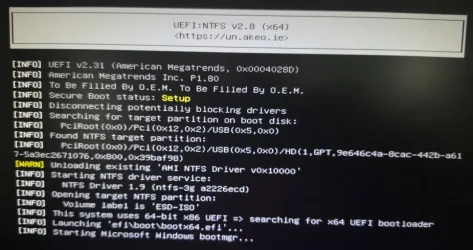
This will be displayed on the monitor for several minutes (I'm guessing 30+ minutes), then the screen will go black for about 3 minutes and again I see the above image.
I've gone beyond my skill level, and now I'm totally lost as to what the heck I should do, nor do I understand what the above image is telling me.
If you have suggestions, please give me instructions at the dummy level.
I removed the SSD boot drive and attached it to my new Win11 tower (S5). Using HD Sentinel, I noticed that it reported the drive health as 1%. I replaced the SSD drive with a spare. However, before installing the drive in S4,, I attached it via USB port and used Macrium Reflect X to restore the boot drive. After the restore completed (no issues were reported), I installed the SSD in S4 and attempted to boot. The boot failed. I never saw windows attempting to run.
On the S5 system I created a Macrium Restore thumb drive and an Acronis restore thumb drive and a Win11 thumb drive. When I used the Win11 thumb drive on S4, it failed to pass the TMP test. I tried the Macrium restore thumb drive, it failed but did not issue any error. It just seemed run but never started Macrium. When I used the Acronis restore Thumb Drive, it ran and I was able to get use Acronis that was on the Thumb Drive. However, I currently do not have a backup produced by Acronis for the S4 system. BTW, when using the Thumb Drives in S4, during the power on, I could get into the startup Boot Menu and ensure the Thumb Drive was the boot drive. Also, I've plugged the Thumb Drive into a USB 2.0 port on the back of the tower.
I have NOt attempted to use a restore from a backup created on my S5 system. The old S4 has AMD processor and the new tower (S5) has an Intel processor. I have no idea if using a backup from S5 to restore the SSD for S4 will create issues. In the new S5 I have a M.2 SSD and in the old S4 the SSD is a 2.5 inche drive.
Earlier today, I created a Rufus Win11 (I downloaded the lates Win11 from the Microsoft website) Thumb Drive, and installed it in the S4 system, USB 2,0 port on the back of the S4 tower. I powered on the system, went into the BIOS/EUFI menu and changed the boot to utilize the Thumb Drive. Now when I boot I see the following:
This will be displayed on the monitor for several minutes (I'm guessing 30+ minutes), then the screen will go black for about 3 minutes and again I see the above image.
I've gone beyond my skill level, and now I'm totally lost as to what the heck I should do, nor do I understand what the above image is telling me.
If you have suggestions, please give me instructions at the dummy level.
- Windows Build/Version
- 25H2
My Computer
At a glance
Windows 11
- OS
- Windows 11






