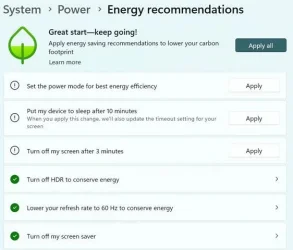
Cannot hide: 'Energy recommendations' Lower your carbon footprint


twelve11

New member
Local time
2:31 PM
Posts
13
OS
Windows 11
OS Name Microsoft Windows 11 Pro
Version 10.0.26100 Build 26100

Hi,

has anyone succeeded in hiding these 'Recommendations'?
I've tried the vivetool notifying me success but the Energy thingy is still present.
c:\vivetool\vivetool /disable /id:39427030
c:\vivetool\vivetool /disable /id:41249924

Unfortunately I cannot find anything 'energy saving' related in the registry.
K640_footprint - Copy.webp
 

My Computer

System One

  • OS
    Windows 11
    Computer type
    PC/Desktop
Don't know how to edit post ... Ah. I see, so it's only a short period one can edit.

I wonder which Windows Update KB...... exactly implemented this nagger.
 

My Computer

System One

  • OS
    Windows 11
    Computer type
    PC/Desktop
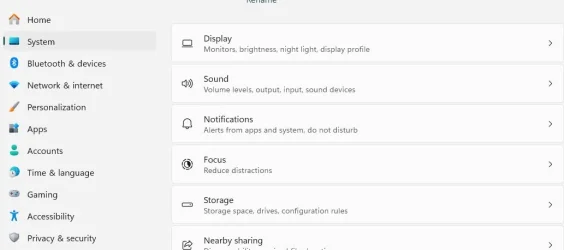
Do you see a nag somewhere other than by going to Settings, System, Power, Energy recommendations?
 

My Computer

System One

  • OS
    Windows 11
    Computer type
    Laptop
 

My Computer

System One

  • OS
    Windows 7
@garlin
Thank you so much for your efforts. I've inserted the code into the terminal notifying success and restarted. The recommendations are still present. Inserted into cmd admin notifying success. Restart. Still present. What did I do wrong?
Code:
reg add "HKLM\SOFTWARE\Microsoft\Windows\CurrentVersion\Policies\Explorer" /v SettingsPageVisibility /t REG_SZ /d "hide:ms-settings:energyrecommendations" /f
Just found something: gpedit: Computer Configuration > Administrative Templates > Control Panel
"Settings Page Visibility" policy. Enabled and Inserted: hide:ms-settings:energyrecommendations. Didn't work. Inserted: hide:energyrecomendations. Results in Power section in settings invisible.
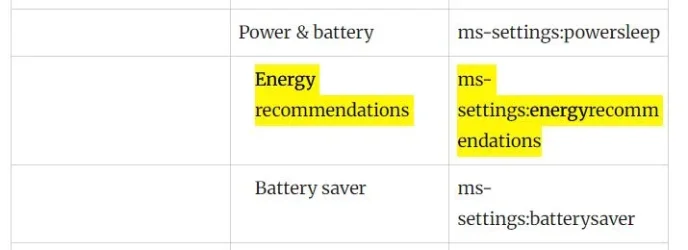
Just found this: Windows 11 ms-settings Commands (Settings URI Shortcuts)
'Hide Pages from Settings' "Power & Battery" in Winaero results in Hiding the Power section without a restart. Just leave settings and click again.
Still searching ...

K640_hide-energy-entry.webp

K640_hide-energy2.webp
 
Last edited:

My Computer

System One

  • OS
    Windows 11
    Computer type
    PC/Desktop
Opening "Run" and inserting "ms-settings:energyrecommendations" show these so-called recommendations directly. But no way to hide indoctrination. I wonder what is the real code word to uncover this setting.
 
Last edited:

My Computer

System One

  • OS
    Windows 11
    Computer type
    PC/Desktop
I think its hard coded. Just live with it.
 

My Computers

System One System Two

  • OS
    Windows 11 Education For 25H2
    Computer type
    Laptop
    Manufacturer/Model
    HP ZBook G2
    CPU
    Intel® Core i7 5500u
    Motherboard
    HP
    Memory
    8 GB
    Graphics Card(s)
    Intel HD Family Graphics 5500 AMD Firepro 4150M
    Sound Card
    Realtek High Audio
    Hard Drives
    1 TB SSD
    Mouse
    HP USB Mouse
    Antivirus
    Windows Defender
  • Operating System
    Windows 11 Pro For Workstations 25H2
    Computer type
    Laptop
    Manufacturer/Model
    HP Zbook G4
    CPU
    Xeon 1535m v6
    Motherboard
    HP
    Memory
    32 GB
    Graphics card(s)
    AMD Quadro Pro 4100
    Sound Card
    Bang and Olufson Audio
    Hard Drives
    1TB SSD
    Mouse
    HP USB Mouse
    Antivirus
    Windows Defender

Latest Support Threads

Back
Top Bottom