Cannot install StartAllBack 3.6.2 only for me at all


Unwired0793

New member
Local time
4:32 PM
Posts
2
OS
Windows 11
I don't like the fact that the taskbar of Windows 11 is not customizable at all so I want to install StartAllBack to replace the taskbar of Windows 11 with that of StartAllBack which is customizable from what I read and understand but only for me and not for all users of this PC.

I ran the setup of StartAllBack 3.6.2 but the option to install StartAllBack 3.6.2 only for me is greyed out and clicking on it does nothing but the option to install StartAllBack 3.6.2 for all users of this PC is not greyed out and clicking on it does install StartAllBack 3.6.2 for all users of this PC but I want to install StartAllBack only for me and not for all users of this PC.
1678648360739.png

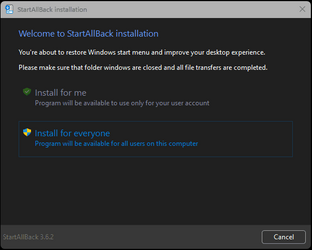
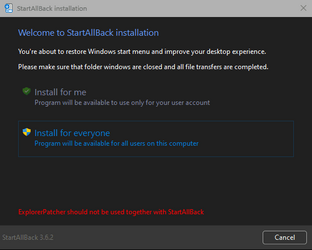
This is what I see when I am running the setup of StartAllBack 3.6.2: "Install for me" is greyed out but not "Install for everyone".

Looks like that I am forced to install StartAllBack for everyone that is not what I want to do at all.

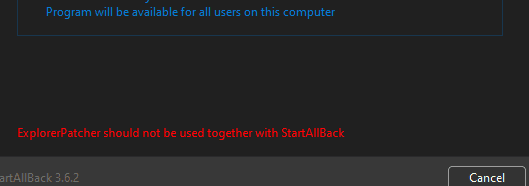
Don't mind the red text "ExplorerPatcher should not be used together with StartAllBack".

I am using ExplorerPatcher temporarily only while StartAllBack is not installed on my PC while this problem persists.

When this problem, that the "Install for me" option is greyed out, will be solved I will uninstall ExplorerPatcher and install StartAllBack only for me.

I am currently using Windows 11 Version 22H2 (OS Build 22621.525)

Why setup doesn't allow me to install StartAllBack only for me at all?
 
Windows Build/Version
Version 22H2 (OS Build 22621.525)

My Computer

System One

  • OS
    Windows 11
1678648641909.png
At the risk of sounding sassy,
This is probably the reason
 

My Computer

System One

  • OS
    Windows 11 | Beta Channel
    Computer type
    Laptop
    Manufacturer/Model
    Lenovo Legion 5
    CPU
    AMD Ryzen 7 5800H
    Motherboard
    Lenovo LNVNB161216
    Memory
    16 GB DDR4
    Graphics Card(s)
    Gefore RTX 3050 Mobile
    Monitor(s) Displays
    60 Hz
    Screen Resolution
    1920*1080
    Keyboard
    Corsair K55 RGB Pro
    Mouse
    Logitech G-502 SE
    Internet Speed
    700 Mb Down | 250 Mb Up
    Browser
    Vivaldi
    Antivirus
    Malware Bytes
View attachment 55062
At the risk of sounding sassy,
This is probably the reason
I uninstalled ExplorerPatcher and now I see this:

1678649288550.png

The red text is gone and the rounded corners are back since the ExplorerPatcher, who removed them, is no longer installed on my PC and the "Install for me" option is annoyingly still greyed out so I wouldn't say that ExplorerPatcher was the problem.
 

My Computer

System One

  • OS
    Windows 11
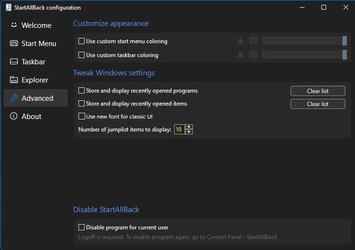
Each user on the computer has the option to disable StartAllBack.

StartAllBack.jpg
 

My Computers

System One System Two

  • OS
    Windows 11 Pro 25H2
    Computer type
    PC/Desktop
    Manufacturer/Model
    PowerSpec B746
    CPU
    Intel Core i7-10700K
    Motherboard
    ASRock Z490 Phantom Gaming 4/ax
    Memory
    16GB (8GB PC4-19200 DDR4 SDRAM x2)
    Graphics Card(s)
    NVIDIA GeForce GTX 1050 TI
    Sound Card
    Realtek Audio
    Monitor(s) Displays
    #1. LG ULTRAWIDE 34" #2. AOC Q32G2WG3 32"
    Screen Resolution
    #1. 3440 X 1440 #2. 1920 x 1080
    Hard Drives
    NVMe WDC WDS100T2B0C-00PXH0 1TB
    Samsung SSD 860 EVO 1TB
    PSU
    750 Watts (62.5A)
    Case
    PowerSpec/Lian Li ATX 205
    Keyboard
    Logitech K270
    Mouse
    Logitech M185
    Browser
    Microsoft Edge and Firefox
    Antivirus
    Webroot SecureAnywhere CE 26.1
  • Operating System
    Windows 11 Canary Channel
    Computer type
    PC/Desktop
    Manufacturer/Model
    PowerSpec G156
    CPU
    Intel Core i5-8400 CPU @ 2.80GHz
    Motherboard
    AsusTeK Prime B360M-A
    Memory
    16 MB DDR 4-2666
    Monitor(s) Displays
    23" Speptre HDMI 75Hz
    Screen Resolution
    1920x1080
    Hard Drives
    Samsung 970 EVO 500GB NVMe
    Keyboard
    Logitek K270
    Mouse
    Logitek M185
    Browser
    Firefox, Edge and Edge Canary
    Antivirus
    Windows Defender
I am currently using Windows 11 Version 22H2 (OS Build 22621.525)

Why setup doesn't allow me to install StartAllBack only for me at all?
Can't help with StartAllBack issue.

However, there are major updates for Windows 11 Build(22621.xxx) cominig our way on the the next 'Patch Tuesday' - 14 March 2023 - and again on 28th March 2023.

I would - MS as well - strongly advise you update to the current publc build (22621.1334) asap
-
February 28, 2023 - KB5022913 (OS Build 22621.1344) - Preview and, later, Public.
 
Last edited:

My Computer

System One

  • OS
    Windows 11 Pro 25H2 (Build 26200.8728)
    Computer type
    PC/Desktop
    Manufacturer/Model
    Dell Pro Max Tower T2 FCT2250
    CPU
    Intel Core Ultra 9 285 5.6 GHz
    Motherboard
    64-bit operating system, x64-based processor
    Memory
    32.00 GB
    Graphics Card(s)
    Intel Integrated Graphics (128 MB)
    Sound Card
    Realtek Audio
    Monitor(s) Displays
    Dell P2714H Monitor
    Screen Resolution
    1920 x 1080
    Hard Drives
    1 x 512GB M.2 XG10d SED KIOXIA PCIe solid state drive (Internal)
    1 x 2TB Seagate ST2000DM008-2UB102 HDD (Internal)
    1 x 1TB Seagate STGX4000400 External HDD
    1 x 4TB Seagate STGX4000400 External HDD
    1 x 6TB WD Elements AE 2689 External HDD
    PSU
    500 Watts
    Cooling
    Air
    Keyboard
    Microsoft Wired Keyboard 600
    Mouse
    Microsoft USB Basic Optical Mouse v2.0
    Browser
    Firefox
    Antivirus
    Windows Defender + Malwarebytes Premium
    Other Info
    BaseBoard Manufacturer Dell Inc.
    BaseBoard Product 022RY57
    BaseBoard Version A01

Latest Support Threads

Back
Top Bottom