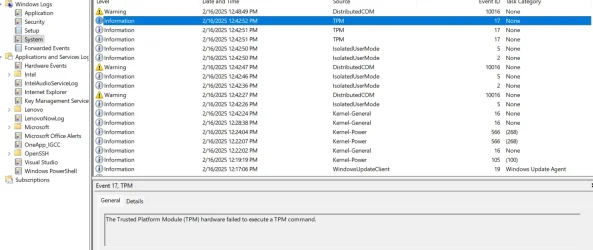
Cannot sign in because - The Trusted Platform Module (TPM) hardware failed to execute a TPM command


JackyChan

New member
Local time
6:41 PM
Posts
2
OS
Windows 11
I am logging into roblox studio and I am getting error cannot sign in . But when I did some deep research and went to event log and saw this The Trusted Platform Module (TPM) hardware failed to execute a TPM command. Seems like TPM is having some issue while logging my credentials. Although sometimes it works like 20% of time but 80% of time it does not.

Plz help
 
Windows Build/Version
11

Attachments

  • Screenshot 2025-02-16 130627.webp
    Screenshot 2025-02-16 130627.webp
    84.5 KB · Views: 1

My Computer My Computer

At a glance

Windows 11
OS
Windows 11
Computer type
Laptop
Manufacturer/Model
Lenovo I5 RTX 3050
If you're experiencing problems with Windows features that rely on TPM, such as BitLocker, clearing the TPM can help reset its state and resolve potential issues.

Clearing the TPM will reset it to factory defaults and remove all stored keys, so make sure to back up any important data before proceeding.

Press Win + R to open the Run dialog, type tpm.msc and hit Enter.

In the Actions pane on the right, click on Clear TPM and select Restart.

After restarting, you’ll see a prompt to confirm clearing the TPM. Follow the instructions to complete the process.
 

My Computer My Computer

At a glance

Windows 11AMD Ryzen 7 5700GMicron Technology DDR4-3200 16GBNVIDIA GeForce RTX 3060
OS
Windows 11
Computer type
PC/Desktop
Manufacturer/Model
HP Pavilion
CPU
AMD Ryzen 7 5700G
Motherboard
Erica6
Memory
Micron Technology DDR4-3200 16GB
Graphics Card(s)
NVIDIA GeForce RTX 3060
Sound Card
Realtek ALC671
Monitor(s) Displays
Samsung SyncMaster U28E590
Screen Resolution
3840 x 2160
Hard Drives
SAMSUNG MZVLQ1T0HALB-000H1
I cleared it but again I am having the same issue and same problem in event viewer log
 

My Computer My Computer

At a glance

Windows 11
OS
Windows 11
Computer type
Laptop
Manufacturer/Model
Lenovo I5 RTX 3050

My Computer My Computer

At a glance

Windows 11AMD Ryzen 7 5700GMicron Technology DDR4-3200 16GBNVIDIA GeForce RTX 3060
OS
Windows 11
Computer type
PC/Desktop
Manufacturer/Model
HP Pavilion
CPU
AMD Ryzen 7 5700G
Motherboard
Erica6
Memory
Micron Technology DDR4-3200 16GB
Graphics Card(s)
NVIDIA GeForce RTX 3060
Sound Card
Realtek ALC671
Monitor(s) Displays
Samsung SyncMaster U28E590
Screen Resolution
3840 x 2160
Hard Drives
SAMSUNG MZVLQ1T0HALB-000H1
This TPM message in the log is just for information. I have 4 Windows 11 PCs at home and all 4 are showing this message repeatedly in the event log, and have been doing for some time now, yet I'm not experiencing any problems with the TPM.

If your logon is failing due to a TPM error, it surely wouldn't show up as an informational message. What is actually stopping you from logging on?
 

My Computers My Computers

  • At a glance

    Windows 11 Home 26H2 RPIntel I3-1010016 GBNvidia GT 1030
    OS
    Windows 11 Home 26H2 RP
    Computer type
    PC/Desktop
    Manufacturer/Model
    Self-build
    CPU
    Intel I3-10100
    Motherboard
    MSI H410M-PRO
    Memory
    16 GB
    Graphics Card(s)
    Nvidia GT 1030
    Sound Card
    Motherboard default
    Monitor(s) Displays
    Philips 27 inch
    Screen Resolution
    1920x1080
    Hard Drives
    Samsung EVO 970 NVMe SSD 256 Gb
    Samsung QVO 870 SATA SSD 2 Tb
    PSU
    ATX 450W
    Keyboard
    Logitech
    Mouse
    Logitech Wireless
    Internet Speed
    930 Mb down / 120 Mb up
    Browser
    Edge
    Antivirus
    Windows Defender
    Other Info
    Microsoft Office 2021 Plus
  • At a glance

    Windows 11 HomeIntel i3-810016 GbNvidia GT 720
    Operating System
    Windows 11 Home
    Computer type
    PC/Desktop
    Manufacturer/Model
    Self-build
    CPU
    Intel i3-8100
    Motherboard
    Gigabyte Z370 D3
    Memory
    16 Gb
    Graphics card(s)
    Nvidia GT 720
    Sound Card
    Motherboard default
    Monitor(s) Displays
    Philips 27-inch
    Screen Resolution
    1920x1080
    Hard Drives
    Samsung 960 NVMe SSD 256 Gb
    Seagate 2 Tb HDD
    PSU
    ATX 450W
    Keyboard
    Microsoft
    Mouse
    Logitech Wireless
    Internet Speed
    930 Mb down / 120 Mb up
    Browser
    Edge
    Antivirus
    Windows Defender
This TPM message in the log is just for information. I have 4 Windows 11 PCs at home and all 4 are showing this message repeatedly in the event log, and have been doing for some time now, yet I'm not experiencing any problems with the TPM.

If your logon is failing due to a TPM error, it surely wouldn't show up as an informational message. What is actually stopping you from logging on?
Yes I get that error in the log every time I open Edge browser but it doesn't prevent me using it or signing in
 

My Computer My Computer

At a glance

Windows 11 Pro 25H2 (RP channel)AMD Ryzen 7 9800X3D 8-core64GB Corsair Titanium 6000/CL30MSI Suprim 5080 SOC
OS
Windows 11 Pro 25H2 (RP channel)
Computer type
PC/Desktop
Manufacturer/Model
MSI
CPU
AMD Ryzen 7 9800X3D 8-core
Motherboard
MEG X870E Godlike
Memory
64GB Corsair Titanium 6000/CL30
Graphics Card(s)
MSI Suprim 5080 SOC
Sound Card
Soundblaster AE-9
Monitor(s) Displays
ASUS TUF Gaming VG289Q
Screen Resolution
3840x2160
Hard Drives
Samsung 9100 Pro 4TB (gen 5 x4, system drive/games)
Samsung 990 Pro 2TB
Samsung 980 Pro 2TB
Samsung 870 Evo 4TB
Samsung 870 Evo 2TB
Samsung T9 4TB
PSU
Seasonic PX-2200
Case
Bequiet! Dark Base Pro 901
Cooling
Noctua NH-D15S Chromax black
Keyboard
Logitech G915 X (wired)
Mouse
Logitech G903 with PowerPlay charger
Internet Speed
900Mb/sec
Browser
Microsoft Edge
Antivirus
Windows Defender
Back
Top Bottom