
- Local time
- 8:37 AM
- Posts
- 42
- OS
- Windows 11 Pro X64 - always current. 25H2
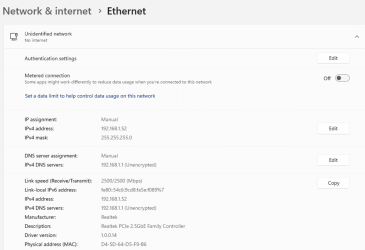
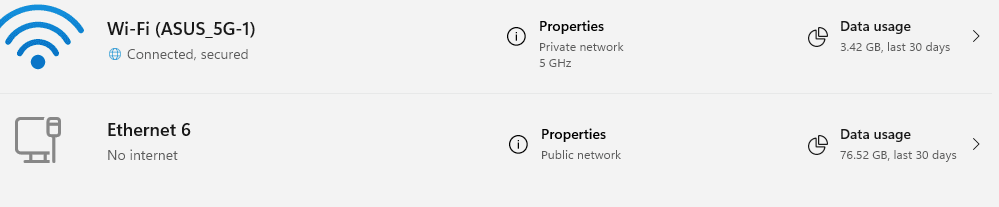
I'm running Windows 11 Pro with the very very latest updates. Just ran them to try to fix this problem. I connect my desktop PC via ethernet to my ASUS router. Been running fine. I moved the PC to another room along with the router. Connected everything back up and now the ethernet is showing it's a PUBLIC network and when I try to change it back to PRIVATE there is no option on the ethernet to change the network profile. I'm posting this via my desktop PC's wifi adapter which is private and connects fine and shows the option to change the network profile. I can't for the life of me find anyway to change the ethernet adapter's profile to private. No option is available in Settings -> Network & internet -> Ethernet
My Computers
-
At a glance
Windows 11 Pro X64 - always current. 25H2AMD Ryzen 9 9950XCORSAIR VENGEANCE RGB DDR5 RAM 96GB (2x48GB) ...NVIDIA GeForce RTX 5080 Founders Edition- OS
- Windows 11 Pro X64 - always current. 25H2
- Computer type
- PC/Desktop
- Manufacturer/Model
- DIY Build
- CPU
- AMD Ryzen 9 9950X
- Motherboard
- ASUS ROG Crosshair X870E Hero AMD X870E AM5 ATX
- Memory
- CORSAIR VENGEANCE RGB DDR5 RAM 96GB (2x48GB) 6000MHz CL30
- Graphics Card(s)
- NVIDIA GeForce RTX 5080 Founders Edition
- Sound Card
- On motherboard
- Monitor(s) Displays
- 2 - NEC PA241W
- Screen Resolution
- 1920X1200
- Hard Drives
- 1 - WD_BLACK 2TB SN850X NVMe Internal Gaming SSD Solid State Drive - Gen4 PCIe, M.2 2280 C:
1 - WD_BLACK 2TB SN850X NVMe Internal Gaming SSD Solid State Drive - Gen4 PCIe, M.2 2280 D:
- PSU
- Corsair HX1000i Fully Modular Ultra-Low Noise ATX
- Case
- Corsair 7000D AirFlow
- Cooling
- Corsair iCUE H150i Elite CAPELLIX XT Liquid CPU Cooler
- Keyboard
- Microsoft Sidewinder
- Mouse
- Logitech
- Internet Speed
- Xfinity - 900mbs
- Browser
- Chrome
- Antivirus
- Windows Defender
-
At a glance
Windows 11 Pro X64 - always current 25H2Intel Core i7 9750H32gb - Kingston DDR4 1333 Mhz Dual channelNVIDIA GeForce RTX 2070 Max Q- Operating System
- Windows 11 Pro X64 - always current 25H2
- Computer type
- Laptop
- Manufacturer/Model
- Maingear Element
- CPU
- Intel Core i7 9750H
- Motherboard
- Intel LAPQC71B
- Memory
- 32gb - Kingston DDR4 1333 Mhz Dual channel
- Graphics card(s)
- NVIDIA GeForce RTX 2070 Max Q
- Sound Card
- On board
- Monitor(s) Displays
- LCD
- Screen Resolution
- 1920x1080
- Hard Drives
- 2tb INTEL SSD PEKNW020T8
- PSU
- On board
- Case
- Laptop
- Cooling
- Fans
- Keyboard
- On Board
- Mouse
- TeckNet
- Internet Speed
- Xfinity 900 mbs
- Browser
- Chrome
- Antivirus
- Windows Defender






