- Local time
- 1:58 PM
- Posts
- 131
- OS
- Win 11
Hello!
I use a TorGuard VPN on one of my PC's.
This, initially, displayed as the Torguard as Public and the local Ethernet as Private in Control Panel. Indeed, on one of my PC's it still does.
But at some stage Windows decided to interfere with this and changed the Torguard to Private in Control Panel.
The problem is that my firewall is setup for the two being Public and Private, so irrespective of what they can be, the Torguard needs to be Public.
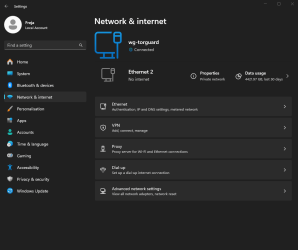
But Windows 11 doesn't offer the chance to change them. Looking in Network Settings, there are no unique properties for Torguard.
If I change the settings on the page I have posted, then it changes the Local Network, not Torguard.
Can anyone shed light on this? Or should I just change my VPN??
I use a TorGuard VPN on one of my PC's.
This, initially, displayed as the Torguard as Public and the local Ethernet as Private in Control Panel. Indeed, on one of my PC's it still does.
But at some stage Windows decided to interfere with this and changed the Torguard to Private in Control Panel.
The problem is that my firewall is setup for the two being Public and Private, so irrespective of what they can be, the Torguard needs to be Public.
But Windows 11 doesn't offer the chance to change them. Looking in Network Settings, there are no unique properties for Torguard.
If I change the settings on the page I have posted, then it changes the Local Network, not Torguard.
Can anyone shed light on this? Or should I just change my VPN??
My Computer
At a glance
Win 111270032gb3070ti
- OS
- Win 11
- Computer type
- PC/Desktop
- CPU
- 12700
- Memory
- 32gb
- Graphics Card(s)
- 3070ti
- Sound Card
- -
- Screen Resolution
- 3840x1600, 2560x1080