Can't copy and paste from my NAS


fmw

Well-known member
Member
Local time
12:04 PM
Posts
77
OS
win 11
New Chinese laptop on ethernet with a Synology NAS. The title explains the issue. I've tried everything I can find on the internet to no avail. When I go to paste on the new computer I get an error message saying that I need admin permission. I am the administrator and the computer won't run file explorer as administrator. I've gone through file ownership, changing the permissions on any file I want to transfer. All of the other computers on the network work normally. I'm about ready to install Linux but that is pretty time consuming. Any ideas?
 

My Computers

System One System Two

  • OS
    win 11
    Computer type
    PC/Desktop
    Manufacturer/Model
    Homebrew
    CPU
    Core i5 10400
    Motherboard
    ASUS B560-Plus
    Memory
    8 GB DDR4
    Graphics Card(s)
    Heatsink cooled ASUS
    Sound Card
    None. Business computer
    Monitor(s) Displays
    ASUS
    Screen Resolution
    1920
    Hard Drives
    1TB WD NVME SSD
    PSU
    Cooler Master 600 watt
    Case
    Cooler Master
    Cooling
    fans
    Keyboard
    ergonomic
    Mouse
    Microsoft
    Internet Speed
    Very slow - satellite internet, nothing else available.
    Browser
    Firefox
    Antivirus
    PC Matic
    Other Info
    5 other computers on our network including Win 11, 10 and Linux.
  • Operating System
    Win 11
    Computer type
    Laptop
    Manufacturer/Model
    Acer Aspire 3
    CPU
    core i5
    Motherboard
    Acer
    Memory
    8GB
    Graphics card(s)
    integral
I get an error message saying that I need admin permission
I think it might help if you posted a picture of the error message.

- I assume you've compared the permissions on the target folder with a similar target folder on one of the the well-behaved computers.
- I assume this error applies to all target folders.
- I assume you've checked Defender [Windows security] Controlled folder access settings.
Enable or Disable Controlled Folder Access for Microsoft Defender Antivirus - ElevenForumTutorials
Add or Remove Protected Folders for Controlled Folder Access - ElevenForumTutorials


Denis
 

My Computer

System One

  • OS
    Windows 11 Home x64 Version 25H2 Build 26200.8037
i think your assumptions are correct. The error message is "You will need to provide administrative permissions to past to this folder."

I did discover that I can paste an app installation file to the desktop and then run it. It works normally. Apparently app installation files have admin privilege.
 

My Computers

System One System Two

  • OS
    win 11
    Computer type
    PC/Desktop
    Manufacturer/Model
    Homebrew
    CPU
    Core i5 10400
    Motherboard
    ASUS B560-Plus
    Memory
    8 GB DDR4
    Graphics Card(s)
    Heatsink cooled ASUS
    Sound Card
    None. Business computer
    Monitor(s) Displays
    ASUS
    Screen Resolution
    1920
    Hard Drives
    1TB WD NVME SSD
    PSU
    Cooler Master 600 watt
    Case
    Cooler Master
    Cooling
    fans
    Keyboard
    ergonomic
    Mouse
    Microsoft
    Internet Speed
    Very slow - satellite internet, nothing else available.
    Browser
    Firefox
    Antivirus
    PC Matic
    Other Info
    5 other computers on our network including Win 11, 10 and Linux.
  • Operating System
    Win 11
    Computer type
    Laptop
    Manufacturer/Model
    Acer Aspire 3
    CPU
    core i5
    Motherboard
    Acer
    Memory
    8GB
    Graphics card(s)
    integral
I'm confused. You first referred to problems copying from somewhere but now you are talking about copying to somewhere.

You also referred to permissions on individual files but didn't mention checking permissions on the folders concerned.
Change Permissions of Files, Folders, Drives, Registry Keys for Users and Groups in Windows 10-11 - TenForumsTutorials

No installation files "have" admin privileges. It's the other way round, you need to grant them admin permission to run otherwise they can't do anything in protected folders such as C:\Program files [some apps only install within your own user account's folders so such app installations do not ask for admin permission to run].

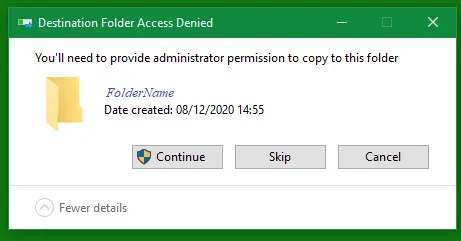
I suppose the dialog you saw was this type -
Admin permission needed to copy to a location.webp
I forced this dialog to appear by attempting to paste into another user's folders.


Denis
 

My Computer

System One

  • OS
    Windows 11 Home x64 Version 25H2 Build 26200.8037
Sorry for any confusion. The "from" is my NAS. The "to" is anywhere on the drive other than the desktop. I can download from the internet, cannot copy and paste from my NAS. I've been using Win 11 since it launched and I have 7 computers on the network. I've never had to deal with any of this. I'll access the link to see if that helps. I appreciate your patience for me.
 

My Computers

System One System Two

  • OS
    win 11
    Computer type
    PC/Desktop
    Manufacturer/Model
    Homebrew
    CPU
    Core i5 10400
    Motherboard
    ASUS B560-Plus
    Memory
    8 GB DDR4
    Graphics Card(s)
    Heatsink cooled ASUS
    Sound Card
    None. Business computer
    Monitor(s) Displays
    ASUS
    Screen Resolution
    1920
    Hard Drives
    1TB WD NVME SSD
    PSU
    Cooler Master 600 watt
    Case
    Cooler Master
    Cooling
    fans
    Keyboard
    ergonomic
    Mouse
    Microsoft
    Internet Speed
    Very slow - satellite internet, nothing else available.
    Browser
    Firefox
    Antivirus
    PC Matic
    Other Info
    5 other computers on our network including Win 11, 10 and Linux.
  • Operating System
    Win 11
    Computer type
    Laptop
    Manufacturer/Model
    Acer Aspire 3
    CPU
    core i5
    Motherboard
    Acer
    Memory
    8GB
    Graphics card(s)
    integral

Latest Support Threads

Back
Top Bottom