- Local time
- 4:00 PM
- Posts
- 113
- OS
- W11
Hi
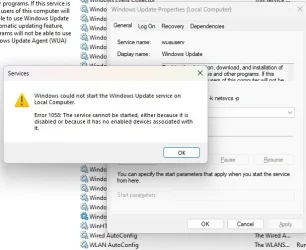
I had disabled win update in the services applet, and when I try to enable it, I get:
I did a search for error 1058, and found this:

 www.kapilarya.com
I am no stranger to the registry, but what gets me is:
------
2. In left pane of Registry Editor window, go to:
Copy
HKEY_LOCAL_MACHINE\SYSTEM\CurrentControlSet\Services\<SERVICE NAME>
*Replace <SERVICE NAME> with actual service name displayed on its property sheet, for example, see screenshot of step 3 in FIX 1.
------
What is the actual service name? Is it wuauserv? And what is "the property sheet"?
Thanks in advance.
I had disabled win update in the services applet, and when I try to enable it, I get:
I did a search for error 1058, and found this:
Fix: Error 1058 The service cannot be started in Windows 10
In this article, learn how to fix if you got error 1058 The service cannot be started in Windows 11/10 system.
www.kapilarya.com
I am no stranger to the registry, but what gets me is:
------
2. In left pane of Registry Editor window, go to:
Copy
HKEY_LOCAL_MACHINE\SYSTEM\CurrentControlSet\Services\<SERVICE NAME>
*Replace <SERVICE NAME> with actual service name displayed on its property sheet, for example, see screenshot of step 3 in FIX 1.
------
What is the actual service name? Is it wuauserv? And what is "the property sheet"?
Thanks in advance.
My Computer
At a glance
W11
- OS
- W11