

wapenshaw
Active member
- Local time
- 12:40 PM
- Posts
- 3
- OS
- Windows 11
----
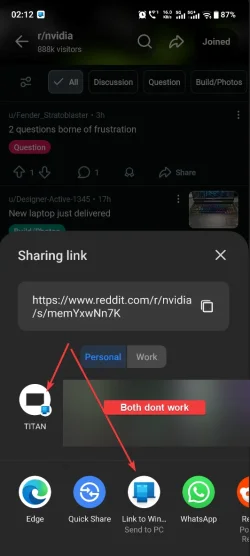
Previously I could share links from various apps using the android share screen and it would open on the default browser on my desktop.
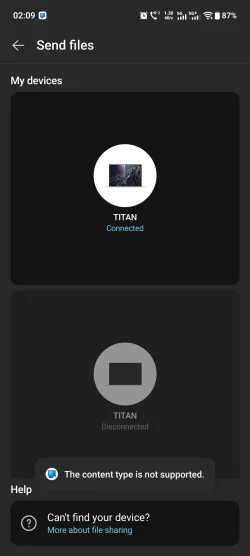
Now whenever I try to share links (from reddit app or edge or anywhere else) using the standard Android "Sharing Link" screen I get this error "The Content Type is not supported"
It was working fine before and I always used to send these links to my desktop/laptop without issue and they were open in my desktop when I got to it.
Windows 11: 25H2 - 26200.7705
Link to Windows android app version: 1.26011.86.0
Phone link Windows App version: 1.25112.36.0
- Windows Build/Version
- 26200.7705
My Computer
At a glance
Windows 11i7 13700K128GB DDR5 - 32x4 @ 5200Gigabyte RTX 5080
- OS
- Windows 11
- Computer type
- PC/Desktop
- Manufacturer/Model
- DIY
- CPU
- i7 13700K
- Motherboard
- MSI MAG Z790 TOMAHAWK WIFI
- Memory
- 128GB DDR5 - 32x4 @ 5200
- Graphics Card(s)
- Gigabyte RTX 5080
- Monitor(s) Displays
- AORUS FO32U2P, LG Ultragear 27GL850-B
- Screen Resolution
- 4K
- PSU
- Corsair HX750
- Case
- Lian Li Lancool 216
- Cooling
- Deepcook AK620
- Keyboard
- XPG Summoner
- Mouse
- G502X
- Internet Speed
- 200Mbps
- Browser
- Edge






