Personalization Change Default New Folder Name in Windows 11

  • Thread starter Thread starter Brink
  • Start date Published: Start date Updated Updated:
  • Tags Tags
    folder

Folder_banner.png

This tutorial will show you how to change the default New folder name template to create new folders with a custom name by default for your account in Windows 10 and Windows 11.

A folder is a location where you can store your files. You can create any number of folders and even store folders inside other folders (subfolders).

When you create a new folder, it is named New folder by default.


If you get a Error 0x8000FFFF: Catastrophic failure when you create a new folder after changing the default "New folder" name template, then it means you used an invalid character (ex: " or * ) in the name, and will just need to change the name again without the invalid character.
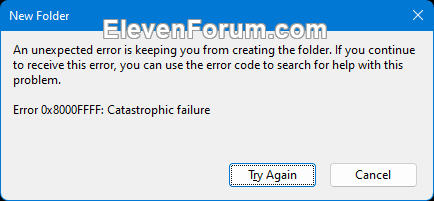
Error_0x8000FFFF.png


Contents


EXAMPLE: New folder

New_Folder.png


OPTION ONE

Change New Folder Name


1 Open Registry Editor (regedit.exe).

2 Navigate to the key below in the left pane of Registry Editor. (see screenshot below)

If you do not have a NamingTemplates key, right click on the Explorer key, click/tap on New, click/tap on Key, type NamingTemplates for the name, and press Enter.


HKEY_CURRENT_USER\SOFTWARE\Microsoft\Windows\CurrentVersion\Explorer\NamingTemplates​

New_Folder_name_regedit-1.png

3 In the right pane of the NamingTemplates key, double click/tap on the RenameNameTemplate string value (REG_SZ) to modify it. (see screenshot above)

If you do not have a RenameNameTemplate string value (REG_SZ) in the right pane of the NamingTemplates key, right click on empty space in the right pane of the NamingTemplates key, click/tap on New, click/tap on String Value, type RenameNameTemplate for the name, and press Enter.


4 Type a name (ex: Folder) you want used by default whenever you create a "New folder", and click/tap on OK. (see screenshot below)

New_Folder_name_regedit-2.png

5 You can now close Registry Editor if you like.


OPTION TWO

Restore Default New Folder Name


1 Open Registry Editor (regedit.exe).

2 Navigate to the key below in the left pane of Registry Editor. (see screenshot below step 3)

HKEY_CURRENT_USER\SOFTWARE\Microsoft\Windows\CurrentVersion\Explorer\NamingTemplates​

3 In the right pane of the NamingTemplates key, right click or press and hold on the RenameNameTemplate string value (REG_SZ), and click/tap on Delete. (see screenshot below)

New_Folder_name_regedit-3.png

4 Click/tap on Yes to confirm. (see screenshot below)

New_Folder_name_regedit-4.png

5 You can now close Registry Editor if you like.


That's it,
Shawn Brink


Last edited:
Can someone create a .BAT file that store in NamingTemplates value of today date in format YYYY-MM-DD like 2021-11-28 ?

Then we can create a shorcut for this BAT file a put it into Windows Startup folder. And every time/day have a fresh new default folder name. ;)Thanks.
 

My Computer My Computer

At a glance

Windows 11 21H2Ryzen 54GBGeForce
OS
Windows 11 21H2
Computer type
PC/Desktop
Manufacturer/Model
AMD
CPU
Ryzen 5
Motherboard
Asus
Memory
4GB
Graphics Card(s)
GeForce
Monitor(s) Displays
DELL
Keyboard
MS
Can someone create a .BAT file that store in NamingTemplates value of today date in format YYYY-MM-DD like 2021-11-28 ?
Create the given bat file. Place it in the autorun or create a shortcut for autorun.
The format of the date output will depend on your short date settings. Change the format to your desired one. Attached is the file.
 

Attachments

My Computer My Computer

At a glance

Windows 11 Stable, Beta, Dev, CanaryAMD Ryzen 9 PRO 5950X128 GbIntel(R) Arc(TM) A380 Graphics (2 ГБ)
OS
Windows 11 Stable, Beta, Dev, Canary
Computer type
PC/Desktop
Manufacturer/Model
Micro-Star International Co., Ltd. MS-7D54
CPU
AMD Ryzen 9 PRO 5950X
Motherboard
MSI MAG X570S Tomahawk Max WiFi (MS-7D54) (2 PCI-E x1, 2 PCI-E x16, 2 M.2, 4 DDR4 DIMM, Audio, Video, 2.5GbE LAN, WiFi)
Memory
128 Gb
Graphics Card(s)
Intel(R) Arc(TM) A380 Graphics (2 ГБ)
Sound Card
Устройство с поддержкой High Definition Audio
Monitor(s) Displays
HP X34 [34" LCD] (6CM1300J5J) {2021}
Screen Resolution
3440x1440
Hard Drives
KINGSTON SFYRD2000G (2000 ГБ, PCI-E 4.0 x4)
PSU
Be Quiet! Dark Rock Pro 4
Case
Cooler Master HAF XB EVO
Internet Speed
1000 Mb/s
Browser
Chrome
Antivirus
Windows Defender
Create the given bat file. Place it in the autorun or create a shortcut for autorun.
The format of the date output will depend on your short date settings. Change the format to your desired one. Attached is the file.
Sorry for the stupid question but what is the code for day, month or year? ( If there is any! )
I tried searching but they didn't work ( Maybe I made a mistake )

My time format is MM/DD/YYYY and it doesn't work properly ( you can't have / in folder's name)
I just want to use this: New Folder [MM.DD.YYYY] or maybe New Folder [MM-DD-YYYY]
Is this possible?
 

My Computer My Computer

At a glance

Windows 11 ProIntel Core i9 9900KCorsair Vengeance RGB Pro 32GB [ 4 x 8GB ] DD...Zotac GeForce RTX 4070 Super Trinity
OS
Windows 11 Pro
Computer type
PC/Desktop
Manufacturer/Model
Custom
CPU
Intel Core i9 9900K
Motherboard
MSI MPG Z390 Gaming Pro Carbon AC
Memory
Corsair Vengeance RGB Pro 32GB [ 4 x 8GB ] DDR4 3600MHz CL18
Graphics Card(s)
Zotac GeForce RTX 4070 Super Trinity
Monitor(s) Displays
Samsung Odyssey G7 , 32" , 2560x1440 , VA , 240Hz , 1ms
Screen Resolution
QHD 2560x1440
Hard Drives
SSD: Samsung 980 Pro 250GB
HDD: 2x Western Digital Blue 4TB
PSU
MSI MPG A1000G PCIE5
Case
Cooler Master MasterCase H500P Mesh ARGB
Cooling
DeepCool Gammaxx L360 v2
Keyboard
Corsair K95 RGB Platinum ( MX Speed ) [ SteelSeries PrismCaps ]
Mouse
Corsair Dark Core RGB Pro SE
Internet Speed
16 Mb/s ‌ ‌ | ‌ ‌ 1 Mb/s
Browser
Microsoft Edge
Antivirus
Windows Security
I just want to use this: New Folder [MM.DD.YYYY] or maybe New Folder [MM-DD-YYYY]
Is this possible?
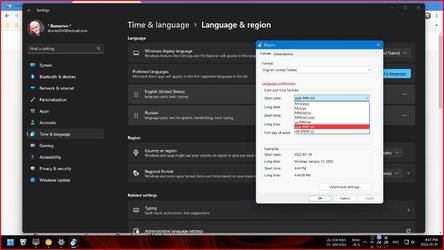
Yes. You can. Choose a short date like in the screenshot, but without the "/". Change my bat file as in the second screenshot.
 

Attachments

  • Short Date.jpg
    Short Date.jpg
    145.8 KB · Views: 221
  • Bat File.jpg
    Bat File.jpg
    27.5 KB · Views: 229

My Computer My Computer

At a glance

Windows 11 Stable, Beta, Dev, CanaryAMD Ryzen 9 PRO 5950X128 GbIntel(R) Arc(TM) A380 Graphics (2 ГБ)
OS
Windows 11 Stable, Beta, Dev, Canary
Computer type
PC/Desktop
Manufacturer/Model
Micro-Star International Co., Ltd. MS-7D54
CPU
AMD Ryzen 9 PRO 5950X
Motherboard
MSI MAG X570S Tomahawk Max WiFi (MS-7D54) (2 PCI-E x1, 2 PCI-E x16, 2 M.2, 4 DDR4 DIMM, Audio, Video, 2.5GbE LAN, WiFi)
Memory
128 Gb
Graphics Card(s)
Intel(R) Arc(TM) A380 Graphics (2 ГБ)
Sound Card
Устройство с поддержкой High Definition Audio
Monitor(s) Displays
HP X34 [34" LCD] (6CM1300J5J) {2021}
Screen Resolution
3440x1440
Hard Drives
KINGSTON SFYRD2000G (2000 ГБ, PCI-E 4.0 x4)
PSU
Be Quiet! Dark Rock Pro 4
Case
Cooler Master HAF XB EVO
Internet Speed
1000 Mb/s
Browser
Chrome
Antivirus
Windows Defender
Yes. You can. Choose a short date like in the screenshot, but without the "/". Change my bat file as in the second screenshot.
Is there a way to do it without changing the system format?
 

My Computer My Computer

At a glance

Windows 11 ProIntel Core i9 9900KCorsair Vengeance RGB Pro 32GB [ 4 x 8GB ] DD...Zotac GeForce RTX 4070 Super Trinity
OS
Windows 11 Pro
Computer type
PC/Desktop
Manufacturer/Model
Custom
CPU
Intel Core i9 9900K
Motherboard
MSI MPG Z390 Gaming Pro Carbon AC
Memory
Corsair Vengeance RGB Pro 32GB [ 4 x 8GB ] DDR4 3600MHz CL18
Graphics Card(s)
Zotac GeForce RTX 4070 Super Trinity
Monitor(s) Displays
Samsung Odyssey G7 , 32" , 2560x1440 , VA , 240Hz , 1ms
Screen Resolution
QHD 2560x1440
Hard Drives
SSD: Samsung 980 Pro 250GB
HDD: 2x Western Digital Blue 4TB
PSU
MSI MPG A1000G PCIE5
Case
Cooler Master MasterCase H500P Mesh ARGB
Cooling
DeepCool Gammaxx L360 v2
Keyboard
Corsair K95 RGB Platinum ( MX Speed ) [ SteelSeries PrismCaps ]
Mouse
Corsair Dark Core RGB Pro SE
Internet Speed
16 Mb/s ‌ ‌ | ‌ ‌ 1 Mb/s
Browser
Microsoft Edge
Antivirus
Windows Security

My Computer My Computer

At a glance

Windows 11 Stable, Beta, Dev, CanaryAMD Ryzen 9 PRO 5950X128 GbIntel(R) Arc(TM) A380 Graphics (2 ГБ)
OS
Windows 11 Stable, Beta, Dev, Canary
Computer type
PC/Desktop
Manufacturer/Model
Micro-Star International Co., Ltd. MS-7D54
CPU
AMD Ryzen 9 PRO 5950X
Motherboard
MSI MAG X570S Tomahawk Max WiFi (MS-7D54) (2 PCI-E x1, 2 PCI-E x16, 2 M.2, 4 DDR4 DIMM, Audio, Video, 2.5GbE LAN, WiFi)
Memory
128 Gb
Graphics Card(s)
Intel(R) Arc(TM) A380 Graphics (2 ГБ)
Sound Card
Устройство с поддержкой High Definition Audio
Monitor(s) Displays
HP X34 [34" LCD] (6CM1300J5J) {2021}
Screen Resolution
3440x1440
Hard Drives
KINGSTON SFYRD2000G (2000 ГБ, PCI-E 4.0 x4)
PSU
Be Quiet! Dark Rock Pro 4
Case
Cooler Master HAF XB EVO
Internet Speed
1000 Mb/s
Browser
Chrome
Antivirus
Windows Defender
I believe this is the complaint perhaps? The registry key cannot contain a dynamic value like date

1643665205894.png


Echoing the %date% on a US English system returns slashes that are invalid on a Windows system.

1643663842638.png


You could use a more advanced batch file to create a date and time if wanted. But you'd still need to call that batch file every time before you created a new folder. Using F2 and renaming the folder would be just as easy unless you were wanting to create folders based on date.

It may take a little getting used to but I'd recommend creating folders based on YYYY-MM-DD that way they properly sort by date on Windows, Linux, and Mac across many years.

The following batch file will create a new DATE, TIME, SS, MS if that's what you're looking for.

It provides output similar to the following

1643665490927.png


How the Registry looks once the batch has run

1643665821444.png


Code:
@Echo Off
Set /A "Jan=1,Feb=2,Mar=3,Apr=4,May=5,Jun=6,Jul=7,Aug=8,Sep=9,Oct=10,Nov=11,Dec=12"
Set /A "Mon=1,Tue=2,Wed=3,Thu=4,Fri=5,Sat=6,Sun=7"
Type Nul >"%TEMP%\~.ddf"
Makecab /D RptFileName="%TEMP%\~.rpt" /D InfFileName=Nul /F "%TEMP%\~.ddf" >Nul
Set /P "timestamp=" <"%TEMP%\~.rpt"
For /F "tokens=3-9 delims=: " %%a In ("%timestamp%") Do (
Set /A "year=%%g,month=%%b,day=1%%c-100,weekday=%%a"
Set /A "hour=1%%d-100,minute=1%%e-100,second=1%%f-100"
)
Del /Q "%TEMP%\~.*"
Set newdir=%year%-%month%-%day%

@ECHO off
SETLOCAL ENABLEEXTENSIONS
for /f "tokens=1-4 delims=:,.-/ " %%i in ('echo %time%') do (
set 'hh'=%%i
set 'mm'=%%j
set 'ss'=%%k
set 'ff'=%%l)
ENDLOCAL & SET v_Hour=%'hh'%& SET v_Minute=%'mm'%& SET v_Second=%'ss'%& SET v_Fraction=%'ff'%
set timestring=%V_Hour%%V_Minute%%v_Second%.%v_Fraction%
Set newdir=%newdir%_%timestring%

:: remove the double colons to enable the line below to modify the registry

:: reg add "HKEY_CURRENT_USER\Software\Microsoft\Windows\CurrentVersion\Explorer\NamingTemplates" /v RenameNameTemplate /t REG_SZ /d "%newdir%" /f >nul

:: add double colon to stop the pause or remove the pause command in production

pause
:EOF
 

My Computer My Computer

At a glance

Windows 11 Pro build 25H2 x64Intel i9-13900K64GBNvidia GeForce RTX-3090 Ti
OS
Windows 11 Pro build 25H2 x64
Computer type
PC/Desktop
Manufacturer/Model
ASUS Custom build
CPU
Intel i9-13900K
Motherboard
Asus ROG STRIX Z790 E GAMING WIFI 11
Memory
64GB
Graphics Card(s)
Nvidia GeForce RTX-3090 Ti
Internet Speed
1 Gbps
Browser
Firefox
Antivirus
Malwarebytes

Latest Support Threads

Back
Top Bottom