
Personalization Change Default System Font in Windows 11

  • Thread starter Thread starter Brink
  • Start date Published: Start date Updated Updated:
  • Tags Tags
    fonts

text_size_banner.png

This tutorial will show you how to change the default system font for all users in Windows10 and Windows 11.

A font is a graphical representation of text that may include a different typeface, point size, weight, color, or design.

Windows 11 uses the Segoe UI font as the default system font. This font is used for icons, menus, title bar text, File Explorer, and more.


You must be signed in as an administrator to change the default system font.

Changing the default system font will not affect Microsoft Store apps and modern UI items like Settings and Start menu.


Contents


EXAMPLE: Default "Segoe UI" vs changed "Arial Bold" system font in File Explorer

Default_Segoe_UI_font.png
Arial_Bold_font.png


Option One

Change Default System Font


1 Click/tap on the Download button below to download the .reg file below.

Change_default_system_font.reg


2 Save the .reg file to your desktop.

3 Unblock the .reg file.

4 Right click or press and hold on the .reg file, and click/tap on Edit to open it in Notepad.

5 In Notepad, replace ENTER FONT NAME HERE at the bottom with the name of the font (ex: "Arial Bold") you want to have as the default system font. (see screenshots below)

To see available fonts and their names:

A) Open the C:\Windows\Font folder.

B) You can click/tap on a font family (ex: "Arial") to open it and see the individual font names (ex: "Arial Bold") in the family.
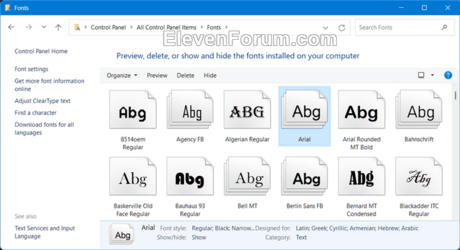
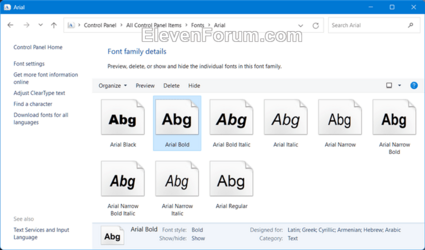
Fonts-1.png Fonts-2.png


Change_default_system_font-1.png
Change_default_system_font-2.png

6 Click/tap on File, and click/tap on Save to save the changes you made to the Change_default_system_font.reg file. (see screenshot below)

Change_default_system_font-3.png

7 Double click/tap on the modified Change_default_system_font.reg file to merge it.

8 When prompted, click/tap on Yes (UAC), Yes, and OK to approve the merge.

9 Restart the computer to apply.


Option Two

Restore Default System Font


1 Click/tap on the Download button below to download the file below.

Restore_default_system_font.reg


(Contents of REG file for reference)
Code:
Windows Registry Editor Version 5.00

[HKEY_LOCAL_MACHINE\SOFTWARE\Microsoft\Windows NT\CurrentVersion\Fonts]
"Segoe MDL2 Assets (TrueType)"="segmdl2.ttf"
"Segoe Print (TrueType)"="segoepr.ttf"
"Segoe Print Bold (TrueType)"="segoeprb.ttf"
"Segoe Script (TrueType)"="segoesc.ttf"
"Segoe Script Bold (TrueType)"="segoescb.ttf"
"Segoe UI (TrueType)"="segoeui.ttf"
"Segoe UI Black (TrueType)"="seguibl.ttf"
"Segoe UI Black Italic (TrueType)"="seguibli.ttf"
"Segoe UI Bold (TrueType)"="segoeuib.ttf"
"Segoe UI Bold Italic (TrueType)"="segoeuiz.ttf"
"Segoe UI Emoji (TrueType)"="seguiemj.ttf"
"Segoe UI Historic (TrueType)"="seguihis.ttf"
"Segoe UI Italic (TrueType)"="segoeuii.ttf"
"Segoe UI Light (TrueType)"="segoeuil.ttf"
"Segoe UI Light Italic (TrueType)"="seguili.ttf"
"Segoe UI Semibold (TrueType)"="seguisb.ttf"
"Segoe UI Semibold Italic (TrueType)"="seguisbi.ttf"
"Segoe UI Semilight (TrueType)"="segoeuisl.ttf"
"Segoe UI Semilight Italic (TrueType)"="seguisli.ttf"
"Segoe UI Symbol (TrueType)"="seguisym.ttf"

[HKEY_LOCAL_MACHINE\SOFTWARE\Microsoft\Windows NT\CurrentVersion\FontSubstitutes]
"Segoe UI"=-

2 Save the .reg file to your desktop.

3 If you have Smart App Control turned on, you will need to unblock the downloaded REG file.

4 Double click/tap on the downloaded .reg file to merge it.

5 When prompted, click/tap on Run, Yes (UAC), Yes, and OK to approve the merge.

6 Restart the computer to apply.

7 You can now delete the downloaded .reg file if you like.


That's it,
Shawn Brink


Attachments

Last edited:
But why is font "Segoe UI Variable" not still the default font?
 

My Computer My Computer

At a glance

Microsoft Windows 11 HomeIntel Core i5-13490F2 x 16 Patriot Memory (PDP Systems) PSD516G56...GIGABYTE GeForce RTX 4070 WINDFORCE OC 12G (G...
OS
Microsoft Windows 11 Home
Computer type
PC/Desktop
Manufacturer/Model
MSI MS-7D98
CPU
Intel Core i5-13490F
Motherboard
MSI B760 GAMING PLUS WIFI
Memory
2 x 16 Patriot Memory (PDP Systems) PSD516G560081 6400MT (32-37-37-74); 1.35V)
Graphics Card(s)
GIGABYTE GeForce RTX 4070 WINDFORCE OC 12G (GV-N4070WF3OC-12GD)
Sound Card
Bluetooth Аудио
Monitor(s) Displays
INNOCN 15K1F
Screen Resolution
1920 x 1080
Hard Drives
WD_BLACK SN770 250GB
KINGSTON SNV2S1000G (ELFK0S.6)
PSU
Thermaltake Toughpower GF3 1000W
Case
CG560 - DeepCool
Cooling
ID-COOLING SE-224-XTS / 2 x 140Mm Fan - rear and top; 3 x 120Mm - front
Keyboard
Corsair K70 RGB TKL
Mouse
Corsair KATAR PRO XT
Internet Speed
100 Mbps
Browser
Firefox
Antivirus
Microsoft Defender Antivirus
Other Info
https://www.userbenchmark.com/UserRun/66553205
Why?

Simple, it's old and worked for 99% of Windows users, we are unable to do in now. What will people think!
 

My Computer My Computer

At a glance

Linux Arch (Windows 11 in a VM)
OS
Linux Arch (Windows 11 in a VM)
Why?

Simple, it's old and worked for 99% of Windows users, we are unable to do in now. What will people think!
Trying to remember, was it Windows 3.0 when we had to install a Font Manager but Windows 3.1 included the feature?
 

My Computers My Computers

  • At a glance

    Win11 Pro RTM Version 24H2 Build 26100.4202Intel Core i5 11th Gen. 2.40GHz12GB
    OS
    Win11 Pro RTM Version 24H2 Build 26100.4202
    Computer type
    Laptop
    Manufacturer/Model
    Dell Vostro 3400
    CPU
    Intel Core i5 11th Gen. 2.40GHz
    Memory
    12GB
    Hard Drives
    256GB SSD NVMe M.2
  • At a glance

    Win11 Pro RTM Version 24H2 Build 26100.4202Intel Core i5 10th Gen. 2.90GHz16GBOnboard, no VGA, using a DisplayPort-to-VGA a...
    Operating System
    Win11 Pro RTM Version 24H2 Build 26100.4202
    Computer type
    PC/Desktop
    Manufacturer/Model
    Dell Vostro 5890
    CPU
    Intel Core i5 10th Gen. 2.90GHz
    Memory
    16GB
    Graphics card(s)
    Onboard, no VGA, using a DisplayPort-to-VGA adapter
    Monitor(s) Displays
    24" Dell
    Hard Drives
    512GB SSD NVMe, 4TB Seagate HDD
    Browser
    Firefox, Edge
    Antivirus
    Windows Defender/Microsoft Security
Thank you so much, Wery wll explained and made easy.
 

My Computer My Computer

At a glance

Windows 11 ProIntel Core i7-12700KCorsair 32GB (2 x 16GB) Vengeance LPX, DDR4 3...Prosessor
OS
Windows 11 Pro
Computer type
PC/Desktop
CPU
Intel Core i7-12700K
Motherboard
PRO Z690-A DDR4 MSI
Memory
Corsair 32GB (2 x 16GB) Vengeance LPX, DDR4 3600MHz
Graphics Card(s)
Prosessor
Screen Resolution
1920x1080
Hard Drives
Kingston 1TB FURY Renegade PCIe 4.0 NVMe M.2 SSD with Heatsink, 3D TLC, 7300/6000 MB/s
Kingston 500GB FURY Renegade PCIe 4.0 NVMe M.2 SSD with Heatsink, 3D TLC, 7300/3900 MB/s
2 x Western Digital 2TB WD_BLACK SN770 NVMe SSD -levy, M.2 2280, PCIe 4.0 x4, 5150/4850 MB/s RAID 1
Hi,

I followed your example but noticed that I can not click in the search fieald in the taskbar anymore. And maybe some other things might not work ? I have a fresh isntalled and up to date Windows 11 64 bit pro. Thanks for you help.
 

My Computer My Computer

At a glance

Windows 11
OS
Windows 11
Hi,

I followed your example but noticed that I can not click in the search fieald in the taskbar anymore. And maybe some other things might not work ? I have a fresh isntalled and up to date Windows 11 64 bit pro. Thanks for you help.

Hello, and welcome. :alien:

It looks like it was from changing the font for "Segoe UI Light (TrueType)" that caused the taskbar search box issue.

I've updated the REG file in option one so it will no longer change this font.

To fix this, use the restore REG file in option two, then you can repeat option one with the new change REG file without getting this issue anymore.
 

My Computers My Computers

  • At a glance

    Windows 11 Pro for WorkstationsIntel i7-8700K 5 GHz64 GB (4x16GB) G.SKILL TridentZ RGB DDR4 3600...ASUS ROG-STRIX-GTX1080TI-O11G-GAMING (11GB GD...
    OS
    Windows 11 Pro for Workstations
    Computer type
    PC/Desktop
    Manufacturer/Model
    Custom self build
    CPU
    Intel i7-8700K 5 GHz
    Motherboard
    ASUS ROG Maximus XI Formula Z390
    Memory
    64 GB (4x16GB) G.SKILL TridentZ RGB DDR4 3600 MHz (F4-3600C18D-32GTZR)
    Graphics Card(s)
    ASUS ROG-STRIX-GTX1080TI-O11G-GAMING (11GB GDDR5X)
    Sound Card
    Integrated Digital Audio (S/PDIF)
    Monitor(s) Displays
    2 x Samsung Odyssey G75 27"
    Screen Resolution
    2560x1440
    Hard Drives
    1TB Samsung 990 PRO M.2,
    4TB Samsung 990 PRO M.2,
    TerraMaster F8 SSD Plus NAS
    PSU
    Seasonic Prime Titanium 850W
    Case
    Thermaltake Core P3 wall mounted
    Cooling
    Corsair Hydro H115i
    Keyboard
    Amazon Basics Wired Full Keyboard MD005
    Mouse
    Logitech MX Master 4
    Internet Speed
    2 Gbps Download and 100 Mbps Upload
    Browser
    Chrome and Edge
    Antivirus
    Microsoft Defender
    Other Info
    Logitech Z625 speaker system,
    Logitech BRIO 4K Pro webcam,
    HP Color LaserJet Pro MFP M477fdn,
    CyberPower CP1500PFCLCD
    Galaxy S23 Plus phone
  • At a glance

    Windows 11 ProSnapdragon X Elite (12 core) 3.42 GHz16 GB LPDDR5x-7467 MHz
    Operating System
    Windows 11 Pro
    Computer type
    Laptop
    Manufacturer/Model
    Surface Laptop 7 Copilot+ PC
    CPU
    Snapdragon X Elite (12 core) 3.42 GHz
    Memory
    16 GB LPDDR5x-7467 MHz
    Monitor(s) Displays
    15" HDR
    Screen Resolution
    2496 x 1664
    Hard Drives
    1 TB SSD
    Internet Speed
    Wi-Fi 7 and Bluetooth 5.4
    Browser
    Chrome and Edge
    Antivirus
    Microsoft Defender
the only thing I find with changing windows font is you have to keep changing it back to what you want after every update. At least for me thats how it works
 

My Computer My Computer

At a glance

Windows 11 Pro Version 23H2(OS Build 22631.4890)12-Core AMD Ryzen 9 5900X, 4950 MHz (49.5 x 100)4 - G Skill Trident Z Neo F4-3600C16-16GTZNCPCI Express 4.0 x16: PowerColor RX 6800
OS
Windows 11 Pro Version 23H2(OS Build 22631.4890)
Computer type
PC/Desktop
Manufacturer/Model
AMD
CPU
12-Core AMD Ryzen 9 5900X, 4950 MHz (49.5 x 100)
Motherboard
Gigabyte X570 Aorus Master
Memory
4 - G Skill Trident Z Neo F4-3600C16-16GTZNC
Graphics Card(s)
PCI Express 4.0 x16: PowerColor RX 6800
Sound Card
Realtek ALC1220 @ AMD K19.2 - High Definition Audio Controller
Monitor(s) Displays
2 - 27 inch Westinghouse
Screen Resolution
1920 x 1080
Hard Drives
2 SSD - 2 TB each
1 SSD - 4TB
1 HDD - 2TB
Keyboard
logitech
Mouse
logitech
Internet Speed
1 GB
Browser
Firefox
Antivirus
Eset Endpoint Security
Thanks Brink,

Working now !
But what a frustrating OS exerience is Windows for a designer like me forced to work on PC just because no Nvidia on Mac :(

Cheers
 

My Computer My Computer

At a glance

Windows 11
OS
Windows 11
Thanks Brink,

Working now !
But what a frustrating OS exerience is Windows for a designer like me forced to work on PC just because no Nvidia on Mac :(

Cheers

Great news.

Yeah, it would be nice for more built-in customization options.
 

My Computers My Computers

  • At a glance

    Windows 11 Pro for WorkstationsIntel i7-8700K 5 GHz64 GB (4x16GB) G.SKILL TridentZ RGB DDR4 3600...ASUS ROG-STRIX-GTX1080TI-O11G-GAMING (11GB GD...
    OS
    Windows 11 Pro for Workstations
    Computer type
    PC/Desktop
    Manufacturer/Model
    Custom self build
    CPU
    Intel i7-8700K 5 GHz
    Motherboard
    ASUS ROG Maximus XI Formula Z390
    Memory
    64 GB (4x16GB) G.SKILL TridentZ RGB DDR4 3600 MHz (F4-3600C18D-32GTZR)
    Graphics Card(s)
    ASUS ROG-STRIX-GTX1080TI-O11G-GAMING (11GB GDDR5X)
    Sound Card
    Integrated Digital Audio (S/PDIF)
    Monitor(s) Displays
    2 x Samsung Odyssey G75 27"
    Screen Resolution
    2560x1440
    Hard Drives
    1TB Samsung 990 PRO M.2,
    4TB Samsung 990 PRO M.2,
    TerraMaster F8 SSD Plus NAS
    PSU
    Seasonic Prime Titanium 850W
    Case
    Thermaltake Core P3 wall mounted
    Cooling
    Corsair Hydro H115i
    Keyboard
    Amazon Basics Wired Full Keyboard MD005
    Mouse
    Logitech MX Master 4
    Internet Speed
    2 Gbps Download and 100 Mbps Upload
    Browser
    Chrome and Edge
    Antivirus
    Microsoft Defender
    Other Info
    Logitech Z625 speaker system,
    Logitech BRIO 4K Pro webcam,
    HP Color LaserJet Pro MFP M477fdn,
    CyberPower CP1500PFCLCD
    Galaxy S23 Plus phone
  • At a glance

    Windows 11 ProSnapdragon X Elite (12 core) 3.42 GHz16 GB LPDDR5x-7467 MHz
    Operating System
    Windows 11 Pro
    Computer type
    Laptop
    Manufacturer/Model
    Surface Laptop 7 Copilot+ PC
    CPU
    Snapdragon X Elite (12 core) 3.42 GHz
    Memory
    16 GB LPDDR5x-7467 MHz
    Monitor(s) Displays
    15" HDR
    Screen Resolution
    2496 x 1664
    Hard Drives
    1 TB SSD
    Internet Speed
    Wi-Fi 7 and Bluetooth 5.4
    Browser
    Chrome and Edge
    Antivirus
    Microsoft Defender
...ooops I found that right click on icon in the taskbar to show the jumplist is not working anymore.
 

My Computer My Computer

At a glance

Windows 11
OS
Windows 11
...ooops I found that right click on icon in the taskbar to show the jumplist is not working anymore.

I'm not seeing that issue using "Arial Bold". Which font did you use so I can test using the same one?
 

My Computers My Computers

  • At a glance

    Windows 11 Pro for WorkstationsIntel i7-8700K 5 GHz64 GB (4x16GB) G.SKILL TridentZ RGB DDR4 3600...ASUS ROG-STRIX-GTX1080TI-O11G-GAMING (11GB GD...
    OS
    Windows 11 Pro for Workstations
    Computer type
    PC/Desktop
    Manufacturer/Model
    Custom self build
    CPU
    Intel i7-8700K 5 GHz
    Motherboard
    ASUS ROG Maximus XI Formula Z390
    Memory
    64 GB (4x16GB) G.SKILL TridentZ RGB DDR4 3600 MHz (F4-3600C18D-32GTZR)
    Graphics Card(s)
    ASUS ROG-STRIX-GTX1080TI-O11G-GAMING (11GB GDDR5X)
    Sound Card
    Integrated Digital Audio (S/PDIF)
    Monitor(s) Displays
    2 x Samsung Odyssey G75 27"
    Screen Resolution
    2560x1440
    Hard Drives
    1TB Samsung 990 PRO M.2,
    4TB Samsung 990 PRO M.2,
    TerraMaster F8 SSD Plus NAS
    PSU
    Seasonic Prime Titanium 850W
    Case
    Thermaltake Core P3 wall mounted
    Cooling
    Corsair Hydro H115i
    Keyboard
    Amazon Basics Wired Full Keyboard MD005
    Mouse
    Logitech MX Master 4
    Internet Speed
    2 Gbps Download and 100 Mbps Upload
    Browser
    Chrome and Edge
    Antivirus
    Microsoft Defender
    Other Info
    Logitech Z625 speaker system,
    Logitech BRIO 4K Pro webcam,
    HP Color LaserJet Pro MFP M477fdn,
    CyberPower CP1500PFCLCD
    Galaxy S23 Plus phone
  • At a glance

    Windows 11 ProSnapdragon X Elite (12 core) 3.42 GHz16 GB LPDDR5x-7467 MHz
    Operating System
    Windows 11 Pro
    Computer type
    Laptop
    Manufacturer/Model
    Surface Laptop 7 Copilot+ PC
    CPU
    Snapdragon X Elite (12 core) 3.42 GHz
    Memory
    16 GB LPDDR5x-7467 MHz
    Monitor(s) Displays
    15" HDR
    Screen Resolution
    2496 x 1664
    Hard Drives
    1 TB SSD
    Internet Speed
    Wi-Fi 7 and Bluetooth 5.4
    Browser
    Chrome and Edge
    Antivirus
    Microsoft Defender
Well I don’t remember because I immediately reset to default. But I think I made a mistake while at the same time I was testing Advanced System Font Changer app. My bad. Now I am fighting Windows adding some keyboard layouts without permission. This OS is a crap definitely!
 

My Computer My Computer

At a glance

Windows 11
OS
Windows 11
Well I don’t remember because I immediately reset to default. But I think I made a mistake while at the same time I was testing Advanced System Font Changer app. My bad. Now I am fighting Windows adding some keyboard layouts without permission. This OS is a crap definitely!

No worries. I hope you get the layouts sorted.
 

My Computers My Computers

  • At a glance

    Windows 11 Pro for WorkstationsIntel i7-8700K 5 GHz64 GB (4x16GB) G.SKILL TridentZ RGB DDR4 3600...ASUS ROG-STRIX-GTX1080TI-O11G-GAMING (11GB GD...
    OS
    Windows 11 Pro for Workstations
    Computer type
    PC/Desktop
    Manufacturer/Model
    Custom self build
    CPU
    Intel i7-8700K 5 GHz
    Motherboard
    ASUS ROG Maximus XI Formula Z390
    Memory
    64 GB (4x16GB) G.SKILL TridentZ RGB DDR4 3600 MHz (F4-3600C18D-32GTZR)
    Graphics Card(s)
    ASUS ROG-STRIX-GTX1080TI-O11G-GAMING (11GB GDDR5X)
    Sound Card
    Integrated Digital Audio (S/PDIF)
    Monitor(s) Displays
    2 x Samsung Odyssey G75 27"
    Screen Resolution
    2560x1440
    Hard Drives
    1TB Samsung 990 PRO M.2,
    4TB Samsung 990 PRO M.2,
    TerraMaster F8 SSD Plus NAS
    PSU
    Seasonic Prime Titanium 850W
    Case
    Thermaltake Core P3 wall mounted
    Cooling
    Corsair Hydro H115i
    Keyboard
    Amazon Basics Wired Full Keyboard MD005
    Mouse
    Logitech MX Master 4
    Internet Speed
    2 Gbps Download and 100 Mbps Upload
    Browser
    Chrome and Edge
    Antivirus
    Microsoft Defender
    Other Info
    Logitech Z625 speaker system,
    Logitech BRIO 4K Pro webcam,
    HP Color LaserJet Pro MFP M477fdn,
    CyberPower CP1500PFCLCD
    Galaxy S23 Plus phone
  • At a glance

    Windows 11 ProSnapdragon X Elite (12 core) 3.42 GHz16 GB LPDDR5x-7467 MHz
    Operating System
    Windows 11 Pro
    Computer type
    Laptop
    Manufacturer/Model
    Surface Laptop 7 Copilot+ PC
    CPU
    Snapdragon X Elite (12 core) 3.42 GHz
    Memory
    16 GB LPDDR5x-7467 MHz
    Monitor(s) Displays
    15" HDR
    Screen Resolution
    2496 x 1664
    Hard Drives
    1 TB SSD
    Internet Speed
    Wi-Fi 7 and Bluetooth 5.4
    Browser
    Chrome and Edge
    Antivirus
    Microsoft Defender
Hey Brink. I've done the change to the global system font as you specify in the tutorial. I've looked at the relevant keys in regedit & verified that the changes occurred. But large parts of the system still have the old font. My target font is Georgia, a serif font. My Settings dialog, for example, is still showing a non-serif font. On the other hand, my File Explorer does use Georgia so it's not that this completely doesn't work. There are many other anomalies. Most tool bars in apps still show a non-serif font while the insides to the app show the Georgia font. Of course, most apps have a way to control their internal font usage via their own settings dialogs, so it becomes extremely difficult to evaluate just what impact this registry change has had.

I note that there are many other keys in this area of the registry editor that have names that start with Segoe UI but that you have not changed with your .reg registry changer. To be specific, I am attaching a trimmed down export of that part of my registry. I'm wondering if changing any of those would affect more of the system.

While I'm here, I want to ask some newbie questions. I know the things in the right panel of the registry editor are called keys. But I either don't know or don't remember what the other things are called. I'm asking about terminology. Like what is the term for HKEY_LOCAL_MACHINE? And what is the term for HKEY_LOCAL_MACHINE\SOFTWARE\Microsoft\Windows NT\CurrentVersion\Fonts? Are there any other levels of the hierarchy for which there are terms? I have the word "hive" floating around in my memory but I'm not sure what it applies to.
 

Attachments

My Computer My Computer

At a glance

Windows 11 Pro 64-bit 25H2Intel Core i9-13900K4x32G Teamgroup TForce Vulcan DDR5 6000 DIMMsMSI/NVidia GeForce RTX 4070 Gaming X Trio 12G...
OS
Windows 11 Pro 64-bit 25H2
Computer type
PC/Desktop
Manufacturer/Model
Self build
CPU
Intel Core i9-13900K
Motherboard
ASUS Z790-Plus WiFi TUF Gaming
Memory
4x32G Teamgroup TForce Vulcan DDR5 6000 DIMMs
Graphics Card(s)
MSI/NVidia GeForce RTX 4070 Gaming X Trio 12G GDDR6X + built into motherboard Intel UHD Graphics
Sound Card
Built into graphics card + built into motherboard Realtek Audio
Monitor(s) Displays
Two connected to the NVidia adapter - Primary: Dell SE2417HGX 23" diagonal connected via HDMI-to-DisplayPort dongle, Secondary: Toshiba TV 32" diagonal connected via HDMI through Onkyo TX-NR717 surround receiver. Third: Viewsonic VS19151 32" diagonal connected wirelessly via WiFi/Miracast & j5create JVAW56 dongle.
Screen Resolution
1920x1080 on all 3 monitors
Hard Drives
Samsung 970 EVO Plus NVMe M.2 2T
6xSATA-to-USB 3.0 Fideco external enclosures holding SATA drives of various brands & sizes 1x20T, 2x18T, 2x6T, 1x500G, all connected to a multi-port USB hub
For backups: USB 3.0 HDDs of various brands & sizes 3x20T, 1x1T + SSDs of various brands & sizes 2x480G, 1x1T, all connected to another multi-port USB hub, powered on only while actually performing backups & (may it never happen) restores
PSU
MSI MPG A1000G PCIe5 1000W, TrippLite Smart1500TSU 1200W UPS for the main system, TrippLite ECO850LCD 850W UPS for the DASD & my Internet connectivity boxes (no reason to throw out legacy equipment that stil works fine)
Case
Fractal North
Cooling
DeepCool AK620 CPU cooler (air, 2 fans), 2 case fans, 1 fan in PSU, 3 fans in graphics adapter; 4xpersonal cooling fans strategically placed to cool the external HDDs
Keyboard
Cherry MX 11900 USB (wired)
Mouse
Touchpad built into the keyboard
Internet Speed
500Mbps via Spectrum cable TV/cell phone bundle
Browser
Firefox
Antivirus
Built into Windows 11
Other Info
The ethernet adapter integrated into the motherboard died. I am now using a TPLink TX201 ethernet adapter in a PCIe expansion slot for Internet connectivity.
UWP apps like Start Menu, Taskbar, and System Settings will ignore your registry font choices. They're written in a different app framework, unlike the older Win32 apps like Explorer which accept other fonts.
 

My Computer My Computer

At a glance

Windows 7
OS
Windows 7
The acronym to learn today is UWP. Universal Windows Platform. Thank you @garlin for that little addition to my knowledge base.

What you say is no doubt true. I don't claim to have broad knowledge in the internal workings of W11. But if I am interpreting your comment correctly, Microsoft uses different programming environments for different parts of the operating system. This is visible to the user as the sort of font anomaly that I am now resigned to never getting satisfaction with. But that sort of fact should be utterly transparent to the user. The fact that their programming practices preclude certain simple user-level actions is reprehensible. I don't care what improvements in their practices they've managed to achieve. They haven't improved my practices.

Bottom line: never mind. I do appreciate your response @garlin. That never mind is not directed at you. It's an exasperated outburst aimed at Microsoft.
 

My Computer My Computer

At a glance

Windows 11 Pro 64-bit 25H2Intel Core i9-13900K4x32G Teamgroup TForce Vulcan DDR5 6000 DIMMsMSI/NVidia GeForce RTX 4070 Gaming X Trio 12G...
OS
Windows 11 Pro 64-bit 25H2
Computer type
PC/Desktop
Manufacturer/Model
Self build
CPU
Intel Core i9-13900K
Motherboard
ASUS Z790-Plus WiFi TUF Gaming
Memory
4x32G Teamgroup TForce Vulcan DDR5 6000 DIMMs
Graphics Card(s)
MSI/NVidia GeForce RTX 4070 Gaming X Trio 12G GDDR6X + built into motherboard Intel UHD Graphics
Sound Card
Built into graphics card + built into motherboard Realtek Audio
Monitor(s) Displays
Two connected to the NVidia adapter - Primary: Dell SE2417HGX 23" diagonal connected via HDMI-to-DisplayPort dongle, Secondary: Toshiba TV 32" diagonal connected via HDMI through Onkyo TX-NR717 surround receiver. Third: Viewsonic VS19151 32" diagonal connected wirelessly via WiFi/Miracast & j5create JVAW56 dongle.
Screen Resolution
1920x1080 on all 3 monitors
Hard Drives
Samsung 970 EVO Plus NVMe M.2 2T
6xSATA-to-USB 3.0 Fideco external enclosures holding SATA drives of various brands & sizes 1x20T, 2x18T, 2x6T, 1x500G, all connected to a multi-port USB hub
For backups: USB 3.0 HDDs of various brands & sizes 3x20T, 1x1T + SSDs of various brands & sizes 2x480G, 1x1T, all connected to another multi-port USB hub, powered on only while actually performing backups & (may it never happen) restores
PSU
MSI MPG A1000G PCIe5 1000W, TrippLite Smart1500TSU 1200W UPS for the main system, TrippLite ECO850LCD 850W UPS for the DASD & my Internet connectivity boxes (no reason to throw out legacy equipment that stil works fine)
Case
Fractal North
Cooling
DeepCool AK620 CPU cooler (air, 2 fans), 2 case fans, 1 fan in PSU, 3 fans in graphics adapter; 4xpersonal cooling fans strategically placed to cool the external HDDs
Keyboard
Cherry MX 11900 USB (wired)
Mouse
Touchpad built into the keyboard
Internet Speed
500Mbps via Spectrum cable TV/cell phone bundle
Browser
Firefox
Antivirus
Built into Windows 11
Other Info
The ethernet adapter integrated into the motherboard died. I am now using a TPLink TX201 ethernet adapter in a PCIe expansion slot for Internet connectivity.
Last edited:

My Computers My Computers

  • At a glance

    Win 11 Home ♦♦♦26200.8875 ♦♦♦♦♦♦♦25H2AMD Ryzen 7 3700XG.Skill (F4-3200C14D-16GTZKW)EVGA RTX 2070 (08G-P4-2171-KR)
    OS
    Win 11 Home ♦♦♦26200.8875 ♦♦♦♦♦♦♦25H2
    Computer type
    PC/Desktop
    Manufacturer/Model
    Built by Ghot® [May 2020]
    CPU
    AMD Ryzen 7 3700X
    Motherboard
    Asus Pro WS X570-ACE (BIOS 5302)
    Memory
    G.Skill (F4-3200C14D-16GTZKW)
    Graphics Card(s)
    EVGA RTX 2070 (08G-P4-2171-KR)
    Sound Card
    Realtek ALC1220P / ALC S1220A
    Monitor(s) Displays
    Dell U3011 30"
    Screen Resolution
    2560 x 1600
    Hard Drives
    2x Samsung 860 EVO 500GB,
    WD 4TB Black FZBX - SATA III,
    WD 8TB Black FZBX - SATA III,
    DRW-24B1ST CD/DVD Burner
    PSU
    PC Power & Cooling 750W Quad EPS12V
    Case
    Cooler Master ATCS 840 Tower
    Cooling
    CM Hyper 212 EVO (push/pull)
    Keyboard
    Ducky DK9008 Shine II Blue LED
    Mouse
    Logitech Optical M-100
    Internet Speed
    300/300
    Browser
    Firefox (latest)
    Antivirus
    Bitdefender Total Security
    Other Info
    Speakers: Klipsch Pro Media 2.1
  • At a glance

    Windows XP Pro 32bit w/SP3AMD Athlon 64 X2 5000+ (OC'd @ 3.2Ghz)TWIN2X2048-6400C4DHX (2 x 1GB, DDR2 800)EVGA 256-P2-N758-TR GeForce 8600GT SSC
    Operating System
    Windows XP Pro 32bit w/SP3
    Computer type
    PC/Desktop
    Manufacturer/Model
    Built by Ghot® (not in use)
    CPU
    AMD Athlon 64 X2 5000+ (OC'd @ 3.2Ghz)
    Motherboard
    ASUS M2N32-SLI Deluxe Wireless Edition
    Memory
    TWIN2X2048-6400C4DHX (2 x 1GB, DDR2 800)
    Graphics card(s)
    EVGA 256-P2-N758-TR GeForce 8600GT SSC
    Sound Card
    Onboard
    Monitor(s) Displays
    ViewSonic G90FB Black 19" Professional (CRT)
    Screen Resolution
    up to 2048 x 1536
    Hard Drives
    WD 36GB 10,000rpm Raptor SATA
    Seagate 80GB 7200rpm SATA
    Lite-On LTR-52246S CD/RW
    Lite-On LH-18A1P CD/DVD Burner
    PSU
    PC Power & Cooling Silencer 750 Quad EPS12V
    Case
    Generic Beige case, 80mm fans
    Cooling
    ZALMAN 9500A 92mm CPU Cooler
    Keyboard
    Logitech Classic Keybooard 200
    Mouse
    Logitech Optical M-BT96a
    Internet Speed
    300/300
    Browser
    Firefox 3.x ??
    Antivirus
    Symantec (Norton)
    Other Info
    Still assembled, still runs. Haven't turned it on for 15 years?
Is that Ghot or Ghost? Did you turn off your spell checker when you picked that name?

I'm trying to decide if that's from the Fantasia episode about Night on Bald Mountain or if it's Sauron's home in Mordor. Either way, it does admirably capture the image I have of a certain corporation.
 

My Computer My Computer

At a glance

Windows 11 Pro 64-bit 25H2Intel Core i9-13900K4x32G Teamgroup TForce Vulcan DDR5 6000 DIMMsMSI/NVidia GeForce RTX 4070 Gaming X Trio 12G...
OS
Windows 11 Pro 64-bit 25H2
Computer type
PC/Desktop
Manufacturer/Model
Self build
CPU
Intel Core i9-13900K
Motherboard
ASUS Z790-Plus WiFi TUF Gaming
Memory
4x32G Teamgroup TForce Vulcan DDR5 6000 DIMMs
Graphics Card(s)
MSI/NVidia GeForce RTX 4070 Gaming X Trio 12G GDDR6X + built into motherboard Intel UHD Graphics
Sound Card
Built into graphics card + built into motherboard Realtek Audio
Monitor(s) Displays
Two connected to the NVidia adapter - Primary: Dell SE2417HGX 23" diagonal connected via HDMI-to-DisplayPort dongle, Secondary: Toshiba TV 32" diagonal connected via HDMI through Onkyo TX-NR717 surround receiver. Third: Viewsonic VS19151 32" diagonal connected wirelessly via WiFi/Miracast & j5create JVAW56 dongle.
Screen Resolution
1920x1080 on all 3 monitors
Hard Drives
Samsung 970 EVO Plus NVMe M.2 2T
6xSATA-to-USB 3.0 Fideco external enclosures holding SATA drives of various brands & sizes 1x20T, 2x18T, 2x6T, 1x500G, all connected to a multi-port USB hub
For backups: USB 3.0 HDDs of various brands & sizes 3x20T, 1x1T + SSDs of various brands & sizes 2x480G, 1x1T, all connected to another multi-port USB hub, powered on only while actually performing backups & (may it never happen) restores
PSU
MSI MPG A1000G PCIe5 1000W, TrippLite Smart1500TSU 1200W UPS for the main system, TrippLite ECO850LCD 850W UPS for the DASD & my Internet connectivity boxes (no reason to throw out legacy equipment that stil works fine)
Case
Fractal North
Cooling
DeepCool AK620 CPU cooler (air, 2 fans), 2 case fans, 1 fan in PSU, 3 fans in graphics adapter; 4xpersonal cooling fans strategically placed to cool the external HDDs
Keyboard
Cherry MX 11900 USB (wired)
Mouse
Touchpad built into the keyboard
Internet Speed
500Mbps via Spectrum cable TV/cell phone bundle
Browser
Firefox
Antivirus
Built into Windows 11
Other Info
The ethernet adapter integrated into the motherboard died. I am now using a TPLink TX201 ethernet adapter in a PCIe expansion slot for Internet connectivity.
Is that Ghot or Ghost? Did you turn off your spell checker when you picked that name?

I'm trying to decide if that's from the Fantasia episode about Night on Bald Mountain or if it's Sauron's home in Mordor. Either way, it does admirably capture the image I have of a certain corporation.


LOL


No. I was on a trade forum (back in 2006), and I wanted... "Got" ...as in, I "got" stuff to trade.
But it was already taken, so I added a silent H.
And that's a pic of Mordor. You can tell because that's Sauron's Eye in the top tower.
:-)
 
Last edited:

My Computers My Computers

  • At a glance

    Win 11 Home ♦♦♦26200.8875 ♦♦♦♦♦♦♦25H2AMD Ryzen 7 3700XG.Skill (F4-3200C14D-16GTZKW)EVGA RTX 2070 (08G-P4-2171-KR)
    OS
    Win 11 Home ♦♦♦26200.8875 ♦♦♦♦♦♦♦25H2
    Computer type
    PC/Desktop
    Manufacturer/Model
    Built by Ghot® [May 2020]
    CPU
    AMD Ryzen 7 3700X
    Motherboard
    Asus Pro WS X570-ACE (BIOS 5302)
    Memory
    G.Skill (F4-3200C14D-16GTZKW)
    Graphics Card(s)
    EVGA RTX 2070 (08G-P4-2171-KR)
    Sound Card
    Realtek ALC1220P / ALC S1220A
    Monitor(s) Displays
    Dell U3011 30"
    Screen Resolution
    2560 x 1600
    Hard Drives
    2x Samsung 860 EVO 500GB,
    WD 4TB Black FZBX - SATA III,
    WD 8TB Black FZBX - SATA III,
    DRW-24B1ST CD/DVD Burner
    PSU
    PC Power & Cooling 750W Quad EPS12V
    Case
    Cooler Master ATCS 840 Tower
    Cooling
    CM Hyper 212 EVO (push/pull)
    Keyboard
    Ducky DK9008 Shine II Blue LED
    Mouse
    Logitech Optical M-100
    Internet Speed
    300/300
    Browser
    Firefox (latest)
    Antivirus
    Bitdefender Total Security
    Other Info
    Speakers: Klipsch Pro Media 2.1
  • At a glance

    Windows XP Pro 32bit w/SP3AMD Athlon 64 X2 5000+ (OC'd @ 3.2Ghz)TWIN2X2048-6400C4DHX (2 x 1GB, DDR2 800)EVGA 256-P2-N758-TR GeForce 8600GT SSC
    Operating System
    Windows XP Pro 32bit w/SP3
    Computer type
    PC/Desktop
    Manufacturer/Model
    Built by Ghot® (not in use)
    CPU
    AMD Athlon 64 X2 5000+ (OC'd @ 3.2Ghz)
    Motherboard
    ASUS M2N32-SLI Deluxe Wireless Edition
    Memory
    TWIN2X2048-6400C4DHX (2 x 1GB, DDR2 800)
    Graphics card(s)
    EVGA 256-P2-N758-TR GeForce 8600GT SSC
    Sound Card
    Onboard
    Monitor(s) Displays
    ViewSonic G90FB Black 19" Professional (CRT)
    Screen Resolution
    up to 2048 x 1536
    Hard Drives
    WD 36GB 10,000rpm Raptor SATA
    Seagate 80GB 7200rpm SATA
    Lite-On LTR-52246S CD/RW
    Lite-On LH-18A1P CD/DVD Burner
    PSU
    PC Power & Cooling Silencer 750 Quad EPS12V
    Case
    Generic Beige case, 80mm fans
    Cooling
    ZALMAN 9500A 92mm CPU Cooler
    Keyboard
    Logitech Classic Keybooard 200
    Mouse
    Logitech Optical M-BT96a
    Internet Speed
    300/300
    Browser
    Firefox 3.x ??
    Antivirus
    Symantec (Norton)
    Other Info
    Still assembled, still runs. Haven't turned it on for 15 years?
Back
Top Bottom










