- Local time
- 9:06 PM
- Posts
- 114
- OS
- Windows 11
Hi there
I wonder if it is possible to force windows to accept an icon of your choosing for a start menu shortcut, I've tried the usual method going via the properties box but the 'change icon' is greyed out. The weird thing is the icon shows fine as a desktop shortcut, but everywhere else it appears as a generic picture icon and cannot be changed.
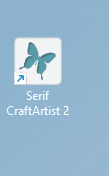 this is the normal desktop icon, and appears normally in the programs folder (the exe file)
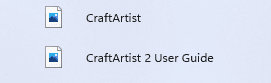 here is how it appears in the start menu and the 'all apps' section.
Thing is I've not found a way to change it, or even know if it is possible. It's an old program i rarely use but would be nice to have an icon of my choosing, or even the correct icon. if i choose to pin the shortcut to the start menu it reverts to the generic ico on the start menu.
Thanks in advance.
I wonder if it is possible to force windows to accept an icon of your choosing for a start menu shortcut, I've tried the usual method going via the properties box but the 'change icon' is greyed out. The weird thing is the icon shows fine as a desktop shortcut, but everywhere else it appears as a generic picture icon and cannot be changed.
this is the normal desktop icon, and appears normally in the programs folder (the exe file) here is how it appears in the start menu and the 'all apps' section.Thing is I've not found a way to change it, or even know if it is possible. It's an old program i rarely use but would be nice to have an icon of my choosing, or even the correct icon. if i choose to pin the shortcut to the start menu it reverts to the generic ico on the start menu.
Thanks in advance.
My Computer
At a glance
Windows 11Intel(R) Core(TM) i7-14700F (2.10 to 5.7 GHz)...32 GB Corsair Vengeance DDR5Nvidia 5060Ti 16GB
- OS
- Windows 11
- Computer type
- PC/Desktop
- Manufacturer/Model
- Scan
- CPU
- Intel(R) Core(TM) i7-14700F (2.10 to 5.7 GHz) 20 cores
- Motherboard
- ASUS Prime H610M-A WiFi D5
- Memory
- 32 GB Corsair Vengeance DDR5
- Graphics Card(s)
- Nvidia 5060Ti 16GB
- Sound Card
- Onboard / Realtek
- Monitor(s) Displays
- Samsung 2K QHD
- Screen Resolution
- 2560 × 1440
- Hard Drives
- 1TB Crucial P310 (Heatsink) M.2
1TB Samsung 990Pro M.2
1 x Crucial SSD 480gb
1 x Crucial SSD 1TB
- PSU
- Corsair 650 w
- Case
- Coolmaster
- Cooling
- Scan Pro Glacier Liquid Cooling
- Keyboard
- HP keyboard and mouse combo
- Mouse
- HP keyboard and mouse combo
- Internet Speed
- 900mbs
- Browser
- Vivaldi
- Antivirus
- Microsoft
- Other Info
- Using a WI-FI 7 Ugreen USB 3.2 Add-On Dongle, as the built in WiFi is a bit deaf.