Change the background during log in


vsub

Active member
Member
VIP
Local time
5:35 AM
Posts
250
OS
Windows 11
I have set the desktop background and I also have set the log in background and it does show it when I log out but if I restart the laptop,it shows a different background while loading and then switches to the one I actually have set

Do I have to edit the registry to be able to do that?
I find it here
HKEY_USERS\S-1-5-19\Control Panel\Desktop\Wallpaper
HKEY_USERS\S-1-5-20\Control Panel\Desktop\Wallpaper
 

My Computer My Computer

At a glance

Windows 1114700HX64GBRTX 4070
OS
Windows 11
Computer type
Laptop
Manufacturer/Model
MSI Sword 17 HX
CPU
14700HX
Memory
64GB
Graphics Card(s)
RTX 4070
I have set the desktop background and I also have set the log in background and it does show it when I log out but if I restart the laptop,it shows a different background while loading and then switches to the one I actually have set

Do I have to edit the registry to be able to do that?
I find it here
HKEY_USERS\S-1-5-19\Control Panel\Desktop\Wallpaper
HKEY_USERS\S-1-5-20\Control Panel\Desktop\Wallpaper


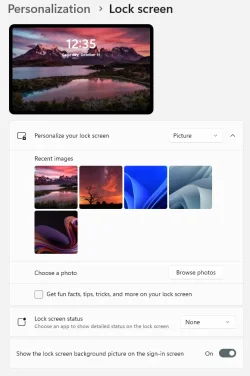
I have mine set like this, and the image doesn't change after a reboot...

Image1.webp


You also need to DISABLE the lock screen slideshow... Option Two, step #3, here...


My Computers My Computers

  • At a glance

    Win 11 Home ♦♦♦26300.9550 ♦♦♦♦♦♦♦26H2AMD Ryzen 7 3700XG.Skill (F4-3200C14D-16GTZKW)EVGA RTX 2070 (08G-P4-2171-KR)
    OS
    Win 11 Home ♦♦♦26300.9550 ♦♦♦♦♦♦♦26H2
    Computer type
    PC/Desktop
    Manufacturer/Model
    Built by Ghot® [May 2020]
    CPU
    AMD Ryzen 7 3700X
    Motherboard
    Asus Pro WS X570-ACE (BIOS 5302)
    Memory
    G.Skill (F4-3200C14D-16GTZKW)
    Graphics Card(s)
    EVGA RTX 2070 (08G-P4-2171-KR)
    Sound Card
    Realtek ALC1220P / ALC S1220A
    Monitor(s) Displays
    Dell U3011 30"
    Screen Resolution
    2560 x 1600
    Hard Drives
    2x Samsung 860 EVO 500GB,
    WD 4TB Black FZBX - SATA III,
    WD 8TB Black FZBX - SATA III,
    DRW-24B1ST CD/DVD Burner
    PSU
    PC Power & Cooling 750W Quad EPS12V
    Case
    Cooler Master ATCS 840 Tower
    Cooling
    CM Hyper 212 EVO (push/pull)
    Keyboard
    Ducky DK9008 Shine II Blue LED
    Mouse
    Logitech Optical M-100
    Internet Speed
    300/300
    Browser
    Firefox (latest)
    Antivirus
    Bitdefender Total Security
    Other Info
    Speakers: Klipsch Pro Media 2.1
  • At a glance

    Windows XP Pro 32bit w/SP3AMD Athlon 64 X2 5000+ (OC'd @ 3.2Ghz)TWIN2X2048-6400C4DHX (2 x 1GB, DDR2 800)EVGA 256-P2-N758-TR GeForce 8600GT SSC
    Operating System
    Windows XP Pro 32bit w/SP3
    Computer type
    PC/Desktop
    Manufacturer/Model
    Built by Ghot® (not in use)
    CPU
    AMD Athlon 64 X2 5000+ (OC'd @ 3.2Ghz)
    Motherboard
    ASUS M2N32-SLI Deluxe Wireless Edition
    Memory
    TWIN2X2048-6400C4DHX (2 x 1GB, DDR2 800)
    Graphics card(s)
    EVGA 256-P2-N758-TR GeForce 8600GT SSC
    Sound Card
    Onboard
    Monitor(s) Displays
    ViewSonic G90FB Black 19" Professional (CRT)
    Screen Resolution
    up to 2048 x 1536
    Hard Drives
    WD 36GB 10,000rpm Raptor SATA
    Seagate 80GB 7200rpm SATA
    Lite-On LTR-52246S CD/RW
    Lite-On LH-18A1P CD/DVD Burner
    PSU
    PC Power & Cooling Silencer 750 Quad EPS12V
    Case
    Generic Beige case, 80mm fans
    Cooling
    ZALMAN 9500A 92mm CPU Cooler
    Keyboard
    Logitech Classic Keybooard 200
    Mouse
    Logitech Optical M-BT96a
    Internet Speed
    300/300
    Browser
    Firefox 3.x ??
    Antivirus
    Symantec (Norton)
    Other Info
    Still assembled, still runs. Haven't turned it on for 15 years?
Yes that's exactly how it is set,both the desktop background and the log in screen are using the same image but if I restart,during the loading it shows a different image(the 3rd image from your screenshot)and then switches to the correct one.
 

My Computer My Computer

At a glance

Windows 1114700HX64GBRTX 4070
OS
Windows 11
Computer type
Laptop
Manufacturer/Model
MSI Sword 17 HX
CPU
14700HX
Memory
64GB
Graphics Card(s)
RTX 4070
Yes that's exactly how it is set,both the desktop background and the log in screen are using the same image but if I restart,during the loading it shows a different image(the 3rd image from your screenshot)and then switches to the correct one.


Do Option Two, step 3, 4, 5, 6, 7 ...in the tutorial I linked.
Then... set whatever image you want for the lock screen.


Then it should stay on your image.


This is the image I use, for my lock screen...

257587.webp
 

My Computers My Computers

  • At a glance

    Win 11 Home ♦♦♦26300.9550 ♦♦♦♦♦♦♦26H2AMD Ryzen 7 3700XG.Skill (F4-3200C14D-16GTZKW)EVGA RTX 2070 (08G-P4-2171-KR)
    OS
    Win 11 Home ♦♦♦26300.9550 ♦♦♦♦♦♦♦26H2
    Computer type
    PC/Desktop
    Manufacturer/Model
    Built by Ghot® [May 2020]
    CPU
    AMD Ryzen 7 3700X
    Motherboard
    Asus Pro WS X570-ACE (BIOS 5302)
    Memory
    G.Skill (F4-3200C14D-16GTZKW)
    Graphics Card(s)
    EVGA RTX 2070 (08G-P4-2171-KR)
    Sound Card
    Realtek ALC1220P / ALC S1220A
    Monitor(s) Displays
    Dell U3011 30"
    Screen Resolution
    2560 x 1600
    Hard Drives
    2x Samsung 860 EVO 500GB,
    WD 4TB Black FZBX - SATA III,
    WD 8TB Black FZBX - SATA III,
    DRW-24B1ST CD/DVD Burner
    PSU
    PC Power & Cooling 750W Quad EPS12V
    Case
    Cooler Master ATCS 840 Tower
    Cooling
    CM Hyper 212 EVO (push/pull)
    Keyboard
    Ducky DK9008 Shine II Blue LED
    Mouse
    Logitech Optical M-100
    Internet Speed
    300/300
    Browser
    Firefox (latest)
    Antivirus
    Bitdefender Total Security
    Other Info
    Speakers: Klipsch Pro Media 2.1
  • At a glance

    Windows XP Pro 32bit w/SP3AMD Athlon 64 X2 5000+ (OC'd @ 3.2Ghz)TWIN2X2048-6400C4DHX (2 x 1GB, DDR2 800)EVGA 256-P2-N758-TR GeForce 8600GT SSC
    Operating System
    Windows XP Pro 32bit w/SP3
    Computer type
    PC/Desktop
    Manufacturer/Model
    Built by Ghot® (not in use)
    CPU
    AMD Athlon 64 X2 5000+ (OC'd @ 3.2Ghz)
    Motherboard
    ASUS M2N32-SLI Deluxe Wireless Edition
    Memory
    TWIN2X2048-6400C4DHX (2 x 1GB, DDR2 800)
    Graphics card(s)
    EVGA 256-P2-N758-TR GeForce 8600GT SSC
    Sound Card
    Onboard
    Monitor(s) Displays
    ViewSonic G90FB Black 19" Professional (CRT)
    Screen Resolution
    up to 2048 x 1536
    Hard Drives
    WD 36GB 10,000rpm Raptor SATA
    Seagate 80GB 7200rpm SATA
    Lite-On LTR-52246S CD/RW
    Lite-On LH-18A1P CD/DVD Burner
    PSU
    PC Power & Cooling Silencer 750 Quad EPS12V
    Case
    Generic Beige case, 80mm fans
    Cooling
    ZALMAN 9500A 92mm CPU Cooler
    Keyboard
    Logitech Classic Keybooard 200
    Mouse
    Logitech Optical M-BT96a
    Internet Speed
    300/300
    Browser
    Firefox 3.x ??
    Antivirus
    Symantec (Norton)
    Other Info
    Still assembled, still runs. Haven't turned it on for 15 years?
here is how i set it permanently per user...

but others use this script:
 

My Computer My Computer

At a glance

Windows 11 Pro
OS
Windows 11 Pro
I just set my wallpaper to the same image as The Lock Screen.
 

My Computers My Computers

  • At a glance

    Windows11 Pro 26300.9550Intel Core i9 14900F (24 -Core, 68 MB Total C...32GB DDR5RTX 4080 Super w/610..88
    OS
    Windows11 Pro 26300.9550
    Computer type
    PC/Desktop
    Manufacturer/Model
    Dell Alienware Aurora R16
    CPU
    Intel Core i9 14900F (24 -Core, 68 MB Total Cache)
    Motherboard
    Dell Alienware
    Memory
    32GB DDR5
    Graphics Card(s)
    RTX 4080 Super w/610..88
    Sound Card
    Realtec
    Monitor(s) Displays
    Corsair XENEON 32QHD165
    Screen Resolution
    2560 X 1440
    Hard Drives
    1-2TB Samsung 990 Pro PCIe NVMe M2 SSD
    1-4TB Samsung 990 Pro PCIe NVMe M2 SSD
    PSU
    1000 Watt Platinum Dell
    Case
    Alienware
    Cooling
    Liquid Closed Loop
    Keyboard
    Corsair Strafe RGB
    Mouse
    Logitech MK270 Wireless
    Internet Speed
    100Gb's Down-20 Up
    Browser
    Firefox 157.0.1
    Antivirus
    Defender
    Other Info
    Very Quiet And Fast
    CyberPower UPS CP1500PFCLCD
  • At a glance

    MX-Linux13th Gen Inter(R) Core(TM) i3-1315U64 GB DDR4 @3200 MHz.Internal
    Operating System
    MX-Linux
    Computer type
    PC/Desktop
    Manufacturer/Model
    Intel
    CPU
    13th Gen Inter(R) Core(TM) i3-1315U
    Motherboard
    Intel
    Memory
    64 GB DDR4 @3200 MHz.
    Graphics card(s)
    Internal
    Sound Card
    None
    Monitor(s) Displays
    Dell 2419HGCF
    Screen Resolution
    1920 X 1080
    Hard Drives
    SAMSUNG 980 PRO SSD 2TB, PCIe 4.0 M.2 2280
    PSU
    Chicony 30 Watt
    Case
    Small
    Keyboard
    Dell
    Mouse
    Razor
    Internet Speed
    1GB
    Browser
    Slimjet
Do Option Two, step 3, 4, 5, 6, 7 ...in the tutorial I linked.
Then... set whatever image you want for the lock screen.


Then it should stay on your image.


This is the image I use, for my lock screen...

View attachment 148531
No change
When I sign out or lock the workstation it show the correct image but when I restart,during the windows loading process,after the initial loading process and then black screen,the first thing that appears after that is the correct image I have set and then windows switches to that blue one during the "Preparing Windows" and then switches to the wallpaper I have set

And I am going to repeat myself,setting the lock screen wallpaper works properly but during the windows loading process,it shows my itema=>the wrong image=>the desktop appears with the correct wallpaper
 

My Computer My Computer

At a glance

Windows 1114700HX64GBRTX 4070
OS
Windows 11
Computer type
Laptop
Manufacturer/Model
MSI Sword 17 HX
CPU
14700HX
Memory
64GB
Graphics Card(s)
RTX 4070
Here is a video
 

Attachments

  • 1.mp4
    3.9 MB

My Computer My Computer

At a glance

Windows 1114700HX64GBRTX 4070
OS
Windows 11
Computer type
Laptop
Manufacturer/Model
MSI Sword 17 HX
CPU
14700HX
Memory
64GB
Graphics Card(s)
RTX 4070
i gave you the answer...
 

My Computer My Computer

At a glance

Windows 11 Pro
OS
Windows 11 Pro
I believe it's this file (which is protected by TrustedInstaller rights):
C:\ProgramData\Microsoft\Windows\SystemData\<SID>\ReadOnly\LockScreen_Z\LockScreen___3636_1959_notdimmed.jpg

Some SID's have LockScreen_W and LockScreen_O versions (?)

This isn't the same file as \Windows\Web\Screen\img100.jpg, even though they appear identical.

LockScreen___3636_1959_notdimmed_2.webp
 

My Computer My Computer

At a glance

Windows 7
OS
Windows 7
I believe it's this file (which is protected by TrustedInstaller rights):
C:\ProgramData\Microsoft\Windows\SystemData\<SID>\ReadOnly\LockScreen_Z\LockScreen___3636_1959_notdimmed.jpg

Some SID's have LockScreen_W and LockScreen_O versions (?)

This isn't the same file as \Windows\Web\Screen\img100.jpg, even though they appear identical.

View attachment 148579
thats why i was saying i provided the answer. in my post, i stated i set it on mine, rebooted, then went in there, took ownership, then overwrote all images in all sub folders. never had anything change it since
 

My Computer My Computer

At a glance

Windows 11 Pro
OS
Windows 11 Pro
I don't think it's the same answer, and I'll explain why. When you see "Preparing Windows", it's running in a system context and not supposed to be your individual lock screen. That's why in the video it briefly switches appearance.

You can specify an alternate image by updating "HKLM\SOFTWARE\Microsoft\Windows\CurrentVersion\SystemProtectedUserData\<SID>\AnyoneRead\LockScreen"

This copies my personal Lock Screen image under LockScreen_A, but LockScreen_Z stays unchanged as the special picture.
 

My Computer My Computer

At a glance

Windows 7
OS
Windows 7
I just set my wallpaper to the same image as The Lock Screen.
OK the first image is my Background, the second is my lockscreen which is the same as my Login.
Backround.webp


Lockscreen.webp
 

My Computers My Computers

  • At a glance

    Windows11 Pro 26300.9550Intel Core i9 14900F (24 -Core, 68 MB Total C...32GB DDR5RTX 4080 Super w/610..88
    OS
    Windows11 Pro 26300.9550
    Computer type
    PC/Desktop
    Manufacturer/Model
    Dell Alienware Aurora R16
    CPU
    Intel Core i9 14900F (24 -Core, 68 MB Total Cache)
    Motherboard
    Dell Alienware
    Memory
    32GB DDR5
    Graphics Card(s)
    RTX 4080 Super w/610..88
    Sound Card
    Realtec
    Monitor(s) Displays
    Corsair XENEON 32QHD165
    Screen Resolution
    2560 X 1440
    Hard Drives
    1-2TB Samsung 990 Pro PCIe NVMe M2 SSD
    1-4TB Samsung 990 Pro PCIe NVMe M2 SSD
    PSU
    1000 Watt Platinum Dell
    Case
    Alienware
    Cooling
    Liquid Closed Loop
    Keyboard
    Corsair Strafe RGB
    Mouse
    Logitech MK270 Wireless
    Internet Speed
    100Gb's Down-20 Up
    Browser
    Firefox 157.0.1
    Antivirus
    Defender
    Other Info
    Very Quiet And Fast
    CyberPower UPS CP1500PFCLCD
  • At a glance

    MX-Linux13th Gen Inter(R) Core(TM) i3-1315U64 GB DDR4 @3200 MHz.Internal
    Operating System
    MX-Linux
    Computer type
    PC/Desktop
    Manufacturer/Model
    Intel
    CPU
    13th Gen Inter(R) Core(TM) i3-1315U
    Motherboard
    Intel
    Memory
    64 GB DDR4 @3200 MHz.
    Graphics card(s)
    Internal
    Sound Card
    None
    Monitor(s) Displays
    Dell 2419HGCF
    Screen Resolution
    1920 X 1080
    Hard Drives
    SAMSUNG 980 PRO SSD 2TB, PCIe 4.0 M.2 2280
    PSU
    Chicony 30 Watt
    Case
    Small
    Keyboard
    Dell
    Mouse
    Razor
    Internet Speed
    1GB
    Browser
    Slimjet
I don't think it's the same answer, and I'll explain why. When you see "Preparing Windows", it's running in a system context and not supposed to be your individual lock screen. That's why in the video it briefly switches appearance.

You can specify an alternate image by updating "HKLM\SOFTWARE\Microsoft\Windows\CurrentVersion\SystemProtectedUserData\<SID>\AnyoneRead\LockScreen"

This copies my personal Lock Screen image under LockScreen_A, but LockScreen_Z stays unchanged as the special picture.
not trying to argue or anything, but i'm saying i did it my way and i have never had it flash any other backgrounds.. not during "preparing windows" (post upgrade/CU, etc), not when logging off/on, not when shutting down/cold boot... never. always remains my custom image

*EDIT*
perhaps i worded it incorrectly... not just all sub Lockscreen_ folders inside your SID, but all sub folders under all SIDs. overwrite them all (and yeah, i just pasted all resolutions in every folder... even the ones that only contained 1 image)
 

My Computer My Computer

At a glance

Windows 11 Pro
OS
Windows 11 Pro
I think that @garlin is correct about the lock screen at start up. You can see which images are used for all the lock screens set on your system by copying the contents of C:\ProgramData\Microsoft\Windows\SystemData\ using the /b option in robocopy. You don't need to make any changes to the permissions or ownership.

create a suitable empty directory, and run the following command from an elevated terminal. Replace the target (second) directory with your chosen directory.

robocopy C:\ProgramData\Microsoft\Windows\SystemData C:\Users\Public\Pictures\lockscreen * /b /s

If you look through the images you should see the ones (under S-1-5-18) which are displayed at startup. There will probably be identically sized (and named) images under the user (S-1-5-21-*) folders with the image you want. Replace images as you wish, preserving the sizes. Copy them back using robocopy. (Swap the source and target directories.)

This is still work for probably only a marginal improvement. But at least you're not messing with ownerships and permissions.

I have a vague recollection that there is an option for OEMs to add their own tasteless lock screen to "brand" your computer, which might increase your wish to replace it.
 

My Computers My Computers

  • At a glance

    Windows 11 25H2 Pro Build 26200i3-1215U8GB
    OS
    Windows 11 25H2 Pro Build 26200
    Computer type
    PC/Desktop
    Manufacturer/Model
    MSI PRO ADL-U Cubi 5 (MS-B0A8)
    CPU
    i3-1215U
    Memory
    8GB
    Monitor(s) Displays
    Sony 43" 4k TV
    Screen Resolution
    3840x2160
    Hard Drives
    250GB NVMe M.2 PCIe Gen 3 SSD
    PSU
    External 65W
    Case
    Mini PC
    Browser
    FireFox
    Antivirus
    MS
  • At a glance

    Windows 11 Pro 25H2Intel i3-910016GB DDR4
    Operating System
    Windows 11 Pro 25H2
    Computer type
    PC/Desktop
    Manufacturer/Model
    Dell Optiplex 3070 SFF
    CPU
    Intel i3-9100
    Memory
    16GB DDR4
    Monitor(s) Displays
    Dell S2721
    Screen Resolution
    3840 x 2160
    Hard Drives
    Samsung 500GB nvMe
    Case
    Dell small form factor
    Keyboard
    Cherry mechanical (Blue)
    Mouse
    Microsoft
    Antivirus
    MS Defender
I think that @garlin is correct about the lock screen at start up. You can see which images are used for all the lock screens set on your system by copying the contents of C:\ProgramData\Microsoft\Windows\SystemData\ using the /b option in robocopy. You don't need to make any changes to the permissions or ownership.

create a suitable empty directory, and run the following command from an elevated terminal. Replace the target (second) directory with your chosen directory.

robocopy C:\ProgramData\Microsoft\Windows\SystemData C:\Users\Public\Pictures\lockscreen * /b /s

If you look through the images you should see the ones (under S-1-5-18) which are displayed at startup. There will probably be identically sized (and named) images under the user (S-1-5-21-*) folders with the image you want. Replace images as you wish, preserving the sizes. Copy them back using robocopy. (Swap the source and target directories.)

This is still work for probably only a marginal improvement. But at least you're not messing with ownerships and permissions.

I have a vague recollection that there is an option for OEMs to add their own tasteless lock screen to "brand" your computer, which might increase your wish to replace it.
taking ownership of SystemData is reverted immediately. close that instance of FE and go back, you wont have perms anymore.

what the OP video shows is not an OEM image. its the windows 11 blue flower or whatever it is.
if you're talking about the POST screen, then no.. i have never modified that on Win 10 or 11.
 

My Computer My Computer

At a glance

Windows 11 Pro
OS
Windows 11 Pro
The only files I have in
C:\ProgramData\Microsoft\Windows\SystemData\
are just images and I can preview all of them(they are not the problematic one)except the one from LockScreen_Z
I take the ownership of that folder and delete it
When I restart,there was no change and the LockScreen_Z was back there with the image in it

It's like if I delete the LockScreen_Z folder,windows will copy the file from
"C:\Windows\Web\Screen\img100.jpg"
and place it there

I don't want to keep taking ownership or manually deleting\replacing images every time I want to change my lockescreen
I want when I set a lockscreen,it will display only that image between the lockscreen and the desktop(I usually have the same one on the lockscreen and the desktop)
 

My Computer My Computer

At a glance

Windows 1114700HX64GBRTX 4070
OS
Windows 11
Computer type
Laptop
Manufacturer/Model
MSI Sword 17 HX
CPU
14700HX
Memory
64GB
Graphics Card(s)
RTX 4070
Overwrite it. Not delete.
 

My Computer My Computer

At a glance

Windows 11 Pro
OS
Windows 11 Pro
Overwrite it with what?
As I said,I don't want to do this every time I want to change the wallpaper
Why is there a in between image,I want to remove that so I will only have an image on the lockscreen and on the desktop
The image in the "Preparing Windows" should be the same one I set for the Lockscreen the "normal way" every time I change it the normal way from Personalize=>Lock Screen
 

My Computer My Computer

At a glance

Windows 1114700HX64GBRTX 4070
OS
Windows 11
Computer type
Laptop
Manufacturer/Model
MSI Sword 17 HX
CPU
14700HX
Memory
64GB
Graphics Card(s)
RTX 4070

Latest Support Threads

Back
Top Bottom