
danny_baciu
New member
- Local time
- 1:25 PM
- Posts
- 2
- OS
- Widows 11
Hi,
maybe someone faced the same inconvenient.
The borders of text editor controls in Windows 11 are displayed in white color and no longer as grey/black. This makes it in Windows 11 hard to visualize the delimitation of the fields. Is there a way to customize / change this?
Thank you!
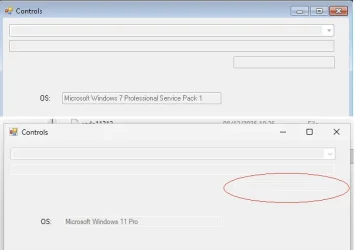
maybe someone faced the same inconvenient.
The borders of text editor controls in Windows 11 are displayed in white color and no longer as grey/black. This makes it in Windows 11 hard to visualize the delimitation of the fields. Is there a way to customize / change this?
Thank you!
My Computer
At a glance
Widows 11
- OS
- Widows 11
- Computer type
- Laptop
- Manufacturer/Model
- DELL






