changing the windows setup installer?


Local time
5:36 AM
Posts
74
OS
windows11 21h2
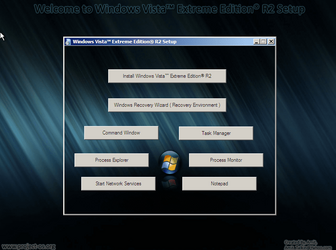
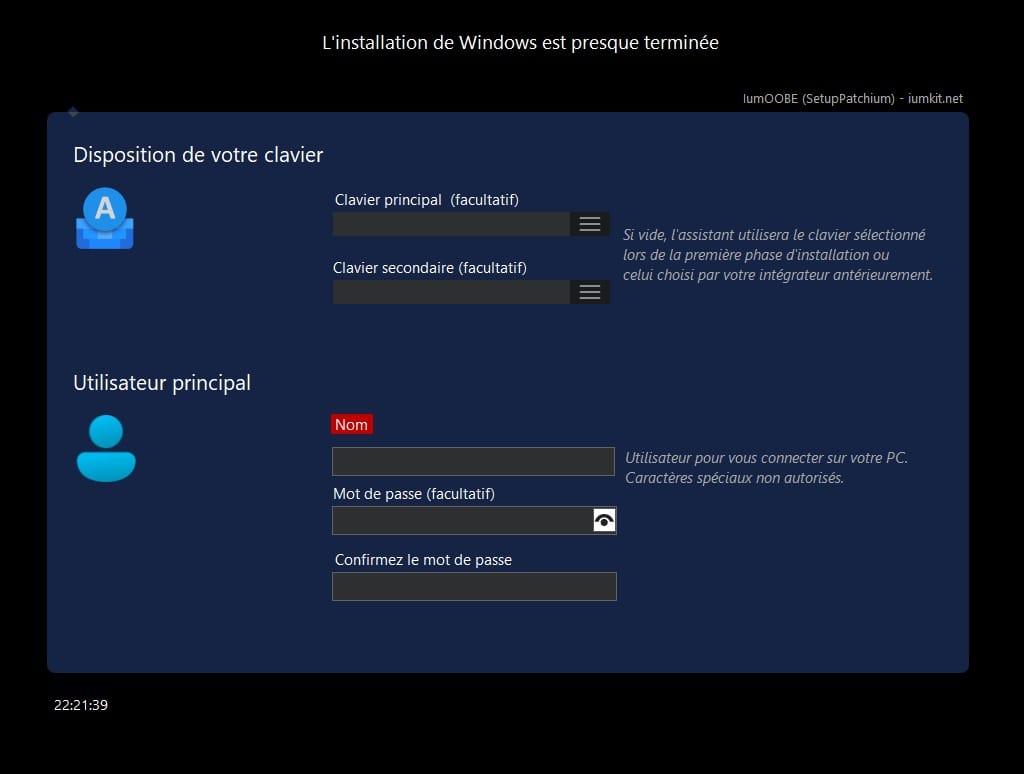
hello, so i have provided thease to image exaples but id like to get windows 11 to do this? how would i go about doing this? i also want to know how to change the installer text and the installer moving line information as well. then how do i get a progam selector to appera in the oobe setup to allow you to select what programs you want installed?
 

Attachments

  • Screen Shot 2022-10-09 at 10.03.36 AM.png
    Screen Shot 2022-10-09 at 10.03.36 AM.png
    101.1 KB · Views: 15
  • Screen Shot 2022-10-09 at 10.04.07 AM.png
    Screen Shot 2022-10-09 at 10.04.07 AM.png
    114.4 KB · Views: 11

My Computer My Computer

At a glance

windows11 21h2
OS
windows11 21h2
Hi @thatwindowsuser

Here's something which should be similar enough.
It's made by french devs, so I translated the presentation. English is (partially) available in app.
Since the days when I was using Windows XP, it's always a pleasure not having to log in each time I turn the PC on (with a local account which doesn't need to be reset every week).
Maybe I could help in supplying full English translation to the devs.
I will also need to use this app in a short while to install Windows 11.
If you use it, your feedback's appreciated. :-)


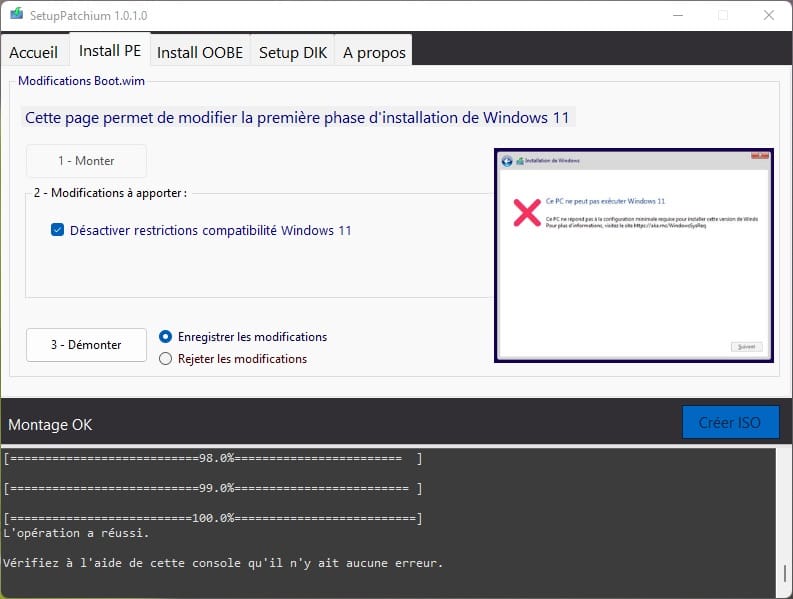
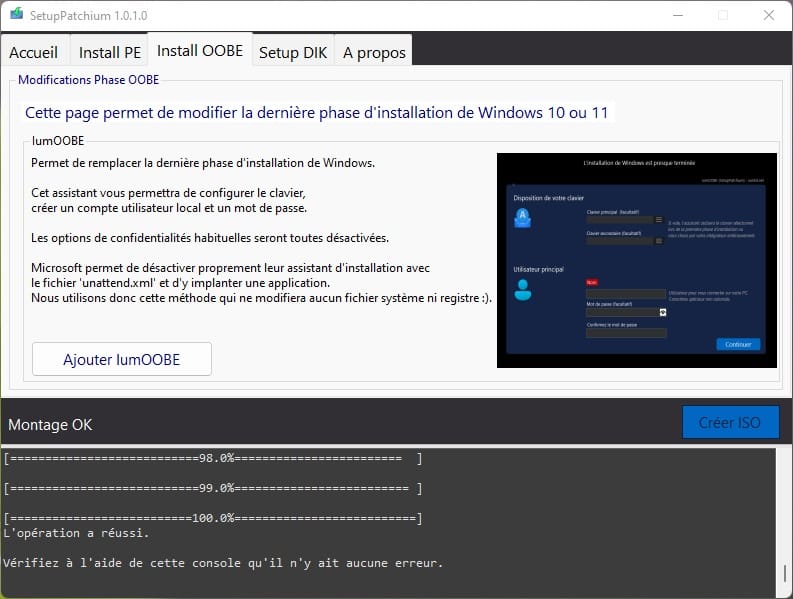
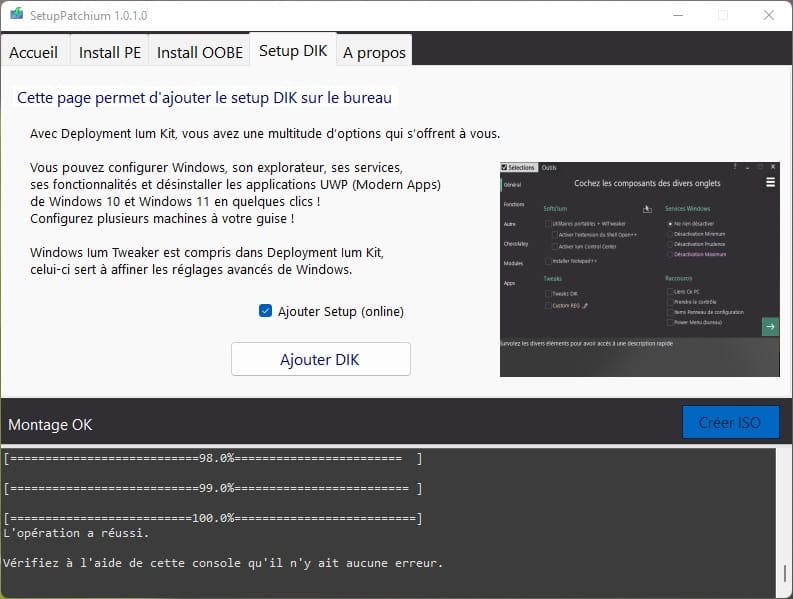
Setup Patchium allows you to customize the installation of Windows 10/11 by modifying the installation ISO:​

  • Remove Windows 11 compatibility restrictions (PE/Boot.wim).
  • Replace the last phase of installation (OOBE) of W10/W11 with IumOOBE to avoid the multitude of options and avoid the use or creation of a Microsoft online account.
  • No confidentiality option will be present on IumOOBE ( the options will be equivalent to "NO" ).
  • No system file is modified, the IumOOBE wizard will be configured and launched using the "unattend.xml" file.


01.jpg
      
02.jpg


03.jpg
      
oobe.jpg


Last edited:

My Computers My Computers

  • At a glance

    Windows 10 & 11 LTSC 3xBoot 1809 21H2 24H2Intel Core i5-2550K8 GBNVIDIA GeForce GTS 450
    OS
    Windows 10 & 11 LTSC 3xBoot 1809 21H2 24H2
    Computer type
    PC/Desktop
    Manufacturer/Model
    Self-made 2013
    CPU
    Intel Core i5-2550K
    Motherboard
    Intel DH67CL
    Memory
    8 GB
    Graphics Card(s)
    NVIDIA GeForce GTS 450
    Sound Card
    EmuPMX
    Monitor(s) Displays
    16/9 Samsung + 4/3 iiyama
    Screen Resolution
    1360 x 768 + 1024 x 768
    Hard Drives
    Main SSD: Samsung 250 Gb
    Secondary HDDs: Western Digital
    (Purple 4 Tb + Blue 2 Tb) x2
    + Green 0.5 Tb
    Case
    Antec
    Keyboard
    Dell
    Mouse
    Advance
    Browser
    Brave
    Antivirus
    Windows Security
    Other Info
    + Portable Cleanup Utilities :

    AdwCleaner
    ZHP Cleaner (+Diag)
    Kaspersky Virus Removal Tool
    CCleaner
  • At a glance

    Windows 11 Home
    Operating System
    Windows 11 Home
    Computer type
    Laptop
    Manufacturer/Model
    HP
    Other Info
    Using W11 OS on customers' computers more and more often, and sometimes on my mum's new laptop.
Hi @thatwindowsuser

Here's something which should be similar enough.
It's made by french devs, so I translated the presentation. English is (partially) available in app.
Since the days when I was using Windows XP, it's always a pleasure not having to log in each time I turn the PC on (with a local account which doesn't need to be reset every week).
Maybe I could help in supplying full English translation to the devs.
I will also need to use this app in a short while to install Windows 11.
If you use it, your feedback's appreciated. :-)


Setup Patchium allows you to customize the installation of Windows 10/11 by modifying the installation ISO:​

  • Remove Windows 11 compatibility restrictions (PE/Boot.wim).
  • Replace the last phase of installation (OOBE) of W10/W11 with IumOOBE to avoid the multitude of options and avoid the use or creation of a Microsoft online account.
  • No confidentiality option will be present on IumOOBE ( the options will be equivalent to "NO" ).
  • No system file is modified, the IumOOBE wizard will be configured and launched using the "unattend.xml" file.


01.jpg
      
02.jpg


03.jpg
      
oobe.jpg


dose this have an english setting?
 

My Computer My Computer

At a glance

windows11 21h2
OS
windows11 21h2
It says so in the description, there could be just few parts missing.

Languages: French, English (partial)

History:

09/23/2022: 1.6.5.0:
– Allow upgrade on non-compatible PC (by mounting the newly created ISO)
– Various improvements: Translation, interface

07/31/2022: 1.6.0.0:
– Possibility to remove the upgrade and associated files
– Possibility to integrate Deployment Ium Kit in Offline version
– IumOOBE: The password does not expire (no invitation to change it)

07/24/2022: 1.5.0.0:
– English translation for Setup Patchium, IumOOBE
– IumOOBE: Various improvements
– Deployment Ium Kit - Download (desktop): Various improvements and false positive correction.

07/11/2022: 1.0.2.2:
– Compatible with ISOs other than FR.

07/08/2022: 1st version.
 

My Computers My Computers

  • At a glance

    Windows 10 & 11 LTSC 3xBoot 1809 21H2 24H2Intel Core i5-2550K8 GBNVIDIA GeForce GTS 450
    OS
    Windows 10 & 11 LTSC 3xBoot 1809 21H2 24H2
    Computer type
    PC/Desktop
    Manufacturer/Model
    Self-made 2013
    CPU
    Intel Core i5-2550K
    Motherboard
    Intel DH67CL
    Memory
    8 GB
    Graphics Card(s)
    NVIDIA GeForce GTS 450
    Sound Card
    EmuPMX
    Monitor(s) Displays
    16/9 Samsung + 4/3 iiyama
    Screen Resolution
    1360 x 768 + 1024 x 768
    Hard Drives
    Main SSD: Samsung 250 Gb
    Secondary HDDs: Western Digital
    (Purple 4 Tb + Blue 2 Tb) x2
    + Green 0.5 Tb
    Case
    Antec
    Keyboard
    Dell
    Mouse
    Advance
    Browser
    Brave
    Antivirus
    Windows Security
    Other Info
    + Portable Cleanup Utilities :

    AdwCleaner
    ZHP Cleaner (+Diag)
    Kaspersky Virus Removal Tool
    CCleaner
  • At a glance

    Windows 11 Home
    Operating System
    Windows 11 Home
    Computer type
    Laptop
    Manufacturer/Model
    HP
    Other Info
    Using W11 OS on customers' computers more and more often, and sometimes on my mum's new laptop.

Latest Support Threads

Back
Top Bottom