Solved Check status Device Encryption in Windows 11 Home, local account


KhanhBui

Member
Local time
4:40 AM
Posts
9
OS
Windows 11
Hi folk,
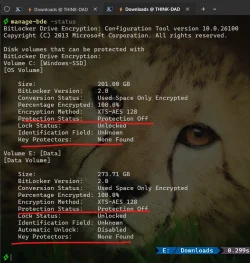
Can I know if my disk is currently encrypted or not? If it is, how can I get recovery key?

My personal laptop is running on Windows 11 Home, (24H2, build 26100.3775) with Local Account.
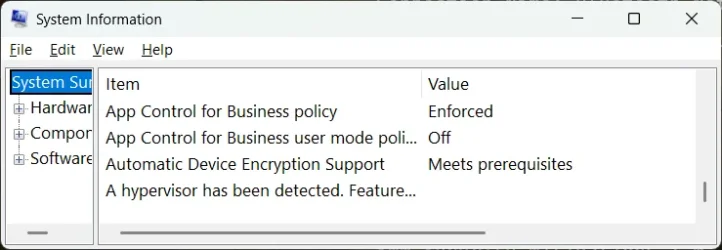
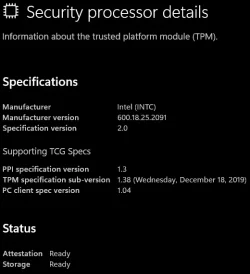
I attached some screenshots to show my laptop's current status.

The inconsistency from these make me quite confused.
1746502241784.webp1746499887193.webp
1746503767813.webp
1746502162322.webp1746500015618.webp
1746502546306.webp1746501099302.webp
 
Last edited:

My Computer My Computer

At a glance

Windows 11i5-1335U16
OS
Windows 11
Computer type
Laptop
Manufacturer/Model
Lenovo
CPU
i5-1335U
Memory
16
The last 3 computers I've set up this year were Home and after they were running a check in Disk Management showed the same as the bottom part of the posted image here, Bitlocker encrypted. I had been under the impression a few months ago that would not be automatic on the Home editiion. During the setups there was never a mention of encryption, a key provided nor a key asked for. It's not a problem to remove Bitlocker if not wanted. I've seen some posting that suggest there may be otherwise-unexplained issues with disk management.
 

My Computers My Computers

  • At a glance

    Win11 Pro RTM Version 24H2 Build 26100.4202Intel Core i5 11th Gen. 2.40GHz12GB
    OS
    Win11 Pro RTM Version 24H2 Build 26100.4202
    Computer type
    Laptop
    Manufacturer/Model
    Dell Vostro 3400
    CPU
    Intel Core i5 11th Gen. 2.40GHz
    Memory
    12GB
    Hard Drives
    256GB SSD NVMe M.2
  • At a glance

    Win11 Pro RTM Version 24H2 Build 26100.4202Intel Core i5 10th Gen. 2.90GHz16GBOnboard, no VGA, using a DisplayPort-to-VGA a...
    Operating System
    Win11 Pro RTM Version 24H2 Build 26100.4202
    Computer type
    PC/Desktop
    Manufacturer/Model
    Dell Vostro 5890
    CPU
    Intel Core i5 10th Gen. 2.90GHz
    Memory
    16GB
    Graphics card(s)
    Onboard, no VGA, using a DisplayPort-to-VGA adapter
    Monitor(s) Displays
    24" Dell
    Hard Drives
    512GB SSD NVMe, 4TB Seagate HDD
    Browser
    Firefox, Edge
    Antivirus
    Windows Defender/Microsoft Security
I believe that device encryption is ON and ready to be encrypted once you sign in to to MS account which will activate it and assign a recovery key. I would turn it off..
 

My Computers My Computers

  • At a glance

    Windows 11 Pro 25H2 26200.8655i9-10900 10 core 20 threads32 gbnone-Intel UHD Graphics 630
    OS
    Windows 11 Pro 25H2 26200.8655
    Computer type
    PC/Desktop
    Manufacturer/Model
    Dell Optiplex 7080
    CPU
    i9-10900 10 core 20 threads
    Motherboard
    DELL 0J37VM
    Memory
    32 gb
    Graphics Card(s)
    none-Intel UHD Graphics 630
    Sound Card
    Integrated Realtek
    Monitor(s) Displays
    Benq 27
    Screen Resolution
    2560x1440
    Hard Drives
    2x1tb Solidigm m.2 nvme /External drives 512gb Samsung m.2 sata+2tb Kingston m2.nvme
    PSU
    500w
    Case
    MT
    Cooling
    Dell Premium
    Keyboard
    Logitech wired
    Mouse
    Logitech wireless
    Internet Speed
    so slow I'm too embarrassed to tell
    Browser
    #1 Edge #2 Firefox
    Antivirus
    Defender+MWB Premium
  • At a glance

    Windows 11 Pro 24H2 26200.8457AMD Ryzen 7 6800U32 gbintegrated
    Operating System
    Windows 11 Pro 24H2 26200.8457
    Computer type
    PC/Desktop
    Manufacturer/Model
    Beelink Mini PC SER5
    CPU
    AMD Ryzen 7 6800U
    Memory
    32 gb
    Graphics card(s)
    integrated
    Sound Card
    integrated
    Monitor(s) Displays
    Benq 27
    Screen Resolution
    2560x1440
    Hard Drives
    1TB Crucial nvme
    Keyboard
    Logitech wired
    Mouse
    Logitech wireless
    Internet Speed
    still too embarrassed to tell
    Browser
    Firefox
    Antivirus
    Defender
    Other Info
    System 3 is non compliant Dell 9020 i7-4770/24gb ram Win11 PRO 26200.8457
Thank for your comment @glasskuter @Berton.
I don't want to sign in to Microsoft account.
I just need to retreive recovery key so if my laptop down in the future, I could save my data
 

My Computer My Computer

At a glance

Windows 11i5-1335U16
OS
Windows 11
Computer type
Laptop
Manufacturer/Model
Lenovo
CPU
i5-1335U
Memory
16
The 3 machines I did were Microsoft Accounts, required. I found the issue with the second one when I booted a USB Diagnostic thumb drive and couldn't access the C: drive without a key.
 

My Computers My Computers

  • At a glance

    Win11 Pro RTM Version 24H2 Build 26100.4202Intel Core i5 11th Gen. 2.40GHz12GB
    OS
    Win11 Pro RTM Version 24H2 Build 26100.4202
    Computer type
    Laptop
    Manufacturer/Model
    Dell Vostro 3400
    CPU
    Intel Core i5 11th Gen. 2.40GHz
    Memory
    12GB
    Hard Drives
    256GB SSD NVMe M.2
  • At a glance

    Win11 Pro RTM Version 24H2 Build 26100.4202Intel Core i5 10th Gen. 2.90GHz16GBOnboard, no VGA, using a DisplayPort-to-VGA a...
    Operating System
    Win11 Pro RTM Version 24H2 Build 26100.4202
    Computer type
    PC/Desktop
    Manufacturer/Model
    Dell Vostro 5890
    CPU
    Intel Core i5 10th Gen. 2.90GHz
    Memory
    16GB
    Graphics card(s)
    Onboard, no VGA, using a DisplayPort-to-VGA adapter
    Monitor(s) Displays
    24" Dell
    Hard Drives
    512GB SSD NVMe, 4TB Seagate HDD
    Browser
    Firefox, Edge
    Antivirus
    Windows Defender/Microsoft Security
Can I know if my disk is currently encrypted or not?


If it is, how can I get recovery key?


My Computers My Computers

  • At a glance

    Windows 11 Pro 25H2 Build 26200.8655Intel(R) Core(TM) i7-4770K CPU @ 3.50GHz32.0 GB of I forget and the box is in storage.Gigabyte nVidia GeForce GTX 1660 Super OC 6GB
    OS
    Windows 11 Pro 25H2 Build 26200.8655
    Computer type
    PC/Desktop
    Manufacturer/Model
    Sin-built 2013
    CPU
    Intel(R) Core(TM) i7-4770K CPU @ 3.50GHz
    Motherboard
    ASUS ROG Maximus VI Formula
    Memory
    32.0 GB of I forget and the box is in storage.
    Graphics Card(s)
    Gigabyte nVidia GeForce GTX 1660 Super OC 6GB
    Sound Card
    ROG SupremeFX Formula 8-Channel High Definition Audio
    Monitor(s) Displays
    5 x LG 25MS500-B - 1 x 24MK430H-B - 1 x Wacom Pro 22" Touch Screen Tablet
    Screen Resolution
    All over the place
    Hard Drives
    Too many to list. OS on Samsung 1TB 870 QVO SATA
    PSU
    Silverstone 1500
    Case
    NZXT Phantom 820 Full-Tower Case
    Cooling
    Noctua NH-D15 Elite Class Dual Tower CPU Cooler / 6 x EziDIY 120mm / 2 x Corsair 140mm somethings / 1 x 140mm Thermaltake something / 2 x 200mm Corsair.
    Keyboard
    Corsair K95 / Logitech diNovo Edge Wireless
    Mouse
    Logitech: G402 / G502 / Mx Masters / Mx Air Cordless
    Internet Speed
    2000/500Mbps
    Browser
    All sorts
    Antivirus
    Kaspersky Premium
    Other Info
    ㅤㅤㅤㅤㅤㅤㅤㅤㅤㅤㅤㅤㅤㅤㅤㅤㅤㅤㅤㅤㅤㅤㅤㅤㅤㅤㅤㅤㅤㅤㅤㅤㅤㅤㅤㅤㅤㅤㅤㅤ⠀⠀⠀⠀⠀⠀⠀⠀⠀⠀
    TP-Link BE9300 WiFi 7 Bluetooth 5.4 (Archer TBE550E)
    TP-Link TX201 V1 2.5GB Lan

    Grandstream HT812 - VoIP
    ASUS DSL-AX82U - Mesh
    ASUS RT-AC68U - Mesh
    ASUS RT-BE88U Router

    Brother MFC-L2880DW Printer

    I’m on a horse.
  • At a glance

    Windows 11 Pro 25H2 Build 26200.8655 (Wifes)13th Generation Intel® Core™ i5-1340P Process...16GB LPDDR5-52001x Intel® Iris® Xe Graphics
    Operating System
    Windows 11 Pro 25H2 Build 26200.8655 (Wifes)
    Computer type
    Laptop
    Manufacturer/Model
    LENOVO Yoga 7 14IRL8 - Type 82YL
    CPU
    13th Generation Intel® Core™ i5-1340P Processor(Core™ i5-1340P)
    Memory
    16GB LPDDR5-5200
    Graphics card(s)
    1x Intel® Iris® Xe Graphics
    Sound Card
    Optimized with Dolby Atmos®
    Screen Resolution
    QHD 2880 x 1800 OLED
    Hard Drives
    M.2 512 GB SSD PCIe
    Mouse
    Logiteck MX Master 3S
    Internet Speed
    2000/500
    Antivirus
    Defender / Malwarebytes
    Other Info
    …still on a horse.


    Wireless Network: Wi-Fi 6E 2x2 AX; Bluetooth® 5.1 or above
    Ports: 1x 1 Novo button; 2 in 1 Audio Combo jack; Micro SD Card Reader; HDMI 1.4b; 2 x USB Type-C (TBT4)
    USB 3.2 Gen 2 DP 1.4a
    PD 3.0); 1 x USB 3.2 Gen1 Type A
    Camera
    1x 1080P FHD IR/RGB Hybrid with Privacy Shutter and Dual Array Microphone
    Graphics
    1x Intel® Iris® Xe Graphics
    Monitor
    14" WUXGA
    Form Factor
    Convertible Notebook
  • Windows 11 Pro 25H2 Build 26200.8655 (Wifes)

    Yoga 7 2-in-1 14IML9 - Type 83DJ

    Processor: Intel® Core™ Ultra 7 155H Processor(Core™ Ultra 7 155H)

    Memory: 32GB LPD5X-7467

    Hard Drive: 1 TB SSD PCIe

    Wireless Network: 1x Wi-Fi 6E 2x2 AX; Bluetooth® 5.1 or above

    Ports: 1 x HDMI 2.1 TMDS; 1 x Novo Button; 1 x Combo Audio Jack
    2 x USB-C (USB 4.0)
    1 x USB-A 3.2 Gen 1

    Camera: 1080P FHD IR Hybrid with Dual Microphone

    Graphics: Intel® Arc™ Graphics

    Monitor: 14" 2.8K

    ...Where's my horse?
Thank guy but neither of 2 tutorials covers my case.
 

My Computer My Computer

At a glance

Windows 11i5-1335U16
OS
Windows 11
Computer type
Laptop
Manufacturer/Model
Lenovo
CPU
i5-1335U
Memory
16
Have you checked and save the encryption key from the Control Panel -- BitLocker?
 

My Computer My Computer

At a glance

Windows 11AMD Ryzen 7 5700GMicron Technology DDR4-3200 16GBNVIDIA GeForce RTX 3060
OS
Windows 11
Computer type
PC/Desktop
Manufacturer/Model
HP Pavilion
CPU
AMD Ryzen 7 5700G
Motherboard
Erica6
Memory
Micron Technology DDR4-3200 16GB
Graphics Card(s)
NVIDIA GeForce RTX 3060
Sound Card
Realtek ALC671
Monitor(s) Displays
Samsung SyncMaster U28E590
Screen Resolution
3840 x 2160
Hard Drives
SAMSUNG MZVLQ1T0HALB-000H1
 

My Computers My Computers

  • At a glance

    11 Homei7 13650HX16GB DDR5GeForce RTX 4060 Mobile
    OS
    11 Home
    Computer type
    Laptop
    Manufacturer/Model
    Asus TUF Gaming F16 (2024)
    CPU
    i7 13650HX
    Memory
    16GB DDR5
    Graphics Card(s)
    GeForce RTX 4060 Mobile
    Sound Card
    Eastern Electric MiniMax DAC Supreme; Emotiva UMC-200; Astell & Kern AK240
    Monitor(s) Displays
    Sony Bravia XR-55X90J
    Screen Resolution
    3840×2160
    Hard Drives
    512GB SSD internal
    37TB external
    PSU
    Li-ion
    Cooling
    2× Arc Flow Fans, 4× exhaust vents, 5× heatpipes
    Keyboard
    Logitech K800
    Mouse
    Logitech G402
    Internet Speed
    30Mbit/s up, 500Mbit/s down
    Browser
    FF
    Antivirus
    What's an antivirus?
  • At a glance

    11 Homei5 1135G716GB DDR4Intel Iris Xe
    Operating System
    11 Home
    Computer type
    Laptop
    Manufacturer/Model
    Medion S15450
    CPU
    i5 1135G7
    Memory
    16GB DDR4
    Graphics card(s)
    Intel Iris Xe
    Sound Card
    Eastern Electric MiniMax DAC Supreme; Emotiva UMC-200; Astell & Kern AK240
    Monitor(s) Displays
    Sony Bravia XR-55X90J
    Screen Resolution
    3840×2160
    Hard Drives
    2TB SSD internal
    37TB external
    PSU
    Li-ion
    Keyboard
    Logitech K800
    Mouse
    Logitech G402
    Internet Speed
    30Mbit/s up, 500Mbit/s down
    Browser
    FF
It is encrypted but no protectors are active, so it's "not armed" and thus, anyone can access it at any time. There is no recovery password to retrieve as there's none set. If I am not mistaken, manage-bde -off c: should work on an elevated command prompt in order to turn it off completely.
 

My Computer My Computer

At a glance

Win11
OS
Win11
It is encrypted but no protectors are active, so it's "not armed" and thus, anyone can access it at any time. There is no recovery password to retrieve as there's none set. If I am not mistaken, manage-bde -off c: should work on an elevated command prompt in order to turn it off completely.
Thank for your explaination.
I want my data is secured so I don't want to turn bitlocker off.

encrypted but no protectors are active
-> So how is it different from unecrypted (Bitlocker off completely)? In both cases everyone can access it at any time?!?!

I believe that device encryption is ON and ready to be encrypted once you sign in to to MS account which will activate it and assign a recovery key. I would turn it off.
I created a bootable Windows PE USB drive, and when I boot my laptop to Windows PE, I can access and read data then. How could that be possible?
 
Last edited:

My Computer My Computer

At a glance

Windows 11i5-1335U16
OS
Windows 11
Computer type
Laptop
Manufacturer/Model
Lenovo
CPU
i5-1335U
Memory
16
It's encrypted but with an empty key which would get exchanged for a real one as soon as you log on with a Microsoft account.
If you don't want to use a Microsoft account AND you're on Windows Home Edition, there's a workaround for you which I describe here: How to use Bitlocker on Windows 10 Home | Experts Exchange (works on Win11 home, too)
 

My Computer My Computer

At a glance

Win11
OS
Win11
It's encrypted but with an empty key which would get exchanged for a real one as soon as you log on with a Microsoft account.
If you don't want to use a Microsoft account AND you're on Windows Home Edition, there's a workaround for you which I describe here: How to use Bitlocker on Windows 10 Home | Experts Exchange (works on Win11 home, too)
The first command in your article wrongfully assumes that disk 0 is always the system disk.

Below is a command that shows both the system drive's partition style and the TCG specification version that the TPM supports. Run it as an administrator:
"%SystemRoot%\System32\WindowsPowerShell\v1.0\powershell.exe" -NoProfile -ExecutionPolicy Bypass -Command $lttr = $env:SystemDrive.TrimEnd(':'); foreach($s in ' Drive ', $lttr, ' is ', \"$((Get-Partition -DriveLetter $lttr | Get-Disk).PartitionStyle)`n\", ' The TPM is ', (Get-CimInstance -Class Win32_Tpm -Namespace root\CIMV2\Security\MicrosoftTpm).SpecVersion.Split(',')[0]){ $i = !$i; Write-Host $s -ForegroundColor @('Cyan', 'Yellow')[$i] -NoNewline }
 

My Computers My Computers

  • At a glance

    11 Homei7 13650HX16GB DDR5GeForce RTX 4060 Mobile
    OS
    11 Home
    Computer type
    Laptop
    Manufacturer/Model
    Asus TUF Gaming F16 (2024)
    CPU
    i7 13650HX
    Memory
    16GB DDR5
    Graphics Card(s)
    GeForce RTX 4060 Mobile
    Sound Card
    Eastern Electric MiniMax DAC Supreme; Emotiva UMC-200; Astell & Kern AK240
    Monitor(s) Displays
    Sony Bravia XR-55X90J
    Screen Resolution
    3840×2160
    Hard Drives
    512GB SSD internal
    37TB external
    PSU
    Li-ion
    Cooling
    2× Arc Flow Fans, 4× exhaust vents, 5× heatpipes
    Keyboard
    Logitech K800
    Mouse
    Logitech G402
    Internet Speed
    30Mbit/s up, 500Mbit/s down
    Browser
    FF
    Antivirus
    What's an antivirus?
  • At a glance

    11 Homei5 1135G716GB DDR4Intel Iris Xe
    Operating System
    11 Home
    Computer type
    Laptop
    Manufacturer/Model
    Medion S15450
    CPU
    i5 1135G7
    Memory
    16GB DDR4
    Graphics card(s)
    Intel Iris Xe
    Sound Card
    Eastern Electric MiniMax DAC Supreme; Emotiva UMC-200; Astell & Kern AK240
    Monitor(s) Displays
    Sony Bravia XR-55X90J
    Screen Resolution
    3840×2160
    Hard Drives
    2TB SSD internal
    37TB external
    PSU
    Li-ion
    Keyboard
    Logitech K800
    Mouse
    Logitech G402
    Internet Speed
    30Mbit/s up, 500Mbit/s down
    Browser
    FF
Ok, for the case that someone uses multiple bootable disks, that will be the necessary, correct.
I wíll change that today, thanks for pointing out.
 

My Computer My Computer

At a glance

Win11
OS
Win11
I have a Win10 netbook that came with a clean install of Win10 Pro, during an update downgraded itself to Win10 Home (WTF?? fully-activated Microsoft Office also came and went, all by itself, second time I've seen that on Win10), and sometime since then, enabled "Device Encryption". I noticed because performance went into the dumpster. Tripped over where to turn it off, "decryption" happened, and CPU usage dropped from 100% to under 4%. THIS SYSTEM ONLY HAS A LOCAL ACCOUNT (and not even one that I made, it uses the default Asus account). No Microsoft account at all, and never had one. Also had no indication anywhere that the disk was encrypted; I had no idea until I saw the decrypt option!

I think this probably explains why my Win11 Home (23H2) netbook used to be slick, and suddenly got slow, but I cannot find any indication that Bitlocker is active, nor anywhere to turn it on or off. This one does have a Microsoft account, but now I'm wondering if switching to a local account would magically make the decrypt option appear.
 

My Computers My Computers

  • At a glance

    XP64i7-477064GB
    OS
    XP64
    Computer type
    PC/Desktop
    Manufacturer/Model
    custom
    CPU
    i7-4770
    Motherboard
    Asus P9X79
    Memory
    64GB
    Monitor(s) Displays
    Samsung S27D360
    Screen Resolution
    1920x1080
    Hard Drives
    SSD 480GB, NVMe 250GB/500GB, HDD 2TB/3TB
  • At a glance

    Win11 ProXeon E3-1276 v332GBRadeon R7 350X / Intel HD 4600
    Operating System
    Win11 Pro
    Computer type
    PC/Desktop
    Manufacturer/Model
    Custom
    CPU
    Xeon E3-1276 v3
    Motherboard
    MSI-7918 H7 Gaming 3
    Memory
    32GB
    Graphics card(s)
    Radeon R7 350X / Intel HD 4600
    Sound Card
    onboard AMD
    Monitor(s) Displays
    Samsung S27D360
    Screen Resolution
    1920x1080
    Hard Drives
    NVMe 500GB

Latest Support Threads

Back
Top Bottom