Checkered-board disturbances sometimes...


RingTailCoon 11

Crank it up... to 11!
Member
Local time
12:05 AM
Posts
250
Location
Harderwijk
OS
Windows 11
When I'm on my PC and watch some YT or something I get once in a while some weird Checkered-boarded disturbances sometimes... And it only lasts for about half a second before it goes away (like in a flash)

Running W11 on unsupp. hardware but do I have to worry? Or was Win11 really too much for my PC to handle? :( (hope not???)
 
Windows Build/Version
Win 11 22621.2215

My Computer My Computer

At a glance

Windows 11I5Too much haha!NVidia 1060
OS
Windows 11
Computer type
PC/Desktop
Manufacturer/Model
Cooler master
CPU
I5
Motherboard
Gigabyte
Memory
Too much haha!
Graphics Card(s)
NVidia 1060
New Nvidia drivers released in 08/23 Make sure you fill out the correct information to get the correct driver for the 1060. Download The Latest Official GeForce Drivers

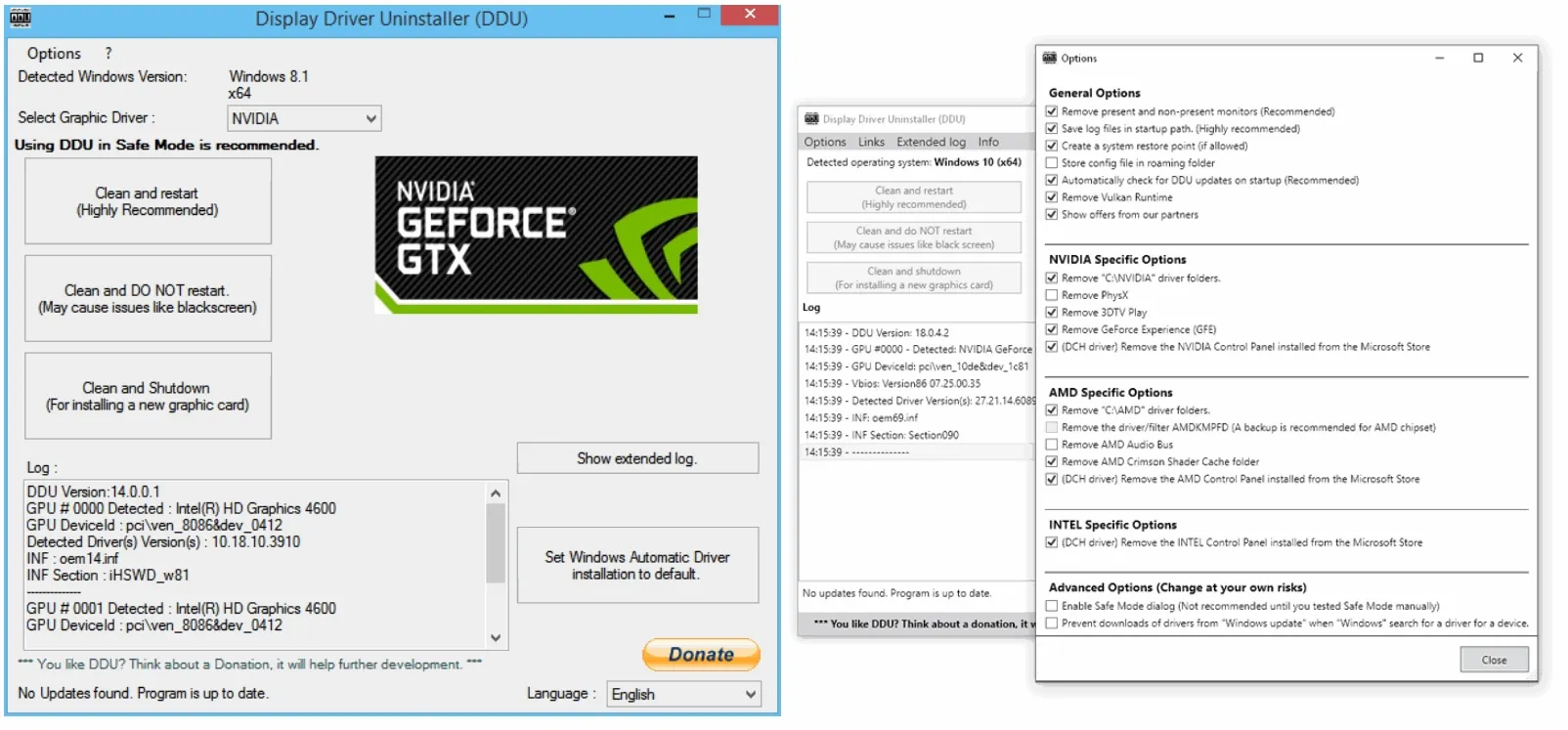
Uninstall your current driver and its software using DDU in safe mode. Restart, then install new driver. Read instructions carefully.
 

My Computers My Computers

  • At a glance

    Windows 11 Pro 25H2 26200.8655i9-10900 10 core 20 threads32 gbnone-Intel UHD Graphics 630
    OS
    Windows 11 Pro 25H2 26200.8655
    Computer type
    PC/Desktop
    Manufacturer/Model
    Dell Optiplex 7080
    CPU
    i9-10900 10 core 20 threads
    Motherboard
    DELL 0J37VM
    Memory
    32 gb
    Graphics Card(s)
    none-Intel UHD Graphics 630
    Sound Card
    Integrated Realtek
    Monitor(s) Displays
    Benq 27
    Screen Resolution
    2560x1440
    Hard Drives
    2x1tb Solidigm m.2 nvme /External drives 512gb Samsung m.2 sata+2tb Kingston m2.nvme
    PSU
    500w
    Case
    MT
    Cooling
    Dell Premium
    Keyboard
    Logitech wired
    Mouse
    Logitech wireless
    Internet Speed
    so slow I'm too embarrassed to tell
    Browser
    #1 Edge #2 Firefox
    Antivirus
    Defender+MWB Premium
  • At a glance

    Windows 11 Pro 24H2 26200.8457AMD Ryzen 7 6800U32 gbintegrated
    Operating System
    Windows 11 Pro 24H2 26200.8457
    Computer type
    PC/Desktop
    Manufacturer/Model
    Beelink Mini PC SER5
    CPU
    AMD Ryzen 7 6800U
    Memory
    32 gb
    Graphics card(s)
    integrated
    Sound Card
    integrated
    Monitor(s) Displays
    Benq 27
    Screen Resolution
    2560x1440
    Hard Drives
    1TB Crucial nvme
    Keyboard
    Logitech wired
    Mouse
    Logitech wireless
    Internet Speed
    still too embarrassed to tell
    Browser
    Firefox
    Antivirus
    Defender
    Other Info
    System 3 is non compliant Dell 9020 i7-4770/24gb ram Win11 PRO 26200.8457
New Nvidia drivers released in 08/23 Make sure you fill out the correct information to get the correct driver for the 1060. Download The Latest Official GeForce Drivers

Uninstall your current driver and its software using DDU in safe mode. Restart, then install new driver. Read instructions carefully.
BIG FAT LIKE! Will do!
 

My Computer My Computer

At a glance

Windows 11I5Too much haha!NVidia 1060
OS
Windows 11
Computer type
PC/Desktop
Manufacturer/Model
Cooler master
CPU
I5
Motherboard
Gigabyte
Memory
Too much haha!
Graphics Card(s)
NVidia 1060
If you're talking about video "pixelation", that's commonly a video ram problem. And when you have On-Board video, it uses a piece of the system ram as Video Ram.
My own fix for the problem has nothing to do with the video drivers. If they worked yesterday, they should be working today as well.
However, dirt on a stick of ram can cause it to short out.
My FIX is to remove the RAM, clean it thoroughly with soap and water, followed by a rinse with Denatured Alcohol and after a thorough drying, replace the ram, reboot and see if it works any better. Most of the time, it will.

If the video ram is actually on a plug in video card, then cleaning it can get more difficult, but the problem as well as the solution remains the same.

If washing the ram does not fix the problem, then I will REPLACE the ram. (or the video card)

Good Luck,
TM :cool:
 
Back
Top Bottom