

- Local time
- 7:19 AM
- Posts
- 5,949
- Location
- Hafnarfjörður IS
- OS
- Windows XP,11 Linux Fedora Rawhide pre-release 46
Hi folks
Particularly if you run different Windows versions from physical vhdx files - installing Windows server 2025 - especially if you do it first gets the old "black" text driven boot menu. So do not install Windows server first !!!!!!. Or run bcdboot from the W2025 server cmd line.
To get back the blue boot menu again you need to do this -- bit of a pain I know but it doesn't take that long.
1) with a W11 recent bootable device boot and select --> repair system and choose command mode.
2) reformat the EFI partition via diskpart -
3) select and attach any W11 vhdx file and re-install the boot loader via bcdboot
4) boot - this will boot into (without the boot menu) the W11 system.
5) now use diskpart to select and attach your windows server vhdx file.
6) use bcdboot to load the bootmanager -- the trick is to use the bcdboot program FROM THE BOOTED W11 SYSTEM -- not the W2025 server e.g - Windows server is on "E" , your running system is on "C" so you do cd c:\windows\system32, c:\ and then bcdboot E:\windows /s S: /f UEFI where "S" is the efi partition -- assuming you have one EFI partition with vhdx1, vhdx2,vhdx3 etc on the disk
.
7) repeat for all remaining windows versions -- you don't need to reboot the system each time -- but just run the bcdboot.exe with the volume letter of the w11 system you want -- e.g bcdboot /<volume:windows> /s S: /f UEFI
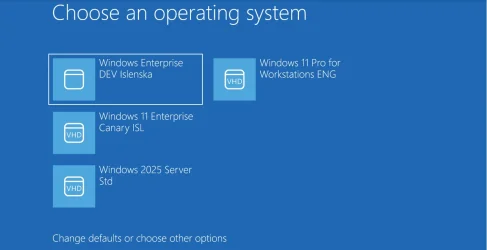
Now it all works perfectly !!! and if you want you can now still make W2025 Server the default OS without getting back to the old black boot text menu.
If anyone can automate this process - or suggest a better way I'm open to suggestion -- setting the nx doesn't do the trick either.
Cheers
jimbo
Particularly if you run different Windows versions from physical vhdx files - installing Windows server 2025 - especially if you do it first gets the old "black" text driven boot menu. So do not install Windows server first !!!!!!. Or run bcdboot from the W2025 server cmd line.
To get back the blue boot menu again you need to do this -- bit of a pain I know but it doesn't take that long.
1) with a W11 recent bootable device boot and select --> repair system and choose command mode.
2) reformat the EFI partition via diskpart -
3) select and attach any W11 vhdx file and re-install the boot loader via bcdboot
4) boot - this will boot into (without the boot menu) the W11 system.
5) now use diskpart to select and attach your windows server vhdx file.
6) use bcdboot to load the bootmanager -- the trick is to use the bcdboot program FROM THE BOOTED W11 SYSTEM -- not the W2025 server e.g - Windows server is on "E" , your running system is on "C" so you do cd c:\windows\system32, c:\ and then bcdboot E:\windows /s S: /f UEFI where "S" is the efi partition -- assuming you have one EFI partition with vhdx1, vhdx2,vhdx3 etc on the disk
.
7) repeat for all remaining windows versions -- you don't need to reboot the system each time -- but just run the bcdboot.exe with the volume letter of the w11 system you want -- e.g bcdboot /<volume:windows> /s S: /f UEFI
Now it all works perfectly !!! and if you want you can now still make W2025 Server the default OS without getting back to the old black boot text menu.
If anyone can automate this process - or suggest a better way I'm open to suggestion -- setting the nx doesn't do the trick either.
Cheers
jimbo
Last edited:
My Computer
At a glance
Windows XP,11 Linux Fedora Rawhide pre-releas...2 X Intel i7
- OS
- Windows XP,11 Linux Fedora Rawhide pre-release 46
- Computer type
- PC/Desktop
- CPU
- 2 X Intel i7
- Screen Resolution
- 4KUHD X 2






