Classic Volume Control for Windows 11


A Guy

Righteous Dude
Pro User
VIP
Local time
12:21 AM
Posts
5,685
Location
No matter where you go, there you are
OS
Windows 10 Home x64
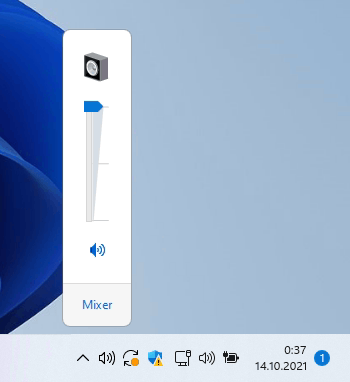
Classic Volume Control for Windows 11 is my latest app that brings back the good old sound mixer to the latest OS from Redmond. In fact, the classic sound mixer is present in Windows 11, but there is no single option to launch from anywhere in the user interface. My app fixes that inconvenience.

A Guy
 

My Computers My Computers

  • At a glance

    Windows 10 Home x64INTEL Core i5-11400KINGSTON HyperX Fury Black DDR4 16GB (2 x 8GB...EVGA GeForce GTX 750 Superclocked 1GB 128-Bit...
    OS
    Windows 10 Home x64
    Computer type
    PC/Desktop
    Manufacturer/Model
    Custom
    CPU
    INTEL Core i5-11400
    Motherboard
    ASUS PRIME H570-PLUS
    Memory
    KINGSTON HyperX Fury Black DDR4 16GB (2 x 8GB) 3200MHz, CL16
    Graphics Card(s)
    EVGA GeForce GTX 750 Superclocked 1GB 128-Bit GDDR5
    Monitor(s) Displays
    LG 32MA68HY 32" IPS
    Screen Resolution
    1920 x 1080
    Hard Drives
    SAMSUNG 250GB 970 EVO Plus NVMe, M.2 SSD, Crucial 250GB MX500, SEAGATE 500GB Barracuda® 7200.12, SATA 3 Gb/s, 7200 RPM, 16MB cache
    PSU
    CORSAIR RM550x 80 PLUS Gold 550W
    Case
    ANTEC P10 FLUX
    Cooling
    be quiet! Pure Rock 2, 5 x 120 mm Case Fans
    Internet Speed
    480 + Mbps Up/ 12+ Mbps Down
    Browser
    Vivaldi Snapshot
    Antivirus
    Avast
  • At a glance

    Windows 10 Home x64Intel Core i5-750Kingston HyperX Fury Black 8GB (2x4GB) DDR3-1...MSI GeForce GT 240 N240GT-MD1G/D5 1 GB DDR5
    Operating System
    Windows 10 Home x64
    Computer type
    PC/Desktop
    Manufacturer/Model
    Custom
    CPU
    Intel Core i5-750
    Motherboard
    ASUS P7P55D
    Memory
    Kingston HyperX Fury Black 8GB (2x4GB) DDR3-1600MHz CL8
    Graphics card(s)
    MSI GeForce GT 240 N240GT-MD1G/D5 1 GB DDR5
    Monitor(s) Displays
    LG 32MA68HY 32" IPS
    Screen Resolution
    1980x1040
    Hard Drives
    Samsung Electronics 840 EVO 120GB, SEAGATE 500GB Barracuda® 7200.12, SATA 3 Gb/s, 7200 RPM, 16MB cache
    PSU
    Antec TruePower New TP-550 550W
    Case
    Antec 300
    Cooling
    Cooler Master Hyper 212+, 4 Noctua NF-P12 120mm, 1 Noctua NF-P14 FLX
    Internet Speed
    480+ Mbps Down/12+Mbps Up
    Browser
    Vivaldi Snapshot
    Antivirus
    Avast
I've been using Volume² for years.
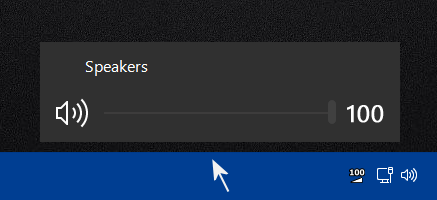
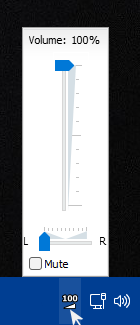
It's great. It displays the volume percentage on the Taskbar and you can scroll your mouse over the Taskbar to adjust the volume.


Volume 2 When Adjusting Volume & Percentage.pngVolume 2 On Taskbar & Volume.png
 
Last edited:

My Computers My Computers

  • At a glance

    Windows 11 ProIntel Core i9-10900XCorsair 64 GB (4 x 16 GB) CMW64GX4M4C3000C15 ...GIGABYTE GeForce GTX 1660 Super Mini ITX 6 GB OC
    OS
    Windows 11 Pro
    Computer type
    PC/Desktop
    Manufacturer/Model
    Stigg's Build
    CPU
    Intel Core i9-10900X
    Motherboard
    GIGABYTE X299X DESIGNARE 10G
    Memory
    Corsair 64 GB (4 x 16 GB) CMW64GX4M4C3000C15 Vengeance RGB Pro 3000Mhz DDR4
    Graphics Card(s)
    GIGABYTE GeForce GTX 1660 Super Mini ITX 6 GB OC
    Sound Card
    Realtek ALC1220
    Monitor(s) Displays
    Samsung 27" FHD LED FreeSync Gaming Monitor (LS27F350FHEXXY)
    Screen Resolution
    1920 x 1080
    Hard Drives
    Samsung 970 Pro Series 1TB M.2 2280 NVMe SSD
    Western Digital Red Pro WD8003FFBX-68B9AN0 8 TB, 7200 RPM, SATA-III
    Western Digital Red Pro WD8003FFBX-68B9AN0 8 TB, 7200 RPM, SATA-III
    PSU
    Corsair HX1200 1200W 80 Plus Platinum
    Case
    Fractal Design Define 7 Black Solid Case
    Cooling
    Noctua NH-D15 Chromax Black
    Keyboard
    Razer Ornata V2
    Mouse
    Razer DeathAdder Essential
    Internet Speed
    FTTN 100Mbps / 40Mbps
    Browser
    Mozilla Firefox
    Antivirus
    N/A
    Other Info
    Logitech BRIO 4k Ultra HD USB-C Webcam
  • At a glance

    Windows 10 ProCore i7-8750HSK Hynix 32 GB (2 x 16 GB) HMA82GS6CJR8N-VK 1...NVIDIA GeForce GTX 1070
    Operating System
    Windows 10 Pro
    Computer type
    Laptop
    Manufacturer/Model
    ASUS ROG Zephyrus M GM501GS
    CPU
    Core i7-8750H
    Motherboard
    Zephyrus M GM501GS
    Memory
    SK Hynix 32 GB (2 x 16 GB) HMA82GS6CJR8N-VK 16 GB DDR4-2666 DDR4 SDRAM
    Graphics card(s)
    NVIDIA GeForce GTX 1070
    Sound Card
    Realtek ALC294
    Monitor(s) Displays
    AU Optronics B156HAN07.1 [15.6" LCD]
    Screen Resolution
    1920 x 1080
    Hard Drives
    Samsung MZVKW512HMJP-00000 512 GB, PCI-E 3.0 x4
    Samsung SSD 860 QVO 4TB 4 TB, SATA-III
    PSU
    N/A
    Case
    N/A
    Cooling
    N/A
    Keyboard
    PC/AT Enhanced PS2 Keyboard (101/102-Key)
    Mouse
    Razer DeathAdder Essential
    Internet Speed
    FTTN 100Mbps / 40Mbps
    Browser
    Mozilla Firefox
    Antivirus
    N/A
    Other Info
    USB2.0 HD UVC Webcam
Hey guys. I know this thread is old. But here's what I do. No need for anything complicated at all to solve this Volume Control issue. Actually the fix is so simple it's not even funny. AND ... it's built into Windows. Click "Run" --> Browse --> %SystemRoot%\SysWOW64\SndVol.exe --> (click okay). Old school volume mixer pops right up. Viola!! Find it on the taskbar and right click it and choose "Pin To TaskBar". And DONE. You now have an even EASIER to access Volume Control than any other fix I've read, and it's 100% Microsoft NATIVE APP. Built in. Drag it to whatever location on the taskbar you'd like it to live in and badda bing. Permanent Old School Volume Control. EXACTLY what the doctor ordered. Hopefully this helped.
 

My Computer My Computer

At a glance

Windows 11, 10, 8.1, 7, XP, 2K, Debian, Mint,...Xeon, Intel, AMD, Risc32gb --> 256gb : varies with systemATI, Nvidia
OS
Windows 11, 10, 8.1, 7, XP, 2K, Debian, Mint, Arch, SuSE, PuppEX, Cent
Computer type
PC/Desktop
Manufacturer/Model
Asus, GigaByte, SuperMicro, PowerEdge
CPU
Xeon, Intel, AMD, Risc
Motherboard
itx, atx, u1, u2, card, virtual
Memory
32gb --> 256gb : varies with system
Graphics Card(s)
ATI, Nvidia
Sound Card
Realtek, SB, Alessis
Monitor(s) Displays
Samsung, Dell, Sony, Google
Screen Resolution
1024 SD --> 8K UHD varies with system
Hard Drives
Hitachi, WD, Samsung, Seagate, PNY, Intel, Fujitsu, Sandisk
PSU
Corsair, Thermaltake, IDT Systems, HP, Dell
Case
Lian, Thermaltake, Dell, RackMount
Cooling
Water, Fan, Air
Keyboard
Standard BT, Wireless, and PS2.
Mouse
PS2, BT, Wireless
Internet Speed
Fibre Channel, GigE, Cable, 5G Ultra,
Browser
Firefox, Chrome, Opera, Safari, Brave, Edge
Antivirus
Eset, McAfee, Defender, Symantec, Kaspersky
Other Info
Home Lan: GigE 2 24 port Smart Switches, Cisco Fibre Channel switch, 2 Nighthawk 5g Ultra Wideband Wireless AP's
I like the way I can adjust browser and system volumes independently!

1675876756586.png
 

My Computers My Computers

  • At a glance

    Windows 11 Pro 25H2 26200.8894AMD Ryzen 7 5825U with Radeon Graphics16GB
    OS
    Windows 11 Pro 25H2 26200.8894
    Computer type
    Laptop
    Manufacturer/Model
    Acemagic LX15PRO
    CPU
    AMD Ryzen 7 5825U with Radeon Graphics
    Motherboard
    BIOS CT_BI_AMI_LX15PRO_AB8139_A-004
    Memory
    16GB
    Screen Resolution
    1920 x 1080
    Hard Drives
    SSD 2TB
    Internet Speed
    30 Mbps
    Browser
    Brave
    Antivirus
    Webroot SecureAnywhere Complete beta
  • At a glance

    Windows 11 Pro 23H2 22631.2506Atom N450 1.66GHz2GB
    Operating System
    Windows 11 Pro 23H2 22631.2506
    Computer type
    Laptop
    Manufacturer/Model
    HP Mini 210-1090NR PC (bought in late 2009!)
    CPU
    Atom N450 1.66GHz
    Memory
    2GB
    Browser
    Brave
    Antivirus
    Webroot
  • Acer Swift SF114-34 laptop
    OS Windows 11 Pro 26200.8894
    CPU Pentium Silver N6000
    RAM 4GB
    BIOS v1.17
    SSD Samsung 970 EVO Plus SSD 2TB (an upgrade)
I mean yea, ofc it's still there. But why not use EarTrumpet?
 

My Computer My Computer

At a glance

Windows 11
OS
Windows 11
Back
Top Bottom