Clean Windows 11 Installation Restore Installed Apps


Lj2025

Member
Local time
9:26 PM
Posts
49
OS
Windows 11 Pro
Is it possible to Create Backup of all Installed Apps in Windows 11 and Load it in Windows 11 Clean Installation?

Is there any software for this?

I don't mean Acronis True Image (Windows 11 System Backup).

I'm asking because i want to install Windows 11 LTSC instead Pro. I don't want to install all Apps again in Windows 11 Clean Installation.


I found this, but Windows Backup App missing in my Windows 11 25H2.
 

My Computer My Computer

At a glance

Windows 11 Pro
OS
Windows 11 Pro
This software displays the ability to transfer applications.

Contact them through their chat to see if it can do only that.


Code:
Most applications are transferred and installed, making them ready-to-use on the new PC. 
So there’s no need to go hunting for old CDs, previously downloaded programs, serial numbers, or license codes!

Code:
PCmover is the only software on the market that automatically moves apps, files, settings, and user profiles 
from an old PC to a new one, or from an old operating system to a new one, without leaving anything behind.
 

My Computer My Computer

At a glance

Windows 10Intel(R) Core(TM) i7-4800MQ CPU @ 2.70GHz16 GB Total: Manufacturer : Samsung MemoryTyp...NVIDIA Quadro K3100M; Intel(R) HD Graphics 4600
OS
Windows 10
Computer type
Laptop
Manufacturer/Model
HP
CPU
Intel(R) Core(TM) i7-4800MQ CPU @ 2.70GHz
Motherboard
Product : 190A Version : KBC Version 94.56
Memory
16 GB Total: Manufacturer : Samsung MemoryType : DDR3 FormFactor : SODIMM Capacity : 8GB Speed : 1600
Graphics Card(s)
NVIDIA Quadro K3100M; Intel(R) HD Graphics 4600
Sound Card
IDT High Definition Audio CODEC; PNP Device ID HDAUDIO\FUNC_01&VEN_111D&DEV_76E0
Hard Drives
Model Hitachi HTS727575A9E364
Antivirus
Microsoft Defender
Other Info
Mobile Workstation
Windows LTSC is considered by Microsoft to be a completely different family of product unlike Win 11 Home and Pro (as one example) which is considered to be in the same family.

No upgrade path from Pro to LTSC exists.
 

My Computers My Computers

  • At a glance

    Win11 Pro 25H2 (RTM+)Intel i7-14650HX32 GBNo GPU - Built-in Intel Graphics
    OS
    Win11 Pro 25H2 (RTM+)
    Computer type
    PC/Desktop
    Manufacturer/Model
    Acemagic
    CPU
    Intel i7-14650HX
    Memory
    32 GB
    Graphics Card(s)
    No GPU - Built-in Intel Graphics
    Sound Card
    Integrated
    Monitor(s) Displays
    Varies as machine will often be moved to locations with different monitors
    Screen Resolution
    Varies
    Hard Drives
    1 x 1TB Gen 4 NVMe SSD
    PSU
    120W Power Brick
    Keyboard
    Corsair K70 Max RGB Magnetic Keyboard
    Mouse
    Logitech MX Master 3
    Internet Speed
    1Gb Up / 1 Gb Down
    Browser
    Edge
    Antivirus
    Windows Defender
  • At a glance

    Win11 Pro 25H2 (RTM+)Intel i7-1255U16 GBIntel Iris Xe Graphics
    Operating System
    Win11 Pro 25H2 (RTM+)
    Computer type
    Laptop
    Manufacturer/Model
    Lenovo ThinkBook 13x Gen 2
    CPU
    Intel i7-1255U
    Memory
    16 GB
    Graphics card(s)
    Intel Iris Xe Graphics
    Sound Card
    Realtek® ALC3306-CG codec
    Monitor(s) Displays
    13.3-inch IPS Display
    Screen Resolution
    WQXGA (2560 x 1600)
    Hard Drives
    2 TB 4 x 4 NVMe SSD
    PSU
    USB-C / Thunderbolt 4 Power / Charging
    Keyboard
    Backlit, spill resistant keyboard
    Mouse
    Buttonless Glass Precision Touchpad
    Internet Speed
    1Gb Up / 1Gb Down
    Browser
    Edge
    Antivirus
    Windows Defender
    Other Info
    WiFi 6e / Bluetooth 5.1 / Facial Recognition / Fingerprint Sensor / ToF (Time of Flight) Human Presence Sensor
As stated, there is no upgrade path. You must clean install. End of story no matter what anyone else may tell you. :-)
 

My Computers My Computers

  • At a glance

    Win11 Pro 25H2 (RTM+)Intel i7-14650HX32 GBNo GPU - Built-in Intel Graphics
    OS
    Win11 Pro 25H2 (RTM+)
    Computer type
    PC/Desktop
    Manufacturer/Model
    Acemagic
    CPU
    Intel i7-14650HX
    Memory
    32 GB
    Graphics Card(s)
    No GPU - Built-in Intel Graphics
    Sound Card
    Integrated
    Monitor(s) Displays
    Varies as machine will often be moved to locations with different monitors
    Screen Resolution
    Varies
    Hard Drives
    1 x 1TB Gen 4 NVMe SSD
    PSU
    120W Power Brick
    Keyboard
    Corsair K70 Max RGB Magnetic Keyboard
    Mouse
    Logitech MX Master 3
    Internet Speed
    1Gb Up / 1 Gb Down
    Browser
    Edge
    Antivirus
    Windows Defender
  • At a glance

    Win11 Pro 25H2 (RTM+)Intel i7-1255U16 GBIntel Iris Xe Graphics
    Operating System
    Win11 Pro 25H2 (RTM+)
    Computer type
    Laptop
    Manufacturer/Model
    Lenovo ThinkBook 13x Gen 2
    CPU
    Intel i7-1255U
    Memory
    16 GB
    Graphics card(s)
    Intel Iris Xe Graphics
    Sound Card
    Realtek® ALC3306-CG codec
    Monitor(s) Displays
    13.3-inch IPS Display
    Screen Resolution
    WQXGA (2560 x 1600)
    Hard Drives
    2 TB 4 x 4 NVMe SSD
    PSU
    USB-C / Thunderbolt 4 Power / Charging
    Keyboard
    Backlit, spill resistant keyboard
    Mouse
    Buttonless Glass Precision Touchpad
    Internet Speed
    1Gb Up / 1Gb Down
    Browser
    Edge
    Antivirus
    Windows Defender
    Other Info
    WiFi 6e / Bluetooth 5.1 / Facial Recognition / Fingerprint Sensor / ToF (Time of Flight) Human Presence Sensor
As stated, there is no upgrade path. You must clean install. End of story no matter what anyone else may tell you. :-)
This worked for 23h2 to ltsc 2024, but if you're on 25h2 i dont know if you can go to ltsc 2024...


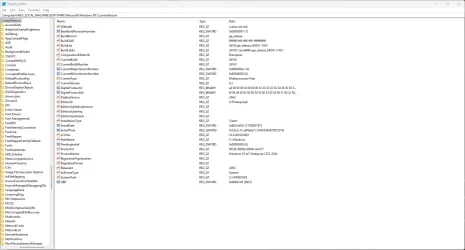
install 23H2, edit the reg:


HKEY_LOCAL_MACHINE\SOFTWARE\Microsoft\Windows NT\CurrentVersion

Edit > String Value "EditionID"

Value = IoTEnterpriseS

Edit > String Value "ProductName"

Value = Windows 10 IoT Enterprise LTSC 2024

Then upgrade to Windows 11 IoT Enterprise LTSC 24H2
 

My Computer My Computer

At a glance

Windows 11 Pro
OS
Windows 11 Pro
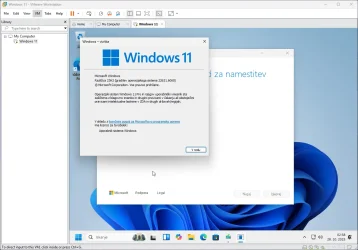
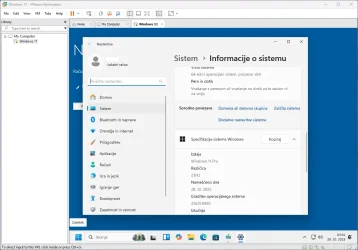
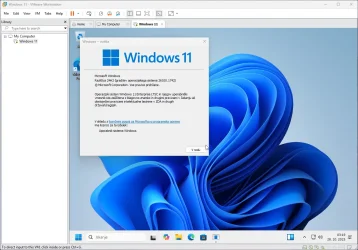
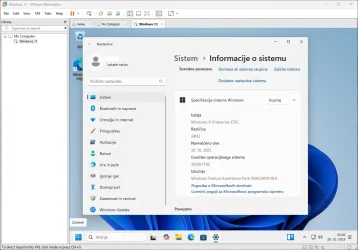
From Windows 11 23H2 to 24H2 LTSC working. I tested in VMware Workstation.
 

Attachments

  • Posnetek zaslona 2025-10-28 030929.webp
    Posnetek zaslona 2025-10-28 030929.webp
    62.1 KB · Views: 3
  • Posnetek zaslona 2025-10-28 031248.webp
    Posnetek zaslona 2025-10-28 031248.webp
    51 KB · Views: 3
  • Posnetek zaslona 2025-10-28 031955.webp
    Posnetek zaslona 2025-10-28 031955.webp
    82.2 KB · Views: 3
  • Posnetek zaslona 2025-10-28 032010.webp
    Posnetek zaslona 2025-10-28 032010.webp
    60.9 KB · Views: 3

My Computer My Computer

At a glance

Windows 11 Pro
OS
Windows 11 Pro
You can try uninstalling the enablement package to go back to 24h2 then try to “upgrade” to 2024 ltsc
 

My Computer My Computer

At a glance

Windows 11 Pro
OS
Windows 11 Pro

Attachments

  • Posnetek zaslona 2025-10-28 214250.webp
    Posnetek zaslona 2025-10-28 214250.webp
    118.8 KB · Views: 3

My Computer My Computer

At a glance

Windows 11 Pro
OS
Windows 11 Pro
Back
Top Bottom