Solved Clone recommendation


larc919

Well-known member
Member
VIP
Local time
6:38 AM
Posts
575
Location
Raleigh, NC, USA
OS
Windows 11 Pro
Macrium Reflect Home 8.1 recently failed cloning the UEFI boot part of system drives on 2 of my PCs running Win 11 24H2. Once I finished, neither would boot into Windows. Reflect boot fix failed as well. I'll be needing to clone the system drive in my laptop soon, but don't trust Reflect 8.1 cloning anymore. What's my best bet for a cloning utility that will work properly?
 

My Computer

System One

  • OS
    Windows 11 Pro
    Computer type
    PC/Desktop
    Manufacturer/Model
    Self Build
    CPU
    Intel Core Ultra 265K
    Motherboard
    Gigabyte Z890 AOROS Elite
    Memory
    TeamGroup T-Force Vulcan DDR5 6400MHz 32GB
    Graphics Card(s)
    MSI GeForce RTX 3050
    Sound Card
    GPU NVIDIA High Definition Audio via HDMI to Denon AVR-S670BT Receiver
    Monitor(s) Displays
    LG 32UN650 32" 4k
    Screen Resolution
    3840x2160 @ 60Hz (175% scaling)
    Hard Drives
    Samsung 980 Pro NVMe 1TB x2
    PSU
    Corsair RM850x
    Case
    be quiet! Pure Base 600
    Cooling
    Thermalright Phantom Spirit 120SE & be quiet! Silent Wings Pro x3 case fans
    Keyboard
    Arteck Backlit USB Wired
    Mouse
    Logitech M510
    Internet Speed
    500Mb down/12Mb up
    Browser
    Firefox & Edge
    Antivirus
    Windows Defender & Free MBAM
    Other Info
    Main PC
The best tool for this is diskgenius free version. Use the os migration ( and add any extra partitions if you want)

It is possible to have multiple target disks but presumably you only want to select one target disk


It automatically selects the partitions on the source disk need for windows


if you want to add extra partitions from the source disk it is very easy

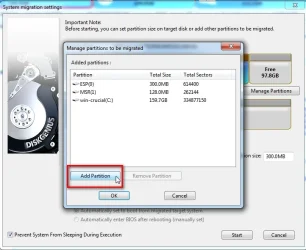
To add an extra partition to the migration Click Manage Partitions


dg-migrate-add-partition1.webp

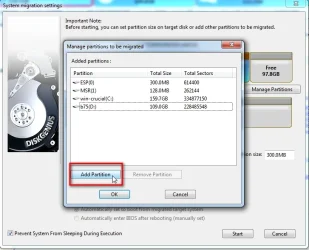
Click Add Partition

dg-migrate-add-partition2.webp

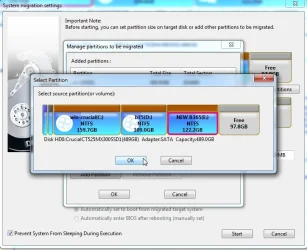
Select the partition to Add ( in this example it is D )

click OK


dg-migrate-add-partition3.webp

I also want to add partition E

clik Add partition again


dg-migrate-add-partition4.webp

Select partition E and click OK

dg-migrate-add-partition5.webp


that is all I want to add so click ok


dg-migrate-add-partition6.webp

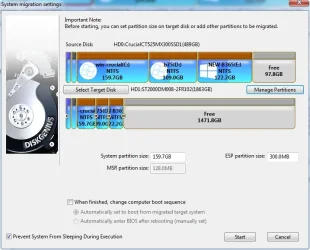
can use the arrows to resize partitions on the target disk if desired


dg-migrate-add-partition7..webp
 
Last edited:

My Computers

System One System Two

  • OS
    Win7,Win11
    Computer type
    PC/Desktop
    CPU
    i7-9700
    Motherboard
    gigabyte b365m ds3h
    Memory
    2x16gb 3600mhz
    Monitor(s) Displays
    benq gw2480
    PSU
    bequiet pure power 11 400CM
    Cooling
    cryorig m9i
  • Operating System
    win7,win11
    Computer type
    PC/Desktop
    CPU
    i5-8400
    Motherboard
    gigabyte b365m ds3h
    Memory
    2x8gb 3200
    PSU
    xfx pro 450
Some of us here never clone. We restore an image which allows us to restore and resize partition all in one go. You resize by dragging the divider bar to the right of the partition. You do not have do do any formatting of the disk either. Macrium will do it all. Personally, I've had problems every time I attempted a clone.
 

My Computers

System One System Two

  • OS
    Windows 11 Pro 25H2
    Computer type
    PC/Desktop
    Manufacturer/Model
    Dell Optiplex 7080
    CPU
    i9-10900 10 core 20 threads
    Motherboard
    DELL 0J37VM
    Memory
    32 gb
    Graphics Card(s)
    none-Intel UHD Graphics 630
    Sound Card
    Integrated Realtek
    Monitor(s) Displays
    Benq 27
    Screen Resolution
    2560x1440
    Hard Drives
    2x1tb Solidigm m.2 nvme /External drives 512gb Samsung m.2 sata+2tb Kingston m2.nvme
    PSU
    500w
    Case
    MT
    Cooling
    Dell Premium
    Keyboard
    Logitech wired
    Mouse
    Logitech wireless
    Internet Speed
    so slow I'm too embarrassed to tell
    Browser
    #1 Edge #2 Firefox
    Antivirus
    Defender+MWB Premium
  • Operating System
    Windows 11 Pro 24H2 26200.8457
    Computer type
    PC/Desktop
    Manufacturer/Model
    Beelink Mini PC SER5
    CPU
    AMD Ryzen 7 6800U
    Memory
    32 gb
    Graphics card(s)
    integrated
    Sound Card
    integrated
    Monitor(s) Displays
    Benq 27
    Screen Resolution
    2560x1440
    Hard Drives
    1TB Crucial nvme
    Keyboard
    Logitech wired
    Mouse
    Logitech wireless
    Internet Speed
    still too embarrassed to tell
    Browser
    Firefox
    Antivirus
    Defender
    Other Info
    System 3 is non compliant Dell 9020 i7-4770/24gb ram Win11 PRO 26200.8457
The best tool for this is diskgenius free version. Use the os migration ( and add any extra partitions if you want)
Thanks very much for your suggestion and detailed guide on using it. Have already downloaded and installed. Will try DiskGenius next week when I will need to clone.
 

My Computer

System One

  • OS
    Windows 11 Pro
    Computer type
    PC/Desktop
    Manufacturer/Model
    Self Build
    CPU
    Intel Core Ultra 265K
    Motherboard
    Gigabyte Z890 AOROS Elite
    Memory
    TeamGroup T-Force Vulcan DDR5 6400MHz 32GB
    Graphics Card(s)
    MSI GeForce RTX 3050
    Sound Card
    GPU NVIDIA High Definition Audio via HDMI to Denon AVR-S670BT Receiver
    Monitor(s) Displays
    LG 32UN650 32" 4k
    Screen Resolution
    3840x2160 @ 60Hz (175% scaling)
    Hard Drives
    Samsung 980 Pro NVMe 1TB x2
    PSU
    Corsair RM850x
    Case
    be quiet! Pure Base 600
    Cooling
    Thermalright Phantom Spirit 120SE & be quiet! Silent Wings Pro x3 case fans
    Keyboard
    Arteck Backlit USB Wired
    Mouse
    Logitech M510
    Internet Speed
    500Mb down/12Mb up
    Browser
    Firefox & Edge
    Antivirus
    Windows Defender & Free MBAM
    Other Info
    Main PC
Some of us here never clone. We restore an image which allows us to restore and resize partition all in one go. You resize by dragging the divider bar to the right of the partition. You do not have do do any formatting of the disk either. Macrium will do it all. Personally, I've had problems every time I attempted a clone.
Thanks! I've done that in the past when switching between drives of the same type. But have had a bad experience or two trying to restore from one type of drive to another type, so will be more comfortable cloning this SATA SSD to NVMe.
 

My Computer

System One

  • OS
    Windows 11 Pro
    Computer type
    PC/Desktop
    Manufacturer/Model
    Self Build
    CPU
    Intel Core Ultra 265K
    Motherboard
    Gigabyte Z890 AOROS Elite
    Memory
    TeamGroup T-Force Vulcan DDR5 6400MHz 32GB
    Graphics Card(s)
    MSI GeForce RTX 3050
    Sound Card
    GPU NVIDIA High Definition Audio via HDMI to Denon AVR-S670BT Receiver
    Monitor(s) Displays
    LG 32UN650 32" 4k
    Screen Resolution
    3840x2160 @ 60Hz (175% scaling)
    Hard Drives
    Samsung 980 Pro NVMe 1TB x2
    PSU
    Corsair RM850x
    Case
    be quiet! Pure Base 600
    Cooling
    Thermalright Phantom Spirit 120SE & be quiet! Silent Wings Pro x3 case fans
    Keyboard
    Arteck Backlit USB Wired
    Mouse
    Logitech M510
    Internet Speed
    500Mb down/12Mb up
    Browser
    Firefox & Edge
    Antivirus
    Windows Defender & Free MBAM
    Other Info
    Main PC
I use Acronis True Image. Over the years I've had to restore a few images, no problem at all.
 

My Computers

System One System Two

  • OS
    Win 11 Pro 25H2, Build 26200.8524
    Computer type
    PC/Desktop
    Manufacturer/Model
    Home Brew
    CPU
    Intel Core i5 14500
    Motherboard
    Gigabyte B760M G P WIFI
    Memory
    64GB DDR4
    Graphics Card(s)
    GeForce RTX 4060
    Sound Card
    Chipset Realtek
    Monitor(s) Displays
    LG 45" Ultragear, Acer 24" 1080p
    Screen Resolution
    5120x1440, 1920x1080
    Hard Drives
    Crucial P310 2TB 2280 PCIe Gen4 3D NAND NVMe M.2 SSD (O/S)
    Silicon Power 2TB US75 NVMe PCIe Gen4 M.2 2280 SSD (backup)
    Crucial BX500 2TB 3D NAND (2nd backup)
    Seagate 4TB Ironwolf, rotating HDD archive files
    External off-line backup Drives: 2 NVMe 4TB drives in external enclosures
    PSU
    Thermaltake Toughpower GF3 750W
    Case
    LIAN LI LANCOOL 216 E-ATX PC Case
    Cooling
    Lots of fans!
    Keyboard
    Microsoft Comfort Curve 2000
    Mouse
    Logitech G305
    Internet Speed
    Verizon FiOS 1GB
    Browser
    Firefox
    Antivirus
    Malware Bytes & Windows Defender Security
  • Operating System
    Win 11 Pro 25H2, Build 26200.8524
    Computer type
    PC/Desktop
    Manufacturer/Model
    Home Brew
    CPU
    Intel Core i5 14400
    Motherboard
    Gigabyte B760M DS3H AX
    Memory
    32GB DDR5
    Graphics card(s)
    Intel 700 Embedded GPU
    Sound Card
    Realtek Embedded
    Monitor(s) Displays
    27" HP 1080p
    Screen Resolution
    1920x1080
    Hard Drives
    Crucial P310 2TB 2280 PCIe Gen4 eD NAND PCIe SSD
    Samsung EVO 990 2TB NVMe Gen4 SSD
    Samsung 2TB SATA SSD
    PSU
    Thermaltake Smart BM3 650W
    Case
    Okinos Micro ATX Case
    Cooling
    Fans
    Keyboard
    Microsoft Comfort Curve 2000
    Mouse
    Logitech G305
    Internet Speed
    Verizon FiOS 1GB
    Browser
    Firefox
    Antivirus
    Malware Bytes & Windows Defender Security
I use Acronis True Image. Over the years I've had to restore a few images, no problem at all.
I second using Acronis True Image. I love it. :)
 

My Computers

System One System Two

  • OS
    Windows 11 25H2
    Computer type
    PC/Desktop
    Manufacturer/Model
    Apple Intel iMac Mid 2013
    CPU
    Apple CPU
    Motherboard
    Macintosh
    Memory
    8gb
    Graphics Card(s)
    Nvidia GeForce Driver
    Sound Card
    Nvidia Audio Driver
    Screen Resolution
    15.6"
    Hard Drives
    256GB M.2 SSD
    Mouse
    Custom Wireless Mouse
    Internet Speed
    256 mbps DL 8-10 mbps UL
    Browser
    Mozilla Firefox
    Antivirus
    Avira AntiVirus
  • Operating System
    Fedora Cinnamon 43
    Computer type
    Laptop
    Manufacturer/Model
    Acer Nitro V15-52
    CPU
    Nvidia GeForce RTX
    Motherboard
    Nvidia
    Memory
    16GB DDR4 Ram
    Graphics card(s)
    Nvidia GeForce RTX
    Sound Card
    Realtek HD Audio
    Screen Resolution
    15"
    Hard Drives
    512GB M2
    Internet Speed
    400mbps
    Browser
    Firefox
    Antivirus
    None
Some of us here never clone. We restore an image which allows us to restore and resize partition all in one go. You resize by dragging the divider bar to the right of the partition. You do not have do do any formatting of the disk either. Macrium will do it all. Personally, I've had problems every time I attempted a clone.
I may be the only cloner here, I bought 2 different stand alone cloners, but they have worked flawlessly every time. 😊
 

My Computer

System One

  • OS
    Windows XP (Stable, iconic) 7/8.1/10/11
    Computer type
    PC/Desktop
    Manufacturer/Model
    Alienware PC
    CPU
    Intel i7 4790K
    Motherboard
    ASROCK Z97 EXTREME4
    Memory
    32GB DDR3 1600 MHz
    Graphics Card(s)
    ATI Radeon HD 7770 2GB GDDR5
    Sound Card
    Onboard
    Monitor(s) Displays
    SAMSUNG UE57 Series 28-Inch 4K UHD
    Hard Drives
    SAMSUNG 970 EVO PLUS M.2
    PSU
    EVGA 850 watt
    Case
    Alienware Area 51 Black Tower Case
    Keyboard
    HyperX - Alloy Elite 2 Mechanical Gaming Keyboard.
    Mouse
    Microsoft Wireless
    Internet Speed
    1.2 GHz
    Browser
    Chrome..Edge..Firefox
I may be the only cloner here, I bought 2 different stand alone cloners, but they have worked flawlessly every time. 😊
I have a SATA TO SATA dock and a SATA to M.2 dock, both will do cloning. I just don't have any reason to use them for that purpose.
 

My Computers

System One System Two

  • OS
    Win 11 Pro 25H2, Build 26200.8524
    Computer type
    PC/Desktop
    Manufacturer/Model
    Home Brew
    CPU
    Intel Core i5 14500
    Motherboard
    Gigabyte B760M G P WIFI
    Memory
    64GB DDR4
    Graphics Card(s)
    GeForce RTX 4060
    Sound Card
    Chipset Realtek
    Monitor(s) Displays
    LG 45" Ultragear, Acer 24" 1080p
    Screen Resolution
    5120x1440, 1920x1080
    Hard Drives
    Crucial P310 2TB 2280 PCIe Gen4 3D NAND NVMe M.2 SSD (O/S)
    Silicon Power 2TB US75 NVMe PCIe Gen4 M.2 2280 SSD (backup)
    Crucial BX500 2TB 3D NAND (2nd backup)
    Seagate 4TB Ironwolf, rotating HDD archive files
    External off-line backup Drives: 2 NVMe 4TB drives in external enclosures
    PSU
    Thermaltake Toughpower GF3 750W
    Case
    LIAN LI LANCOOL 216 E-ATX PC Case
    Cooling
    Lots of fans!
    Keyboard
    Microsoft Comfort Curve 2000
    Mouse
    Logitech G305
    Internet Speed
    Verizon FiOS 1GB
    Browser
    Firefox
    Antivirus
    Malware Bytes & Windows Defender Security
  • Operating System
    Win 11 Pro 25H2, Build 26200.8524
    Computer type
    PC/Desktop
    Manufacturer/Model
    Home Brew
    CPU
    Intel Core i5 14400
    Motherboard
    Gigabyte B760M DS3H AX
    Memory
    32GB DDR5
    Graphics card(s)
    Intel 700 Embedded GPU
    Sound Card
    Realtek Embedded
    Monitor(s) Displays
    27" HP 1080p
    Screen Resolution
    1920x1080
    Hard Drives
    Crucial P310 2TB 2280 PCIe Gen4 eD NAND PCIe SSD
    Samsung EVO 990 2TB NVMe Gen4 SSD
    Samsung 2TB SATA SSD
    PSU
    Thermaltake Smart BM3 650W
    Case
    Okinos Micro ATX Case
    Cooling
    Fans
    Keyboard
    Microsoft Comfort Curve 2000
    Mouse
    Logitech G305
    Internet Speed
    Verizon FiOS 1GB
    Browser
    Firefox
    Antivirus
    Malware Bytes & Windows Defender Security
I have a SATA TO SATA dock and a SATA to M.2 dock, both will do cloning. I just don't have any reason to use them for that purpose.
This is what I have, I have never used mine for a dock, just for stand alone cloning. :-)
 

My Computer

System One

  • OS
    Windows XP (Stable, iconic) 7/8.1/10/11
    Computer type
    PC/Desktop
    Manufacturer/Model
    Alienware PC
    CPU
    Intel i7 4790K
    Motherboard
    ASROCK Z97 EXTREME4
    Memory
    32GB DDR3 1600 MHz
    Graphics Card(s)
    ATI Radeon HD 7770 2GB GDDR5
    Sound Card
    Onboard
    Monitor(s) Displays
    SAMSUNG UE57 Series 28-Inch 4K UHD
    Hard Drives
    SAMSUNG 970 EVO PLUS M.2
    PSU
    EVGA 850 watt
    Case
    Alienware Area 51 Black Tower Case
    Keyboard
    HyperX - Alloy Elite 2 Mechanical Gaming Keyboard.
    Mouse
    Microsoft Wireless
    Internet Speed
    1.2 GHz
    Browser
    Chrome..Edge..Firefox
Macrium Reflect Home 8.1 recently failed cloning the UEFI boot part of system drives on 2 of my PCs running Win 11 24H2. Once I finished, neither would boot into Windows. Reflect boot fix failed as well. I'll be needing to clone the system drive in my laptop soon, but don't trust Reflect 8.1 cloning anymore

The last time this happened to me Fix Windows Boot Problems didn't work for me either. What did work was Redeploy To New Hardware.

1747978455325.webp

However, i think, if you could manage to boot into Safe Mode, it should then boot properly into Windows.
 

My Computers

System One System Two

  • OS
    Win 11 Pro 25H2 26200.8524
    Computer type
    PC/Desktop
    Manufacturer/Model
    Self Built
    CPU
    Intel® Core™ i7-14700K
    Motherboard
    ASUS TUF Z690-PLUS WIFI BIOS 4505 11/29/25
    Memory
    G.SKILL Ripjaws S5 Series 64GB (2 x 32GB) DDR5
    Graphics Card(s)
    ASUS GeForce RTX 4070 Super 12GB
    Sound Card
    Sound Blaster AE-5 Plus
    Monitor(s) Displays
    ASUS TUF Gaming 27" 2K HDR Gaming
    Screen Resolution
    2560 x 1440
    Hard Drives
    Samsung 990 Pro 1TB NVMe (Win 11 25H2)
    SK hynix P41 500GB NVMe 25H2 DEV/Games
    SK hynix P41 2TB NVMe (x3)
    Crucial P3 Plus 4TB
    PSU
    Corsair RM850x Shift
    Case
    Antec Dark Phantom DP502 FLUX
    Cooling
    Corsair Nautilus 360 RS AIO
    Keyboard
    Logitech MK 320
    Mouse
    Razer Basilisk V3
    Internet Speed
    350Mbs
    Browser
    Firefox
    Antivirus
    Winows Security
    Other Info
    MR 8.1 Home

    System 3 Specs
    Win 11 Pro 25H2 26200.8524
    ASUS PRIME Z370-P II BIOS 3004 7/12/21
    Intel Core i7-8700 CPU @ 3.20GHz
    32GB DDR4 RAM (4x8)
    iGPU Intel UHD Graphics 630
  • Operating System
    Win 11 Pro 25H2 26200.8524
    Computer type
    PC/Desktop
    Manufacturer/Model
    Self Built
    CPU
    Intel Core i7-11700F
    Motherboard
    Asus TUF Gaming Z590 Plus WiFi (BIOS 2803)
    Memory
    64 GB DDR4
    Graphics card(s)
    MSI GeForce RTX 3060 Ventus 2X 12GB
    Sound Card
    SoundBlaster Audigy Fx V2
    Monitor(s) Displays
    Samsung F27T350
    Screen Resolution
    1920x1080
    Hard Drives
    Samsung 980 Pro 1TB
    Samsung 970 EVO Plus 2TB
    Samsung 870 EVO 500GB SSD
    PSU
    Corsair HX750
    Case
    Cougar MX330-G Window
    Cooling
    Thermalright Frozen Edge 240 Black AIO
    Internet Speed
    350Mbps
    Browser
    Firefox
    Antivirus
    Windows Security
However, i think, if you could manage to boot into Safe Mode, it should then boot properly into Windows.
That's exactly what worked on both PCs.
 

My Computer

System One

  • OS
    Windows 11 Pro
    Computer type
    PC/Desktop
    Manufacturer/Model
    Self Build
    CPU
    Intel Core Ultra 265K
    Motherboard
    Gigabyte Z890 AOROS Elite
    Memory
    TeamGroup T-Force Vulcan DDR5 6400MHz 32GB
    Graphics Card(s)
    MSI GeForce RTX 3050
    Sound Card
    GPU NVIDIA High Definition Audio via HDMI to Denon AVR-S670BT Receiver
    Monitor(s) Displays
    LG 32UN650 32" 4k
    Screen Resolution
    3840x2160 @ 60Hz (175% scaling)
    Hard Drives
    Samsung 980 Pro NVMe 1TB x2
    PSU
    Corsair RM850x
    Case
    be quiet! Pure Base 600
    Cooling
    Thermalright Phantom Spirit 120SE & be quiet! Silent Wings Pro x3 case fans
    Keyboard
    Arteck Backlit USB Wired
    Mouse
    Logitech M510
    Internet Speed
    500Mb down/12Mb up
    Browser
    Firefox & Edge
    Antivirus
    Windows Defender & Free MBAM
    Other Info
    Main PC
This is what I have, I have never used mine for a dock, just for stand alone cloning. :-)
I use them for prepping and testing drives. I had the SATA<->SATA one, but when I got a bunch of NVMe M.2 drives, I got one that could deal with those.
 

My Computers

System One System Two

  • OS
    Win 11 Pro 25H2, Build 26200.8524
    Computer type
    PC/Desktop
    Manufacturer/Model
    Home Brew
    CPU
    Intel Core i5 14500
    Motherboard
    Gigabyte B760M G P WIFI
    Memory
    64GB DDR4
    Graphics Card(s)
    GeForce RTX 4060
    Sound Card
    Chipset Realtek
    Monitor(s) Displays
    LG 45" Ultragear, Acer 24" 1080p
    Screen Resolution
    5120x1440, 1920x1080
    Hard Drives
    Crucial P310 2TB 2280 PCIe Gen4 3D NAND NVMe M.2 SSD (O/S)
    Silicon Power 2TB US75 NVMe PCIe Gen4 M.2 2280 SSD (backup)
    Crucial BX500 2TB 3D NAND (2nd backup)
    Seagate 4TB Ironwolf, rotating HDD archive files
    External off-line backup Drives: 2 NVMe 4TB drives in external enclosures
    PSU
    Thermaltake Toughpower GF3 750W
    Case
    LIAN LI LANCOOL 216 E-ATX PC Case
    Cooling
    Lots of fans!
    Keyboard
    Microsoft Comfort Curve 2000
    Mouse
    Logitech G305
    Internet Speed
    Verizon FiOS 1GB
    Browser
    Firefox
    Antivirus
    Malware Bytes & Windows Defender Security
  • Operating System
    Win 11 Pro 25H2, Build 26200.8524
    Computer type
    PC/Desktop
    Manufacturer/Model
    Home Brew
    CPU
    Intel Core i5 14400
    Motherboard
    Gigabyte B760M DS3H AX
    Memory
    32GB DDR5
    Graphics card(s)
    Intel 700 Embedded GPU
    Sound Card
    Realtek Embedded
    Monitor(s) Displays
    27" HP 1080p
    Screen Resolution
    1920x1080
    Hard Drives
    Crucial P310 2TB 2280 PCIe Gen4 eD NAND PCIe SSD
    Samsung EVO 990 2TB NVMe Gen4 SSD
    Samsung 2TB SATA SSD
    PSU
    Thermaltake Smart BM3 650W
    Case
    Okinos Micro ATX Case
    Cooling
    Fans
    Keyboard
    Microsoft Comfort Curve 2000
    Mouse
    Logitech G305
    Internet Speed
    Verizon FiOS 1GB
    Browser
    Firefox
    Antivirus
    Malware Bytes & Windows Defender Security
Back
Top Bottom