Cloned NVMe drive unbootable using newest AOMEI Backupper


SWong

Member
Local time
4:06 AM
Posts
6
Location
NYC
OS
Windows 11 Pro 64-bit
I am in the process of finally migrating all my apps over to a newly assembled Asus ROG Strix-H pc. I've been a 20+ year user of Backupper and had to purchase their newest version over the web. My Strix motherboard has a total of 5 NVMe slots so I thought it would be easy cloning a spare NVMe just to have for emergency purposes. Clone creation completed uneventfully with no unusual displays warning me of any abnormalities. No amount of cloning will give me a spare bootable NVMe drive. I event went so far as to putting this target NVMe in it's own external enclosure and attached with my type-C USB cable without success. Been on this for almost 4 days and emails to AOMEI have yielded nothing productive hence I requested a complete refund. Per chance is anyone using Backupper and able to successfully clone spare NVMe drives? Only thing I can think of is my primary boot NVMe drive (Windows 11 Pro) has both bit locker and encryption enabled during my initial o/s build.

My new build has nothing really exotic other than the Strix motherboard, 64GB of DDR5 memory, no video card other than the built in GPU on my i7 265k CPU, and a plain jane AIO cpu cooler. Everything else works fine and this includes my HP printer, Microsoft Azure client, and Microsoft office 2010. Thanks much everyone for help or advice!
 

My Computer

System One

  • OS
    Windows 11 Pro 64-bit
    Computer type
    PC/Desktop
    Manufacturer/Model
    Asus Strix Z890-H
    CPU
    Intel i7 265K
    Motherboard
    Asus Strix Z890-H
    Memory
    64MB
    Graphics Card(s)
    GPU built into Intel i7 265K
    Sound Card
    none
    Monitor(s) Displays
    Samsung smart tv
    Screen Resolution
    3480 x 2160
    Hard Drives
    WD 1TB NVMe
    PSU
    750 watt Lian
    Case
    Master Cooler full tower
    Cooling
    Corsair AIO Water
    Keyboard
    Corsair K70
    Mouse
    MS
    Internet Speed
    30MB/sec
    Browser
    Chrome
    Antivirus
    none
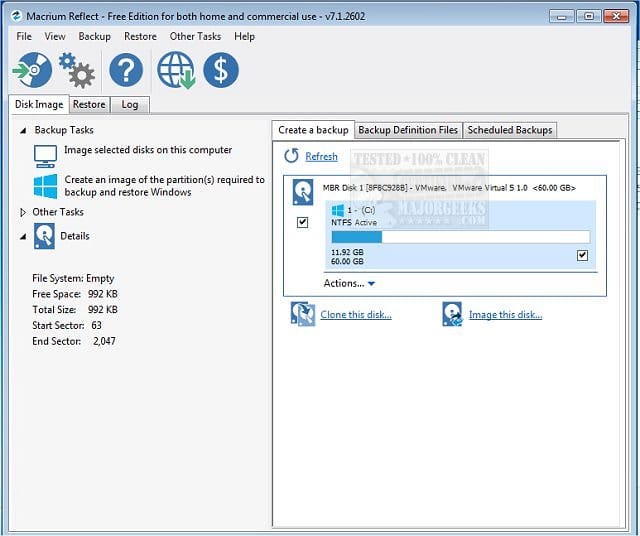
Restoring image using an old copy of Macrium V8 will give you 99.9% success in "cloning" your OS. I just built one this week and restored an image from my old M.2 SSD and it boot up in one go.
 

My Computers

System One System Two

  • OS
    Windows 11 Pro
    Computer type
    PC/Desktop
    CPU
    AMD Ryzen 7 9800X3D
    Motherboard
    MSI PRO B850-P Wifi
    Memory
    32GB DDR5 CL30 Kingston Fury
    Graphics Card(s)
    ASUS Prime Radeon RX 9060 XT OC Edition 16GB
    Monitor(s) Displays
    LG Ultrawide 34" + LG 27" 1080p
    Screen Resolution
    3440x1440
    Hard Drives
    Main Boot Drive : 512GB Adata XPG RGB Gen3x4 NVMe M.2 SSD
    PSU
    EVGA 750 Watts 80+ Gold
    Case
    Deepcool Genome II
    Cooling
    Thermalright Burst Assassin 120
    Internet Speed
    1Gbps
    Browser
    Chrome
    Antivirus
    "Moderna"
  • Operating System
    Windows 11 Pro
    Computer type
    PC/Desktop
    CPU
    i7-4790K
    Motherboard
    ASRock Xtreme6 Z97
    Memory
    16GB Corsair Vengeance Pro
    Graphics card(s)
    MSI R9 290
    Monitor(s) Displays
    LG Ultrawide 34"
    Screen Resolution
    3440x1440
    Hard Drives
    500GB Adata SSD (OS Only)
    PSU
    Thermaltake 475 Watts 80 Bronze
    Case
    Thermaltake Commander I Snow Edition
    Cooling
    Deep Cool Archer Air Cooler
    Keyboard
    Armageddon MKA-5R RGB-Hornet
    Mouse
    Logitech G402
    Internet Speed
    1Gbps
    Browser
    Chrome
    Antivirus
    Moderna :)
While I have never used Macrium I "was" a desciple of Backupper until now. I can clone from NVMe to SSD but NOT NVME to NVMe leading me to believe it's AOMEI's cloning utility Windows 11 with bitlocker and encryption related. Instead of pointing fingers and casting blame I escalated my issue to AOMEI
 

My Computer

System One

  • OS
    Windows 11 Pro 64-bit
    Computer type
    PC/Desktop
    Manufacturer/Model
    Asus Strix Z890-H
    CPU
    Intel i7 265K
    Motherboard
    Asus Strix Z890-H
    Memory
    64MB
    Graphics Card(s)
    GPU built into Intel i7 265K
    Sound Card
    none
    Monitor(s) Displays
    Samsung smart tv
    Screen Resolution
    3480 x 2160
    Hard Drives
    WD 1TB NVMe
    PSU
    750 watt Lian
    Case
    Master Cooler full tower
    Cooling
    Corsair AIO Water
    Keyboard
    Corsair K70
    Mouse
    MS
    Internet Speed
    30MB/sec
    Browser
    Chrome
    Antivirus
    none
I've cloned Windows 11 Pro drives many times. Zero errors with Macrium V8 free for personal use.
Follow their YouTube tutorial. (y) ;-)
 

My Computers

System One System Two

  • OS
    Windows 11 Pro 25H2 (OS Build 26200.8246)
    Computer type
    Laptop
    Manufacturer/Model
    Dell Precision Mobile Workstation
    CPU
    Intel(R) Xeon(R) CPU E3-1535M v5 @ 2.90 Max Turbo 3.80
    Motherboard
    00V5FJ
    Memory
    64GB DDR4 ECC (Error-Correcting Code memory)
    Graphics Card(s)
    NVIDIA Quadro M2000M 4GB GDDR5 & Intel(R) HD Graphics P530
    Sound Card
    Realtek Audio
    Monitor(s) Displays
    15.6" 4K UltraHD
    Screen Resolution
    4K UHD 3840x2160
    Hard Drives
    2TB Crucial NVMe & 2TB Seagate SATA
    PSU
    Dell 180W 19.5V-9.23A
    Keyboard
    Backlit
    Mouse
    Logitech G703 & Logitech G305
    Internet Speed
    WIFI: Intel(R) Wi-Fi 6E AX210NGW(Gig+) 160MHz Bands 2.4GHz(574Mbps), 5GHz 2.4Gbps, 6 GHz (160MHz) 2.4Gbps
    Browser
    Mozilla Firefox
    Antivirus
    Windows Defender/Microsoft Security + additional Anti Spyware, Anti Malware, etc.
    Other Info
    Thunderbolt 3
  • Operating System
    Windows 11 Pro 24H2 (OS Build 26100.6725)
    Computer type
    PC/Desktop
    Manufacturer/Model
    Dell Precision Workstation T5610
    CPU
    Dual (X2) Intel(R) Xeon(R) CPU E5-2690 0 @ 2.90GHz Max Turbo 3.80
    Motherboard
    0WN7Y6
    Memory
    64GB DDR3 ECC (Error-Correcting Code memory)
    Graphics card(s)
    NVIDIA GeForce GTX 970 4GB of GDDR5
    Sound Card
    Realtek Audio & NVIDIA High Definition Audio
    Monitor(s) Displays
    3 Acer Monitors
    Screen Resolution
    1920x1080
    Hard Drives
    2 Seagate Barracuda ST2000DM008-2UB102 (RAID)
    Mouse
    Logitech G305
While I have never used Macrium I "was" a desciple of Backupper until now. I can clone from NVMe to SSD but NOT NVME to NVMe leading me to believe it's AOMEI's cloning utility Windows 11 with bitlocker and encryption related. Instead of pointing fingers and casting blame I escalated my issue to AOMEI
Try it. It's free. You've got nothing to lose but time. Which I think you already lost a lot trying to fix your cloned OS. But first you need to image your old OS.
 

My Computers

System One System Two

  • OS
    Windows 11 Pro
    Computer type
    PC/Desktop
    CPU
    AMD Ryzen 7 9800X3D
    Motherboard
    MSI PRO B850-P Wifi
    Memory
    32GB DDR5 CL30 Kingston Fury
    Graphics Card(s)
    ASUS Prime Radeon RX 9060 XT OC Edition 16GB
    Monitor(s) Displays
    LG Ultrawide 34" + LG 27" 1080p
    Screen Resolution
    3440x1440
    Hard Drives
    Main Boot Drive : 512GB Adata XPG RGB Gen3x4 NVMe M.2 SSD
    PSU
    EVGA 750 Watts 80+ Gold
    Case
    Deepcool Genome II
    Cooling
    Thermalright Burst Assassin 120
    Internet Speed
    1Gbps
    Browser
    Chrome
    Antivirus
    "Moderna"
  • Operating System
    Windows 11 Pro
    Computer type
    PC/Desktop
    CPU
    i7-4790K
    Motherboard
    ASRock Xtreme6 Z97
    Memory
    16GB Corsair Vengeance Pro
    Graphics card(s)
    MSI R9 290
    Monitor(s) Displays
    LG Ultrawide 34"
    Screen Resolution
    3440x1440
    Hard Drives
    500GB Adata SSD (OS Only)
    PSU
    Thermaltake 475 Watts 80 Bronze
    Case
    Thermaltake Commander I Snow Edition
    Cooling
    Deep Cool Archer Air Cooler
    Keyboard
    Armageddon MKA-5R RGB-Hornet
    Mouse
    Logitech G402
    Internet Speed
    1Gbps
    Browser
    Chrome
    Antivirus
    Moderna :)
I've searched but cannot find any FREE trial copies of Macrium. Some of the forums even stated Macrium no longer provides trial copies. Am I incorrect?
 

My Computer

System One

  • OS
    Windows 11 Pro 64-bit
    Computer type
    PC/Desktop
    Manufacturer/Model
    Asus Strix Z890-H
    CPU
    Intel i7 265K
    Motherboard
    Asus Strix Z890-H
    Memory
    64MB
    Graphics Card(s)
    GPU built into Intel i7 265K
    Sound Card
    none
    Monitor(s) Displays
    Samsung smart tv
    Screen Resolution
    3480 x 2160
    Hard Drives
    WD 1TB NVMe
    PSU
    750 watt Lian
    Case
    Master Cooler full tower
    Cooling
    Corsair AIO Water
    Keyboard
    Corsair K70
    Mouse
    MS
    Internet Speed
    30MB/sec
    Browser
    Chrome
    Antivirus
    none

Here's the way I would do it
Install the applications and create rescue media. I would disable bitlocker/device encryption and disable secure boot before creating rescue media or making an image. If I was going to clone I would do it offline using the rescue media. The Free version rescue disk will not boot with secure boot enabled. You can enable secure boot afterwards if you wish.
If the cloned disk will not boot, use the rescue media "fix boot problems" feature.
 

My Computers

System One System Two

  • OS
    Windows 11 Pro 25H2
    Computer type
    PC/Desktop
    Manufacturer/Model
    Dell Optiplex 7080
    CPU
    i9-10900 10 core 20 threads
    Motherboard
    DELL 0J37VM
    Memory
    32 gb
    Graphics Card(s)
    none-Intel UHD Graphics 630
    Sound Card
    Integrated Realtek
    Monitor(s) Displays
    Benq 27
    Screen Resolution
    2560x1440
    Hard Drives
    2x1tb Solidigm m.2 nvme /External drives 512gb Samsung m.2 sata+2tb Kingston m2.nvme
    PSU
    500w
    Case
    MT
    Cooling
    Dell Premium
    Keyboard
    Logitech wired
    Mouse
    Logitech wireless
    Internet Speed
    so slow I'm too embarrassed to tell
    Browser
    #1 Edge #2 Firefox
    Antivirus
    Defender+MWB Premium
  • Operating System
    Windows 11 Pro 24H2 26200.8457
    Computer type
    PC/Desktop
    Manufacturer/Model
    Beelink Mini PC SER5
    CPU
    AMD Ryzen 7 6800U
    Memory
    32 gb
    Graphics card(s)
    integrated
    Sound Card
    integrated
    Monitor(s) Displays
    Benq 27
    Screen Resolution
    2560x1440
    Hard Drives
    1TB Crucial nvme
    Keyboard
    Logitech wired
    Mouse
    Logitech wireless
    Internet Speed
    still too embarrassed to tell
    Browser
    Firefox
    Antivirus
    Defender
    Other Info
    System 3 is non compliant Dell 9020 i7-4770/24gb ram Win11 PRO 26200.8457

My Computer

System One

  • OS
    WinDOS 25H2
    Computer type
    Laptop
    CPU
    Intel & AMD
    Memory
    SO-DIMM SK Hynix 15.8 GB Dual-Channel DDR4-2666 (2 x 8 GB) 1329MHz (19-19-19-43)
    Graphics Card(s)
    nVidia RTX 2060 6GB Mobile GPU (TU106M)
    Sound Card
    Onbord Realtek ALC1220
    Screen Resolution
    1920 x 1080
    Hard Drives
    1x Samsung PM981 NVMe PCIe M.2 512GB / 1x Seagate Expansion ST1000LM035 1TB
Success! .... finally! My new pc built originally had Windows 11 Pro 64-bit installed via a bootable USB created by utility aptly named "rufus". During this o/s build Windows 11 included "everything under the sun" and much of absolutely useless to me simply bcause it's all bloat! I've been using AOMEI Backupper since Windows 7 and AOMEI was FREE but easy to use. Anyway, since I was already out $70 for my newly purchased copy of AOMEI I soldiered through and finally was able to finally create a cloned bootable NVMe but not without multitudes of bad cloned drives.

My new motherboard is a Asus Strix Z890-H with five M.2 slots and four SATA ports. During this new build I completed a clean Win 11 to a new WD 1TB NVMe, The key for me to successfully clone from NVMe-to-NVMe is to first clone to a 2-1/2-inch SSD then boot off this newly cloned SSD to a target internal newly partitioned NVMe. My only frustration is one of my 5 year old NVMe was defective hence troubleshooting with a defective part adds to my length list of frustrations. Do NOT attempt to clone a target on a "external" enclosure....it simply refuses to boot up. You must clone from a cloned SSD to a newly partitioned NVMe installed "internally" to the new motherboard. Don't ask me why....it just works!

I've been on this cloning issue over 72 (non-consecutive hours and it has been a learning experience. My last build was in 2008 when I was still actively working for a living. FYI, the only reason for this new build is to prepare for tax season 2026. TurboTax informed me their tax prep package "must" be installed on a Windows 11 platform hence my urgency in this new build. Learned a lot from this venture ..... hardware and software have changed dramatically. My worse problem on this upgrade was using a 25-year old Cooler Master tower instead of purchasing a current tower. Room is the issue since I no longer need these half dozen 5-1/4 inch bays. Upside is the fact this is my first AIO CPU cooler .... it's absolutely quiet versus using a cpu heatsink/fan combination. This build set me back $1200 but includes what I deem important to me .... something to last another 10+ years and repairable. If money was no object I'd would have gone with a motherboard which had a thunderbolt port, a dozen USB port hanging off the back, and a I9 285k but that's a posting for another time. Finally, I "was" a Asus desciple but no longer ..... Asus cheaped out on providing printed documentation and has gotten money hungry over quality. Intel I'm sad to say is slowly "circling the drain". Quality no longer matters!
 

My Computer

System One

  • OS
    Windows 11 Pro 64-bit
    Computer type
    PC/Desktop
    Manufacturer/Model
    Asus Strix Z890-H
    CPU
    Intel i7 265K
    Motherboard
    Asus Strix Z890-H
    Memory
    64MB
    Graphics Card(s)
    GPU built into Intel i7 265K
    Sound Card
    none
    Monitor(s) Displays
    Samsung smart tv
    Screen Resolution
    3480 x 2160
    Hard Drives
    WD 1TB NVMe
    PSU
    750 watt Lian
    Case
    Master Cooler full tower
    Cooling
    Corsair AIO Water
    Keyboard
    Corsair K70
    Mouse
    MS
    Internet Speed
    30MB/sec
    Browser
    Chrome
    Antivirus
    none
take the bays out of your CM Tower I did with mine. easy, drill the rivets out. ..... I gave up on al the free backup and cloning, and partition software, I bought mine. The format may have been wrong, regardless.. catch them on sale... often the ssd makers give you free software when you buy the ssd. Downloads form their websites. IMHO
 

My Computer

System One

  • OS
    Win11
    Computer type
    PC/Desktop
    Manufacturer/Model
    Asus Home built
    CPU
    i9-13900
    Motherboard
    ASUS Strix Z790-H
    Memory
    64 GB
    Graphics Card(s)
    Nvidia RTX 5070 TI OC
    Monitor(s) Displays
    Sony 55"
    Hard Drives
    SSD
    PSU
    850 watt EVGA
    Case
    Cooler Master Haf 932
    Cooling
    CoolerMaster
    Keyboard
    RedDragon
    Mouse
    CoolerMaster
    Internet Speed
    300/300
    Antivirus
    Defender
    Other Info
    VR, Virtual Reality
I too your advice Retiredat44 and just for giggles I went to the WD site. They had cloning s/w however I'm reluctant to download then use since I have no WD drives. Per chance have you ever gone this route?
 

My Computer

System One

  • OS
    Windows 11 Pro 64-bit
    Computer type
    PC/Desktop
    Manufacturer/Model
    Asus Strix Z890-H
    CPU
    Intel i7 265K
    Motherboard
    Asus Strix Z890-H
    Memory
    64MB
    Graphics Card(s)
    GPU built into Intel i7 265K
    Sound Card
    none
    Monitor(s) Displays
    Samsung smart tv
    Screen Resolution
    3480 x 2160
    Hard Drives
    WD 1TB NVMe
    PSU
    750 watt Lian
    Case
    Master Cooler full tower
    Cooling
    Corsair AIO Water
    Keyboard
    Corsair K70
    Mouse
    MS
    Internet Speed
    30MB/sec
    Browser
    Chrome
    Antivirus
    none
I too your advice Retiredat44 and just for giggles I went to the WD site. They had cloning s/w however I'm reluctant to download then use since I have no WD drives. Per chance have you ever gone this route?
so many times.... or else i wouldn't have said so
 

My Computer

System One

  • OS
    Win11
    Computer type
    PC/Desktop
    Manufacturer/Model
    Asus Home built
    CPU
    i9-13900
    Motherboard
    ASUS Strix Z790-H
    Memory
    64 GB
    Graphics Card(s)
    Nvidia RTX 5070 TI OC
    Monitor(s) Displays
    Sony 55"
    Hard Drives
    SSD
    PSU
    850 watt EVGA
    Case
    Cooler Master Haf 932
    Cooling
    CoolerMaster
    Keyboard
    RedDragon
    Mouse
    CoolerMaster
    Internet Speed
    300/300
    Antivirus
    Defender
    Other Info
    VR, Virtual Reality
Back
Top Bottom