Hello!
i am facing an issue with steam that i believe i have caused and i have no idea how to fix it.
basically steam was running fine since i installed it many months ago BUT today i decided to run some commands in CMD (as admin) because i thought they might give me better internet connection and clear out junks.
the commands:
ipconfig /flushdns
ipconfig /release
ipconfig /renew
netsh winsock reset
netsh int ip reset
i ran these one by one into CMD and then restarted my laptop and then tried to open steam but it didnt.
note: steam was working fine that day. i opened it chatted with friends i played a few minutes of a game but right after these commands and the restart it stopped opening.
details i can provide:
so i open it and i think (i am not too sure) it shows the classic update window for a split second and then closes (some times it doesnt open the update window) and then nothing happens. steam just doesnt open. BUT i can see it running in task manager.
i see steam, steam client service, and steam client webhelper in task manager.
what i have tried so far:
i killed it in task manger and tried again,
i deleted some steam related files such as package and logs,
i went and delete everything except steam.exe and steamapps,
i uninstalled and downloaded and installed steam again,
i opened a new local user account on my laptop and tried it there ,
i tried to reset networking settings,
i tried to (BUT was NOT successful to give it an honest try since i was tired) to redo the commands i showed you in a desperate way because i have no idea how to reverse them.
and none of these solutions worked for me.
feel free to ask ANY questions and i will try to provide as much info as i can
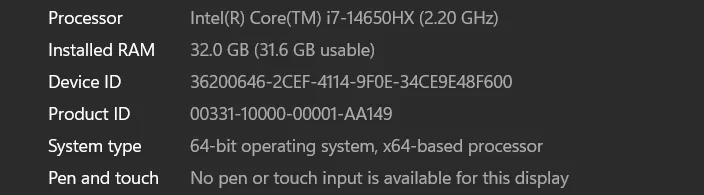
also i am on windows 11 AND i have an asus rog strix.
and i also noticed that the RGB colors on my laptop have stopped working. meaning the lights are off and i dont know how to turn them on since armoury crate is NOT opening. armoury crate not opening COULD be a separate issue since its been months since i last checked armoury crate so i dont know. now the RGB issue i dont think is just a coincidence since it happened with everything else.
i am facing an issue with steam that i believe i have caused and i have no idea how to fix it.
basically steam was running fine since i installed it many months ago BUT today i decided to run some commands in CMD (as admin) because i thought they might give me better internet connection and clear out junks.
the commands:
ipconfig /flushdns
ipconfig /release
ipconfig /renew
netsh winsock reset
netsh int ip reset
i ran these one by one into CMD and then restarted my laptop and then tried to open steam but it didnt.
note: steam was working fine that day. i opened it chatted with friends i played a few minutes of a game but right after these commands and the restart it stopped opening.
details i can provide:
so i open it and i think (i am not too sure) it shows the classic update window for a split second and then closes (some times it doesnt open the update window) and then nothing happens. steam just doesnt open. BUT i can see it running in task manager.
i see steam, steam client service, and steam client webhelper in task manager.
what i have tried so far:
i killed it in task manger and tried again,
i deleted some steam related files such as package and logs,
i went and delete everything except steam.exe and steamapps,
i uninstalled and downloaded and installed steam again,
i opened a new local user account on my laptop and tried it there ,
i tried to reset networking settings,
i tried to (BUT was NOT successful to give it an honest try since i was tired) to redo the commands i showed you in a desperate way because i have no idea how to reverse them.
and none of these solutions worked for me.
feel free to ask ANY questions and i will try to provide as much info as i can
also i am on windows 11 AND i have an asus rog strix.
and i also noticed that the RGB colors on my laptop have stopped working. meaning the lights are off and i dont know how to turn them on since armoury crate is NOT opening. armoury crate not opening COULD be a separate issue since its been months since i last checked armoury crate so i dont know. now the RGB issue i dont think is just a coincidence since it happened with everything else.
My Computer
At a glance
Windows 11i732 gb8 gb
- OS
- Windows 11
- Computer type
- Laptop
- Manufacturer/Model
- Asus, Rog strix
- CPU
- i7
- Memory
- 32 gb
- Graphics Card(s)
- 8 gb