

- Local time
- 4:23 PM
- Posts
- 56
- OS
- W10 (Yes, I'm still on W10 lol)
I just put a new (used) W11 computer in place at the office. I have an external expansion drive for daily backups and a portable which I use monthly for offsite backups, all using Macrium Reflect X.
Today, all of a sudden, the computer won't recognize the external portable drive. After some troubleshooting, I decided to unplug the external expansion drive and try the portable drive in the known-working USB port. Once again, it did not work. Then I plugged back in the expansion drive and it was not being seen either!
Then I found error code 38 in Device Manager.
How do I fix this please? TIA.
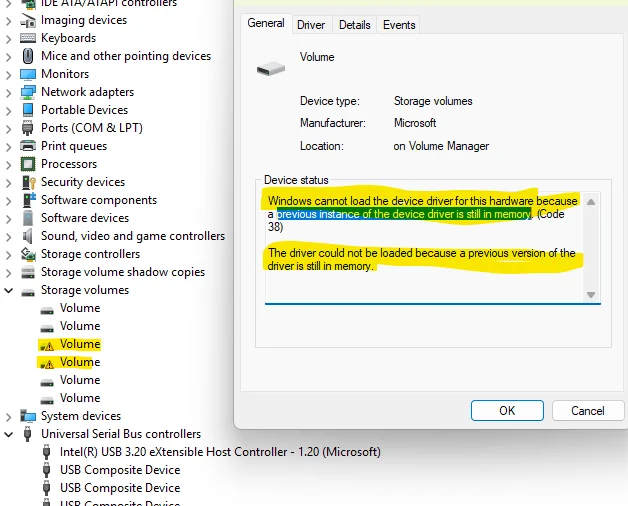
Today, all of a sudden, the computer won't recognize the external portable drive. After some troubleshooting, I decided to unplug the external expansion drive and try the portable drive in the known-working USB port. Once again, it did not work. Then I plugged back in the expansion drive and it was not being seen either!
Then I found error code 38 in Device Manager.
How do I fix this please? TIA.
My Computer
At a glance
W10 (Yes, I'm still on W10 lol)i7-9700K 3.6GHz 8 Core32GB DDR4nVidia GeForce GTX 960
- OS
- W10 (Yes, I'm still on W10 lol)
- Computer type
- PC/Desktop
- Manufacturer/Model
- home brew
- CPU
- i7-9700K 3.6GHz 8 Core
- Motherboard
- MSi Z390
- Memory
- 32GB DDR4
- Graphics Card(s)
- nVidia GeForce GTX 960
- Monitor(s) Displays
- Acer R271 + ASUS
- Screen Resolution
- 1920 x 1080 60Hz
- Hard Drives
- SSDs + spinners
- PSU
- EVGA SuperNOVA 750G1 Gold
- Case
- Corsair Obsidian 750D
- Keyboard
- Corsair K70 Cherry MX
- Mouse
- Logitech ergonomic
- Internet Speed
- 200GB
- Browser
- FF






