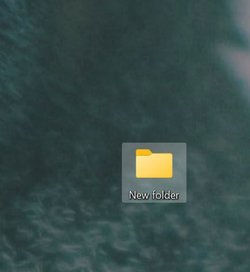
Color of selected files on desktop


dragoscscc

New member
Local time
9:10 AM
Posts
6
OS
Windows 11
Is there a way to change color of a selected folder? I can't tell when a folder is selected because it matches my background wallpaper pretty well.

Messed with settings/personalization/colors with no luck. It's a minor issue, I can live with it rather than change the background or go to a high contrast theme. Just wondering if there's a quick setting for it somewhere that I'm missing.

Thanks,

Windows 11 22H22

D

not selected.jpgselected.jpg
 

My Computer

System One

  • OS
    Windows 11
If I hover the mouse over a shortcut on the Desktop I get a white checkbox on top left corner, clicking once turns it blue with the checkmark and the highlight of the full shortcut.

1673450917962.png
 

My Computers

System One System Two

  • OS
    Win11 Pro RTM Version 24H2 Build 26100.4202
    Computer type
    Laptop
    Manufacturer/Model
    Dell Vostro 3400
    CPU
    Intel Core i5 11th Gen. 2.40GHz
    Memory
    12GB
    Hard Drives
    256GB SSD NVMe M.2
  • Operating System
    Win11 Pro RTM Version 24H2 Build 26100.4202
    Computer type
    PC/Desktop
    Manufacturer/Model
    Dell Vostro 5890
    CPU
    Intel Core i5 10th Gen. 2.90GHz
    Memory
    16GB
    Graphics card(s)
    Onboard, no VGA, using a DisplayPort-to-VGA adapter
    Monitor(s) Displays
    24" Dell
    Hard Drives
    512GB SSD NVMe, 4TB Seagate HDD
    Browser
    Firefox, Edge
    Antivirus
    Windows Defender/Microsoft Security
As @Berton states but to see the blue ticked check box you need to have 'Item Check boxes' ticked in File Explorer 'View' tab.
 

My Computers

System One System Two

  • OS
    Windows 11 Pro
    Computer type
    PC/Desktop
    Manufacturer/Model
    GMKtec K11
    CPU
    AMD Ryzen 9 8945HS
    Memory
    32GB DDR5 SO-DIMM
    Graphics Card(s)
    Integrated AMD Radeon 780M (4.00 GHz)
    Monitor(s) Displays
    Benq 2250HM
    Screen Resolution
    1920 x 1080
    Hard Drives
    1 TB PCIe 4.0 NVMe M.2 SSD
  • Operating System
    Windows 11 Home
    Computer type
    Laptop
    Manufacturer/Model
    ASUS Zenbook 14 OLED 14" Laptop - UX3405CA-QL192W
    CPU
    Intel® Core™ Ultra 7 - 255H processor
    Memory
    16 GB LPDDR5 SDRAM
    Graphics card(s)
    Intel Arc 140T onboard graphics
    Screen Resolution
    1920 x 1200 (16:10 WUXGA resolution) OLED Touchscreen
    Hard Drives
    1TB SSD
No, from what I have been able to find, there is no way to change the highlight color on desktop unless you are using a high contrast theme. It is all built-in to whatever theme you are using. I have found that changing themes until I found one that worked for me was something I could live with.
 

My Computers

System One System Two

  • OS
    Windows 11 Pro 25H2 26200.8655
    Computer type
    PC/Desktop
    Manufacturer/Model
    Dell Optiplex 7080
    CPU
    i9-10900 10 core 20 threads
    Motherboard
    DELL 0J37VM
    Memory
    32 gb
    Graphics Card(s)
    none-Intel UHD Graphics 630
    Sound Card
    Integrated Realtek
    Monitor(s) Displays
    Benq 27
    Screen Resolution
    2560x1440
    Hard Drives
    2x1tb Solidigm m.2 nvme /External drives 512gb Samsung m.2 sata+2tb Kingston m2.nvme
    PSU
    500w
    Case
    MT
    Cooling
    Dell Premium
    Keyboard
    Logitech wired
    Mouse
    Logitech wireless
    Internet Speed
    so slow I'm too embarrassed to tell
    Browser
    #1 Edge #2 Firefox
    Antivirus
    Defender+MWB Premium
  • Operating System
    Windows 11 Pro 24H2 26200.8457
    Computer type
    PC/Desktop
    Manufacturer/Model
    Beelink Mini PC SER5
    CPU
    AMD Ryzen 7 6800U
    Memory
    32 gb
    Graphics card(s)
    integrated
    Sound Card
    integrated
    Monitor(s) Displays
    Benq 27
    Screen Resolution
    2560x1440
    Hard Drives
    1TB Crucial nvme
    Keyboard
    Logitech wired
    Mouse
    Logitech wireless
    Internet Speed
    still too embarrassed to tell
    Browser
    Firefox
    Antivirus
    Defender
    Other Info
    System 3 is non compliant Dell 9020 i7-4770/24gb ram Win11 PRO 26200.8457
Thanks for the replies and the suggestions. I'll have to check out the blue check mark.

Cheers, D
 

My Computer

System One

  • OS
    Windows 11

My Computers

System One System Two

  • OS
    Windows 1164-bits besturingssysteem, x64-processor
    Computer type
    PC/Desktop
    Manufacturer/Model
    Acer Aspire TC-1760
    CPU
    12x , 2100 MHz
    Motherboard
    Acer Aspire TC-1760
    Memory
    16 GB
    Graphics Card(s)
    Intel(R) UHD Graphics 770 (1024 MB)
    Sound Card
    High Definition Audio-besturing [8086-7AD0] [NoDB]
    Monitor(s) Displays
    2x Generic Monitor (PHL 273V7)
    Screen Resolution
    1920x1080
    Hard Drives
    Many
    PSU
    200 W Bronze
    Case
    Kunst, metaal
    Cooling
    Fan
    Keyboard
    Logitech Illuminated Keyboard K 810
    Mouse
    Logitech MX Master 3
    Internet Speed
    100 mb/s
    Browser
    Firefox
    Antivirus
    Norton 360 Deluxe
    Other Info
    My pc is fast and I like my pc.
  • Operating System
    Windows 1164-bits besturingssysteem, x64-processor
    Computer type
    PC/Desktop
    Manufacturer/Model
    Acer Aspire TC-1760
    CPU
    12x , 2100 MHz
    Motherboard
    Acer Aspire TC-1760
    Memory
    16 GB
    Graphics card(s)
    Intel(R) UHD Graphics 770 (1024 MB)
    Sound Card
    High Definition Audio-besturing [8086-7AD0] [NoDB]
    Monitor(s) Displays
    2x Generic Monitor (PHL 273V7)
    Screen Resolution
    1920x1080
    Hard Drives
    Many
    PSU
    200 W Bronze
    Case
    Kunstof, metaal
    Cooling
    Fan
    Keyboard
    Logitech Illuminated Keyboard K 810
    Mouse
    Logitech MX Master 3
    Internet Speed
    100 mb/s
    Browser
    Firefox
    Antivirus
    Norton 360 Deluxe
    Other Info
    My PC is my Big hobby

Latest Support Threads

Back
Top Bottom