
Completing the Secure Boot Certificate Conversion


gunrunnerjohn

Well-known member
Pro User
VIP
Local time
5:57 AM
Posts
3,252
Location
SE-PA
OS
Win 11 Pro 25H2, Build 26200.8737
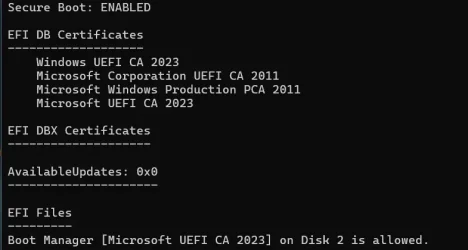
OK, I have the 2023 Certificates installed and secure boot enabled. How do I "complete" the conversion and get Windows booting using the 2023 certificate? I installed Windows initially in March, but it automatically did a repair a couple days ago during the last update, so now it thinks it was installed Aug 28th. I am presuming that Windows will recognize the 2023 secure boot certificate at this point, but how to I check to make sure?

If that checks OK, what's the next step to get it actually using the certificate instead of the 2011 certificate for the secure boot?

1756562634837.webp


1756562459118.webp
 
Windows Build/Version
See Computer 1 Specs

My Computers My Computers

  • At a glance

    Win 11 Pro 25H2, Build 26200.8737Intel Core i5 1450064GB DDR4GeForce RTX 4060
    OS
    Win 11 Pro 25H2, Build 26200.8737
    Computer type
    PC/Desktop
    Manufacturer/Model
    Home Brew
    CPU
    Intel Core i5 14500
    Motherboard
    Gigabyte B760M G P WIFI
    Memory
    64GB DDR4
    Graphics Card(s)
    GeForce RTX 4060
    Sound Card
    Chipset Realtek
    Monitor(s) Displays
    LG 45" Ultragear, Acer 24" 1080p
    Screen Resolution
    5120x1440, 1920x1080
    Hard Drives
    Crucial P310 2TB 2280 PCIe Gen4 3D NAND NVMe M.2 SSD (O/S)
    Silicon Power 2TB US75 NVMe PCIe Gen4 M.2 2280 SSD (backup)
    Crucial BX500 2TB 3D NAND (2nd backup)
    Seagate 4TB Ironwolf, rotating HDD archive files
    External off-line backup Drives: 2 NVMe 4TB drives in external enclosures
    PSU
    Thermaltake Toughpower GF3 750W
    Case
    LIAN LI LANCOOL 216 E-ATX PC Case
    Cooling
    Lots of fans!
    Keyboard
    Microsoft Comfort Curve 2000
    Mouse
    Logitech G305
    Internet Speed
    Verizon FiOS 1GB
    Browser
    Firefox
    Antivirus
    Malware Bytes & Windows Defender Security
  • At a glance

    Win 11 Pro 25H2, Build 26200.8655Intel Core i5 1440032GB DDR5Intel 700 Embedded GPU
    Operating System
    Win 11 Pro 25H2, Build 26200.8655
    Computer type
    PC/Desktop
    Manufacturer/Model
    Home Brew
    CPU
    Intel Core i5 14400
    Motherboard
    Gigabyte B760M DS3H AX
    Memory
    32GB DDR5
    Graphics card(s)
    Intel 700 Embedded GPU
    Sound Card
    Realtek Embedded
    Monitor(s) Displays
    27" HP 1080p
    Screen Resolution
    1920x1080
    Hard Drives
    Crucial P310 2TB 2280 PCIe Gen4 eD NAND PCIe SSD
    Samsung EVO 990 2TB NVMe Gen4 SSD
    Samsung 2TB SATA SSD
    PSU
    Thermaltake Smart BM3 650W
    Case
    Okinos Micro ATX Case
    Cooling
    Fans
    Keyboard
    Microsoft Comfort Curve 2000
    Mouse
    Logitech G305
    Internet Speed
    Verizon FiOS 1GB
    Browser
    Firefox
    Antivirus
    Malware Bytes & Windows Defender Security
  • Nimo N171 17" Laptop, (Intel i3-1215U, 16GB RAM, 2TB NVMe, Win11 Pro)
    Acemagic Vista Mini PC V1 (Intel N150, 16GB RAM, 1TB NVMe, Win11 Pro)
    HP ENVY h8-1540t, (24GB RAM, 2TB SSD, 2TB HDD, Win11 Pro)
How did you get the Windows UEFI CA 2023 certificate installed in the DB?


Step 2 in the above process is the one that signs the EFI bootfile with the Microsoft UEFI 2023 CA certificate and initiates booting using it.

I am strongly advised to not do step 3 (revoking trust of the 2011 certificate) unless you have a special need for it and create USB boot disks signed using the 2023 certificate since you can't use any with EFI bootfiles signed with the (now untrusted) 2011 certificate going forward. As explained to me, if you do not revoke trust in it the system will still boot in Secure Boot mode using a boot file signed with the 2011 certificate when needed, even if it is expired. It should still boot with Secure Boot disabled, or in CSM mode.

There is another thread on this in the Antivirus, Firewalls and Security forum covering this in detail. It's long and confusing, with several deep-dives into highly peculiar scenarios using third party scripts. You can try to follow it, I nearly got myself into trouble by doing so (I revoked the 2011 certificate and had to figure out how to recover from that).

I think it's really only important to have the 2023 certificates in your DB. That way they can be used for signing binaries, usually at a time Microsoft comes out with security updates.
 
Last edited:

My Computers My Computers

  • At a glance

    Windows 11 ProRyzen 7 5800XGSkill 3200, 2x8GBMSI RX 6800 XT Gaming Z
    OS
    Windows 11 Pro
    Computer type
    PC/Desktop
    Manufacturer/Model
    DIY
    CPU
    Ryzen 7 5800X
    Motherboard
    Gigabyte B550M Aorus Pro
    Memory
    GSkill 3200, 2x8GB
    Graphics Card(s)
    MSI RX 6800 XT Gaming Z
    Sound Card
    on-board Realtek
    Monitor(s) Displays
    MSI 180hz
    Screen Resolution
    1440p
    Hard Drives
    Samsung 980 Pro, Samsung 870 Evo, generic PCIe NVME, WD 1TB 2.5" laptop spinner
    PSU
    Corsair RM 650
    Case
    mATX
    Cooling
    BeQuiet 240mm AIO and a bunch of case fans
    Keyboard
    one that clacks softly
    Mouse
    logitech
    Internet Speed
    bunches of bps
    Browser
    Firefox
    Antivirus
    Windows' own
  • At a glance

    Win11 ProRyzen 7 170016GB DDR4RX-480
    Operating System
    Win11 Pro
    Computer type
    PC/Desktop
    Manufacturer/Model
    DIY
    CPU
    Ryzen 7 1700
    Motherboard
    GA-AB350M G-3
    Memory
    16GB DDR4
    Graphics card(s)
    RX-480
    Sound Card
    In-Built Realtek
    Monitor(s) Displays
    Samsung
    Screen Resolution
    1440p
    Hard Drives
    NVME/SSD's
    PSU
    Thermaltake BX1 550W
    Case
    Some junky thing
    Cooling
    ThermalTake Assassin(?)
    Browser
    FF/Edge
    Antivirus
    Whatever Windows does
    Other Info
    Secure Boot enabled updated to 2023 CA keys, TPM2.0 enabled with system drive Bitlocker'd.
Back
Top Bottom




