Solved Acer Predator Helios 300 PH317-56 Secure Boot Certificate Update.


acer54

Well-known member
Local time
6:56 AM
Posts
44
OS
Windows 11
My secure boot certificates etc. still have not been updated, has anybody with the same laptop had them updated by either Acer and/or Microsoft or any other method successfully?
 
Windows Build/Version
OS Build 26200.9168 / Version 25H2

My Computer My Computer

At a glance

Windows 11
OS
Windows 11
Windows Secure Boot certificates (such as the 2023 CA keys replacing aging 2011 certificates) are primarily delivered automatically via standard Windows Update. Most users do not need manual intervention, but you can verify your status or force-trigger updates if needed.


My Computer My Computer

At a glance

Windows 11AMD Ryzen 7 5700GMicron Technology DDR4-3200 16GBNVIDIA GeForce RTX 3060
OS
Windows 11
Computer type
PC/Desktop
Manufacturer/Model
HP Pavilion
CPU
AMD Ryzen 7 5700G
Motherboard
Erica6
Memory
Micron Technology DDR4-3200 16GB
Graphics Card(s)
NVIDIA GeForce RTX 3060
Sound Card
Realtek ALC671
Monitor(s) Displays
Samsung SyncMaster U28E590
Screen Resolution
3840 x 2160
Hard Drives
SAMSUNG MZVLQ1T0HALB-000H1
My secure boot certificates etc. still have not been updated, has anybody with the same laptop had them updated by either Acer and/or Microsoft or any other method successfully?

you can use this how to to update your secure boot certs

also @garlin has some scripts that can be used also.
best of luck Steve ..
 

My Computers My Computers

  • At a glance

    Windows 11 HomeRyzen 7 5825u64GB DDR4 3200Ryzen 7 5825u
    OS
    Windows 11 Home
    Computer type
    PC/Desktop
    Manufacturer/Model
    HP 24" AiO
    CPU
    Ryzen 7 5825u
    Motherboard
    HP
    Memory
    64GB DDR4 3200
    Graphics Card(s)
    Ryzen 7 5825u
    Sound Card
    Realtek External 5w speaker bar.
    Monitor(s) Displays
    24" HP AiO
    Screen Resolution
    1920 x 1080 @60 Hz
    Hard Drives
    1TB WD Blue SN580 M2 SSD Partitioned C:/D: drives.
    2x 1TB USB HDD External Backup/Storage.
    all VeraCrypt encrypted.
    PSU
    90W external power brick
    Case
    24" All in One
    Cooling
    Default Air Cooling
    Keyboard
    Dell WiFi UK extended
    Mouse
    Dell WiFi 3 Button
    Internet Speed
    1GB full fibre
    Browser
    Vivaldi Browser/Email/Calendar
    Antivirus
    AVG Internet Security/Windows Defender
    Other Info
    Mainly Open Source Software
  • At a glance

    Ubuntu 22.04.5 LTSi5 7200u16GB DDR4Intel
    Operating System
    Ubuntu 22.04.5 LTS
    Computer type
    Laptop
    Manufacturer/Model
    Dell 13" Latitude 2017
    CPU
    i5 7200u
    Motherboard
    Dell
    Memory
    16GB DDR4
    Graphics card(s)
    Intel
    Sound Card
    Intel
    Monitor(s) Displays
    13" Dell Laptop
    Hard Drives
    250GB Crucial 2.5" SSD
    Mouse
    Generic WiFi 3 button
    Internet Speed
    WiFi only
    Browser
    Firefox
    Antivirus
    ClamAV TK
    Other Info
    Mainly Open Source Software
How is everything progressing, do you need more assistant on this issue?
 

My Computer My Computer

At a glance

Windows 11AMD Ryzen 7 5700GMicron Technology DDR4-3200 16GBNVIDIA GeForce RTX 3060
OS
Windows 11
Computer type
PC/Desktop
Manufacturer/Model
HP Pavilion
CPU
AMD Ryzen 7 5700G
Motherboard
Erica6
Memory
Micron Technology DDR4-3200 16GB
Graphics Card(s)
NVIDIA GeForce RTX 3060
Sound Card
Realtek ALC671
Monitor(s) Displays
Samsung SyncMaster U28E590
Screen Resolution
3840 x 2160
Hard Drives
SAMSUNG MZVLQ1T0HALB-000H1
Windows Secure Boot certificates (such as the 2023 CA keys replacing aging 2011 certificates) are primarily delivered automatically via standard Windows Update. Most users do not need manual intervention, but you can verify your status or force-trigger updates if needed.

Followed this and did it to the letter - result was certificates still not updated, not sure what to try next?
 

My Computer My Computer

At a glance

Windows 11
OS
Windows 11
How is everything progressing, do you need more assistant on this issue?
More assistance required, FreeBooters video did not change anything.
 

My Computer My Computer

At a glance

Windows 11
OS
Windows 11
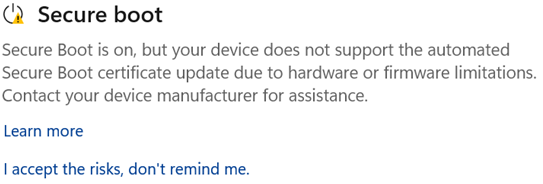
Screenshot of Windows Security warning that Secure Boot certificate updates are blocked


This is what I have in device security, secure boot - not sure what to do next.
 

My Computer My Computer

At a glance

Windows 11
OS
Windows 11
Microsoft's original Secure Boot certificates (issued in 2011) expire in 2026, requiring systems to update to the newer 2023 Secure Boot certificates (e.g., Windows UEFI CA 2023).

Step 1: Check Your Current Status​

  1. Open Windows Security via the Start menu.
  2. Click Device security.
  3. Look at the Secure boot section:
    • Up to date: "Secure boot is on and all required certificate updates have been applied." You do not need to do anything further.
    • Action needed: It indicates certificate updates are required or blocked.

Step 2: Verify Active Certificates via PowerShell​

To manually check if the 2023 certificates are active on your system:
  1. Right-click Start and select Terminal (Admin) or PowerShell (Admin).
  2. Run the following commands:
PowerShell

[System.Text.Encoding]::ASCII.GetString((Get-SecureBootUEFI KEK).bytes) -match 'Microsoft Corporation KEK 2K CA 2023'

PowerShell

[System.Text.Encoding]::ASCII.GetString((Get-SecureBootUEFI db).bytes) -match 'Windows UEFI CA 2023'
  • If both output True, the 2023 certificates are active.
  • If either outputs False, the certificates still need to be updated or applied.

Step 3: Update and Apply the Certificates​

Method A: Automatic Deployment (Recommended)​

  1. Go to Settings > Windows Update.
  2. Select Check for updates and install all cumulative and security updates.
  3. Restart your PC. Microsoft automatically deploys and applies the DB/KEK updates to most consumer systems via standard monthly updates.

Method B: Force Manual Servicing (For Early Deployment)​

If Windows Update is fully installed but PowerShell still returns False, trigger the certificate application flag via Registry/PowerShell:
  1. Open PowerShell (Admin).
  2. Set the registry key to apply the update on the next reboot:
PowerShell

Set-ItemProperty -Path "HKLM:\SYSTEM\CurrentControlSet\Control\SecureBoot" -Name "AvailableUpdates" -Value 0x40 -Type DWord
  1. Restart your PC twice to complete the enrollment phase.

Method C: Update Hardware Firmware / BIOS (If Blocked)​

If Windows Security shows a message stating that updates are blocked or firmware is incompatible:
  • Update your BIOS: Check your motherboard or laptop manufacturer's support site (Dell, Lenovo, ASUS, MSI, HP, etc.) for the latest BIOS/UEFI firmware update that includes the updated Windows UEFI CA 2023 database.
  • BitLocker Caution: If BitLocker drive encryption is enabled, ensure you back up your BitLocker Recovery Key before running any BIOS update.

 

My Computer My Computer

At a glance

Windows 11AMD Ryzen 7 5700GMicron Technology DDR4-3200 16GBNVIDIA GeForce RTX 3060
OS
Windows 11
Computer type
PC/Desktop
Manufacturer/Model
HP Pavilion
CPU
AMD Ryzen 7 5700G
Motherboard
Erica6
Memory
Micron Technology DDR4-3200 16GB
Graphics Card(s)
NVIDIA GeForce RTX 3060
Sound Card
Realtek ALC671
Monitor(s) Displays
Samsung SyncMaster U28E590
Screen Resolution
3840 x 2160
Hard Drives
SAMSUNG MZVLQ1T0HALB-000H1
Microsoft's original Secure Boot certificates (issued in 2011) expire in 2026, requiring systems to update to the newer 2023 Secure Boot certificates (e.g., Windows UEFI CA 2023).

Step 1: Check Your Current Status​

  1. Open Windows Security via the Start menu.
  2. Click Device security.
  3. Look at the Secure bootsection:
    • Up to date: "Secure boot is on and all required certificate updates have been applied." You do not need to do anything further.
    • Action needed: It indicates certificate updates are required or blocked.

Step 2: Verify Active Certificates via PowerShell​

To manually check if the 2023 certificates are active on your system:
  1. Right-click Start and select Terminal (Admin) or PowerShell (Admin).
  2. Run the following commands:
PowerShell

[System.Text.Encoding]::ASCII.GetString((Get-SecureBootUEFI KEK).bytes) -match 'Microsoft Corporation KEK 2K CA 2023'

PowerShell

[System.Text.Encoding]::ASCII.GetString((Get-SecureBootUEFI db).bytes) -match 'Windows UEFI CA 2023'
  • If both output True, the 2023 certificates are active.
  • If either outputs False, the certificates still need to be updated or applied.

Step 3: Update and Apply the Certificates​

Method A: Automatic Deployment (Recommended)​

  1. Go to Settings > Windows Update.
  2. Select Check for updates and install all cumulative and security updates.
  3. Restart your PC. Microsoft automatically deploys and applies the DB/KEK updates to most consumer systems via standard monthly updates.

Method B: Force Manual Servicing (For Early Deployment)​

If Windows Update is fully installed but PowerShell still returns False, trigger the certificate application flag via Registry/PowerShell:
  1. Open PowerShell (Admin).
  2. Set the registry key to apply the update on the next reboot:
PowerShell

Set-ItemProperty -Path "HKLM:\SYSTEM\CurrentControlSet\Control\SecureBoot" -Name "AvailableUpdates" -Value 0x40 -Type DWord
  1. Restart your PC twice to complete the enrollment phase.

Method C: Update Hardware Firmware / BIOS (If Blocked)​

If Windows Security shows a message stating that updates are blocked or firmware is incompatible:
  • Update your BIOS: Check your motherboard or laptop manufacturer's support site (Dell, Lenovo, ASUS, MSI, HP, etc.) for the latest BIOS/UEFI firmware update that includes the updated Windows UEFI CA 2023 database.
  • BitLocker Caution: If BitLocker drive encryption is enabled, ensure you back up your BitLocker Recovery Key before running any BIOS update.
Looks like I will have to wait until Acer do a Bios/Firmware update if in fact they actually do one.
I was hoping someone with the same laptop had actually successfully updated the certificates.
 

My Computer My Computer

At a glance

Windows 11
OS
Windows 11

My Computer My Computer

At a glance

Windows 11AMD Ryzen 7 5700GMicron Technology DDR4-3200 16GBNVIDIA GeForce RTX 3060
OS
Windows 11
Computer type
PC/Desktop
Manufacturer/Model
HP Pavilion
CPU
AMD Ryzen 7 5700G
Motherboard
Erica6
Memory
Micron Technology DDR4-3200 16GB
Graphics Card(s)
NVIDIA GeForce RTX 3060
Sound Card
Realtek ALC671
Monitor(s) Displays
Samsung SyncMaster U28E590
Screen Resolution
3840 x 2160
Hard Drives
SAMSUNG MZVLQ1T0HALB-000H1
Secure boot certificates now updated via Windows update so all good and problem resolved.
 

My Computer My Computer

At a glance

Windows 11
OS
Windows 11
Back
Top Bottom