Microsoft's original Secure Boot certificates (issued in 2011) expire in 2026, requiring systems to update to the newer
2023 Secure Boot certificates (e.g.,
Windows UEFI CA 2023).
Step 1: Check Your Current Status
- Open Windows Security via the Start menu.
- Click Device security.
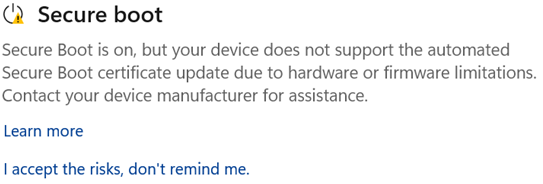
- Look at the Secure bootsection:
- Up to date: "Secure boot is on and all required certificate updates have been applied." You do not need to do anything further.
- Action needed: It indicates certificate updates are required or blocked.
Step 2: Verify Active Certificates via PowerShell
To manually check if the 2023 certificates are active on your system:
- Right-click Start and select Terminal (Admin) or PowerShell (Admin).
- Run the following commands:
PowerShell
[System.Text.Encoding]::ASCII.GetString((Get-SecureBootUEFI KEK).bytes) -match 'Microsoft Corporation KEK 2K CA 2023'
PowerShell
[System.Text.Encoding]::ASCII.GetString((Get-SecureBootUEFI db).bytes) -match 'Windows UEFI CA 2023'
- If both output True, the 2023 certificates are active.
- If either outputs False, the certificates still need to be updated or applied.
Step 3: Update and Apply the Certificates
Method A: Automatic Deployment (Recommended)
- Go to Settings > Windows Update.
- Select Check for updates and install all cumulative and security updates.
- Restart your PC. Microsoft automatically deploys and applies the DB/KEK updates to most consumer systems via standard monthly updates.
Method B: Force Manual Servicing (For Early Deployment)
If Windows Update is fully installed but PowerShell still returns False, trigger the certificate application flag via Registry/PowerShell:
- Open PowerShell (Admin).
- Set the registry key to apply the update on the next reboot:
PowerShell
Set-ItemProperty -Path "HKLM:\SYSTEM\CurrentControlSet\Control\SecureBoot" -Name "AvailableUpdates" -Value 0x40 -Type DWord
- Restart your PC twice to complete the enrollment phase.
Method C: Update Hardware Firmware / BIOS (If Blocked)
If Windows Security shows a message stating that updates are blocked or firmware is incompatible:
- Update your BIOS: Check your motherboard or laptop manufacturer's support site (Dell, Lenovo, ASUS, MSI, HP, etc.) for the latest BIOS/UEFI firmware update that includes the updated Windows UEFI CA 2023 database.
- BitLocker Caution: If BitLocker drive encryption is enabled, ensure you back up your BitLocker Recovery Key before running any BIOS update.