
Solved Secure Boot Certificate


This is the old message, you haven't received the April 2026 version of Security Center. It's gradually rolling out to all users.

Check back in a few days, to see if you get a more longer description.
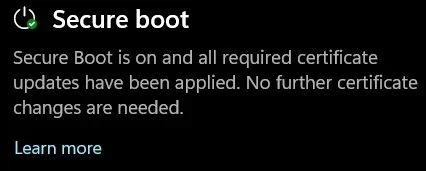
Thanks @garlin I now have this message, so I guess I am good now. Even though my last BIOS update was back in Jan 26 and the boot certificates in that update were from 2023, so maybe the newer ones came via Windows update and not BIOS updates
Screenshot 2026-04-18 124532.webp
 
Last edited:

My Computers

System One System Two

  • OS
    Windows 11 Pro
    Computer type
    Laptop
    Manufacturer/Model
    Alienware M18 R1
    CPU
    13th Gen Core i9 13900HX
    Memory
    32GB DDR5 @4800MHz 2x16GB
    Graphics Card(s)
    Geforce RTX 4090HX 16GB
    Sound Card
    Nvidia HD / Realtek ALC3254
    Monitor(s) Displays
    18" QHD+
    Screen Resolution
    25660 X 1600
    Hard Drives
    C: KIOXIA (Toshiba) 2TB KXG80ZNV2T04 NVMe PCIe M.2 SSD
    D: KIOXIA (Toshiba) 2TB KXG80ZNV2T04 NVMe PCIe M.2 SSD
    Case
    Dark Metallic Moon
    Keyboard
    Alienware M Series per-key AlienFX RGB
    Mouse
    Alienware AW610M
    Browser
    Chrome and Firefox
    Antivirus
    Norton
    Other Info
    Killer E3000 Ethernet Controller
    Killer Killer AX1690 Wi-Fi Network Adaptor Wi-Fi 6E
    Bluetooth 5.2
    Alienware Z01G Graphic Amplifier
  • Operating System
    Windows 11 Pro
    Computer type
    Laptop
    Manufacturer/Model
    Alienware Area 51m R2
    CPU
    10th Gen i-9 10900 K
    Memory
    32Gb Dual Channel DDR4 @ 8843MHz
    Graphics card(s)
    Nvidia RTX 2080 Super
    Sound Card
    Nvidia
    Screen Resolution
    1920 x 1080
    Hard Drives
    Hard Drive C: Samsung 2TB SSD PM981a NVMe
    Hard Drive D:Samsung 2TB SSD 970 EVO Plus
    Mouse
    Alienware 610M
    Browser
    Chrome
    Antivirus
    Norton
Most users will get their Secure Boot certs from a BIOS update, or because your OEM (Dell) shared a KEK CA 2023 cert with MS. A BIOS update is always the better of the two options because it's preserved in the factory defaults.

- m18 R1 just got a BIOS update this week (Apr 2026) with the CA 2023 certs.
- 51m R2 got its BIOS update on Jan 2026.
 

My Computer

System One

  • OS
    Windows 7
Most users will get their Secure Boot certs from a BIOS update, or because your OEM (Dell) shared a KEK CA 2023 cert with MS. A BIOS update is always the better of the two options because it's preserved in the factory defaults.

- m18 R1 just got a BIOS update this week (Apr 2026) with the CA 2023 certs.
- 51m R2 got its BIOS update on Jan 2026.
@garlin thank you most helpful. In the end I ran a PowerShell command to check if the updates were present and they were on all 3 of my machines.
 

My Computers

System One System Two

  • OS
    Windows 11 Pro
    Computer type
    Laptop
    Manufacturer/Model
    Alienware M18 R1
    CPU
    13th Gen Core i9 13900HX
    Memory
    32GB DDR5 @4800MHz 2x16GB
    Graphics Card(s)
    Geforce RTX 4090HX 16GB
    Sound Card
    Nvidia HD / Realtek ALC3254
    Monitor(s) Displays
    18" QHD+
    Screen Resolution
    25660 X 1600
    Hard Drives
    C: KIOXIA (Toshiba) 2TB KXG80ZNV2T04 NVMe PCIe M.2 SSD
    D: KIOXIA (Toshiba) 2TB KXG80ZNV2T04 NVMe PCIe M.2 SSD
    Case
    Dark Metallic Moon
    Keyboard
    Alienware M Series per-key AlienFX RGB
    Mouse
    Alienware AW610M
    Browser
    Chrome and Firefox
    Antivirus
    Norton
    Other Info
    Killer E3000 Ethernet Controller
    Killer Killer AX1690 Wi-Fi Network Adaptor Wi-Fi 6E
    Bluetooth 5.2
    Alienware Z01G Graphic Amplifier
  • Operating System
    Windows 11 Pro
    Computer type
    Laptop
    Manufacturer/Model
    Alienware Area 51m R2
    CPU
    10th Gen i-9 10900 K
    Memory
    32Gb Dual Channel DDR4 @ 8843MHz
    Graphics card(s)
    Nvidia RTX 2080 Super
    Sound Card
    Nvidia
    Screen Resolution
    1920 x 1080
    Hard Drives
    Hard Drive C: Samsung 2TB SSD PM981a NVMe
    Hard Drive D:Samsung 2TB SSD 970 EVO Plus
    Mouse
    Alienware 610M
    Browser
    Chrome
    Antivirus
    Norton
The latest Monthly Updates will attempt to add the new CA 2023 certificates if possible. But if you have an older PC, the necessary certs were not made available from your PC's OEM.

What is the exact model of your Dell laptop? Before proceeding, we need to know if there was a BIOS update available for it.

Older devices won't get them. You remain on the secure boot certificate you have and Windows 11 will continue to run. Nothing will change.
 
Last edited:

My Computers

System One System Two

  • OS
    Windows 11 Education For 25H2
    Computer type
    Laptop
    Manufacturer/Model
    HP ZBook G2
    CPU
    Intel® Core i7 5500u
    Motherboard
    HP
    Memory
    8 GB
    Graphics Card(s)
    Intel HD Family Graphics 5500 AMD Firepro 4150M
    Sound Card
    Realtek High Audio
    Hard Drives
    1 TB SSD
    Mouse
    HP USB Mouse
    Antivirus
    Windows Defender
  • Operating System
    Windows 11 Pro For Workstations 25H2
    Computer type
    Laptop
    Manufacturer/Model
    HP Zbook G4
    CPU
    Xeon 1535m v6
    Motherboard
    HP
    Memory
    32 GB
    Graphics card(s)
    AMD Quadro Pro 4100
    Sound Card
    Bang and Olufson Audio
    Hard Drives
    1TB SSD
    Mouse
    HP USB Mouse
    Antivirus
    Windows Defender
Your PC has the older CA 2011 certs, but hasn't received the CA 2023 versions. Check if there's a newer BIOS available for your PC's model.

There won't be. You will run on that secure boot certificate forever. Windows 11 won't be affected.
 

My Computers

System One System Two

  • OS
    Windows 11 Education For 25H2
    Computer type
    Laptop
    Manufacturer/Model
    HP ZBook G2
    CPU
    Intel® Core i7 5500u
    Motherboard
    HP
    Memory
    8 GB
    Graphics Card(s)
    Intel HD Family Graphics 5500 AMD Firepro 4150M
    Sound Card
    Realtek High Audio
    Hard Drives
    1 TB SSD
    Mouse
    HP USB Mouse
    Antivirus
    Windows Defender
  • Operating System
    Windows 11 Pro For Workstations 25H2
    Computer type
    Laptop
    Manufacturer/Model
    HP Zbook G4
    CPU
    Xeon 1535m v6
    Motherboard
    HP
    Memory
    32 GB
    Graphics card(s)
    AMD Quadro Pro 4100
    Sound Card
    Bang and Olufson Audio
    Hard Drives
    1TB SSD
    Mouse
    HP USB Mouse
    Antivirus
    Windows Defender
So there's really no use to enable the Secure Boot since the certificate wouldn't be renewed ?

Thank you.


No, the only way to update a secure boot certificate is to update the BIOS. It doesn't happen within Windows Update. Windows Update is only a delivery mechanism. If your BIOS can't be updated, the secure boot certificate you have installed will remain valid. Windows 11 will continue to run.
 
Last edited:

My Computers

System One System Two

  • OS
    Windows 11 Education For 25H2
    Computer type
    Laptop
    Manufacturer/Model
    HP ZBook G2
    CPU
    Intel® Core i7 5500u
    Motherboard
    HP
    Memory
    8 GB
    Graphics Card(s)
    Intel HD Family Graphics 5500 AMD Firepro 4150M
    Sound Card
    Realtek High Audio
    Hard Drives
    1 TB SSD
    Mouse
    HP USB Mouse
    Antivirus
    Windows Defender
  • Operating System
    Windows 11 Pro For Workstations 25H2
    Computer type
    Laptop
    Manufacturer/Model
    HP Zbook G4
    CPU
    Xeon 1535m v6
    Motherboard
    HP
    Memory
    32 GB
    Graphics card(s)
    AMD Quadro Pro 4100
    Sound Card
    Bang and Olufson Audio
    Hard Drives
    1TB SSD
    Mouse
    HP USB Mouse
    Antivirus
    Windows Defender
Back
Top Bottom




